
Travel connectivity guide
Aalborg eSIM for mobile internet in Denmark
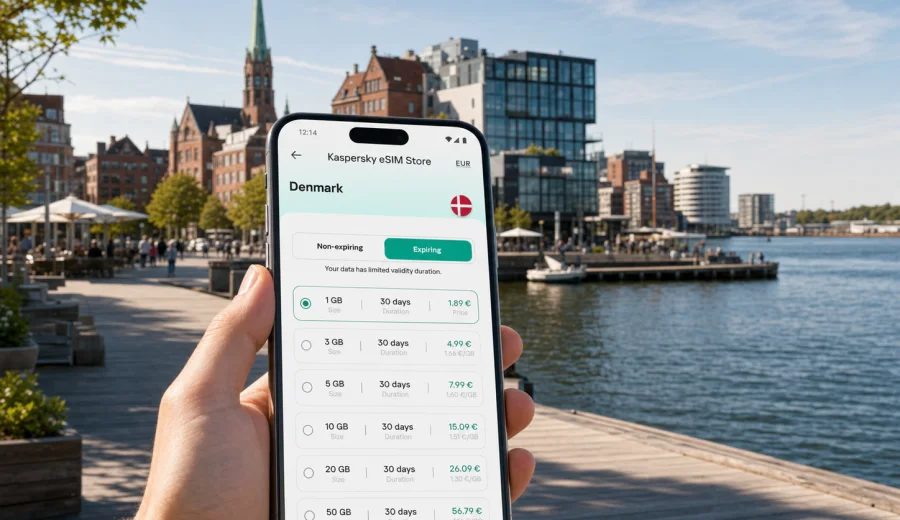
Aalborg eSIM: mobile connection and internet for a smooth trip
Aalborg is a practical city for travelers: compact enough to cross by bus, bike, taxi or on foot, but busy enough that mobile internet matters from the first hour. You may arrive through Aalborg Airport, come by train from Copenhagen or Aarhus, or use the city as a base for North Jutland. In each case, an eSIM helps you keep maps, hotel details, tickets, ride apps and work messages available without waiting for public Wi-Fi or looking for a physical SIM card after arrival.
This guide focuses on Aalborg itself: the airport transfer, the waterfront, the old center, university areas, hotels, business districts, short stopovers and day trips from the city. Denmark has a highly digital travel environment, so your phone often becomes the main travel tool. A prepared eSIM can make that routine simpler, provided your device supports eSIM and you choose a data plan that fits the length and style of your visit.
Why mobile internet matters in Aalborg
Aalborg is easy to navigate, but the details are often online. Bus routes, train times, hotel messages, museum opening hours, restaurant bookings, parking zones and walking routes along the Limfjord are easiest to manage with a live connection. Even if your hotel has strong Wi-Fi, you still need data between check-in, meetings, meals and transfers.
Common Aalborg situations where mobile internet is useful:
- checking bus or taxi options from Aalborg Airport to the city center;
- opening a map near Nytorv, Jomfru Ane Gade, the waterfront or Aalborg Street Food;
- confirming a hotel address in Danish street spelling;
- using messaging apps when a standard voice call is not included in your travel data plan;
- joining a video call from a coworking space, university area or hotel lobby;
- planning side trips to Lindholm Hoje, Rebild Bakker, Skagen or the North Sea coast;
- checking train connections if your route continues to Aarhus, Copenhagen or Frederikshavn.
An eSIM is especially convenient when the trip is short. You can choose a plan before departure, install the eSIM on a compatible phone, and activate it according to the plan instructions when you need mobile data. Conditions, data volume and validity depend on the selected plan, so it is worth checking them before payment.
Arrival in Aalborg: where an eSIM helps first
Aalborg Airport is close to the city, so transfers are usually straightforward. The challenge is not distance; it is timing. If you land with luggage, a meeting ahead or a late check-in, you need fast access to directions, booking messages and transport information.
Typical first-hour tasks include:
| Moment | What you may need online | Why it matters |
|---|---|---|
| At the airport | Hotel address, map, transport route | You can choose between bus, taxi or pickup without guessing |
| On the way to the center | Live map and arrival time | Useful if your hotel is near the waterfront or an old-town pedestrian street |
| Before check-in | Booking messages and access codes | Some apartments and boutique stays use digital instructions |
| After check-in | Restaurant search, route planning, messaging | Aalborg is walkable, but plans change quickly in bad weather |
If you arrive by train, the need is similar. Aalborg Station is near the center, but travelers often continue to the waterfront, university, conference hotels or neighborhoods across the Limfjord. With mobile data already set up, you can leave the station and navigate without depending on the first available Wi-Fi network.
Best Aalborg areas for connected travel
The city is compact, yet different districts create different internet needs. A leisure visitor may spend the day walking along the Limfjord and the old center. A business traveler may move between the airport, hotel, meeting venue and university campus. A student or conference guest may need heavier data for navigation, messaging and document access.
City center and old streets
The center around Nytorv, Budolfi Church and Jomfru Ane Gade is dense with shops, restaurants and evening venues. Mobile internet helps with walking routes, menu checks, translation, opening hours and group coordination. It is also useful when streets are busy and you need to share a meeting point accurately.
Waterfront and cultural stops
Aalborg's harborfront has become one of the city's main visitor areas. The Utzon Center, House of Music, Nordkraft and open waterside spaces are close enough for a relaxed walk, but you may still want live maps, weather updates and ticket information. If you are taking photos and uploading selectively, keep an eye on data use: image and video backups can consume more traffic than navigation.
Aalborg University and business areas
Travelers visiting Aalborg University, research facilities, offices or conference venues often need reliable access to calendars, mail, cloud documents and ride information. An eSIM does not replace office or hotel Wi-Fi, but it gives you a backup for transit and for moments when a guest network is slow, restricted or unavailable.
Norresundby and routes across the Limfjord
Norresundby is just across the water, but the bridge and tunnel routes can matter when you are choosing transport. A connected phone helps you compare timing, locate the correct stop and avoid taking a long walking route by accident. For travelers on tight schedules, this is one of the practical advantages of having data ready before leaving the hotel.
How much data to consider for Aalborg
Data needs depend on your habits, not only on the city. Aalborg itself does not require heavy data for basic navigation, but video calls, hotspot use, cloud sync and constant social media uploads can change the calculation quickly.
Use this simple planning guide:
| Trip style | Typical use | Possible data approach |
|---|---|---|
| One-day stopover | Maps, messages, tickets, light browsing | A small short-validity plan may be enough |
| Weekend city break | Navigation, restaurant search, photos, messaging | A moderate plan gives more flexibility |
| Business trip | Maps, email, files, calendar, occasional calls via apps | Choose extra data if you cannot rely on venue Wi-Fi |
| North Jutland base | Aalborg plus day trips by train or car | More data is useful for routes, weather and itinerary changes |
| Family or group trip | Messaging, maps, shared bookings, entertainment | Avoid relying on one phone for everyone's data needs |
Before you choose a plan, check whether tethering or hotspot use is allowed under the selected conditions if you plan to connect a laptop or another device. Also remember that eSIM data plans usually focus on mobile internet. A regular phone number, ordinary voice calls and SMS are not included unless the selected plan states otherwise. For calls and messages, you can use internet-based apps while your data plan is active.
Preparing before departure
Aalborg is a good city for pre-planning because the transfer from the airport or station can be quick. If your connection is ready, you can use the first minutes for movement instead of setup.
Preparation checklist:
- confirm that your phone supports eSIM and is not locked to another mobile operator;
- save your hotel address and booking reference offline as a backup;
- decide how many days of mobile data you need in Denmark;
- check whether your trip continues outside Aalborg, because day trips can increase data use;
- install the eSIM while you still have stable home or hotel Wi-Fi;
- keep the activation instructions available in case you need to review them after landing.
Device compatibility is the first step. Before selecting a plan, check your device and make sure eSIM is supported on the exact model you will carry. If your device is compatible, Kaspersky eSIM Store can help you choose, arrange and activate a suitable eSIM data plan for your trip.
Using Aalborg as a base for Denmark travel
Many visitors do not stay only inside the city. Aalborg is a useful base for North Jutland, with routes toward Skagen, Frederikshavn, Hirtshals, the North Sea coast and nature areas such as Rebild Bakker. Mobile internet becomes more important when you leave the compact center because you may depend on maps, train updates, ferry details, weather and parking information.
If Aalborg is part of a broader Denmark route, choose a plan for the country rather than thinking only about one city. You can prepare an eSIM plan for Denmark through Kaspersky eSIM Store and then use it for Aalborg plus other Danish stops covered by the selected plan conditions.
For a road trip, download offline maps as a backup, but keep mobile data available for live routing and changes. For train travel, data helps with platform updates, transfer timing and digital tickets. For ferry connections from northern ports, a live connection is useful for schedule changes and last-minute messages from accommodation or transport providers.
Step-by-step eSIM setup for an Aalborg trip
The exact setup flow depends on your phone and the selected plan, but the travel logic is usually simple: choose the destination, install the eSIM profile, then activate and use mobile data when needed.
1. Check that your smartphone supports eSIM.
2. Choose Denmark as the destination for your Aalborg trip.
3. Compare the available data volume, validity period and price.
4. Complete the order and keep the installation details available.
5. Install the eSIM on a stable Wi-Fi connection before departure or before leaving your hotel.
6. Activate the eSIM according to the plan instructions.
7. Set the eSIM as the mobile data line when you are ready to use it.
8. Monitor remaining data and validity during the trip.
For device-specific steps, use the Android setup guide or the iOS setup guide. Follow the instructions for your operating system carefully, because menus and labels can differ by device model and software version.
Practical Aalborg travel scenarios
Short stopover
If you have only a few hours in Aalborg, use mobile data for a tight, simple route. From the airport or station, head to the waterfront, walk toward the old center, check a cafe or restaurant, then return with live transport information. A small data plan can be enough if you avoid streaming and large uploads.
Weekend leisure trip
For a weekend, the main data use is usually maps, restaurant search, social sharing, messaging and ticket checks. Aalborg's center is walkable, but you may still use buses, taxis or bikes depending on weather. A moderate data plan gives room for itinerary changes without depending on every cafe or hotel network.
Business travel
Business visitors often need data in short bursts: airport transfer, calendar updates, email, hotel check-in, document access, messenger calls and navigation to a venue. If you expect video calls or laptop tethering, choose a plan with more data and check the plan terms. Keep hotel Wi-Fi for heavy file transfers when possible.
Family travel
Families often underestimate data use because several people depend on one itinerary. If one phone holds tickets, maps, hotel messages and restaurant plans, that phone should not run out of data halfway through the day. Save important documents offline and keep a data margin for unexpected route changes.
Student or conference visit
Aalborg has a strong university and conference profile. If you are attending an event, you may need campus maps, session schedules, QR tickets, email and chat groups. Venue Wi-Fi may work well, but mobile data is useful between venues, at lunch, in taxis and when the guest network requires repeated login.
Comparing eSIM with roaming and public Wi-Fi
There is no single best option for every traveler. The practical choice depends on your home roaming costs, how long you stay, how much data you use and whether you prefer setup before departure.
| Option | Strength | Limitation |
|---|---|---|
| eSIM data plan | Can be prepared in advance and used without a physical SIM card | Requires a compatible, unlocked device and careful plan selection |
| Home roaming | Uses your existing phone line and may be convenient | Costs and data limits depend on your home operator's terms |
| Public Wi-Fi | Useful in hotels, cafes, airports and venues | Not always available between locations and may require login |
| Local physical SIM | Can suit longer stays or specific local needs | Requires finding a point of sale and handling a physical card |
For many Aalborg visitors, the balanced approach is simple: use eSIM for mobile data while moving around, and use trusted hotel or venue Wi-Fi for large updates, backups and long video sessions. This keeps mobile data for the moments when it matters most.
Data-saving tips in Aalborg
You can make a moderate eSIM plan last longer with a few practical settings:
- download offline maps for Aalborg and North Jutland before the trip;
- pause automatic photo and video backup on mobile data;
- update apps only on Wi-Fi;
- use lower video quality if you stream during transit;
- close navigation after you reach a destination;
- disable mobile data for apps that you do not need while traveling;
- save tickets, hotel details and passport copies in an offline folder;
- check data usage each evening if the trip lasts several days.
Weather can also affect data use. On rainy or windy days, travelers often change plans more often, check transport more frequently and spend more time searching indoor options. A small data reserve is useful for those ordinary changes.
Common mistakes to avoid
The biggest eSIM mistakes are usually not technical failures; they are planning gaps.
- Waiting until the airport exit to start setup, then losing patience while handling luggage.
- Choosing a plan by price only, without checking data volume and validity.
- Forgetting to confirm device compatibility before payment.
- Assuming the eSIM includes a local phone number, voice calls or SMS.
- Using mobile data for cloud backup and then running through the plan too early.
- Installing the eSIM on the wrong device if you travel with multiple phones.
- Deleting an eSIM profile before the trip is finished.
Keep the setup simple: prepare on Wi-Fi, read the plan conditions, and keep important travel details offline as a backup.
Quick answers for Aalborg eSIM travelers
Do I need an eSIM if my hotel has Wi-Fi?
Hotel Wi-Fi helps indoors, but it does not cover airport transfers, street navigation, buses, taxis, day trips or last-minute changes. An eSIM is useful for those moments between Wi-Fi networks.
Can I use an eSIM for calls in Aalborg?
Most travel eSIM plans are focused on mobile data. Ordinary voice calls and SMS are not included unless the selected plan says so. You can use internet-based calling and messaging apps while connected to mobile data.
Should I activate the eSIM before flying?
Install it before departure if you have stable Wi-Fi, then follow the plan instructions for activation timing. Some plans start validity when activated or when they connect to a supported network, so check the details.
Is Aalborg suitable for a small data plan?
Yes, if you mainly use maps, messages and tickets. Choose more data if you expect video calls, hotspot use, frequent uploads or day trips across North Jutland.
Can one Denmark plan cover Aalborg and other Danish cities?
Use the destination and coverage terms shown for the selected plan. If the plan is for Denmark, it is intended for travel in Denmark under its stated conditions, not just one city page.
Final preparation before you go
Aalborg rewards travelers who keep logistics light. With mobile internet ready, you can move from airport to hotel, from the waterfront to dinner, and from the city center to North Jutland routes without turning every step into a Wi-Fi search. The best setup is the one you understand before you land: compatible device, clear data volume, suitable validity and saved instructions.
Before your trip, check your phone, estimate your data needs and choose a plan that fits your Aalborg itinerary. Kaspersky eSIM Store helps you select, arrange and activate an eSIM data plan for travel, so you can focus on the city rather than the connection setup. To get ready, choose an eSIM plan for your Denmark trip and keep the installation instructions available before departure.