
Travel connectivity guide
Aarhus eSIM for Mobile Internet
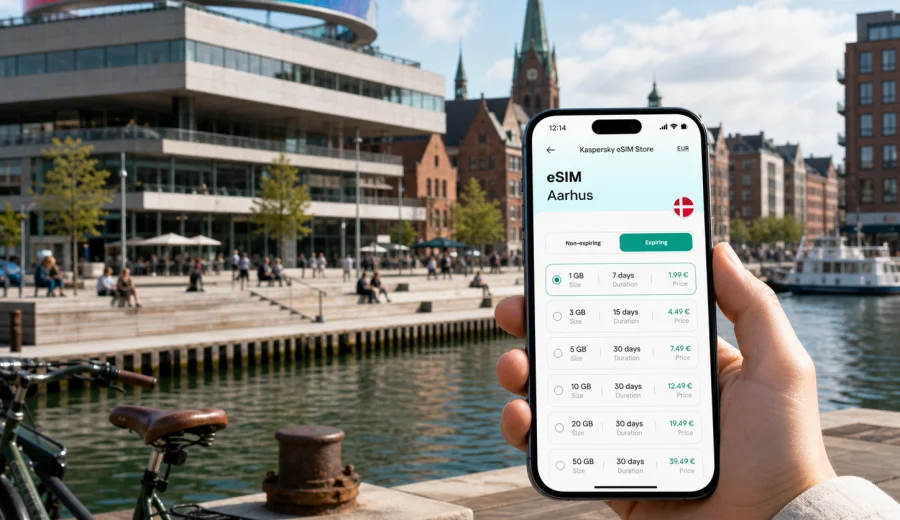
Aarhus eSIM: mobile connection and internet for your city trip
Aarhus is a practical city for travelers: compact enough to cross without stress, but busy enough that mobile internet quickly becomes part of the trip. You may need maps from the airport, train updates at Aarhus H, a ride to a hotel near the harbor, tickets for a museum, or messaging with colleagues before a meeting. An eSIM can help you prepare mobile connection before you arrive in Denmark, without looking for a physical SIM card on your first day.
This guide is focused on Aarhus, not on Denmark in general. It explains where mobile internet is useful in the city, how to estimate data for a short stay or business trip, what to check before choosing an eSIM tariff, and how to install it on a compatible phone. Kaspersky eSIM Store is an app and website where you can choose, arrange, and activate an eSIM with a suitable mobile internet tariff for an international trip.
Why mobile internet matters in Aarhus
Aarhus is easy to navigate when your phone is online. The city center, Aarhus Ø, Frederiksbjerg, the Latin Quarter, the university area, Dokk1, ARoS, and the waterfront are all close enough for flexible plans. That is convenient, but it also means you may make many small decisions during the day: walk, take the light rail, book a taxi, find the right platform, scan a ticket, or confirm a restaurant reservation.
An eSIM is useful because it gives your compatible device a digital SIM profile for mobile data. You do not need to swap a plastic SIM card, and you can usually keep your main SIM active for calls or banking messages if your phone supports dual SIM use. For a visitor in Aarhus, the main benefit is simple: your travel phone can be ready for mobile internet when you need directions, confirmations, and messaging.
Common Aarhus travel moments where mobile internet helps:
- checking transfer options after landing at Aarhus Airport or arriving by train;
- using maps between Aarhus H, the city center, the harbor, and hotel districts;
- opening booking confirmations for hotels, events, and restaurants;
- checking public transport times when plans change during the day;
- joining a video call from a hotel lobby, coworking space, or office visit;
- translating short signs or messages when you need practical help;
- using ride-hailing, parking, banking, and travel apps.
The point is not to replace every local option. Hotel Wi-Fi and cafe Wi-Fi can be useful, but they are tied to specific places. Mobile data is useful between those places: on the way from the station, on the waterfront, while walking through the Latin Quarter, or when your meeting location changes at short notice.
Arrival scenarios: airport, train, ferry, and road trips
Many visitors reach Aarhus through different routes. Some fly into Aarhus Airport, some arrive by train from Copenhagen Airport, and others include Aarhus in a wider Denmark route by car. The best eSIM setup depends on that first day.
| Arrival route | Why mobile internet helps | Practical tip |
|---|---|---|
| Aarhus Airport | Transfer checks, taxi apps, hotel address, messaging | Install the eSIM before departure, then activate mobile data after arrival if the tariff conditions allow it. |
| Train via Copenhagen | Platform changes, rail updates, maps around Aarhus H | Keep enough data for navigation and messaging during the transfer, not only in Aarhus. |
| Road trip in Jutland | Maps, parking apps, route changes, hotel check-in | Choose a Denmark tariff with enough data for driving days and city days. |
| Ferry or regional route | Confirmations, onward transport, location sharing | Download key documents offline, then use mobile data for live updates. |
If your first stop is a hotel, apartment, or office outside the central walking area, mobile internet is especially useful. Aarhus is not difficult to get around, but local transport apps, maps, and messages are easier when your phone is already set up.
How much data do you need for Aarhus?
Data needs vary by traveler, but Aarhus trips usually fall into a few patterns. A weekend visitor who mostly uses maps and messaging will need less data than a remote worker who uses video calls and hotspot mode. Do not choose a tariff only by price. Look at the amount of data, validity period, destination, and whether your route stays within Denmark or continues elsewhere.
| Trip type | Typical online tasks | Data approach |
|---|---|---|
| One-day stopover | Maps, messages, tickets, restaurant search | A smaller data package may be enough if you avoid video streaming. |
| Weekend city break | Navigation, photos, social apps, museum tickets | Choose a tariff that covers the full stay with room for spontaneous use. |
| Business trip | Email, calendars, calls over apps, route changes | Leave a data buffer for video calls, file previews, and hotspot emergencies. |
| Study or conference visit | Campus navigation, group chats, event apps | Check validity carefully if the program lasts more than a few days. |
| Denmark route | Aarhus plus Copenhagen, Aalborg, Odense, or the coast | Choose a tariff for Denmark or a suitable regional option if your route crosses borders. |
As a rule of thumb, maps and messaging use far less data than streaming video, cloud backups, and hotspot sharing. Before you travel, switch off automatic photo backup on mobile data if you want better control. Download offline maps, travel documents, and entertainment on Wi-Fi. Then use eSIM data for live tasks: navigation, transport, messaging, booking changes, and urgent work.
City movement: where an eSIM is useful in Aarhus
Aarhus is a city where you may walk a lot, but mobile internet still matters because routes often connect different types of places. You may start the morning near the waterfront, meet someone around the central station, visit ARoS, go to the university area, and finish in Frederiksbjerg or the Latin Quarter. Each step may involve maps, opening hours, tickets, or messages.
For visitors, the most practical data use is not dramatic. It is small and constant:
- checking which side of the station you need;
- finding the correct hotel entrance or apartment key box;
- following walking directions through pedestrian streets;
- comparing light rail, bus, taxi, and walking time;
- opening a museum or event ticket from email;
- sending your live location to someone you are meeting;
- checking whether a restaurant or shop is still open.
If you rely only on public Wi-Fi, you may be online at the hotel and offline on the way. With an eSIM tariff on a compatible phone, you can keep mobile data available during the movement itself. That is useful in Aarhus because many city experiences are linked by short transfers rather than one long ride.
Before you choose an eSIM tariff for Aarhus
Before selecting an eSIM tariff, check four things: destination, validity, data volume, and device compatibility. The destination should match your actual route. For Aarhus, that normally means Denmark. If you also plan to continue to another country, review whether a regional tariff is more suitable. The validity period should cover the full stay, including arrival and departure days.
Use this checklist before payment:
- Confirm that your phone supports eSIM and is not locked to one carrier. Check your device before choosing a tariff.
- Check that the tariff covers Denmark for an Aarhus trip.
- Choose a data volume that fits your tasks: navigation and messaging, work, or heavier media use.
- Review the validity period and when it starts according to the selected tariff terms.
- Check whether calls and SMS are included. Many travel eSIM tariffs focus on mobile data, while calls and messages can be handled through internet apps.
- Keep your primary SIM available if you need banking SMS or calls on your regular number.
Kaspersky eSIM Store helps you choose and arrange an eSIM tariff for mobile internet in an international trip. It is not a mobile network operator and does not replace checking the conditions of the selected tariff. The useful part for a traveler is that you can review the destination, data amount, validity, and activation steps before your Aarhus itinerary becomes busy.
For a city trip where Aarhus is your main destination, you can prepare an eSIM tariff for Denmark before your Aarhus trip and keep the first day simpler. This is especially helpful if you arrive in the evening, travel with luggage, or need to reach a hotel, meeting, or apartment without stopping to look for a local SIM option.
Installing an eSIM before departure or after arrival
You can usually install an eSIM before the trip while you still have stable Wi-Fi at home. That is often the calmer option: you have time to read the steps, save the QR code or installation details, and check that the eSIM profile appears on your phone. Depending on the tariff conditions, activation or data usage may begin only after connection to the destination network, but you should always read the specific terms before installing.
The basic setup flow is simple:
1. Check that your device supports eSIM and is not carrier-locked.
2. Choose Denmark as the destination for an Aarhus trip.
3. Select a tariff by data amount and validity period.
4. Install the eSIM profile using the on-screen instructions or QR code.
5. On arrival, choose the eSIM line for mobile data.
6. Enable data roaming for the eSIM if the instructions for your device and tariff require it.
7. Test maps or a messenger before leaving the airport, station, or hotel.
For installation details, use the relevant guide: instructions for Android or instructions for iOS. Keep a stable internet connection during setup, and do not delete the eSIM profile unless you are sure it is no longer needed. Some eSIM profiles cannot be transferred to another device after activation.
Practical data-saving settings for Aarhus
Before leaving for Denmark, review your phone settings. The goal is not to make the phone unusable. The goal is to stop background activity from consuming data that you wanted for maps, communication, and work.
- Disable mobile data for apps you do not need during the trip.
- Turn off automatic app updates on mobile data.
- Pause cloud photo and video backup until Wi-Fi.
- Download offline maps for central Aarhus and your hotel area.
- Save hotel address, booking confirmations, and ticket PDFs offline.
- Set the eSIM as the mobile data line after arrival.
- Set a data warning below the total tariff volume if your phone supports it.
Common mistakes to avoid
Avoid these preventable setup problems:
- Choosing a tariff for the wrong destination. For Aarhus, check Denmark coverage.
- Forgetting to check eSIM support before payment.
- Installing the eSIM on the wrong device.
- Deleting the eSIM profile after installation.
- Assuming the tariff includes a local phone number, calls, or SMS when it may be data-only.
- Using hotspot and video calls without enough data.
- Waiting until you have no Wi-Fi to read installation instructions.
- Forgetting to enable data roaming for the eSIM when the setup guide requires it.
Quick comparison: eSIM, roaming, local SIM, and Wi-Fi
| Option | Strength in Aarhus | Limitation |
|---|---|---|
| Travel eSIM | Can be prepared before the trip and used without changing a physical SIM | Requires compatible, unlocked device and a suitable tariff |
| Standard roaming | Keeps your existing number and operator relationship | Costs and data limits depend on your home operator |
| Local physical SIM | May fit longer stays or local calling needs | Requires finding a place to buy and install it |
| Public Wi-Fi | Useful in hotels, offices, and cafes | Not available everywhere and not ideal as the only plan |
FAQ: eSIM for Aarhus
Is an eSIM useful for a short trip to Aarhus?
Yes. It is useful for maps, transport updates, booking confirmations, and messaging from the first hour.
Does a travel eSIM usually include calls and SMS?
Many travel eSIM tariffs focus on mobile data. Calls and SMS are included only if the selected tariff says so.
Should I install the eSIM before I travel?
Often, yes. You can use stable Wi-Fi and read the steps calmly. Check the tariff conditions to understand when validity and data use begin.
Can I use one eSIM for Aarhus and other Danish cities?
If the tariff covers Denmark, it can suit an itinerary that includes Aarhus and other Danish destinations. Check coverage, validity, and data volume.
Can I keep my regular SIM active?
Many dual-SIM phones allow this: regular SIM for calls or SMS, eSIM for mobile data. Check your phone settings before the trip.
What should I do if mobile data does not work after arrival?
Check that the eSIM is selected for mobile data, data roaming is enabled if required, airplane mode is off, and the device has connected to a local network.
Choose an eSIM tariff for your Aarhus trip
Aarhus is easiest when your phone is ready for the practical parts of travel: finding the hotel, checking transport, opening tickets, joining messages, and changing plans without searching for Wi-Fi. Before departure, check device compatibility, choose a Denmark tariff with enough data and validity for your route, install the eSIM on a stable connection, and keep the setup instructions available.
Kaspersky eSIM Store helps you choose, arrange, and activate an eSIM with a suitable mobile internet tariff for an international trip. If Aarhus is your destination, you can choose an eSIM tariff for Denmark for your Aarhus trip and arrive with a clearer mobile internet plan.