Travel connectivity guide
Aasiaat eSIM Guide: Mobile Data in Greenland
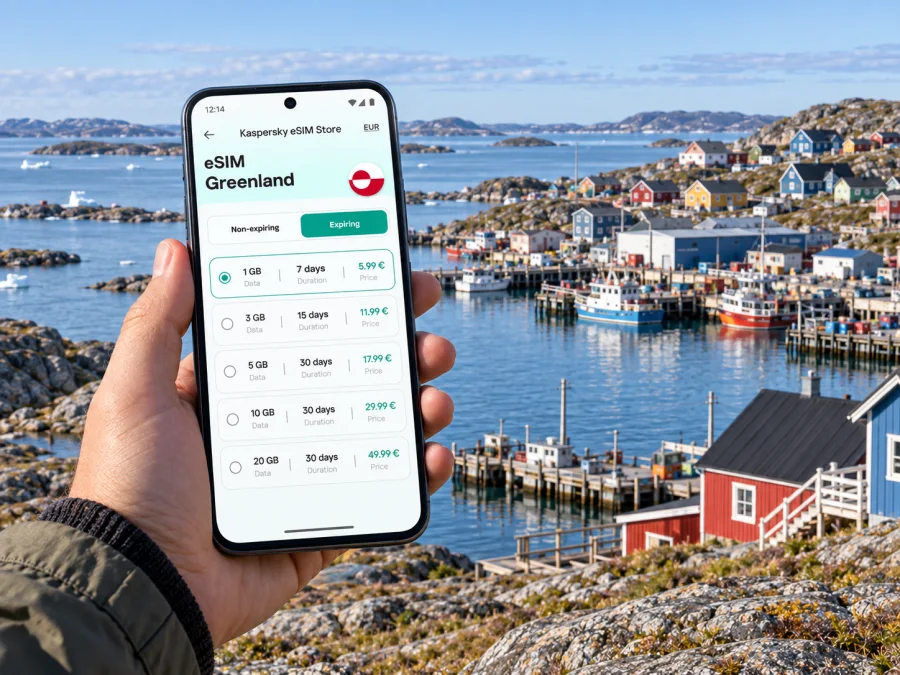
Aasiaat eSIM: mobile connection and internet in Greenland
Aasiaat sits on an island at the southern edge of Disko Bay, surrounded by a broad archipelago. Mobile data can help you check plans, contact your accommodation and navigate between the airport, harbour and town. An eSIM prepares mobile data for your Greenland journey without replacing your physical SIM. Keep key details available offline for times when service or power is limited.
What to plan before arriving in Aasiaat
Greenland travel often includes more than one leg. Depending on your itinerary, you may reach Aasiaat by air after a transfer in Kangerlussuaq or Ilulissat, or by sea on a coastal passenger route. Flights, boats and local transfers have their own timetables, and conditions can affect operations. Confirm the latest details with your carrier or tour provider before setting out; do not rely on a map app as a live transport schedule.
Before departure, save:
- Your accommodation’s name, address or meeting instructions, plus a phone number or message contact.
- Flight, boat and activity confirmations, including check-in times and baggage notes.
- A map of Aasiaat and the route between the airport, harbour and your lodging.
- A short list of essential contacts and any instructions from your host or guide.
- Digital copies of travel documents stored securely on your device, with access available offline where possible.
Mobile data can support messages, navigation and itinerary updates, but it does not confirm that a route or activity is operating. Check directly with the airline, vessel operator, accommodation or guide and leave room for changes. In Aasiaat, save each transfer detail before leaving a dependable connection; a map alone cannot confirm local schedules.
eSIM for a town connected by air and sea
Aasiaat’s airport and harbour serve different parts of the journey. If you arrive by plane, you may need to coordinate a taxi or pickup and confirm where your host will meet you. If you arrive by boat, you may be walking from the harbour with luggage or checking a message about your lodging. Having mobile data ready can help you retrieve those details after arrival, while a screenshot or saved note remains useful if you are offline.
An eSIM is a digital SIM profile for a compatible, unlocked device. Kaspersky eSIM Store is an app and website where travellers can choose, arrange and activate an eSIM plan for mobile internet abroad. Coverage, data allowance, validity and activation conditions depend on the selected offer; read its terms before purchase.
An eSIM data plan is not automatically a replacement for your usual phone number. Keep your regular line available if you need calls or SMS, and check its roaming charges with your existing provider. Messaging and internet calls may work through apps when data service is available, but availability depends on the connection and the app. If you need conventional voice calls, arrange that separately before travelling.
Choose a plan for the way you will use Aasiaat
Think through your itinerary rather than choosing a data allowance based only on the number of days. A stay focused on the town may involve maps, messages and checking arrangements. A trip with boat excursions, shared photos or remote work can use more data, while video calls and media uploads can consume it quickly.
| Your travel pattern | Useful preparation | Data habits to consider |
|---|---|---|
| A short stop in town | Save accommodation and onward-travel details; download a map | Use mobile data for messages and essential searches; defer large uploads |
| Several days based in Aasiaat | Keep activity confirmations and walking routes accessible | Check how photo backup, app updates and streaming use data |
| Boat trips around the archipelago | Confirm the meeting point and return arrangements with the guide | Download maps and instructions before departure; do not assume a signal offshore |
| A work visit | Check your accommodation’s internet arrangements in advance | Reserve mobile data for essential tasks and keep work files available offline |
| A multi-stop Greenland itinerary | Compare the plan’s stated destination and validity with every leg | Verify coverage for each planned destination rather than inferring it from a country name |
Check the price, data amount, validity, destination and activation instructions at checkout. Understand when validity begins. For frequent navigation, reduce background data use and carry an airline-approved power bank. For short stopovers, determine whether you can walk to your accommodation or need a prearranged pickup; for a boat connection, keep harbour directions and departure time together.
When you have a route that includes Aasiaat and other destinations in Greenland, review the available eSIM options for Greenland and compare the stated terms with the full itinerary. The country page is a starting point for choosing a suitable plan; coverage details in the offer should guide your decision for each stop.
Getting around town with maps and mobile data
Aasiaat is spread across a low island, but many central sights can be reached on foot. Walking is a practical way to orient yourself between the centre, waterfront and cultural stops. Wind, snow or rain can make a short route feel longer, so check local advice and allow time to return before a scheduled activity.
The harbour is a useful point of reference as well as a working waterfront. Save a map of the town, pin your accommodation and any pickup point, and keep written directions available outside the map app. For an airport transfer, arrange transport ahead of time: visitor guidance recommends calling a taxi, especially with luggage. Ask your accommodation whether it can help and confirm the meeting point and payment method. Do not assume a ride-hailing app or continuous service will be available when you land.
A reliable navigation routine:
- Download an offline map while you have a connection.
- Save your lodging, harbour, airport pickup and activity meeting points.
- Keep screenshots of routes and your host’s instructions.
- Check the weather and return plan before walking beyond the centre.
- Follow local guidance around shoreline, ice and unfamiliar routes.
Maps support local advice; they do not replace it. For boat travel, confirm the meeting point, return time and contact procedure with the operator before boarding.
A town walk: harbour, art and local history
Aasiaat suits a flexible walk more than a tightly timed sightseeing circuit. Start near the harbour and continue through central streets with colourful homes and public artworks. Murals and sculptures are found around town, so save a few map points but leave time to wander.
The Aasiaat Museum focuses on local cultural history and occupies the former governor’s residence, dating to 1860. Opening arrangements can change, so check locally before making it the only fixed stop in a short visit. The former girls’ school, now the public library, is another historic building to notice on a walk. Ask before photographing people or entering buildings, and treat homes and work areas as private spaces.
Combine a harbour walk, the museum if open, and an art walk or guided activity. Keep the plan flexible and confirm local details.
Accommodation and work visits
Visit Greenland lists Hotel SØMA Aasiaat and Hotel Nattoralik among local places to stay. Confirm availability, services and booking arrangements with your chosen property. Ask about check-in, meals, luggage, local transport and internet access. Hotel Wi-Fi and mobile data have different uses: one may be convenient indoors, while the other can help with messages and navigation away from the building, depending on local service.
For a business visit, save the venue address and host contact, confirm how to reach the meeting and download documents in advance. If a meeting depends on video, ask about the available connection and prepare an alternative. Keep work files protected.
Before you set out, check:
- The time zone used for each booking or meeting.
- Your local contact’s name and number, saved in the phone and a separate note.
- That itinerary and transport confirmations are available offline.
- That a colleague or host knows if you are leaving town for an excursion.
- That you have left a buffer between arrival and a fixed appointment.
Day trips from Aasiaat: plan beyond the signal
The surrounding archipelago invites boat and kayak trips in summer. Guided outings may include whale watching, fishing or visits to islands and nearby settlements. Routes depend on the operator, season and conditions. Confirm the itinerary, equipment, meeting point, duration and return plan; do not treat a map pin as permission or safe access to a remote island.
Municipal information names Akunnaaq, Kitsissuarsuit and Ikamiut among settlements associated with Aasiaat. Reaching them requires transport planning. Check which boats operate on your dates, how transfers work, and how your return and luggage will be handled. Timetables and services can change, and weather may affect travel.
In winter, local activities can include dogsledding, skiing and snowshoeing. Sea ice and weather shape access, so arrange outings with an experienced local operator and follow their safety instructions. A summer route may not be accessible in another season.
Before a day trip, confirm the departure, meeting point and return plan; save the provider’s contact and booking details; download maps and instructions; ask what clothing or equipment to bring; and tell your accommodation when you expect to return.
Mobile data can help coordinate changes while service is available, but it is not an emergency system and should not be assumed to work over open water or in remote areas. Follow your guide’s communication plan and keep essential information offline.
Install and activate an eSIM before you need it
Start with the device requirements and the plan’s own directions. Your phone must support eSIM and be unlocked for the selected plan. Check whether your device supports eSIM before arranging it; compatibility can differ by model and regional version.
Use a stable internet connection for installation and follow the steps for your operating system: Android eSIM installation instructions or iOS eSIM installation instructions. Menu names vary by device and software. Read the plan’s activation instructions too: installing a profile and starting its validity may be separate steps.
- Review destination, data, duration, price and activation conditions.
- Confirm compatibility, unlock status and Wi-Fi access.
- Install and label the profile according to the device and plan instructions.
- Set the travel line for mobile data and roaming as directed.
- At your destination, activate it as instructed and confirm data works.
Keep your usual line if you need your number, but check its roaming charges. Avoid deleting a travel profile unless the instructions tell you to; reinstalling may require a new activation process. Save plan and support details offline.
If mobile data is unavailable
If data is unavailable, the travel line may not be selected or active, a setting may need attention, or service may be unavailable. Check the plan instructions, then:
- Confirm the eSIM is installed and selected for mobile data.
- Check activation status and destination conditions.
- Review data-roaming settings as specified by the plan.
- Restart the phone or briefly toggle airplane mode, then wait for registration.
- Move to a location where service may be available and try again.
- Use saved support details or contact your accommodation if the issue continues.
Do not remove the profile as a first step. If you are offline, use saved maps and itinerary details and ask your host or guide for local help. For a delayed flight or boat, check updates through the transport operator when possible.
Frequently asked questions
Can I rely on mobile internet everywhere in Aasiaat?
No plan guarantees uninterrupted service. Check the offer’s destination and coverage details, and expect availability to depend on local network access, your device and conditions. Download maps before leaving town.
Does an eSIM include calls and SMS?
A plan selected for mobile data does not necessarily include a phone number, voice service or SMS. Keep your regular line if you need those services and check roaming costs. Internet messaging apps need data or Wi-Fi.
Can I explore without a car?
Many central places can be reached on foot. Arrange transport for the airport, luggage and excursions beyond town through your accommodation or activity provider. Distances and conditions matter, especially in winter.
What should I save offline?
Keep accommodation details, airport or harbour transfer instructions, bookings, guide contacts, maps and return arrangements available without data. Screenshots and downloaded maps are useful away from a connection.
Prepare for Aasiaat with a flexible connection plan
For Aasiaat, mobile data is most useful for the practical details of an island itinerary: meeting your host, finding the harbour, checking messages and staying in touch with a guide. Pair it with saved maps and booking information, and confirm transport directly because schedules and conditions can change.
Kaspersky eSIM Store helps travellers choose, arrange and activate an eSIM plan for mobile internet abroad. Review destination, validity, data and activation terms, then choose an eSIM plan for your Greenland trip. Install it on a compatible device before departure and keep essential details offline.


