
Travel connectivity guide
Abu Dhabi eSIM for Mobile Internet
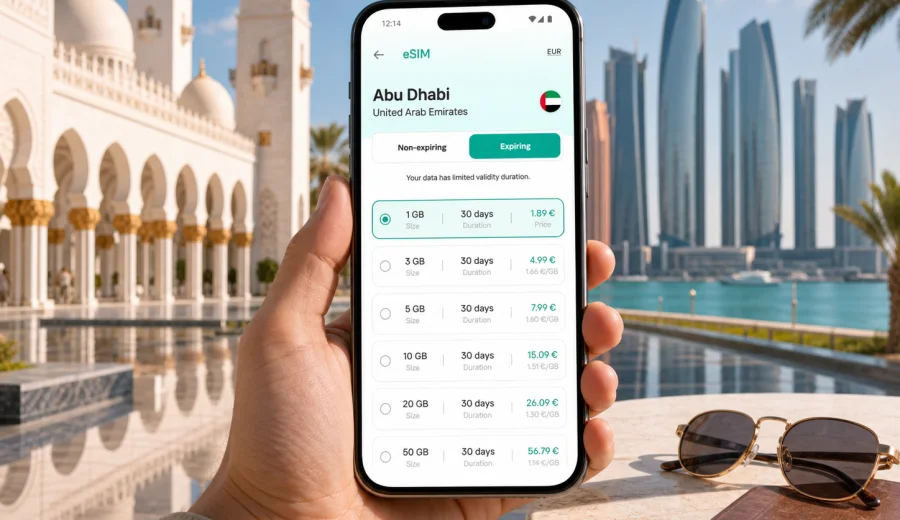
Abu Dhabi eSIM: mobile connection and internet for your trip
Abu Dhabi is a city where a trip can move quickly from airport arrival to hotel check-in, from a business meeting on Al Maryah Island to an evening walk along the Corniche, or from the Sheikh Zayed Grand Mosque to a day on Saadiyat Island. In each of these moments, mobile internet is not a luxury extra. You may need maps, ride-hailing, hotel messages, restaurant bookings, airline updates, messenger calls, banking confirmations, and access to travel documents.
An eSIM can make that first day easier because you do not need to look for a physical SIM card immediately after landing. You choose a suitable data plan for the United Arab Emirates, install the eSIM on a compatible device, and use mobile data for the tasks that keep the trip moving. Kaspersky eSIM Store helps you choose, arrange, and activate an eSIM with a suitable data plan for mobile internet during an international trip.
This guide focuses on Abu Dhabi, not the United Arab Emirates in general. The details below are built around arrival at Zayed International Airport, transport across the city, hotel districts, business areas, beaches, museums, stopovers, and short trips from Abu Dhabi to nearby destinations.
Why mobile internet matters in Abu Dhabi
Abu Dhabi is spacious. The airport, the Corniche, Yas Island, Saadiyat Island, Al Maryah Island, Al Reem Island, the Sheikh Zayed Grand Mosque area, and mainland residential districts are not all within a compact walking zone. You can have a very smooth trip, but only if you can move between places confidently.
Mobile internet helps with:
- checking the terminal, baggage, and transfer details after landing;
- opening hotel booking confirmations before check-in;
- using maps for routes between islands and mainland districts;
- ordering a ride when taxi queues are busy;
- receiving one-time passwords for banking or travel apps;
- messaging a driver, colleague, hotel, or tour operator;
- checking prayer times, opening hours, reservation changes, and weather alerts;
- using messenger calls if your eSIM data plan does not include regular voice calls or SMS.
Public Wi-Fi can be useful in airports, malls, and hotels, but it is not always available exactly when you need it. A data eSIM helps reduce dependence on public networks and on offline SIM-card counters, especially when your schedule is tight.
Arrival at Zayed International Airport
Many Abu Dhabi trips start with a practical question: can you get online before you leave the airport? You may need to message your hotel, open a map, confirm a ride, or tell colleagues that you have landed. If you are arriving late at night, traveling with children, or moving straight to a meeting, the ability to use mobile data early can remove a lot of friction.
A sensible arrival workflow looks like this:
1. Install the eSIM before departure while you still have stable home Wi-Fi.
2. Keep the QR code or installation details available in your email or account.
3. After landing, switch mobile data to the eSIM profile when the plan is ready to activate.
4. Keep your primary SIM active for calls if you need it, but check roaming charges before using it for data.
5. Test maps, messenger, and hotel apps before leaving the terminal.
If you are connecting through Abu Dhabi for only a few hours, mobile data can still be useful. A stopover may include immigration checks, lounge access, terminal changes, transport into the city, or a short visit to the mosque or waterfront. In those cases, you do not want to spend the first hour solving connectivity.
Where eSIM is useful across the city
Abu Dhabi trips often combine business, culture, leisure, and family travel. The city is organized around districts and islands, so mobile data is most useful when plans change during the day.
| Area or route | Why you may need mobile internet |
|---|---|
| Zayed International Airport to hotel | ride-hailing, maps, hotel messages, flight updates |
| Corniche and city center | walking navigation, restaurant bookings, photo backup |
| Sheikh Zayed Grand Mosque area | transport timing, visitor information, group coordination |
| Yas Island | theme park tickets, shuttle details, family messaging |
| Saadiyat Island | museum tickets, beach access, hotel transfers |
| Al Maryah Island and ADGM area | business meetings, calendar changes, video calls |
| Al Reem Island | apartment stays, food delivery, local navigation |
| Abu Dhabi to Dubai | route planning, intercity transport updates, hotspot use |
The main benefit is continuity. You can leave the hotel, cross the city, change plans, and still have access to the apps that hold your itinerary.
How much data to plan for
Your data needs depend on how you travel. Maps and messaging use relatively little data, while video calls, cloud photo backup, and hotspot use can consume a plan quickly. Avoid choosing only by the lowest price. Look at the number of travel days, the amount of navigation you expect, and whether you will rely on hotel Wi-Fi for heavy tasks.
For many Abu Dhabi trips, these scenarios are a useful starting point:
| Trip style | Typical mobile data use | Planning note |
|---|---|---|
| Short stopover | maps, messenger, ride apps, boarding updates | a small short-validity plan may be enough |
| Weekend city break | navigation, bookings, social apps, light browsing | allow extra data for photos and transport apps |
| Business trip | email, calendar, messenger calls, hotspot backup | choose a plan with comfortable headroom |
| Family holiday | maps, ticket apps, messaging, shared logistics | more than one device may need data |
| Remote work stay | video calls, cloud tools, hotspot use | estimate daily usage before choosing |
If you use video streaming, cloud backups, or a laptop hotspot, check your usage carefully. Abu Dhabi hotels and offices often have Wi-Fi, but mobile data is what keeps you connected between those fixed points.
Choosing an eSIM plan for Abu Dhabi
For a city trip to Abu Dhabi, the correct destination is the United Arab Emirates. A city article may mention specific neighborhoods, but the data plan is selected for the country or region where the eSIM tariff is available. If your route includes Abu Dhabi and Dubai in the same trip, a United Arab Emirates plan is usually the natural option. If your itinerary continues to Oman, Qatar, Saudi Arabia, or another country, compare the destination coverage and validity before choosing.
Before you select a plan, check four points:
- destination: United Arab Emirates or a regional option if your route crosses borders;
- data volume: enough for navigation, messaging, bookings, and any hotspot use;
- validity period: aligned with your arrival and departure dates;
- activation rules: when the plan starts and what you need to do after installation.
Kaspersky eSIM Store helps you review available data-plan conditions before you travel, including data volume, validity, destination, and price. For Abu Dhabi, you can choose a mobile internet plan for the United Arab Emirates and prepare the eSIM before your flight, then activate it according to the plan instructions.
City scenarios: what to prepare before you go
Different Abu Dhabi trips create different connectivity needs. A traveler staying at a resort on Saadiyat Island will use mobile data differently from a consultant moving between Al Maryah Island and mainland offices.
For a business trip:
- keep email and calendar apps available offline where possible;
- allow data for messenger calls and document access;
- keep a hotspot backup for a laptop, but avoid using it for large downloads;
- install the eSIM before departure so you can connect between airport, hotel, and meeting venue.
For a leisure trip:
- save hotel and attraction bookings in your phone wallet or email;
- use mobile data for maps, ride apps, restaurant bookings, and translation;
- download large videos or maps on Wi-Fi when practical;
- keep enough data for the final airport transfer and flight updates.
For family holidays and stopovers, decide which phones really need mobile data, keep tickets and hotel details available offline, and reserve enough data for maps, ride-hailing, airport timing, and group messaging.
Installing and activating eSIM for Abu Dhabi
The best time to install an eSIM is usually before the trip, using a stable Wi-Fi connection. Activation timing depends on the selected plan, so read the plan conditions before you turn on data roaming for the eSIM profile.
A simple installation checklist:
1. Confirm that your phone supports eSIM and is not locked to another carrier.
2. Choose the United Arab Emirates as the destination, or a suitable regional option for a wider route.
3. Arrange the eSIM plan in Kaspersky eSIM Store.
4. Install the eSIM using the instructions shown after purchase or the QR code provided.
5. Name the mobile profile clearly, for example Abu Dhabi data.
6. When you arrive or when the plan instructions say to activate, select the eSIM for mobile data.
7. If required by the plan or device, enable data roaming for the eSIM profile.
8. Test mobile data with maps or a browser before leaving the airport or hotel.
Device menus differ by brand and operating system. If you need a guided setup, use the Android eSIM installation guide or the iOS eSIM installation guide and follow the steps for your device.
Check device compatibility first
Not every smartphone or tablet supports eSIM. Some devices also have carrier locks or regional model differences. Before choosing a plan for Abu Dhabi, check your device and confirm that it can add an eSIM profile.
Pay attention to these points:
- the device must support eSIM technology;
- the device should be unlocked if it was purchased through a mobile carrier;
- the operating system should be updated enough to manage eSIM profiles;
- you need internet access during installation, usually Wi-Fi before departure;
- after activation, an eSIM profile may not be transferable to another device, depending on the plan conditions.
This check is worth doing before payment. It is faster to solve compatibility questions at home than after landing in Abu Dhabi with luggage, transport, and hotel check-in waiting.
Transport and navigation in Abu Dhabi
Abu Dhabi travel is easier when maps and transport apps work without interruption. The city has wide roads, islands, bridges, large hotel complexes, and venues with separate entrances for visitors, taxis, deliveries, and private vehicles.
Mobile internet helps you confirm the right pickup point, compare routes, check whether a venue is on Abu Dhabi Island, Yas Island, Saadiyat Island, or the mainland, share your live location, and update plans if traffic changes. If you rent a car, it also supports navigation, parking searches, fuel stops, and route changes.
Hotels, apartments, and workspaces
Hotel Wi-Fi is useful for large downloads and evening planning, but it does not cover the moments when travel problems usually happen: the airport curb, a taxi pickup point, a mall entrance, a beach club reception, or the lobby before check-in. An eSIM is the travel layer between fixed Wi-Fi networks.
If you are staying in an apartment on Al Reem Island, a business hotel near Al Maryah Island, or a resort on Saadiyat or Yas Island, mobile data can help with access messages, reservations, shuttle times, delivery apps, and family coordination. For short trips from Abu Dhabi to Dubai, Al Ain, or the desert, check that the plan conditions still match your route.
Quick checklist before flying to Abu Dhabi
Use this checklist before departure:
- confirm that your device supports eSIM and is unlocked;
- choose a data allowance that fits your trip length;
- install the eSIM while you have stable Wi-Fi;
- save your QR code or installation details where you can access them;
- label the eSIM profile clearly in phone settings;
- decide whether your primary SIM should stay active for calls or SMS;
- disable heavy background data use before travel;
- keep hotel, flight, and transport details available offline;
- test the eSIM after activation before leaving the airport area.
FAQ: eSIM and mobile internet in Abu Dhabi
Do I need an eSIM for Abu Dhabi if my hotel has Wi-Fi?
Hotel Wi-Fi helps inside the property, but mobile data is useful between the airport, hotel, transport, meetings, beaches, malls, and attractions.
Is Abu Dhabi covered by a city-specific eSIM plan?
For a city trip, you normally choose a plan for the United Arab Emirates or a suitable regional plan, depending on your route. Always check the destination and coverage conditions before choosing.
Can I use an eSIM for calls and SMS?
Many travel eSIM plans are designed for mobile data. They may not include a regular phone number, voice calls, or SMS unless the specific plan says so.
Will eSIM work on any phone?
No. Your phone must support eSIM and must not be restricted in a way that prevents adding another mobile profile. Check compatibility before choosing a plan.
Prepare mobile internet before your Abu Dhabi trip
Abu Dhabi is easier to navigate when mobile internet is ready before the first taxi ride, meeting, or hotel check-in. With an eSIM, you can prepare a data plan for the United Arab Emirates, install it on a compatible device and use data for maps, messages, bookings, and travel updates.
Kaspersky eSIM Store helps you choose, arrange, and activate an eSIM with a suitable data plan for an international trip. If Abu Dhabi is your destination, prepare an eSIM plan for the United Arab Emirates before you travel and keep your first day focused on the trip itself.