
Travel connectivity guide
Agadir eSIM: mobile internet for Morocco travel
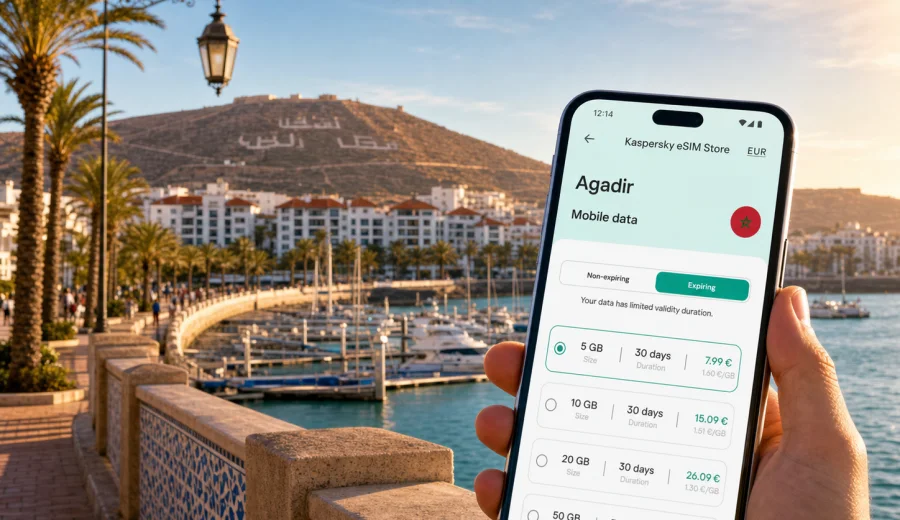
Agadir eSIM: mobile connection and internet for your trip
Agadir is a city where mobile internet becomes useful almost as soon as you arrive. The airport is outside the city, hotels are spread along the beach, Founty, the marina, Talborjt and nearby resort areas, and many travelers use Agadir as a base for Taghazout, Tamraght, Paradise Valley or Taroudant. An eSIM helps you prepare mobile data before the trip, so you can open maps, message your hotel, check transport options and manage bookings without looking for a physical SIM card after landing.
This guide focuses on practical city scenarios: arrival at Agadir Al Massira Airport, transfer to the beachfront, navigation between districts, remote work from hotels and cafes, short stopovers, surfing trips north of the city and day trips inland. It also explains how to choose an eSIM plan for Morocco through Kaspersky eSIM Store, what to check before buying, and how to install and activate an eSIM on a compatible device.
Why mobile data matters in Agadir
Agadir is easier to navigate when your phone is online. Street signs, hotel names, pickup points and beachside promenades can be simple in the main tourist area, but mobile internet helps when plans change, when you need the exact entrance to a riad or apartment, or when your driver asks for a live location.
Common moments when mobile data helps:
- checking the route from Agadir Al Massira Airport to the city;
- messaging a hotel or apartment host before check-in;
- finding the correct entrance for a beachfront hotel, marina restaurant or business venue;
- using maps around Talborjt, Founty, Sonaba, the marina and Agadir Oufella;
- keeping booking confirmations available in email or travel apps;
- using translation apps in shops, cafes or transport situations;
- checking surf conditions or meeting points for trips to Taghazout and Tamraght;
- staying connected when hotel or cafe Wi-Fi is slow, crowded or not available.
Agadir is not only a beach destination. It is also a practical base city for work trips, family holidays and regional movement. If your trip includes airport transfers, hotel changes, early tours or remote work calls, decide how you will connect before you leave home.
Arrival at Agadir Al Massira Airport
Agadir Al Massira Airport is roughly outside the city rather than in the beachfront hotel zone. After passport control and baggage claim, you may need to contact a transfer driver, confirm a shuttle, order transport, open a map or tell your hotel that you have arrived. Airport Wi-Fi may not be the connection you want to depend on at that exact moment, especially if several people in your group need to get online at the same time.
With an eSIM installed before departure, you can usually handle the first steps more calmly:
1. Land in Morocco and switch your phone out of airplane mode.
2. Select the eSIM profile for mobile data if your phone does not do it automatically.
3. Check whether data roaming needs to be enabled for the eSIM profile.
4. Open maps and confirm the route to your hotel or apartment.
5. Message your transfer driver or host with your arrival status.
Activation details can depend on the device, selected plan and local network conditions. It is better to install the eSIM before your flight while you still have a stable connection, then activate it according to the plan instructions when you are ready to use mobile data.
Where eSIM is useful inside the city
Agadir has several traveler zones, and each creates a different connectivity need.
| Area or situation | Why mobile internet helps |
|---|---|
| Beachfront promenade | Maps, restaurant searches, meeting points, ride coordination and photo backups. |
| Marina | Reservations, navigation to boat trips, payment messages and group coordination. |
| Founty and Sonaba | Hotel transfers, apartment check-ins, walking routes and food delivery apps where available. |
| Talborjt | Local cafes, shops, appointments, navigation and translation. |
| Agadir Oufella area | Route planning, taxi pickup coordination and sharing location after sightseeing. |
| Souk El Had | Finding entrances, meeting points and transport back to the hotel. |
| Business venues | Email, calendars, messaging, maps and a backup connection for laptop tethering if the plan allows it. |
| Taghazout and Tamraght trips | Surf school messages, route checks, weather, meeting points and return transport. |
The point is not to be online every second. It is to have mobile data ready at the moments when a missed message, a wrong turn or a weak Wi-Fi network would waste time.
How much data may you need for Agadir?
Your data use depends on how you travel. A light traveler who mostly uses maps, messaging and email may need much less than someone who joins video calls, uploads photos or uses the phone as a hotspot. Kaspersky eSIM Store lets you review data volume, validity period, destination and price before choosing an option.
A simple way to estimate:
- 1 to 3 GB can suit a short stay with maps, messaging and light browsing.
- 5 to 10 GB can suit a week with regular navigation, social apps, bookings and some photo sharing.
- 20 GB or more can make sense for longer stays, remote work, heavier media use or frequent tethering, if tethering is allowed by the selected plan.
Do not choose only by the number of days. A three-day business trip with video calls can use more data than a seven-day beach break where the phone is mostly for maps and messages.
Choosing an eSIM plan for Agadir
For a city trip to Agadir, choose a plan that covers Morocco, because the city belongs to Morocco and your mobile data must match the country or region where you will use it. If your itinerary goes beyond Agadir, check whether the same plan covers the other places you will visit or whether a regional option is more suitable.
Before you choose, compare:
- destination coverage: Morocco for Agadir, plus any other countries or regions on your route;
- data volume: enough for maps, messaging, booking apps, calls over the internet and work tools;
- validity period: it should cover your full stay, including arrival and departure days;
- activation rules: some plans start when installed, others when connected to a supported network;
- hotspot or tethering conditions: important for laptop work;
- refund and support conditions: useful if your plans change or the device is not compatible.
If Agadir is your main destination and the rest of the trip remains within Morocco, you can review available options and choose an eSIM plan for your trip to Agadir before you travel. This is the first point in the planning process where the country landing page becomes useful: it lets you focus on Morocco rather than searching for a separate city product.
Agadir trip scenarios and data planning
Different Agadir trips use data in different ways:
- Beach holiday: maps for restaurants, messages for group plans, translation in shops and transport between the hotel, marina and Souk El Had.
- Surf trip to Taghazout or Tamraght: surf school messages, pickup times, map pins, weather checks and return transport.
- Business trip: calendar updates, ride coordination, email, document access and a backup connection between the airport, hotel, cafe and meeting venue.
- Family trip: shared locations, digital boarding passes, booking confirmations and coordination when the group splits up.
- Short stopover: airport transfer, hotel check-in, route planning and messages without spending time looking for a physical SIM card.
Installing an eSIM before or after arrival
Install the eSIM while you still have a stable internet connection, ideally before departure or at your hotel before you need to move again. You will need a compatible device, access to the eSIM profile or QR code, and enough battery to complete setup.
General steps:
1. Check that your phone supports eSIM and is not locked to one operator.
2. Choose the destination and a suitable plan for Morocco.
3. Follow the installation instructions shown after the plan is arranged.
4. Add the eSIM profile to your phone.
5. Choose the eSIM for mobile data when you are ready to use it.
6. Enable data roaming for the eSIM profile if the instructions or device require it.
7. Test mobile data with a simple page or map search.
For device-specific setup, follow the Android eSIM installation instruction or the iOS eSIM installation instruction. The exact menu names can vary by device model and operating system version, so use the instructions together with the prompts on your phone.
Compatibility checklist before you buy
Before buying any eSIM plan, check the phone first. Some models support eSIM only in certain regional versions, and some phones may be locked by an operator.
Use this checklist:
- Your smartphone or tablet supports eSIM.
- The device is not locked to a mobile operator.
- The operating system is updated enough to support eSIM setup.
- You have internet access for installation before the eSIM is active.
- You understand when the plan validity starts.
- The plan covers Morocco and the dates of your Agadir stay.
- You know whether calls and SMS are included; many travel eSIM plans are data-only unless stated otherwise.
- You know whether tethering is allowed if you need laptop access.
You can also check your device before choosing a plan. This is especially important if you recently bought the phone in another region, use a dual-SIM setup, or are not sure whether the device is locked.
Local movement in Agadir with mobile internet
Agadir is relatively straightforward along the beach, but mobile data still helps with small practical details. A hotel entrance may be on a side road, a restaurant may be clearer from a map pin than from an address, and a driver may ask for your live location.
Useful mobile habits in Agadir:
- Save your hotel address and a map pin before leaving the airport.
- Keep a screenshot of your booking confirmation in case data is temporarily unavailable.
- Share your live location only with people you trust and only when needed.
- Download a small offline map as a backup, but use mobile data for live routing and updated search results.
- Keep the eSIM profile name clear, for example "Morocco data", so you do not confuse it with your home SIM.
- Monitor data use if you upload many photos or use video calls.
Hotel, cafe and public Wi-Fi: when eSIM is still useful
Many hotels and cafes in Agadir provide Wi-Fi, but quality can vary by room, time of day and number of users. An eSIM does not replace every Wi-Fi connection, but it helps when you arrive before check-in, need maps after dinner, move between hotels, receive a payment confirmation or coordinate with a group. For heavier tasks, such as long video calls or cloud backups, use Wi-Fi when it is stable and secure enough for your needs.
Trips from Agadir
Agadir often becomes the starting point for regional trips. Mobile internet is useful because transport details and meeting points can change during the day.
Popular movement patterns include:
- Agadir to Taghazout or Tamraght for surfing and beach stays;
- Agadir to Paradise Valley for a day trip;
- Agadir to Taroudant for a city and market visit;
- Agadir to Essaouira as part of a coastal route;
- Agadir to Marrakech by road after a beach break;
- Agadir airport to a resort outside the city center.
If your route stays inside Morocco, a Morocco plan can remain the simplest choice. If you continue into another country, check the destination coverage before relying on the same eSIM.
FAQ
Is an eSIM useful for Agadir?
Yes. An eSIM can be useful in Agadir for airport arrival, hotel transfers, maps, messaging, restaurant searches, business travel and trips to nearby places such as Taghazout or Paradise Valley. It is most useful when you prepare it before you need mobile data.
Does an eSIM give me a Moroccan phone number?
Not necessarily. Many travel eSIM plans are intended for mobile data and do not include a regular phone number, voice calls or SMS unless this is stated in the plan conditions. For calls and messages, you can often use internet-based apps.
Should I install the eSIM before flying to Agadir?
It is usually more convenient to install the eSIM before departure while you have stable Wi-Fi. Then activate or select it for mobile data according to the plan instructions when you are ready to use it in Morocco.
Can I use one eSIM for Agadir and Taghazout?
If the plan covers Morocco and remains valid during your travel dates, it can be suitable for both Agadir and Taghazout. Always check the destination, validity period and data volume before choosing.
What if my hotel has Wi-Fi?
Hotel Wi-Fi is useful, especially for heavier tasks. An eSIM is still helpful outside the hotel for transfers, walking routes, ride coordination, messages and bookings.
Prepare mobile internet for Agadir
Agadir is easier when your phone is ready for the first hour after landing and the small movements that follow: airport transfer, hotel check-in, beach plans, marina reservations, local navigation and regional trips. Before you travel, check your device compatibility, choose a data volume and validity period that match your itinerary, and install the eSIM while you have a stable connection.
Kaspersky eSIM Store helps you choose, arrange and activate an eSIM with a suitable plan for mobile internet during an overseas trip. If Morocco is your destination, you can review available eSIM options for Morocco and prepare your Agadir connection before you leave.