Travel connectivity guide
Agat eSIM: Mobile Internet for Your Guam Trip
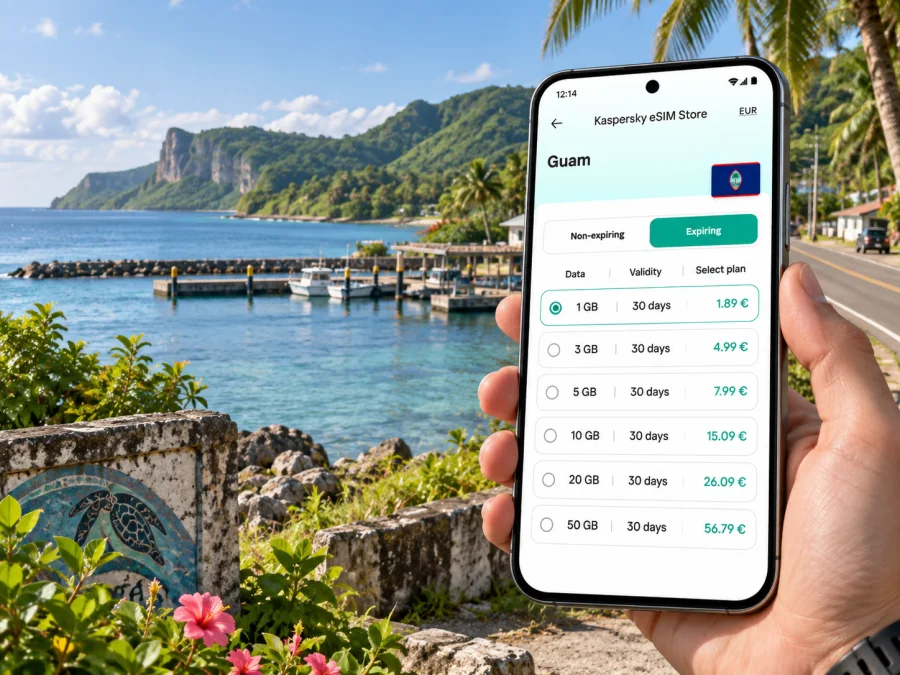
Agat eSIM: mobile connection and internet for your trip
Agat is a coastal village on Guam’s southwest side. A visit here often means moving between the shoreline, village roads, a marina, and nearby historic places rather than following a dense downtown grid. A mobile connection can make those transitions easier: check directions before leaving, message your host if plans change, and keep a map available while exploring the coast.
An eSIM is a digital SIM profile that can be installed on a compatible phone. For a trip to Agat, it offers a practical way to use mobile data without swapping a physical SIM card. The useful question is not only how much data to choose, but how you expect to move around: a short visit focused on the village differs from several days of driving between southern Guam, Hagåtña, and the island’s busier visitor areas.
What to plan for in Agat
Agat is also known by its Chamorro name, Hågat. The village lies along Guam’s southwestern coast, with a quieter setting than the hotel and shopping concentration around Tumon. The shoreline, marina, village roads, and nearby historic sites are useful reference points when planning a day here.
Save the specific places you intend to visit before setting out:
- Agat Marina, a coastal landmark and reference point for the bay.
- Agat Beach at Ga’an Point, identified along Route 2. It is a beach and historic area; check local conditions and posted guidance before entering the water or exploring structures.
- Nimitz Beach Park, near Routes 2 and 12, a named coastal stop in Agat.
- The village center and Route 2, helpful map references when arranging a pickup or finding a meeting point.
These places are not interchangeable. A marina visit, beach stop, and historic site can have different access and parking arrangements. Save the exact map pin, then confirm it matches the entrance or pickup point you need. A broad search for “Agat” may locate the village rather than a particular stop.
Getting from the airport to Agat
Most visitors arrive at Antonio B. Won Pat International Airport and continue south toward Agat. The airport is outside the village, so plan for a separate ground-transport leg after landing. Depending on your arrangements, you might pick up a rental car, meet a pre-booked driver, or coordinate a ride with your accommodation or local host.
Before leaving the airport area, open the address or map pin for your destination. If you are collecting a rental car, save the route while you have a reliable connection and check that navigation can use your location. A drive to southwest Guam may involve changing from the island’s main north–south road to coastal routes; follow current signs and navigation rather than relying on an old screenshot.
A simple arrival sequence reduces uncertainty:
- Confirm the exact name and address of your lodging or meeting place.
- Send the location to your driver or save it in your map app.
- Check whether pickup is at the terminal, a designated point, or a rental-car area.
- Keep your phone charged and accessible during the drive.
- Near Agat, verify the final turn against the destination pin.
If you land late or have a tight connection, agree on pickup details in advance. A map helps, but it does not replace a confirmed ride, a working battery, or clear instructions from your host. Keep the address in a notes app too, in case navigation reloads or your signal changes.
Moving around: roads, rides, and walking
Agat’s coastal stops can be separated by stretches that are more convenient by car than on foot. If you plan several stops, a rental car or pre-arranged ride can make the day easier to manage. For a single destination, ask about pickup timing and the best place to meet instead of assuming that every beach, marina, or hotel has the same access.
Route 2 is an important reference for Agat’s coast; Route 12 is another orientation point near Nimitz Beach Park. Longer island journeys may connect to Route 1 or other roads. Route numbers are more useful navigation cues than a general instruction such as “head south,” especially when you are unfamiliar with Guam’s junctions.
Public transportation may suit some journeys, but confirm whether current service reaches the precise origin and destination at the time you need. Do not plan around an old timetable or assume that a route to a nearby village stops at a particular beach or hotel. Check schedules close to your travel date and keep another ride option for early starts, evening returns, or fixed appointments.
Walking is best treated as a short-distance option, not a default way to connect every attraction. Heat, rain, road shoulders, visibility, and distance can change how comfortable a walk feels. Check conditions, carry water, and decide on your return ride before settling in for an evening at the coast.
Staying connected through a day in Agat
Mobile internet is most valuable when it answers a concrete travel question: finding a marina entrance, checking a beach pin, contacting a driver, confirming a reservation, or navigating back to your lodging. Messaging and maps are often lighter uses than video, but photo backups and automatic updates can consume data in the background.
Before heading out, consider your likely phone use:
- Navigation: allow location access and download offline map areas if your app supports them.
- Coordination: save your host’s contact and share an estimated arrival when appropriate.
- Photos: decide whether cloud uploads should wait until Wi-Fi.
- Work: download meeting documents and check video-call needs before leaving your accommodation.
- Safety: keep emergency details and your accommodation address accessible offline.
A short coastal outing may involve occasional map checks and messages. A workday with video calls, file transfers, and hotspot use can require much more data. Estimate from your own habits rather than a generic daily figure. Your phone’s usage history can help; leave room for navigation, route changes, and messages with photos.
Think about the full trip, not only the hours spent in Agat. If you will also visit Hagåtña, Tumon, or other parts of Guam, choose a data allowance and validity that fit the whole itinerary. You can compare eSIM options for Guam in Kaspersky eSIM Store and review the package terms before choosing one.
The app and website let you select, arrange, and activate an eSIM with a suitable data plan for an international trip. Review the destination, data allowance, validity, and activation conditions shown for the selected plan. Availability and terms depend on the option chosen.
Choosing a plan for your itinerary
Start with the shape of your trip. Someone staying mainly in Agat and using maps, messaging, and occasional searches may have different needs from a traveler navigating around Guam, sharing large files, or using a phone hotspot. The right choice depends on your use and the plan’s stated allowance and validity.
Compare options by asking:
- How long will you need data? Match the validity to your dates and the plan’s activation rules.
- How much data do your apps use? Navigation and messages are usually lighter than streaming, cloud photo sync, or video calls, though settings matter.
- Will you use tethering? Check the plan conditions and account for laptop updates and cloud sync.
- When does the plan begin? Confirm whether validity starts at installation, activation, or first network connection.
- Do you need voice calls or SMS? A travel data eSIM may not include a regular number, calls, or texts. Keep your usual line available if needed and use internet-based messaging where appropriate.
For maps and messages, limit background sync and choose an allowance suited to your dates. Frequent photo sharing needs room for uploads; remote work or hotspot use calls for a more careful estimate and a check of tethering terms.
No estimate replaces the specific plan terms or your own phone’s data history. Disable automatic app updates on mobile data, pause large backups, and check usage during the trip. This makes it easier to adjust plans before the next leg instead of discovering a shortfall during a drive.
Lodging and meeting points
Agat can suit a stay centered on the southwest coast; other visitors may stay elsewhere on Guam and come for a day. Compare transport convenience with your daily plans, and confirm that an accommodation listing’s address is actually in Agat rather than a nearby locality described broadly.
Ask your host about arrival directions, a recognizable meeting point, late pickup options, and transport back after an evening visit. For business travel, share the full meeting address rather than only “Agat”; a pin may mark a roadside access point or a larger property instead of the entrance. Save the hotel or meeting address offline, and specify it clearly when arranging a return ride.
Short stopovers and day trips
A short visit works best with one main purpose: Ga’an Point, the marina, or Nimitz Beach Park. Trying to fit distant stops into a narrow window can turn a relaxed outing into rushed transfers, particularly if you depend on a pickup or have to return to the airport.
For a stopover, plan backward from your fixed departure or appointment:
- Set a firm time to leave the coast.
- Confirm your ride and pickup location before arrival.
- Save the airport or next meeting address.
- Add another stop only after checking the route and allowing for delays.
- Keep enough battery to navigate and contact your driver.
If Agat is one part of a broader Guam itinerary, treat it as a coastal day rather than assuming it is a convenient midpoint for every attraction. Distances, road conditions, weather, and traffic can affect the sequence. Check a current map before departure and reconsider outdoor plans if conditions change.
A journey toward Hagåtña or Tumon means leaving the southwest coast and crossing into busier parts of the island. Check the route at departure time instead of relying on a fixed duration from an earlier visit.
Installation and arrival checklist
Set up your data plan before you need a map in an unfamiliar place. First confirm that your phone supports eSIM and is not restricted by a carrier lock. You can check your device compatibility before selecting a plan. Settings vary by model and operating system, so follow the on-screen prompts and the relevant installation guide.
- Review the plan’s destination, allowance, validity, and activation terms.
- Connect to stable Wi-Fi before installing the eSIM profile.
- Follow the Android eSIM installation instructions or iOS eSIM installation instructions.
- Label the travel line so you can distinguish it from your regular SIM.
- Check which line is selected for data and review roaming settings as directed by the plan.
- Keep your usual line’s call and message settings as intended, and understand any charges that may apply abroad.
- When ready to connect, check that maps, messaging, and plan status behave as expected.
Installation and activation may be separate steps. You might install a profile before departure while service begins according to the plan’s activation rule. Read that rule and avoid deleting an installed eSIM if you are unsure how it can be restored. If connection fails, check the selected data line, signal status, and plan instructions before changing several settings at once.
Before leaving for Agat, check that:
- [ ] Your lodging or meeting address is saved in text and on a map.
- [ ] Your driver, rental, or transport arrangement is confirmed.
- [ ] Your phone is charged and a charging cable or power bank is packed.
- [ ] The travel eSIM is installed and selected for data when appropriate.
- [ ] Background downloads and backups are set as you prefer.
- [ ] You know how to contact your host if the pickup point is unclear.
- [ ] A return ride is planned for beach or evening stops.
Common questions
Is Agat a useful base for Guam?
It may suit plans centered on the southwest coast. If you will spend most of your time elsewhere, compare transport convenience with staying closer to your daily destinations.
Do I need mobile data in Agat?
Offline maps and arranged rides cover some needs, while mobile data helps with updated directions, messages, ride coordination, and changing plans. Save key details in advance as a backup.
Does a travel eSIM include a local number?
A data-focused plan may not include a regular voice number or SMS. Check the selected plan’s details; your usual line may still handle calls or verification, subject to your operator’s charges.
How much data should I choose?
Base the allowance on trip length and habits. Maps and messages usually use less than streaming, video meetings, hotspot use, or automatic backups. Check past usage and plan validity.
Keep the trip simple
Agat is easier to navigate when each outing has a clear destination, saved location, and return plan. Use Route 2 and Route 12 as references where relevant, confirm the precise access point for coastal stops, and arrange transport around the places you intend to visit. Mobile data supports navigation and communication; offline details and a charged phone are useful backups.
Kaspersky eSIM Store’s app and website help you choose, arrange, and activate a suitable eSIM data plan for travel. Review the plan terms against your full Guam itinerary, prepare the profile while connected to dependable Wi-Fi, and keep the address for your first stop close at hand. When you are ready, choose an eSIM plan for your Guam trip and set up mobile data for your time in Agat.


