Travel connectivity guide
Ahmedabad eSIM for Mobile Internet and City Travel
Ahmedabad eSIM: Mobile Connection and Internet for a City Trip
Ahmedabad rewards a little planning. The historic centre, riverfront, business districts, railway connections and airport each shape a different kind of day, and a working map can make the transitions easier. An eSIM gives you a way to prepare mobile internet for the trip without relying on a physical local SIM as soon as you arrive. This guide focuses on making that connection useful around Ahmedabad, from airport arrival and hotel check-in to heritage walks, meetings and onward travel.
Why mobile internet matters in Ahmedabad
Ahmedabad is a large, busy city in Gujarat, with compact Old City lanes, commercial districts along major roads and the Sabarmati River as a point of orientation. A saved map, ride details, hotel address and translation app help when plans change. Mobile data is useful for confirming pickup points, checking routes, messaging a host and finding a place to eat.
In dense streets, a map may take a moment to settle on your location. Use visible landmarks as well as the location dot, and check directions from a safe place rather than while crossing a road.
An eSIM is a digital SIM profile installed on a compatible phone. A travel plan can be prepared before departure and activated under its own instructions. Your usual SIM may remain in the device for calls or messages, subject to roaming settings and charges. Do not assume a data plan includes a local number, voice or SMS unless its details say so.
Before you leave: prepare for the first hour
Before boarding, confirm that your phone supports eSIM and is not carrier-locked. Review the plan’s destination, data allowance, validity and activation conditions. Save your first address and pickup instructions where they are available offline.
A short checklist:
- Save the hotel or meeting address with a nearby landmark.
- Keep booking and pickup details available offline.
- Download an offline map; it will not show live traffic.
- Know how to select the travel eSIM for mobile data.
- Carry a charger or power bank for a day of navigation.
- Review roaming settings if your regular number will stay active.
An eSIM can often be installed before travel, but the start of data use depends on the plan. Follow its instructions. If the first connection takes time, check the selected line and mobile-data setting before deleting a profile.
Arriving at Sardar Vallabhbhai Patel International Airport
Sardar Vallabhbhai Patel International Airport serves Ahmedabad and the wider Ahmedabad–Gandhinagar area. On arrival, you may need to contact a host, confirm a ride, message your hotel or check a route into town. Keep the terminal, pickup zone and meeting point in your booking; “outside arrivals” can mean different places in a busy area.
Compare pre-arranged instructions with transport options available at the time. A transfer, taxi, auto-rickshaw or app-based ride may suit different arrival times and luggage needs. Confirm the vehicle and destination before setting off, and allow flexibility for traffic and access conditions.
A hotel’s map listing may not make its entrance obvious. Confirm the exact pin and ask the property for a practical drop-off point if needed. For a late arrival or short stopover, keep the address, contact, pickup details and an offline map accessible before landing.
Getting around: choose a route that fits the day
A neighborhood hop, cross-city meeting and riverfront visit call for different choices. Ahmedabad has metro and bus-based public transport alongside taxis, auto-rickshaws and app-based rides. Routes, hours, station access and service conditions can change; check current details before relying on a particular connection.
Enter each destination’s full name and verify the final approach. A station or stop may cover most of a trip but leave a walk or transfer. With luggage, in hot weather or after dark, a door-to-door ride may be more convenient. Leave extra time for an unfamiliar route.
| Trip | What to check | Planning note |
|---|---|---|
| Airport to hotel | Exact pin and pickup instructions | Confirm a suitable drop-off. |
| Old City visit | Landmark and return meeting point | A named landmark may help more than a pin. |
| Meeting across town | Venue entrance and route | Allow time for traffic and building access. |
| Sabarmati Riverfront | Exact access point or venue | The riverfront is long; save the destination. |
| Railway transfer | Station and onward booking | Keep details available offline. |
A map is a planning aid, not a promise about road conditions. Check before leaving and avoid reading the phone in moving traffic. While walking, consult the map at a safe pause.
The Old City: navigation through compact streets
Ahmedabad’s historic centre is known for its pols—traditional residential neighborhoods with closely arranged homes and lanes—and landmarks such as Jama Masjid and Bhadra. Dense streets can make turn-by-turn directions less intuitive; a route may end near a lane rather than at the entrance you want.
Save a few anchor points: where to begin, one or two landmarks, a place to pause and a clear meeting point for your return ride. For a guided walk, follow the organizer’s meeting instructions. For a self-guided visit, keep the itinerary flexible and ask locally if a turn or entrance is unclear.
Search results can show businesses with similar names, and a pin may not indicate the easiest pedestrian entrance. Check the address and allow time to orient yourself. Mobile data helps with translation or sharing a location, while an offline map and written hotel address are useful backups.
Sabarmati Riverfront and a more open itinerary
The Sabarmati Riverfront offers a different scale from the historic lanes, but it is not one entrance or a single compact attraction. Save the promenade access, event venue, park area or meeting point you intend to visit; this makes directions and pickup easier to coordinate.
For an outdoor walk, check local conditions, carry water and keep an eye on battery use. In warm weather, plan breaks. For an evening visit, decide on a defined return pickup point rather than “near the river.” A saved next address makes it easier to fit a short visit between meetings or other plans.
Hotels, work trips and neighborhood changes
Visitors may stay near a business venue, a transport connection, a heritage itinerary or family. Compare the hotel’s exact address with the places you expect to visit instead of choosing by a neighborhood name alone. Confirm a practical drop-off point with the property; two addresses in the same broad area can have different access to main roads or stations.
For a work trip, save the meeting location, building name, entrance and host’s contact together. Office and event complexes may have multiple gates, so ask the organizer which entrance visitors should use and whether registration is needed. Keep the address in a calendar entry or offline note in case an email is slow to load.
For leisure, group nearby sights rather than crossing the city repeatedly. Leave room for meals, rest and traffic. Mobile data helps confirm reservations, check directions and message reception; use hotel Wi‑Fi for large downloads when appropriate.
A short stopover in Ahmedabad
With only a few hours, choose one area and one main activity. The Old City and a riverfront visit can each make a worthwhile stop, but trying several distant districts between flights or rail journeys leaves little margin for traffic or a delayed pickup.
Before leaving, check your onward departure time, terminal or station, luggage arrangements and return route. Save these essentials offline:
- Arrival and onward departure details.
- The exact address you plan to visit.
- A return pickup point and backup route.
- A contact for your hotel, host or driver.
A small, dependable plan is often more satisfying than a long list of landmarks. Leave a time buffer for the return journey.
Choose a travel eSIM plan for your Ahmedabad visit
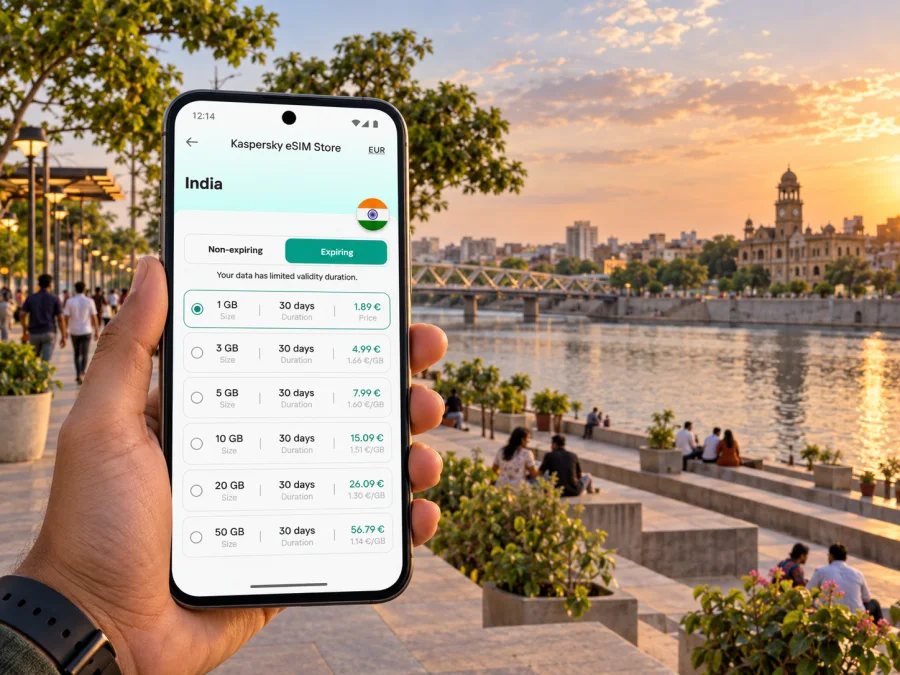
Your data needs depend on how you use your phone. Navigation, messaging and booking checks are lighter than video calls, cloud backups or streaming. Review a plan’s data allowance, validity, destination coverage and activation conditions, especially if your itinerary extends beyond Ahmedabad.
Kaspersky eSIM Store is an app and website where you can choose, arrange and activate an eSIM with a suitable plan for mobile internet during an international trip. It helps you prepare the digital SIM and review plan details; network service and coverage depend on the selected plan and its underlying provider. You can review eSIM plan options for India and compare the terms with your Ahmedabad itinerary.
Use this quick comparison:
- City break: maps, messages, ride coordination and occasional searches. Consider trip length and whether heavier tasks can use hotel Wi‑Fi.
- Business visit: account for email, work chat, video meetings or hotspot use if you expect them.
- Multi-stop Gujarat itinerary: confirm the plan covers the full route, not just Ahmedabad.
- Longer stay: compare validity and data across the visit; the largest allowance is not automatically the best fit.
Check when validity begins—installation, activation or first network use—and follow the plan’s terms. There is no single data estimate for every traveler: video and automatic photo uploads can use much more than messages. Download media over Wi‑Fi and limit background refresh if you want to reserve data for directions.
Check your device and install the eSIM
Before choosing a plan, confirm that your device supports eSIM and is not carrier-locked. Settings vary by model and operating-system version. If you are unsure, check whether your device supports eSIM before purchase. Keep Wi‑Fi available during setup.
A simple setup sequence:
- Choose the destination and review the plan’s data, validity and activation instructions.
- Install the eSIM using the method shown for your device and follow the prompts through completion.
- Label the line clearly, such as “India travel,” so it is easy to identify beside your regular SIM.
- Select the travel eSIM for mobile data when you are ready, following the plan instructions.
- Check the selected line, data roaming setting and activation status as described in the plan guidance.
- Confirm home-operator roaming charges if your regular SIM remains active abroad.
For device-specific steps, use the Android eSIM installation guide or the iOS eSIM installation guide. If the line does not connect, check that the profile is enabled, the correct line is selected and the plan is active. Follow the plan guidance before changing additional settings.
Day trips and onward journeys
Ahmedabad can be a base for visiting other places in Gujarat or continuing by train. Check the plan’s destination coverage instead of assuming a city-focused description answers every question. Save rail or coach details offline and confirm the departure station, which may differ from your arrival point.
Plan the return before leaving: store the destination and pickup point, share the schedule with your companion and keep enough battery for navigation. For a multi-stop trip, compare the plan’s coverage and validity with the full route.
Frequently asked questions
Can I prepare an eSIM before arriving in Ahmedabad?
Usually, if your device supports it and the plan allows pre-installation. Activation and validity depend on that plan’s conditions; keep Wi‑Fi available during setup.
Will a travel eSIM replace my regular number?
A data-focused plan should not be treated as a replacement. Voice and SMS are included only if the plan says so. Check home-operator roaming settings and charges if keeping your usual SIM active.
Is mobile data enough to navigate the Old City?
It helps with maps and sharing a location, but narrow lanes can make a pin hard to interpret. Save named landmarks and an offline map, and agree on a clear meeting point.
Should I rely on the metro for every journey?
No single mode suits every trip. Metro, buses, taxis, auto-rickshaws and app-based rides may help depending on destination, luggage and current service. Check current routes, especially for an airport transfer or a tight schedule.
How much data should I choose?
Estimate by activity and duration. Messaging differs from video calls, streaming, hotspot use and automatic uploads. Compare typical use and plan validity with the whole itinerary.
A simple plan for staying connected
For Ahmedabad, prepare the first address, save the map and choose a travel eSIM plan whose destination, data allowance and validity fit your trip. Use mobile internet to coordinate arrival, navigate between the Old City and newer districts, confirm meeting details and adjust plans around the Sabarmati Riverfront. Keep offline copies of essentials and leave time for traffic, station transfers and unfamiliar entrances.
When you are ready, choose an eSIM plan for your trip to India through Kaspersky eSIM Store, then install and activate it according to the plan’s instructions. A little preparation before departure can make the practical parts of your Ahmedabad visit easier to manage.


