
Travel connectivity guide
Ahuachapan eSIM: mobile internet guide
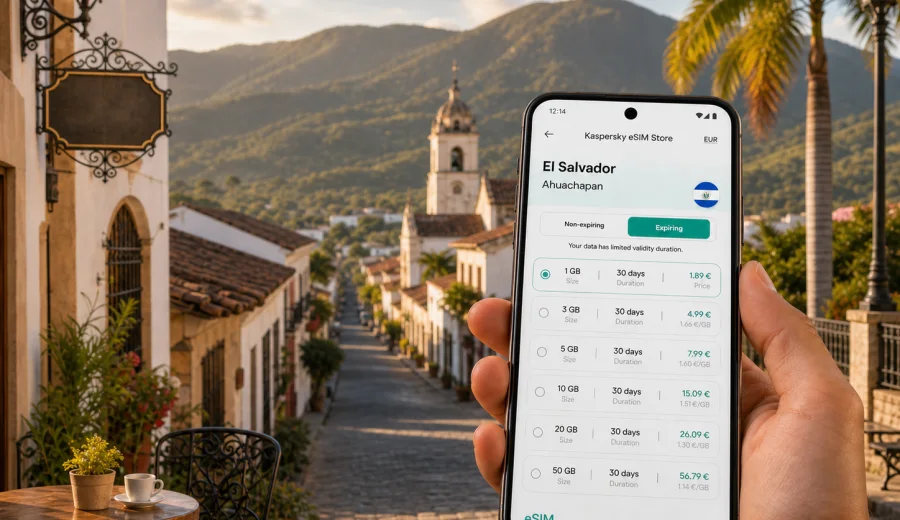
Ahuachapan eSIM: mobile connection and internet for your city trip
Ahuachapan is a practical base for western El Salvador: close to the Guatemala border, tied to the Ruta de las Flores, and useful for travelers who want colonial streets, coffee-country day trips, hot springs, and a quieter arrival than the capital. It is also a city where mobile internet can shape the whole trip. You may need maps before your hotel check-in, messaging during intercity bus transfers, a translation app at a market stall, or a stable data connection while planning a route toward Apaneca, Ataco, Santa Ana, or the border at Las Chinamas.
An eSIM helps you prepare mobile data before you rely on local Wi-Fi or look for a physical SIM card. Instead of treating connectivity as something to solve after arrival, you can choose a suitable prepaid data plan in advance, install the eSIM on a compatible phone, and switch it on when you need mobile internet for the city and nearby routes.
This guide focuses on Ahuachapan itself: arrival, local movement, hotels, short business stays, weekend trips, and regional travel from the city. It does not replace checking the exact conditions of a selected plan, but it gives you a useful framework for deciding how much data to prepare and when an eSIM is most helpful.
Why mobile internet matters in Ahuachapan
Ahuachapan is not a huge city, but it often sits in the middle of a wider travel plan. Visitors may arrive from San Salvador, Santa Ana, Sonsonate, the Pacific coast, or Guatemala. Once you are there, the daily rhythm can include short taxi rides, walks around the historic center, buses toward nearby towns, hotel check-ins, café stops, and day trips into coffee-growing highlands.
Mobile data is useful because important travel decisions happen in motion:
- confirming your hotel location before the driver drops you off;
- checking whether a bus route is better than a private transfer;
- using maps when streets change from a main road to smaller neighborhood lanes;
- messaging a host, guide, colleague, or family member;
- translating menus, signs, or transport notes;
- checking opening hours before going to hot springs, cafés, or nearby viewpoints;
- managing bookings while moving between Ahuachapan and Ruta de las Flores towns.
Public Wi-Fi can help at a hotel or café, but it is rarely the best tool for the first hour in a new city. With an eSIM, your phone can be ready for mobile internet when you step away from a fixed Wi-Fi network.
Arrival scenarios: when to activate data
Many travelers reach Ahuachapan by road rather than by air directly into the city. Your connectivity plan should match that reality. The first useful connection may be needed long before you arrive at your hotel.
| Scenario | Why data helps | Practical eSIM approach |
|---|---|---|
| Arrival from San Salvador | Long drive, changing transport, hotel messages | Install before travel, activate when you start using maps and messaging |
| Arrival from Santa Ana | Regional transfer with flexible timing | Keep data ready for route checks and ride coordination |
| Ruta de las Flores route | Several towns in one day | Choose enough data for maps, photos, messaging, and navigation |
| Guatemala border route | More coordination and timing checks | Confirm plan coverage and keep essential details saved offline too |
| Short business visit | Meetings, document access, calls over apps | Prioritize enough data for messaging, email, cloud files, and hotspot use if allowed |
If you install the eSIM before departure, you avoid setup while moving luggage or looking for transport. Activation timing depends on the plan conditions, so read when the validity period starts and whether data roaming must be enabled for the eSIM profile.
Where eSIM is most useful around the city
Ahuachapan rewards flexible movement. You may spend the morning near the center, the afternoon in a nearby town, and the evening arranging the next leg of the trip. Mobile internet reduces friction in each of those small transitions.
In the historic center, data helps with walking routes, restaurant searches, and messages to your accommodation. Around transport points, it helps you compare travel times and share your live location. Near hotels and guesthouses, it gives you a fallback if Wi-Fi is slow or only strong in common areas.
On day trips, mobile data becomes more important. Routes toward Concepcion de Ataco, Apaneca, Juayua, or Santa Ana may involve changing vehicles or checking the return plan. Save essential booking details offline, but keep mobile data available for plans that change during the day.
Choosing data volume for an Ahuachapan trip
The best eSIM plan is not simply the largest one. It should match your itinerary, the number of travel days, and your habits. A person using maps and messaging needs far less data than someone uploading video, working from cloud documents, and using hotspot mode.
Use this planning guide:
- 1 to 3 GB can be enough for a short visit if you mainly use maps, messaging, email, and light browsing.
- 3 to 5 GB is more comfortable for several days with daily navigation, ride coordination, restaurant searches, and moderate photo sharing.
- 5 to 10 GB suits travelers who also use cloud storage, video calls, social media uploads, and regular work messages.
- Larger plans are useful for remote work, longer routes across El Salvador, or frequent hotspot use if the selected plan allows tethering.
Estimate your normal daily use, then add extra room for navigation and route changes. Ahuachapan can be compact, but nearby travel often adds data use: road times, shared locations, town searches, and onward planning.
Ahuachapan travel moments that consume data
Small mobile tasks can add up over a day. Navigation, cloud photo backup, short videos, and map searches can use more data than expected. To keep usage modest, turn off automatic cloud sync on mobile data, download offline map areas before longer drives, and use hotel Wi-Fi for large app updates.
For a typical day in Ahuachapan, data may go to:
1. Morning route checks from the hotel to the center.
2. Messaging with a driver, guide, host, or colleague.
3. Map searches for cafés, pharmacies, banks, or meeting points.
4. Translation while ordering food or asking for directions.
5. Tickets, confirmations, and reservation emails.
6. Photo sharing during a Ruta de las Flores stop.
7. Video calls or voice calls through messaging apps.
8. Checking the next bus, transfer, or intercity route.
If you are traveling with someone else, decide whether every person needs their own eSIM or whether one traveler will handle navigation and communication. A separate eSIM on each compatible phone can be more convenient if you split up, move independently, or need a backup contact method.
Prepare your eSIM plan before the city stage
Before your Ahuachapan stay, choose a plan that covers El Salvador and fits your route length. Kaspersky eSIM Store is an app and website where you can quickly choose, arrange, and activate an eSIM with a suitable mobile data plan for an international trip. You can review data volume, validity period, destination, and price before you commit, then install the eSIM on a compatible device.
If Ahuachapan is part of your El Salvador itinerary, you can prepare an eSIM data plan for your trip to El Salvador before you need it on the road. This is especially useful when your first day includes a transfer from San Salvador, a regional bus ride, a late hotel check-in, or a stop in another western city.
Keep the product role clear: Kaspersky eSIM Store helps you select and set up an eSIM plan for travel. Mobile network performance, coverage, and speed depend on local network conditions and the selected plan. Check the plan details before purchase, and keep important trip information saved offline in case you pass through an area with weaker signal.
Device compatibility and setup checks
An eSIM only helps if your phone supports it and is not locked in a way that prevents adding another mobile plan. Before buying, check your device compatibility, confirm that your phone supports eSIM, and make sure it can use mobile data with the eSIM profile while you travel.
A good pre-trip checklist:
- Update your phone operating system before departure.
- Make sure you can access the email or account where the eSIM details will arrive.
- Keep your primary SIM active if you need bank messages or regular calls.
- Check whether the eSIM plan includes data only or other services.
- Read when the validity period starts.
- Confirm whether data roaming must be enabled for the eSIM profile.
- Save installation details somewhere you can reach offline.
Many travel eSIM plans are data-focused. They may not include a local phone number, voice calls, or SMS unless the plan conditions say so. For Ahuachapan, that is usually fine if you use messaging apps for calls, hotel contact, and family updates. If you must receive traditional SMS, keep your primary SIM plan in mind and check possible roaming costs with your home provider.
How to install and activate eSIM for Ahuachapan
It is usually easier to install the eSIM while you still have stable Wi-Fi, then activate data when your plan conditions and travel timing make sense. Follow the steps shown in the app or website, and use the device-specific guide if you need more detail: Android installation instructions and iOS installation instructions.
The basic flow is simple:
1. Choose El Salvador as the destination, or a regional option if your full route requires it.
2. Select a data volume and validity period that match your Ahuachapan stay.
3. Complete checkout and open the eSIM details in your profile, app, or email.
4. Add the eSIM to your compatible phone using the provided steps or QR code.
5. Set the eSIM as the mobile data line when you are ready to use it.
6. Enable data roaming for the eSIM profile if the instructions or plan conditions require it.
7. Keep your primary line for calls or SMS if you still need it.
Do not delete the eSIM profile after installation unless you are sure you no longer need it. In many cases, an activated eSIM cannot simply be moved to another phone. If something does not work, check profile settings, selected data line, roaming toggle, and signal area before changing the setup.
Local movement: city center, taxis, buses, and walking
Ahuachapan is manageable, but travelers still need reliable orientation. A hotel may be only a short ride from the center, yet street names, pickup points, and exact entrances can still be easier with maps. If you use taxis or app-based coordination where available, mobile data helps confirm the driver, send your location, and adjust the route.
For buses and regional transport, data is useful for planning rather than only live tracking. You may need to check where to transfer, ask your accommodation about the best departure point, or compare travel times to Ataco, Apaneca, Juayua, Santa Ana, or San Salvador.
Walking around the center, keep the phone charged and avoid staring at the screen on busy streets. Download an offline map as a backup, then use mobile data for searches, updates, and communication.
Hotels, cafés, and remote work
Hotel Wi-Fi in smaller cities can vary by room, floor, and time of day. It may be strong in the lobby but weaker in a back room. An eSIM gives you a mobile-data fallback for email, bookings, cloud documents, and messaging away from reliable Wi-Fi.
For remote work or business travel in Ahuachapan, plan data more carefully:
- choose a plan with enough data for meetings and file access;
- check whether hotspot mode is allowed by the selected plan if you need a laptop connection;
- keep large uploads for stable Wi-Fi when possible;
- test your eSIM before an important meeting;
- save meeting addresses and contact numbers offline;
- carry a charger if you will work from cafés or between appointments.
If your work depends on video calls, do not rely on one connection source. Use hotel Wi-Fi when it is stable and keep eSIM data as a backup.
Routes from Ahuachapan
Ahuachapan is a strong starting point for western El Salvador routes. You may move through highland towns, coffee areas, hot springs, border roads, and larger cities within a few days.
Common route ideas include:
- Ahuachapan to Concepcion de Ataco for art, cafés, and relaxed walking.
- Ahuachapan to Apaneca for highland scenery and outdoor stops.
- Ahuachapan to Juayua for food-focused weekend planning.
- Ahuachapan to Santa Ana for a larger city base and onward transport.
- Ahuachapan to San Salvador when ending the trip or connecting to the airport.
- Ahuachapan toward Guatemala if your itinerary continues across the border.
For cross-border travel, check plan coverage carefully. A country plan for El Salvador is meant for that destination, while a regional or separate country plan may be needed if your route includes Guatemala. Do not assume a plan will remain suitable once you leave the destination listed in its conditions.
Data-saving tips for Ahuachapan
You can make a modest data plan last longer by changing a few habits:
- Download offline map areas before longer drives.
- Turn off automatic photo and video backup on mobile data.
- Use lower video quality on mobile data.
- Save hotel addresses, reservation numbers, and key messages offline.
- Use Wi-Fi for app updates and large file transfers.
- Close navigation after you arrive instead of leaving it running.
- Check data use in your phone settings every day.
These steps matter on a route that mixes city time with day trips. Maps, photos, and messaging are usually worth the data. Automatic cloud sync and background updates are less useful.
Quick planning table
| Traveler type | Likely needs in Ahuachapan | Suggested priority |
|---|---|---|
| Weekend visitor | Maps, messaging, restaurants, hotel contact | Small or medium data plan with simple setup |
| Ruta de las Flores traveler | Navigation, photo sharing, multiple town searches | Medium data plan and offline maps |
| Business traveler | Email, cloud files, calls over apps, possible hotspot | More data and careful validity period |
| Family traveler | Shared locations, messaging, bookings, entertainment | Enough data for several phones or separate eSIMs |
| Border-route traveler | Route checks, messages, onward planning | Confirm destination coverage and save offline backups |
The right choice depends on your actual use. If you use video, hotspot mode, and cloud storage every day, choose more data. If you mainly use maps and messages, a smaller plan may be enough.
FAQ: eSIM and mobile internet in Ahuachapan
Is eSIM useful if my hotel has Wi-Fi?
Yes, because hotel Wi-Fi only helps when you are at the property and the connection is stable. eSIM mobile data helps when you are arriving, walking, taking transport, visiting nearby towns, or coordinating plans away from the hotel.
Should I install the eSIM before I arrive in Ahuachapan?
Installing before travel is usually more comfortable because you can use stable Wi-Fi and avoid setup during a transfer. Check the plan conditions so you understand when the validity period starts and when to turn on mobile data.
Can I use eSIM for calls and SMS?
Many travel eSIM plans focus on mobile data. Voice calls and SMS may not be included unless the specific plan says so. You can usually use messaging apps over data for calls and messages.
What if I travel from Ahuachapan to Guatemala?
Check coverage before crossing the border. A plan for El Salvador may not cover Guatemala. If your route includes both countries, compare country and regional options before choosing.
Can I keep my regular SIM active?
In many phones, yes. You can keep your primary SIM for calls or SMS and use the eSIM for mobile data, depending on your device settings. Check your phone model and carrier lock status before travel.
Final checklist before you go
Before leaving for Ahuachapan, make sure you have:
- a compatible, unlocked phone with eSIM support;
- an eSIM plan that covers El Salvador and matches your stay length;
- installation details saved and accessible;
- offline maps for Ahuachapan and nearby routes;
- hotel address and key contacts saved outside messaging apps;
- a clear idea of whether you need data only or also traditional calls and SMS;
- a charger or power bank for long road days.
With these basics handled, mobile internet becomes part of your travel preparation rather than a problem to solve after arrival. You can move through Ahuachapan, coordinate local transport, manage hotel and café plans, and take day trips across western El Salvador with fewer interruptions.
To prepare before your route begins, use Kaspersky eSIM Store to choose an eSIM data plan for your trip to El Salvador, install it on a compatible phone, and keep mobile internet ready for Ahuachapan and the surrounding travel days.