
Travel connectivity guide
Ajman eSIM for mobile internet
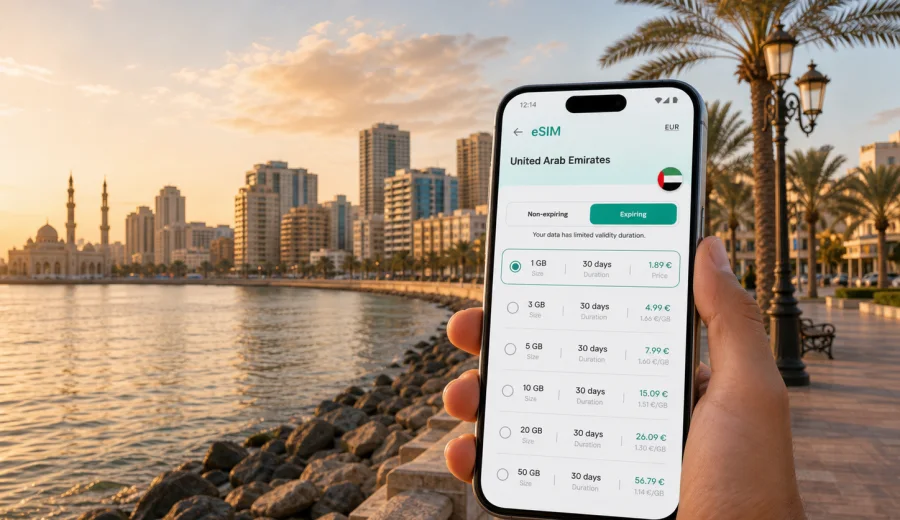
Ajman eSIM: mobile connection and internet for your trip
Ajman is compact by UAE standards, but a trip there still depends on mobile internet from the first hour. You may arrive through Dubai International Airport or Sharjah International Airport, take a taxi or transfer north, check into a beach hotel, move between Ajman Corniche, Al Nuaimiya, Al Rashidiya, Al Jurf, Ajman Free Zone, and nearby emirates, and use maps, ride apps, hotel messages, digital payments, and restaurant bookings throughout the day.
An eSIM can make that routine easier because it lets you prepare a mobile data plan without looking for a physical SIM card after arrival. With Kaspersky eSIM Store, you can choose a suitable eSIM plan for your trip, review the data allowance and validity period, install it on a compatible device, and manage the plan through the app or website. The focus is simple: mobile internet for travel, with clear steps before you land or soon after you reach Ajman.
Why mobile internet matters in Ajman
Ajman is easy to navigate, but it is closely connected with Sharjah, Dubai, Umm Al Quwain, and Ras Al Khaimah. Many visitors do not stay within one neighborhood. A typical day can start with breakfast near the Corniche, continue with meetings in Al Jurf or Ajman Free Zone, move to Sharjah for an appointment, and end with dinner near the waterfront. Mobile data keeps the trip practical when plans change.
Useful online tasks in Ajman include:
- checking the route from the airport to your hotel;
- sharing your live location with family or colleagues;
- comparing taxi routes during busy cross-emirate traffic;
- using maps around Ajman Corniche, the marina area, and Al Zorah;
- confirming hotel check-in details and business meeting times;
- opening QR menus, booking apps, messenger calls, and payment notifications;
- keeping travel documents, tickets, and reservation details reachable in cloud storage.
Public Wi-Fi can help in hotels, malls, and cafes, but it is not always available at the exact moment you need it. It may also require registration, a local number, or repeated logins. A prepared eSIM plan reduces dependence on public Wi-Fi during airport transfers, short city hops, and days when you move between Ajman and neighboring emirates.
Arrival scenarios: where eSIM helps first
Ajman does not usually function as the main international arrival point for visitors. Most travelers reach it by road from Dubai or Sharjah airports. That makes the first connection moment important: you may need mobile data before you are actually in the city.
| Arrival route | Why data is useful | Practical eSIM use |
|---|---|---|
| Dubai International Airport to Ajman | The drive can vary by time of day and traffic around Dubai and Sharjah | Open maps, contact your driver, check hotel messages, and track the route |
| Sharjah International Airport to Ajman | The airport is closer, but you may still need a transfer, taxi, or hotel pickup | Message the hotel, confirm pickup details, and share arrival updates |
| Road trip from another emirate | Routes may change during peak hours or weekend travel | Use live navigation and keep communication apps online |
| Business transfer to Ajman Free Zone | Meeting times can be tight after landing | Confirm schedules, send updates, and access work apps securely |
If you install the eSIM before departure, you can switch to the eSIM data line after landing and follow the activation instructions for your device. If you prefer to install it after arrival, make sure you have temporary Wi-Fi at the airport or hotel, because the installation process itself requires an internet connection.
City movement: neighborhoods, hotels, and short rides
Ajman is smaller than Dubai or Abu Dhabi, which is one of its advantages for travelers. Distances inside the city are manageable, but mobile connection still matters because many useful services depend on data rather than voice calls.
For beach stays, mobile data helps you move between Ajman Corniche, waterfront hotels, cafes, supermarkets, and evening walks without searching for Wi-Fi. For family trips, it helps with ride coordination and location sharing. For business trips, it supports email, messenger calls, calendar updates, and cloud files between hotel, office, and meeting venues.
Neighborhood-specific use cases:
- Ajman Corniche and waterfront hotels: navigation, ride apps, restaurant searches, video calls, and beach-day planning.
- Al Nuaimiya and Al Rashidiya: local errands, food delivery apps, pharmacy searches, and routes to malls or offices.
- Al Jurf and Ajman University area: campus visits, business appointments, maps, documents, and messenger coordination.
- Ajman Free Zone: work email, meeting updates, secure access to documents, and transport timing.
- Al Zorah: resort navigation, marina plans, golf or nature-area visits, and photo backups when Wi-Fi is not nearby.
The city is also a base for longer day trips. Travelers often combine Ajman with Sharjah, Dubai, Umm Al Quwain, or Ras Al Khaimah. In that case, choose a plan that fits the country coverage and your full route rather than only the hotel location.
How much data do you need for Ajman?
The right data allowance depends on how you travel. A light user who mainly opens maps and messages needs much less than someone who uses video calls, uploads photos, or works from cloud documents. The safest approach is to list your daily online tasks before choosing a plan.
| Trip style | Common data use | What to consider |
|---|---|---|
| Short stopover or one-night stay | Maps, taxi apps, chat, hotel messages | A smaller data package may be enough if hotel Wi-Fi covers heavy use |
| Beach holiday | Maps, messaging, restaurant searches, photo uploads | Allow extra data for media, especially outside the hotel |
| Business trip | Email, document access, video meetings, hotspot use | Choose a plan with enough validity and data for working days |
| Family trip | Navigation, multiple chats, entertainment, bookings | Estimate data for the main device and decide whether hotspot use is needed |
| Multi-emirate route | Maps across Ajman, Sharjah, Dubai, and northern emirates | Check the destination coverage and validity for the full UAE itinerary |
Video streaming, large app updates, cloud backups, and operating system downloads can use data quickly. Use hotel Wi-Fi for heavy downloads when possible, and reserve mobile data for movement, communication, and urgent tasks. If you plan to use your phone as a hotspot for a laptop or another device, review the plan conditions before relying on tethering.
Choosing an eSIM plan for Ajman
For a city trip, the plan should match the country where the city is located. Ajman is in the United Arab Emirates, so use a UAE plan unless your route requires a regional or global option. Before checkout, compare the data volume, validity period, destination coverage, price, and activation conditions. You should also check whether the plan is data-only, because many travel eSIM plans do not include a regular phone number, voice calls, or SMS unless the plan terms say otherwise.
When you are ready to prepare mobile data for the trip, you can view eSIM plan options for the United Arab Emirates and choose the allowance and validity period that fit your Ajman itinerary. This is the main country landing page to use for an Ajman city article, because the plan must match the country coverage.
Use this quick checklist before selecting a plan:
- Confirm that the destination is the United Arab Emirates.
- Match validity to your full stay, including arrival and departure days.
- Choose data volume based on maps, messages, work apps, and media use.
- Check whether the plan supports the way you intend to use data, including hotspot use if relevant.
- Keep your primary SIM active if you need your usual phone number for calls, SMS, or banking messages.
- Read the activation notes so you know when the validity period begins.
Kaspersky eSIM Store helps you compare available plan details and complete setup through the app or website. The mobile internet itself depends on the chosen plan conditions, compatible device settings, and local network availability.
Before you buy: device and setup checks
Not every phone or tablet supports eSIM, and some devices can be locked by a mobile operator. Before paying for a plan, confirm that your device supports eSIM and can use a travel data plan. You can check your device before you continue.
Also check these settings:
- Your device is unlocked for mobile plans from other carriers.
- Your operating system is up to date enough to support eSIM installation.
- You know which SIM line will handle mobile data during the trip.
- You can receive important SMS or calls on your primary SIM if you still need them.
- You have Wi-Fi available for installation if you install the eSIM after arrival.
For dual-SIM devices, keep labels clear. Name your regular SIM something like “Home” and the travel eSIM something like “UAE data” or “Ajman trip.” This helps avoid using the wrong line for mobile data or roaming.
How to install an eSIM for Ajman
The installation process depends on your device and operating system. In most cases, you choose a plan, complete checkout, open the eSIM details, and follow the device prompts or scan a QR code. For device-specific steps, use the Android installation guide or the iOS installation guide.
A practical setup sequence:
1. Check that your phone supports eSIM and is not carrier-locked.
2. Choose a UAE eSIM plan with suitable data and validity.
3. Install the eSIM while you still have a stable internet connection.
4. Keep your primary SIM active if you need your usual number.
5. After landing, select the eSIM as the mobile data line.
6. Enable data roaming for the eSIM if the plan instructions require it.
7. Test maps or a messenger app before leaving the airport or hotel.
Do not delete the eSIM profile after installation unless you are sure you no longer need it. Some eSIM profiles cannot be moved or reinstalled on another device after activation, depending on the plan conditions.
Ajman trip scenarios and practical data tips
Weekend beach stay. If your hotel is near Ajman Corniche, you may spend much of the day near Wi-Fi, but mobile data is still useful for rides, route changes, restaurant searches, and beach-to-hotel coordination. Save large photo uploads for Wi-Fi and keep data for navigation and messages.
Business visit. Ajman Free Zone, Al Jurf, and nearby Sharjah routes can make timing sensitive. Use mobile data for calendar updates, email, files, and video calls when Wi-Fi is not reliable. If you need hotspot use for a laptop, choose data volume conservatively and review plan conditions first.
Family trip. Families often split up between hotel, beach, malls, and restaurants. One connected phone can coordinate taxis and messages, but each traveler who needs independent navigation may benefit from their own setup. Avoid relying only on public Wi-Fi for children’s location sharing or urgent messages.
Stopover before another emirate. Ajman can be part of a route through Sharjah, Dubai, Umm Al Quwain, or Ras Al Khaimah. Pick a UAE plan that covers the full journey and lasts until the final departure day, not just the nights spent in Ajman.
Remote work day. If you plan to work from a hotel lobby, cafe, or coworking-style setting, use mobile data as a backup connection. Keep video meetings on Wi-Fi where possible, and reserve eSIM data for email, messaging, authentication, and urgent file access if the local network is unstable.
FAQ: eSIM and mobile internet in Ajman
Can I use an eSIM in Ajman if I land in Dubai or Sharjah?
Yes, if the plan covers the United Arab Emirates and your device is compatible. Many visitors reach Ajman from Dubai or Sharjah airports, so choose the plan by country coverage rather than by arrival airport name.
Does an eSIM replace my regular phone number?
Usually no. Travel eSIM plans are commonly focused on mobile data. Regular voice calls and SMS are not included unless the specific plan conditions say otherwise. Keep your primary SIM active if you need your usual number.
Should I install the eSIM before flying?
Installing before departure is often practical because you can use a stable Wi-Fi connection. You can then activate or select the eSIM data line according to the plan instructions after arrival.
Can I use hotel Wi-Fi instead?
Hotel Wi-Fi is useful, especially for heavy downloads and streaming. Mobile data is still helpful when you are in a taxi, walking along the Corniche, moving between emirates, or dealing with urgent messages outside the hotel.
Will the same plan work for Dubai or Sharjah day trips?
If the plan covers the United Arab Emirates, it is intended for use within that destination according to the plan conditions. Check the details before purchase, especially if your route includes several emirates.
Final preparation before your Ajman trip
A good Ajman mobile internet setup is not complicated. Confirm your device compatibility, choose a UAE plan with enough data and validity, install the eSIM while you have reliable Wi-Fi, and know which SIM line will handle mobile data after landing. Keep Wi-Fi for large downloads and use eSIM data for maps, messages, rides, bookings, and work tasks while you move through the city.
Before you travel, prepare an eSIM plan for the United Arab Emirates through Kaspersky eSIM Store so your Ajman trip starts with a clear mobile data plan instead of a search for a physical SIM card after arrival.