
Travel connectivity guide
Al Ain eSIM: mobile internet for your trip
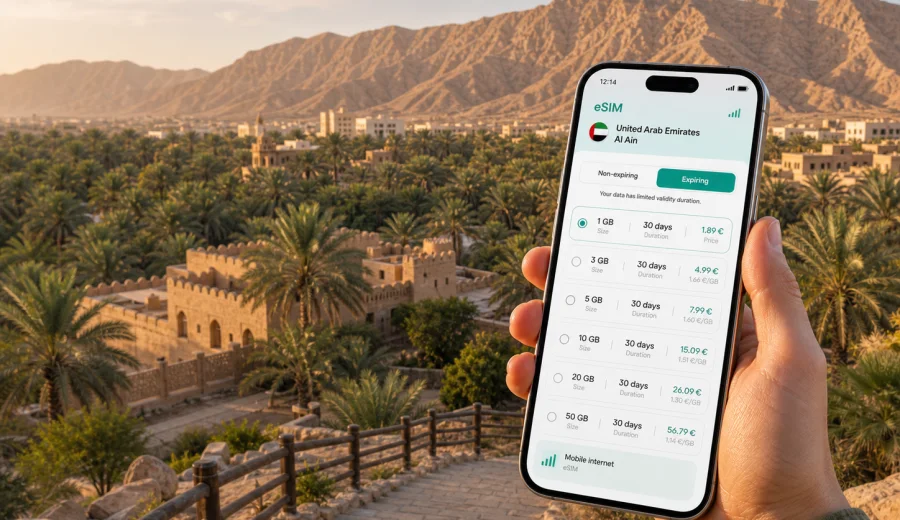
Al Ain eSIM: mobile connection and internet for your trip
Al Ain is a different kind of United Arab Emirates trip. Instead of a waterfront skyline, you get an inland oasis city, palm groves, mountain views, museums, family hotels, university areas, business meetings, desert drives and day trips across Abu Dhabi emirate. For that kind of itinerary, mobile internet is not just useful at the hotel. You need it when you land, when you check a pickup point, when you move between districts, when you navigate to Al Ain Oasis or Jebel Hafeet, and when you keep in touch with colleagues or family.
An eSIM can make that first connection easier because you do not need to look for a physical SIM-card counter after arrival. With a compatible phone, you can prepare a digital SIM profile before the trip, choose a data plan for the United Arab Emirates, and switch on mobile data when the trip starts. Kaspersky eSIM Store is an app and website where you can quickly choose, arrange and activate an eSIM with a suitable data plan for mobile internet in an international trip.
This guide is focused on Al Ain, not on the UAE in general. It explains where mobile data matters in the city, how to estimate your traffic needs, what to check before ordering an eSIM plan, and how to use mobile internet across local transport, hotels, business travel and short routes from Al Ain.
Why mobile internet matters in Al Ain
Al Ain is spread out, green in parts, and car-oriented in many everyday routes. You may spend the morning in an oasis area, the afternoon around a mall or university district, and the evening on the mountain road toward Jebel Hafeet. Public Wi-Fi may be available in hotels, malls or cafes, but it will not help much when you are changing locations, confirming a ride, translating a sign, checking parking, or sharing your live location.
Mobile internet is especially useful in Al Ain for:
- navigation between Al Ain International Airport, hotels, malls, parks and heritage sites;
- taxi and ride-hailing pickup coordination, especially near large venues or hotel entrances;
- map use in oasis areas and on routes toward Jebel Hafeet;
- messaging during family trips, business visits or university stays;
- mobile check-in, booking confirmations and document access;
- using translation, currency conversion and restaurant apps;
- staying reachable during day trips from Al Ain to Abu Dhabi, Dubai or nearby border areas.
Al Ain is also a city where a trip often includes several micro-routes instead of one compact walking loop. You may move from Al Jimi to Al Mutared, from a hotel to a hospital or university campus, or from the city center to a desert resort. A prepared eSIM helps you keep maps and messengers available between those stops without waiting for the next Wi-Fi network.
Arrival scenarios: Al Ain, Abu Dhabi and Dubai
Some travelers arrive directly through Al Ain. Others reach the city after landing in Abu Dhabi or Dubai, then continue inland by car, bus, company transfer or hotel pickup. In all three cases, the first hour is when mobile data can save time.
If you arrive in Al Ain, you may need data for airport pickup instructions, hotel address details and route checks. If you arrive in Abu Dhabi or Dubai, you may need mobile internet for the longer transfer, ride updates, meeting messages, road navigation and check-in timing. If you are traveling for work, you may also need to answer messages before reaching the hotel.
Typical first-hour tasks are simple but data-dependent:
| Moment | What you may need mobile internet for |
|---|---|
| After landing | Messaging the driver, opening booking details, checking the hotel address |
| During transfer | Tracking route time, sharing location, checking meeting updates |
| At the hotel | Accessing reservation emails before Wi-Fi is available |
| First local trip | Finding the correct entrance, taxi pickup point or restaurant |
An eSIM does not replace normal travel planning. It simply gives you a practical option for mobile data without waiting to buy a physical SIM card after a flight or transfer.
Local movement: taxis, rental cars and walking routes
Al Ain has walkable pockets, but many visitor routes are easier by taxi, rental car or arranged transfer. This makes reliable mobile internet useful even if you are not streaming videos or working all day. You may open maps repeatedly, check entrances, compare travel times, or coordinate with a driver who is waiting at a different gate than expected.
For taxi and ride-hailing use, keep mobile data available until you are in the vehicle. Large hotel driveways, malls, hospitals and event locations can have several pickup zones. A short message with a landmark or a live location can prevent confusion.
For rental cars, mobile internet supports navigation, parking searches and route changes. It is also useful if you add a stop, such as a viewpoint, a mall, a cafe or a family attraction.
Where an eSIM is useful in the city
Al Ain trips often combine sightseeing, appointments and quiet time rather than only nightlife or beach activities. The data pattern can be different from a big-city weekend: fewer subway maps, more car routes, more photo sharing, more hotel-to-venue movement, and more time checking directions between spread-out areas.
Useful Al Ain scenarios include:
- Al Ain Oasis and heritage areas: maps, photo backup, messaging and route checks between entrances.
- Jebel Hafeet and mountain viewpoints: navigation, weather checks, ride coordination and safety messages.
- Hotels and resorts: booking details, taxi ordering and family communication before room Wi-Fi is available.
- Business districts and campuses: email, calendar updates, meeting locations and mobile hotspot use where allowed by the plan and device.
- Malls and family venues: group messages, taxi pickup points, digital payments and restaurant searches.
- Day trips: route planning toward Abu Dhabi city, Dubai, desert areas or other emirates.
The point is not to stay online every minute. The point is to have a predictable data option when the city layout, heat, appointments or family logistics make mobile access more important than expected.
For an Al Ain itinerary, it is useful to view mobile internet options for the United Arab Emirates before you travel. This lets you compare data volume, validity period and destination before you are dealing with airport transfers, hotel check-in or a meeting schedule.
How much data to plan for Al Ain
Your best data amount depends on trip length and behavior. A short business stay with hotel Wi-Fi may need less data than a family trip with maps, photos, video calls and day drives. Before you choose a plan, estimate what you will actually do away from Wi-Fi.
| Trip style | Typical mobile data use | Planning note |
|---|---|---|
| Stopover or one-night visit | Maps, messaging, ride apps, check-in details | A smaller package may be enough if you avoid video streaming |
| Business trip | Email, messenger calls, maps, hotspot in limited moments | Check whether tethering is supported by your device and selected plan |
| Family visit | Maps, group chats, restaurant searches, photo sharing | Choose extra data if several days include outdoor routes |
| Road-based itinerary | Navigation, live traffic, destination searches | Keep a buffer for route changes and long transfers |
| Remote work day | Cloud files, calls, authentication apps | Use hotel Wi-Fi for heavy work where practical |
As a practical rule, maps and messaging are usually light compared with video, cloud backups and social media uploads. If you plan to use mobile internet mainly for navigation and messages, a modest data allowance may be enough. If you expect frequent video calls, content uploads or laptop tethering, choose a larger package and check the plan terms carefully.
Choosing an eSIM plan for Al Ain
Because Al Ain is in the United Arab Emirates, a city trip usually needs a data plan for the United Arab Emirates, not a separate city plan. If your route includes only Al Ain and perhaps Abu Dhabi or Dubai, a UAE plan is the straightforward option. If your itinerary continues to Oman, Qatar, Bahrain, Saudi Arabia or another region, compare whether a country, regional or global option better matches your full route.
When comparing eSIM options, focus on four details:
1. Destination coverage: confirm that the plan is valid for the United Arab Emirates or for the wider region you will visit.
2. Data volume: match the allowance to maps, messaging, calls over internet, uploads and any hotspot use.
3. Validity period: choose a duration that covers your full stay, including arrival and departure days.
4. Activation rules: check when the validity period starts and whether you should install before travel or after arrival.
Kaspersky eSIM Store helps you choose, arrange and activate an eSIM with a suitable plan for travel mobile internet. It is not a mobile network operator and does not own a local network. The terms, data allowance, validity period and availability depend on the selected plan, so read the plan details before you confirm.
Preparation checklist before you travel
Before using eSIM in Al Ain, spend a few minutes on device and trip checks. This reduces the chance of troubleshooting while standing at an airport pickup point or hotel lobby.
- Check whether your device supports eSIM and is not locked to one carrier.
- Confirm that the selected plan covers the United Arab Emirates.
- Check the data allowance, validity period and start conditions.
- Keep your primary SIM active if you need calls or SMS on your usual number.
- Save your hotel address and first destination offline.
- Install the eSIM while you have stable internet, if the plan instructions allow it.
- Keep the QR code or activation details accessible until setup is complete.
- Know which SIM profile should be used for mobile data after arrival.
Most travel eSIM plans are designed for mobile data. They usually do not include a standard local phone number, voice calls or SMS unless this is stated in the selected plan terms. For calls and messages, you can use internet-based messaging and calling apps when mobile data is active.
Installing and activating your eSIM
The exact setup flow depends on your phone and operating system, but the general process is simple: choose the plan, complete the order, install the eSIM profile, then select it for mobile data when your trip begins. If your device asks for data roaming on the eSIM profile, follow the plan instructions.
Use the official setup guidance for your phone type:
For Al Ain, a practical setup sequence looks like this:
1. Before departure, check eSIM compatibility and carrier-lock status.
2. Choose a United Arab Emirates data plan with enough validity for the whole stay.
3. Install the eSIM while connected to reliable Wi-Fi.
4. Keep your home SIM available for calls or bank SMS if you need it.
5. On arrival, select the eSIM as your mobile data line.
6. Test a map search and a message before leaving the airport, hotel or transfer point.
Practical data-saving tips in Al Ain
You can make a travel eSIM last longer by reserving mobile data for moments when it matters most. These habits are useful in Al Ain because many visitor days mix indoor Wi-Fi with outdoor transfers.
- Download offline map areas before departure.
- Use hotel Wi-Fi for large app updates and cloud backups.
- Turn off automatic photo and video uploads on mobile data.
- Save booking confirmations to your phone.
- Reduce video streaming quality when using mobile data.
- Close apps that refresh location or media in the background.
- Track remaining data in your phone settings or account area.
If your phone supports two SIM lines, label them clearly, for example "Home" and "Travel eSIM." This helps avoid using the wrong line for mobile data or roaming.
FAQ: eSIM and mobile internet in Al Ain
Do I need a special Al Ain eSIM?
No. Since Al Ain is in the United Arab Emirates, travelers usually choose a data plan that covers the United Arab Emirates. A wider regional plan may make sense only if your route includes other countries.
Can I install the eSIM before I fly?
In many cases, yes. Installation before departure is convenient because you can use stable Wi-Fi and avoid setup pressure after arrival. Always check the selected plan's activation rules and validity start conditions.
Will an eSIM give me a UAE phone number?
Travel eSIM plans are usually for mobile data. They do not include a normal phone number, voice calls or SMS unless this is clearly stated in the plan terms.
Can I keep my usual SIM active?
Yes, many dual-SIM phones let you keep your usual SIM for calls or SMS while using the eSIM for mobile data. Check your phone settings carefully to avoid unintended roaming use.
Choose mobile internet for your Al Ain trip
Al Ain rewards a trip that is planned with movement in mind: airport or intercity arrival, hotel transfers, oasis visits, mountain viewpoints, business appointments and drives across Abu Dhabi emirate. A prepared eSIM can help you keep maps, messages, bookings and travel tools available without relying only on public Wi-Fi or a physical SIM-card purchase after arrival.
Before you travel, check your device, compare data volume and validity, and choose a plan that fits your Al Ain itinerary. You can prepare an eSIM data plan for the United Arab Emirates through Kaspersky eSIM Store and set it up on a compatible phone before or during your trip.