Travel connectivity guide
Al Khobar eSIM for Mobile Internet in Saudi Arabia
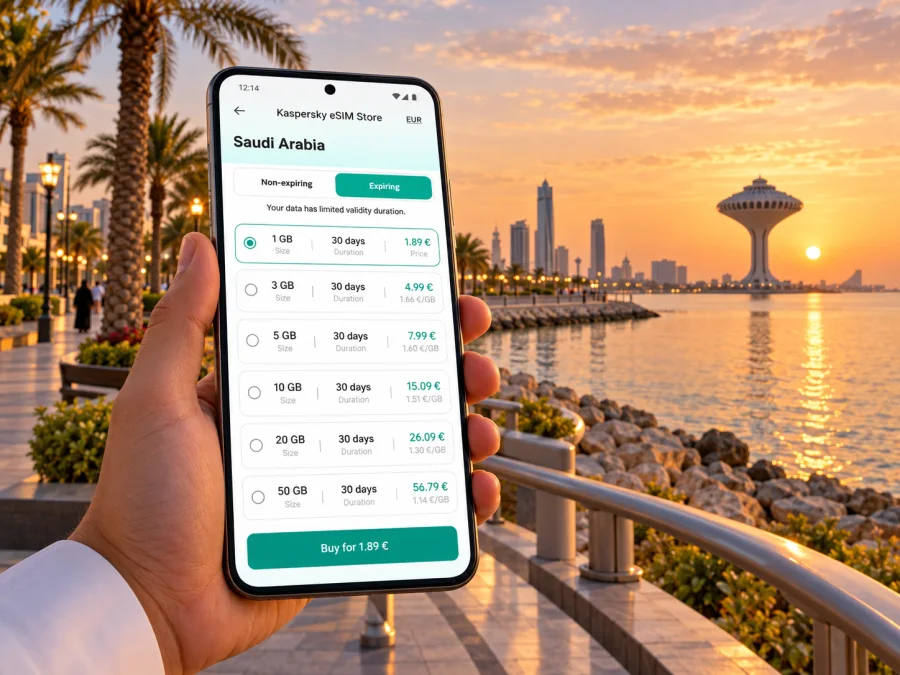
Al Khobar eSIM: mobile connection and internet for your trip
Al Khobar is a coastal city in Saudi Arabia’s Eastern Province, set along the Arabian Gulf and closely connected with Dammam and Dhahran. A trip here can mean a business meeting in Dhahran, a walk by the water, a family stay near the Corniche, or a drive towards Bahrain. Each plan depends on practical details: where you arrive, how you will get around, and whether your phone can get online when you need a map, booking, message or work file.
An eSIM can make mobile data easier to prepare before departure. It is a digital SIM profile installed on a compatible, unlocked device, so you can set up a travel data option without swapping out the physical SIM you use at home. It does not automatically include a local phone number, voice calls or SMS; check the terms of the specific plan. Keep your usual number available for calls and verification if needed, and use data-based messaging for everyday updates.
This guide focuses on using mobile internet around Al Khobar: the airport journey, the waterfront and central areas, nearby Dhahran and Dammam, and the road connection to Bahrain. A data connection is useful, but it is not a substitute for planning your route, checking transport arrangements or downloading essential details for offline use.
What to plan before you land
King Fahd International Airport is in Dammam and serves Al Khobar as well as the wider Eastern Province. Al Khobar’s governorate centre is about 54 km from the airport, so allow for a substantial road transfer rather than assuming the terminal is in the city. Traffic, your exact hotel and the time of arrival affect the journey. Confirm the pick-up point and destination with your driver or transfer provider before leaving the terminal.
For the first leg, mobile data helps you open a map, share your location, check a reservation and contact the person meeting you. Airport Wi-Fi may be useful, but it is sensible to have your own connection ready if you expect to need navigation as soon as you exit. Save the hotel address in English and, if available, Arabic; a pin can be easier to communicate than a transliterated street name.
Before departure, prepare a small offline pack:
- Your accommodation address, booking details and check-in instructions.
- The airport transfer confirmation and the driver’s contact method.
- A map of Al Khobar and the route to your first destination.
- Copies of essential travel documents stored securely on your device.
- Any meeting location, reservation or event pass you will need on arrival.
Al Khobar’s layout and why location matters
Al Khobar is not a single attraction clustered around one square. Its daily rhythm follows the coast, commercial districts, hotels, shopping areas and roads linking the neighbouring cities. The Corniche and Khobar Sea Front are natural reference points for visitors who want a waterfront walk. Business travellers may spend much of the day moving between offices, hotels and meeting venues, while families may make several short trips between accommodation, restaurants and indoor attractions.
| Trip purpose | Details worth saving | Why mobile data helps |
|---|---|---|
| Airport to hotel | Hotel pin, address and transfer contact | Confirming the destination and sharing arrival updates |
| Corniche visit | Waterfront section, parking point and return destination | Checking directions as you move between stops |
| Business meetings | Venue name, map pin, contact and calendar entry | Handling route changes and last-minute messages |
| Shopping or dining | Exact branch and opening information | Verifying the branch before taking a car |
| Day trip | Stops, route and return plan | Rechecking directions and communicating changes |
Getting around: maps, cars and short trips
Al Khobar and its neighbouring urban areas are spread out, so many visitors use a car, a pre-arranged transfer or a ride-hailing service for point-to-point trips. Check what is available for your itinerary and confirm collection details in the relevant app or with your hotel. A mobile connection helps you see the driver’s location, update a booking and send a corrected pin if a road entrance is difficult to find.
For each trip, confirm three things before you leave:
- The destination: Open the map pin and compare it with the address or venue details.
- The drop-off point: Ask whether the entrance, parking area or hotel lobby is the intended stop.
- The return: Decide whether you will book a ride later, wait at a fixed point or contact your driver directly.
Choosing mobile data for a city stay
The right travel data option depends on how you will use your phone. Navigation, messaging, ride coordination, email and web browsing create a different pattern from frequent video calls, uploading large files or streaming. Estimate your daily use honestly and consider whether hotel or office Wi-Fi will cover some high-volume activity. Do not choose only by a large headline allowance: check the package’s destination, validity, activation conditions and whether tethering is permitted if you intend to connect another device.
For a short city break, a simple plan with enough data for maps and messaging may be easier to manage than an oversized allowance. A longer stay or a work trip may require more room for video meetings, cloud documents and hotspot use. Actual consumption varies with app settings, map downloads, photo backups and video quality, so use your phone’s data tracker during the trip and turn off automatic media downloads if you want to conserve data.
When comparing options for Saudi Arabia, read the coverage and plan details for the specific product shown at checkout. Al Khobar is in Saudi Arabia, but a plan’s country or regional scope determines where it is intended to work; the city name alone does not establish coverage. Also distinguish the travel eSIM’s underlying operator arrangement from the device variant you own. Saudi operators also offer their own eSIM products under their own eligibility and service terms. The Saudi Arabia plans currently listed in Kaspersky eSIM Store identify Zain as the local service provider; that detail applies to those listed plans, not every Saudi eSIM or every area’s reception. Do not assume that an operator’s local offer and a travel plan have the same conditions, or that a Saudi Arabia plan includes a neighbouring country.
Kaspersky eSIM Store is an app and website where you can choose, arrange and activate a suitable eSIM plan for mobile data on an international trip. To review the destination options, choose a mobile data plan for Saudi Arabia. Before completing an order, compare the displayed allowance, validity, activation timing, supported destinations and any restrictions with your own itinerary. Product terms can change, so rely on the terms shown for the plan you select.
Keep Saudi Arabia and Bahrain as separate destinations
The King Fahd Causeway links Saudi Arabia with Bahrain from the coast south of Al Khobar. It makes a cross-border excursion possible, but the bridge does not turn the two countries into one mobile destination. If Bahrain is part of your itinerary, verify separately that your selected plan includes it. A Saudi Arabia-only plan should not be assumed to include Bahrain, and your phone may need to connect to a different network after crossing the border.
Before setting out, check travel documents and current border requirements through the relevant official channels, allow time for border procedures, and agree how you will handle the return journey. Save the address of your destination on both sides of the crossing and download any confirmation you may need. If mobile data becomes unavailable during a network change, use a saved map and follow the agreed meeting plan until the connection returns.
Device compatibility and regional variants
Confirm that your phone supports eSIM and is not locked to a home operator before you choose a plan. Availability can vary by exact model, hardware revision and market of sale, even when two phones share the same retail family name. This matters for international visitors carrying devices bought in different countries. Search by the full model number in the device settings or manufacturer documentation; do not rely only on the brand and model family printed on the box. Check whether your device supports eSIM before purchase.
A practical installation sequence
Install the eSIM before departure if the plan allows it and you have a reliable connection. Installing a profile and starting to use its data are separate actions; activation timing can vary by plan. Read the product instructions so you know whether the package begins at purchase, installation or first connection in the destination.
- Check the device. Confirm eSIM support, carrier unlock status and access to the device settings.
- Keep a connection available. Use reliable Wi-Fi or another internet connection while adding the profile.
- Open the installation details. Follow the steps supplied with your order or in the app.
- Add the eSIM profile. Scan the supplied QR code or use the available in-app installation flow. Keep the activation details until setup is complete.
- Label the line. Give it a clear name such as “Travel data” so you can identify it beside your regular SIM.
- Choose mobile data settings. Select the travel eSIM for data when you are ready to use it; keep your home line’s settings as intended for calls and messages.
- Check the plan instructions on arrival. Some devices or products may require data roaming to be enabled for the travel eSIM. Follow the plan’s stated setup and monitor which line is using data.
For device-specific steps, follow the Android eSIM installation instructions or the iOS eSIM installation instructions. If the phone does not connect immediately, wait briefly, check that the travel line is enabled and selected for mobile data, and review the plan’s network instructions. Avoid deleting the eSIM profile as a first troubleshooting step; an installation code may not be reusable.
How much data might you need?
A day in Al Khobar: connection by situation
Arrival day: Keep the hotel pin and transfer details accessible. Once you are in the car, confirm the destination with the driver and send a short arrival update. Avoid trying to install an eSIM while moving through airport formalities; set it up when you can concentrate and have a steady connection.
Workday between Al Khobar and Dhahran: Put each meeting address into your calendar and allow time between appointments. If a meeting moves, share the revised location in writing and confirm which building entrance to use. Keep your laptop’s connection needs in mind if you expect to use the phone as a hotspot; the selected plan and device must support that use.
Day trip beyond the city: Check the full route, fuel or transfer arrangements, return timing and any booking requirements. Download maps and save addresses before departure. If the trip crosses into Bahrain, confirm the separate destination scope and border requirements in advance.
Troubleshooting without losing your route
If data does not work after landing, work through a few checks in order. First make sure the travel eSIM is enabled and selected for mobile data. Then check the plan’s destination, activation status and network instructions. If the plan directs you to enable data roaming on that eSIM, follow that instruction while keeping your home SIM’s roaming settings under control. Restarting the phone can help it register again, but avoid removing the profile unless support tells you to.
Quick checklist before leaving home
- [ ] Confirm the exact phone model supports eSIM and is unlocked.
- [ ] Check whether the selected plan covers Saudi Arabia and every other country on your route.
- [ ] Read the allowance, validity, activation and data-roaming instructions.
- [ ] Install the profile when you have a reliable connection and enough time.
- [ ] Save your Al Khobar accommodation address, airport transfer and first destination.
- [ ] Download offline maps and essential booking details.
- [ ] Set the correct line for mobile data and understand how your home SIM will be used.
- [ ] Carry a charger or power bank for long drives and navigation.
- [ ] Recheck cross-border requirements and plan scope before travelling to Bahrain.
Frequently asked questions
Is Al Khobar in Saudi Arabia or Bahrain?
Al Khobar is a city and governorate in Saudi Arabia’s Eastern Province, on the Arabian Gulf. The King Fahd Causeway connects the Saudi coast near Al Khobar with Bahrain, but the border separates the two countries.
Which airport should I use for Al Khobar?
King Fahd International Airport is in Dammam and is the closest airport serving Al Khobar. The governorate centre is about 54 km away, so plan a road transfer and confirm the time for your specific destination.
Will a Saudi Arabia eSIM work on the causeway and in Bahrain?
Do not assume so. Check whether the specific plan includes Bahrain as a destination. A plan for Saudi Arabia alone does not establish service across the border.
Does every phone sold under the same model name support eSIM?
No. Support may differ between regional variants and exact model numbers. Check your device’s full model identifier and eSIM settings before ordering, and confirm that the phone is not carrier-locked.
Does a travel eSIM include a Saudi phone number?
Not necessarily. Many travel eSIM plans are data-only. Check the selected plan terms; you can use internet-based messaging and calling apps with your existing account when available.
Should I install the eSIM before I arrive?
Often it is convenient to prepare it before travel, provided your plan permits advance installation and you follow its activation rules. Installation and the start of data use may happen at different times, so read the plan details before proceeding.
Prepare for your Al Khobar stay
Al Khobar is a coastal Eastern Province base with practical links to Dammam, Dhahran and the road to Bahrain. Plan the airport transfer, save exact destination pins, and choose a data option based on the places you will visit and the way you use your phone. Check model compatibility and package conditions before travel, then keep offline maps and essential booking details available.
When you are ready, choose an eSIM plan for your Saudi Arabia trip in Kaspersky eSIM Store, the app and website for selecting, arranging and activating an eSIM plan for mobile data abroad. Review the destination, data allowance, validity and activation instructions, install it on a compatible unlocked device, and set it as your data line when you are ready to connect.


