
Travel connectivity guide
Albania eSIM: mobile internet for travel
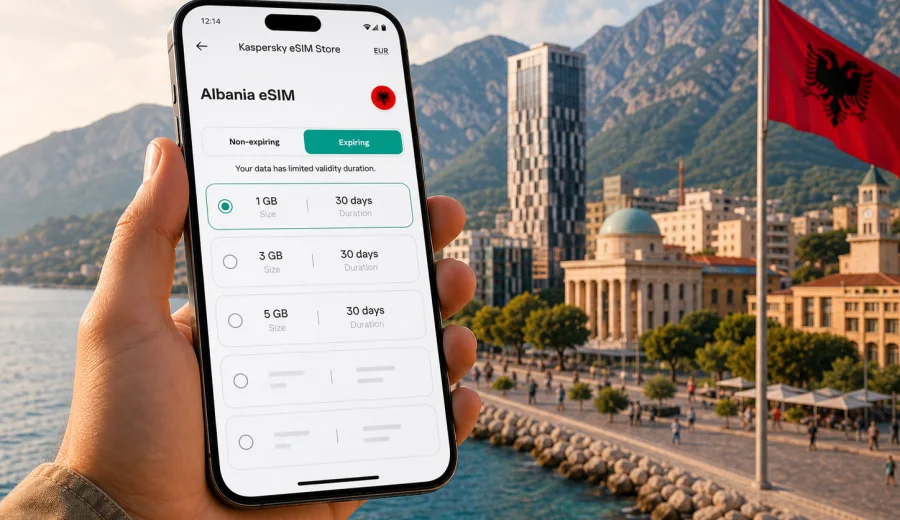
eSIM in Albania: mobile connection and internet for your trip
Albania is a compact country, but a trip there can be surprisingly mobile: you may land near Tirana, spend a few days on the coast, continue to Berat or Gjirokaster, then head north toward Shkoder or the Albanian Alps. In that kind of route, mobile internet is not just a convenience. It helps you use maps, confirm hotel details, call a ride, translate short phrases, check ferry or bus information, and stay in touch without looking for a shop that sells physical SIM cards.
An eSIM can make this easier because it lets you prepare a data plan for Albania on a compatible phone before departure or shortly after arrival. You do not need to replace your main SIM card, and you can keep your regular number active for calls or messages while using the eSIM profile for mobile data, if your device and home operator settings allow it.
Kaspersky eSIM Store is an app and website where you can quickly choose, arrange, install, and activate an eSIM with a suitable data plan for mobile internet during an international trip. The main value is control: you can review the data allowance, validity period, destination, and price before you travel, then install the eSIM on a compatible device and use it for your Albania itinerary.
Why an eSIM is useful for Albania
Albania is easy to explore independently, but many practical travel moments depend on internet access. Public Wi-Fi may be available in hotels, cafes, and some transport hubs, yet it is not always where you need it: at the airport exit, on a coastal road, at a bus station, or while looking for an apartment entrance in an old town.
An eSIM plan for Albania can help in several everyday situations:
- navigation from Tirana International Airport to the city or to the coast;
- messaging your host, hotel, guide, or driver after arrival;
- using maps in Tirana, Durres, Vlore, Sarande, Berat, Gjirokaster, Shkoder, or mountain areas where routes can be less familiar;
- checking bookings, QR tickets, boarding passes, and travel documents;
- translating menus, signs, parking instructions, or short messages;
- using internet-based calls and messengers when ordinary voice calls are not included in the selected data plan;
- reducing dependence on public Wi-Fi in busy tourist areas.
The important detail is that an eSIM for travel is mainly about mobile data. Unless the plan conditions say otherwise, it usually does not include a local phone number, traditional voice calls, or SMS. For many travelers, that is enough: maps, chats, email, banking apps, ride services, and browser searches all work through mobile internet.
When to set it up: before departure or after arrival
For Albania, the calmest option is usually to choose and install the eSIM before you leave home, while you still have stable Wi-Fi and time to follow the activation steps carefully. Some eSIM profiles start using validity only after they connect to a supported local mobile network, while others may have different activation conditions. Always check the details of the selected plan before purchase and installation.
Here is a simple planning rule:
| Travel moment | What to do | Why it helps |
|---|---|---|
| A few days before departure | Check that your phone supports eSIM and is not locked to one operator | Avoids buying a plan that your device cannot use |
| Before the flight | Install the eSIM profile while connected to Wi-Fi | Gives you time to scan a QR code or follow app instructions |
| On arrival | Select the eSIM for mobile data and enable data roaming for that profile if required | Helps the travel eSIM connect to a local network |
| During the trip | Track data use and adjust app settings | Prevents background apps from using more data than expected |
If you prefer to set up everything after arrival, make sure you have another way to get online for the first few minutes: airport Wi-Fi, hotel Wi-Fi, or your home operator's roaming. You may need internet access to open the app, receive email, or follow the installation instructions.
How much data do you need in Albania?
The right data allowance depends on how you travel, not only on how many days you stay. A traveler who uses offline maps, hotel Wi-Fi, and messaging apps needs much less data than someone who uploads videos from the coast, works remotely, or uses navigation all day.
Use this quick estimate as a practical starting point:
| Scenario | Typical data need | Practical note |
|---|---|---|
| Weekend in Tirana or Durres | Low to moderate | Messaging, maps, restaurant searches, and ride apps are usually manageable with a smaller package |
| One week across several cities | Moderate | Maps, booking apps, and photo sharing can add up quickly |
| Coastal route from Vlore to Sarande | Moderate to high | Navigation, beach recommendations, and frequent uploads may increase usage |
| Remote work or many video calls | High | Choose a larger allowance and use trusted Wi-Fi for long calls when possible |
| Family trip with hotspot use | High | Tethering can drain data quickly, especially with automatic updates |
To keep data under control, download offline maps before the trip, disable automatic cloud backups on mobile data, restrict video autoplay, and update apps only over Wi-Fi. These small settings matter more than many travelers expect.
Choosing an eSIM plan for Albania
When you compare options, avoid focusing only on the largest number of gigabytes. A plan is useful when its data allowance, validity period, and destination match your real itinerary. For example, a short city break may need less data but a clear activation window. A longer Albania route may need more data and enough validity for the full trip.
Check these plan details before you decide:
- Destination: confirm that the plan covers Albania.
- Data allowance: choose enough gigabytes for maps, messaging, browsing, and your expected media use.
- Validity period: match it to your full stay, including arrival and departure days.
- Activation conditions: understand when the plan starts and what action triggers it.
- Top-up or additional plan options: useful if your route changes or you use more data than expected.
- Device support: confirm that your phone or tablet can install and use eSIM.
- Hotspot rules: check plan conditions if you want to share mobile data with a laptop or another traveler.
If your itinerary is already clear, you can open the choose a suitable eSIM data plan for the trip page in Kaspersky eSIM Store and choose a plan that fits your route, data needs, and travel dates. Review the terms before purchase so you know the allowance, duration, and installation steps.
Where mobile internet matters most during an Albania trip
Albania is not only a single-city destination. Many visitors move between Tirana, Durres, Berat, Gjirokaster, Vlore, Sarande, Shkoder, and mountain routes. Mobile internet is useful because you are often between fixed Wi-Fi points and need quick decisions.
Typical high-value moments:
- arrival near Tirana, when you need maps, transport, accommodation messages, or rental car details;
- city days in Tirana or Durres, when you check routes, bookings, restaurant details, and ride options;
- coastal travel through Vlore, Himare, or Sarande, where plans can change around weather, beaches, and transport;
- northern or mountain routes, where offline maps and saved addresses are still important because coverage and speed can vary by terrain and local conditions.
Device compatibility: check before you buy
Before choosing a plan, confirm that your phone supports eSIM and is not locked in a way that prevents adding another mobile plan. This is especially important if the phone was bought through an operator contract or in a market where some models have different SIM capabilities.
Check your device before you purchase a plan. The check should cover three things:
- the exact device model supports eSIM;
- the operating system is up to date enough for eSIM installation;
- the device can use a travel eSIM profile and is not restricted by an operator lock.
If you travel with two devices, install the eSIM only on the device you plan to use. After activation, eSIM profiles often cannot be freely moved to another phone. If you are not sure which phone you will carry every day, decide before installation.
How to install and activate an eSIM for Albania
The exact flow depends on your device and the selected plan, but the general process is straightforward. In Kaspersky eSIM Store, the eSIM appears in your profile on the site or in the app after purchase. You can then follow the on-screen steps or use the QR code from the email, depending on the available installation method.
For detailed setup steps, use the relevant guide: Android installation instructions or iOS installation instructions.
Typical setup:
1. Connect your phone to stable Wi-Fi.
2. Open the eSIM details in the app, on the site, or from the email instructions.
3. Install the eSIM profile on the compatible device.
4. Give the profile a clear label, such as Albania travel data.
5. Keep your primary SIM for calls if needed, and select the eSIM for mobile data.
6. On arrival in Albania, enable data roaming for the eSIM profile if the instructions or device settings require it.
7. Wait a few minutes for the phone to connect to a supported local mobile network.
Do not delete the eSIM profile unless you are sure you no longer need it. Deleting an installed eSIM can make it difficult or impossible to reinstall, depending on the plan conditions.
Mobile data settings that prevent surprises
A travel eSIM gives you a separate data profile, but your phone settings still matter. A few minutes of setup can prevent background apps from using a large part of your allowance.
Before you leave or while connected to Wi-Fi:
- download offline maps for Albania and your main cities;
- save hotel addresses, ticket PDFs, and booking confirmations offline;
- turn off automatic app updates over mobile data;
- pause cloud photo and video backups on mobile data;
- reduce video streaming quality in entertainment apps;
- check which SIM is selected for mobile data;
- keep your primary number active only if you need calls or SMS from your regular operator;
- set data warnings if your phone supports them.
During the trip, review mobile data use every day or two. If usage rises quickly, check video apps, navigation, social media uploads, cloud backups, and hotspot sharing first.
Practical data scenarios for Albania
For a short city break, you may mainly need maps, messaging, browsing, and occasional ride or food apps. A smaller allowance can be enough if you use hotel Wi-Fi for media.
For a one-week route across Tirana, Berat, Gjirokaster, Vlore, and Sarande, choose enough validity for the full trip and expect more map use, booking checks, and photo sharing.
For work or study, choose a larger allowance and keep long video calls on trusted Wi-Fi when possible. For hiking or remote routes, save maps offline, carry a power bank, and treat mobile data as helpful where service is available, not as your only safety tool.
Checklist before traveling to Albania
Use this checklist a day or two before departure:
- Your phone supports eSIM and is unlocked for additional mobile plans.
- You selected an eSIM plan that includes Albania.
- The validity period covers the full trip.
- You understand when the plan starts.
- The eSIM is installed or you know where to find the QR code and instructions.
- You saved important bookings, addresses, and maps offline.
- You know how to switch mobile data to the eSIM profile.
- Data roaming is enabled for the eSIM profile if required.
- Automatic updates and cloud backups are limited on mobile data.
- Your primary SIM settings are clear, especially if you want to avoid roaming charges.
This preparation is simple, but it reduces the chance of solving connectivity issues while tired, offline, or standing at an airport exit.
FAQ
Does an eSIM for Albania include calls and SMS?
Usually, travel eSIM plans are focused on mobile data. A regular phone number, traditional voice calls, and SMS are not included unless the plan conditions specifically say so. You can normally use internet-based calls and messaging apps through mobile data.
Should I install the eSIM before going to Albania?
Installing before departure is often easier because you can use stable Wi-Fi and follow the steps without pressure. Check the plan conditions to understand when validity starts.
Will an eSIM work in every place in Albania?
No mobile solution can guarantee service in every location. Coverage and speed depend on local network availability, terrain, building conditions, and device settings. Download important information offline for remote routes.
What happens if I use all my data?
The next step depends on the selected plan and available options. You may be able to top up or choose another suitable plan in the app or on the site. It is better to monitor data use during the trip rather than wait until the allowance is fully used.
Choose an eSIM plan for Albania
If you want mobile internet prepared before your trip, open the review mobile internet options for your destination page in Kaspersky eSIM Store, review the available data plans, and choose the option that fits your route and travel dates. Install the eSIM on a compatible device, check the activation instructions, and keep your mobile data settings ready for arrival.