Travel connectivity guide
Albufeira eSIM: Mobile Internet & Travel Guide
Albufeira eSIM: A Practical Guide to Mobile Connection and Internet
Albufeira is a coastal city where a short walk can take you from narrow old-town lanes to a beach, while a longer day may involve a hotel outside the centre, a train station inland, or a trip along the Algarve coast. Mobile internet helps with the practical joins between those plans: checking an address, following a route, messaging your host, and confirming how you will get back after dinner. An eSIM can make that connection easier to prepare before you travel, without changing the city into a checklist of pins on a map.
Start with the shape of Albufeira
The name Albufeira is used for the city and the wider municipality. For a visitor, several familiar areas matter most: the historic centre beside Praia dos Pescadores; the eastern resort area around Areias de São João and Praia da Oura; and beach communities stretching west and east along the coast. These places are part of one destination, but they are not all a few minutes apart on foot.
The old centre is compact in feel but has narrow, winding streets and changes in elevation. Its lanes lead towards the waterfront and the town beaches, including Praia dos Pescadores and Praia do Túnel (also called Praia do Peneco). The view from the upper streets can be lovely, but a route that looks short on a small map may involve slopes, steps or a different level of the town. If you have luggage, mobility needs or a tight check-in window, use a door-to-door route and confirm the final approach with your accommodation.
| If your plan is… | What to keep in mind | Useful phone task |
|---|---|---|
| Stay in the historic centre | Streets are close together but can be steep or winding | Save the accommodation pin and entrance instructions |
| Spend evenings near Oura | Your return may be later than your daytime route | Check the return option before leaving the hotel |
| Visit a beach outside the centre | Access points and facilities vary by beach | Pin the specific access point and meeting place |
| Travel by rail | Albufeira-Ferreiras station is inland from the main beach areas | Plan the onward leg to or from the station |
The table is a planning aid, not a promise about journey times. Transport schedules, road conditions and seasonal services can change. Use current local information on the day and leave margin when a connection matters.
Arrival: connect the airport leg to your stay
Many visitors reach Albufeira through Faro Airport, then continue by road to their accommodation. The final leg can be a pre-booked transfer, taxi, hire car or a combination of public transport and a local connection. The best choice depends on arrival time, luggage, party size and where you are staying. A rail journey is not a door-to-door trip: the station named Albufeira-Ferreiras is in Ferreiras, away from the waterfront districts, so allow for the onward transfer when comparing options.
Before travelling, save the accommodation name, full address and check-in instructions where they are available offline. Ask your host or hotel which entrance or nearby landmark is easiest to find; a broad map pin can land on the wrong side of a block or street. Keep the booking confirmation accessible without mobile data, and take a screenshot of any transfer meeting point. If a driver is meeting you, agree on the pickup location and a backup contact method before you leave the airport building.
A useful arrival sequence is simple:
- Before departure, download the city area in your preferred map app if offline maps are available.
- Keep the address ready, including the postcode and any door or building details.
- Confirm the transfer, its pickup point and the expected method for contacting the driver.
- After landing, check messages and the current route when you have a connection.
- At the destination, verify that the building entrance matches the instructions before unloading luggage.
This approach is helpful whether you are staying in the old centre, near Oura, in a resort farther along the coast or in a quieter inland address. The key is to plan the last kilometre as carefully as the airport transfer.
Choose a connection plan around the way you travel
A city break and a week of beach-hopping can use mobile data differently. Navigation and messages are usually light tasks; repeated photo uploads, video calls, streaming and hotspot use can consume more. Consider the time you will spend away from Wi-Fi, whether you will travel outside Albufeira, and how often you expect to use data-heavy services. Choose according to the tariff terms shown for your trip rather than assuming that every package has the same validity or conditions.
A practical estimate starts with your routine:
- Mostly maps and messaging: allow for route searches, location sharing and confirmations throughout the day.
- Frequent browsing and social posts: include photo uploads and time spent researching restaurants, beaches and transport.
- Remote work: account for calls, file access and tethering, and check whether the selected tariff suits your expected use.
- Several travellers: decide whether each person needs their own connection or whether a supported hotspot arrangement makes sense for your devices and plan.
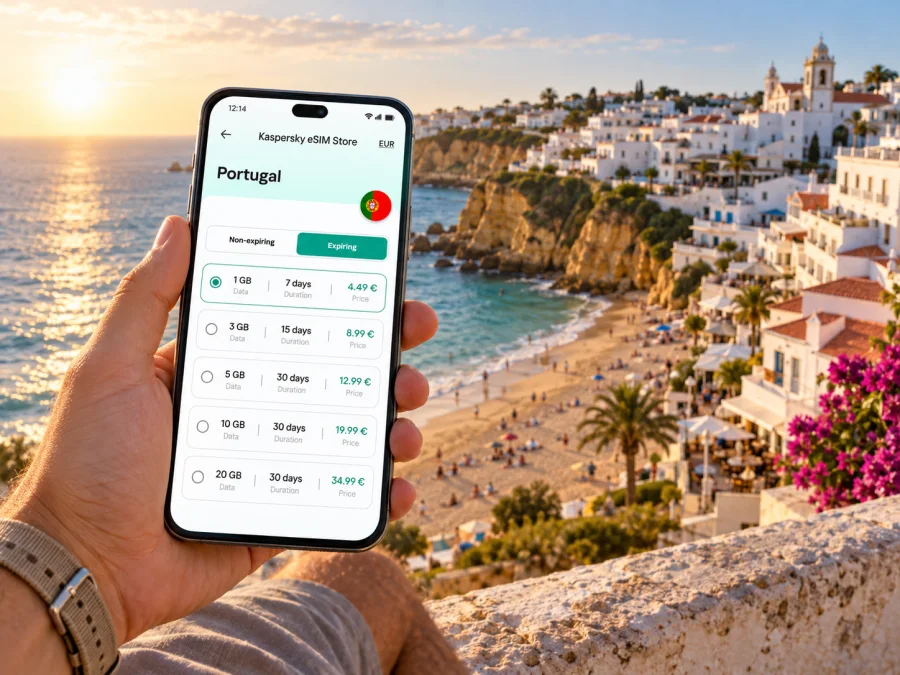
Kaspersky eSIM Store is an app and website where you can choose, purchase and activate an eSIM with a suitable mobile-data tariff for an international trip. Review the destination, data allowance, validity period, price and any activation conditions shown for the Portugal option. The available details belong to the selected tariff and can vary, so check them before completing a purchase. You can review eSIM options for a trip to Portugal when you are ready to compare what is currently available.
An eSIM for mobile data does not automatically provide a regular phone number, voice calls or SMS; those are included only if the specific tariff says so. Your existing SIM can remain useful for calls or one-time verification, depending on your operator and settings. Check roaming conditions with your home provider if you intend to leave that line active, since its charges are separate from the travel eSIM tariff.
Getting around: plan the return too
The central areas are walkable for many visitors, but Albufeira's hills, heat, luggage and accommodation location affect what feels convenient. In the old centre, map directions help with meeting points, while narrow lanes, slopes and steps can make a short route less direct. Allow time and follow local signs where they are clearer than the screen.
The municipal GIRO network serves urban journeys; regional buses and trains may help with trips beyond the centre. Routes and operating times can change, so consult current municipal or operator information. Albufeira-Ferreiras station is inland in Ferreiras, not beside the beach. Treat the trip to the station and the train journey as separate legs, and verify departure details before leaving.
For a beach day, save both the access point and your intended pickup or stop. Beach names can refer to a stretch of coast with more than one approach. Confirm how you will return, keep enough phone battery for the route and set a map destination to the entrance you actually need.
Pick the right area for your stay
Accommodation location affects how often you rely on maps and transport. The old centre keeps you close to winding historic streets and town beaches, but its lanes may be awkward with large bags. Areias de São João and Oura put you near a different cluster of evening venues and eastern beaches. Santa Eulália, Olhos de Água, Galé and other coastal areas offer distinct settings, though a short map distance does not guarantee an easy walk to the centre.
Before travelling, confirm the full address, easiest entrance, route from your drop-off point and late check-in procedure. Ask about steep paths or stairs if step-free access, a stroller or heavy luggage matters. “Near the beach” may describe an area rather than a direct, level route.
Navigation for beaches and short outings
Albufeira's coastline supports different day plans: Praia dos Pescadores beside the old town, Praia da Oura to the east, or beaches such as Santa Eulália, Olhos de Água, Galé and São Rafael farther along the coast. Access and surroundings differ. Choose based on what matters to your group, check the actual entrance and follow local safety guidance around cliffs and changing sea conditions.
For a meal or group meeting, save the venue address and agree on a specific meeting point. “Near the beach” or “in the old town” can mean several streets or access points. For trips beyond Albufeira, compare the complete journey, including the route from your hotel to the departure point and from arrival to your destination. Check the return option before an evening outing.
Prepare your eSIM before the trip
Before purchase or installation, confirm that your phone supports eSIM and is not carrier-locked. Support can differ by exact model and regional version; check your model and manufacturer guidance. You can check your device's eSIM compatibility before choosing a tariff.
Compare the tariff's destination, data allowance, validity and activation conditions with your travel dates. Read when validity begins: some plans allow advance installation and later use, but the instructions for the specific tariff determine the timing. Keep Wi-Fi available during installation and save the order details and QR code or activation information securely.
Installation checklist
Prepare an internet connection and the QR code or profile details. Follow the instructions for your eSIM and device, especially if you plan to connect only after arrival.
- Check that the device supports eSIM and is not carrier-locked.
- Open mobile or cellular settings.
- Choose the option to add an eSIM or mobile plan.
- Scan the supplied QR code or follow manual activation steps.
- Label the line clearly, such as “Portugal travel data.”
- Select the travel eSIM for mobile data when you are ready to use it.
- Wait for setup to finish; connection can take a few minutes.
- Check whether the tariff requires data roaming for that eSIM.
For device-specific steps, follow the Android eSIM installation instructions or the iOS eSIM installation instructions. Menu names vary by system version. If you install before travelling, follow the tariff's activation timing and do not delete the profile casually; some profiles cannot be reinstalled after removal.
On arrival, confirm that the travel eSIM is enabled and selected for mobile data. Keep your regular SIM settings in mind if you need calls or texts. The installed profile, selected data line and start of tariff validity are separate settings, so follow the plan instructions for each.
A simple daily routine
Save the day's accommodation, beach access and meeting point before leaving. Check the return plan before boarding transport, download available maps or tickets while connected, and keep an address or booking reference offline. A power bank can help on long days. In Albufeira, plans may move between waterfront streets, elevated lanes, resort areas and beaches outside the centre, so a small backup makes route changes easier to handle.
Frequently asked questions
Is Albufeira easy to explore on foot?
Many central visits are walkable, especially around the old town and nearby beaches. The lanes can be steep and winding, and districts farther along the coast may require transport. Check access and elevation before choosing a route.
Is the train station close to the beach?
No. Albufeira-Ferreiras is in Ferreiras, inland from the main waterfront. Plan the onward leg to your accommodation and check current connections.
Can I use an eSIM for maps and messaging?
Yes, if your device supports eSIM, the tariff covers Portugal and its conditions are met. Network availability and performance can vary, so keep key addresses available offline.
Does a travel eSIM include calls or SMS?
Not necessarily. A data tariff includes a regular number, calls or SMS only when its terms say so. Check the selected plan and your home operator's roaming conditions.
Should I install the eSIM before flying?
You may prepare it in advance if the tariff instructions allow it. Install with a reliable internet connection and follow the stated activation timing; validity can depend on the plan's conditions.
Before you set out
For an Albufeira trip, the most useful connection plan is the one matched to your itinerary. Save the property address, plan the transfer from Faro or Ferreiras, pin the exact beach access and check the return from evening areas before you go. Choose a mobile-data tariff by its destination, allowance, validity and conditions, then install and activate the eSIM according to its instructions.
When you are ready, use Kaspersky eSIM Store to choose and activate a suitable eSIM for your Portugal trip. Explore the available Portugal eSIM options and check the tariff details against your Albufeira dates and expected data use.


