Travel connectivity guide
Alesund eSIM: Mobile Internet and Travel Tips
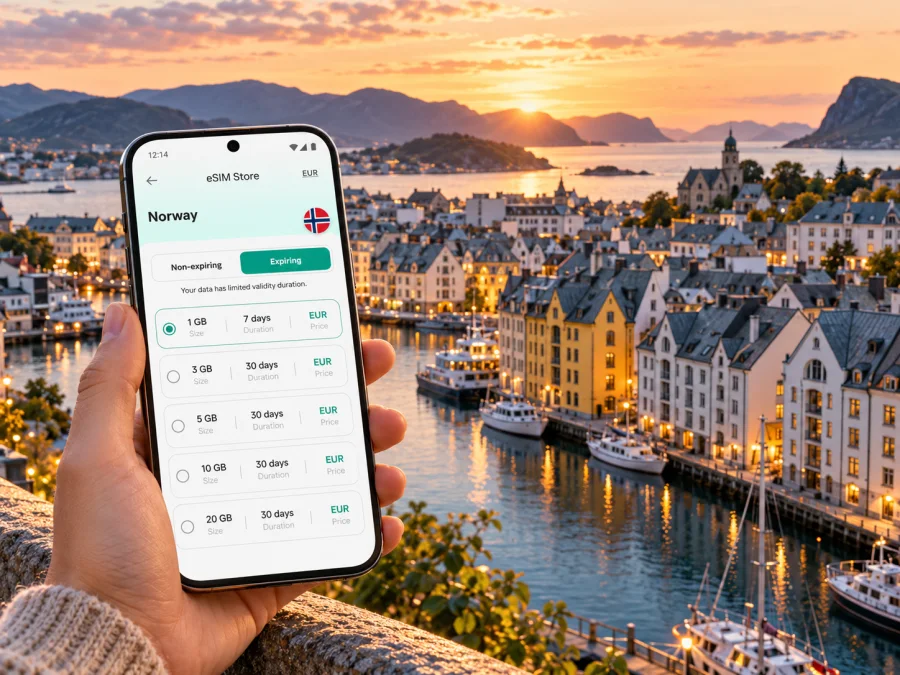
Alesund eSIM for mobile connection and internet on your trip
Alesund is a compact coastal city in western Norway, but a visit can quickly extend beyond its central streets: you may arrive at Vigra, cross between islands, climb to a viewpoint, or continue toward a fjord or another town in Møre og Romsdal. Mobile internet is useful for each leg, from checking a transfer after landing to opening a map when the weather changes. An eSIM can provide mobile data without replacing your usual physical SIM, provided your device and the selected plan support it.
This guide focuses on staying connected around Alesund: what to prepare before departure, how to plan the airport transfer, where navigation matters most, and what to check before activating an eSIM. The city’s real geography matters. Alesund Airport, Vigra is not in the city centre; it is on the island of Vigra, in Giske municipality. The airport bus and road connections link it with Alesund, while local and regional services have their own timetables and ticket rules.
Why mobile internet is useful in Alesund
Alesund’s historic centre is walkable, yet the wider destination is spread across islands and coastal roads. You may use a map for the short walk between a hotel and Brosundet, then rely on live departure information for a bus toward Moa, Valderøy or a regional connection. A route that looks simple on a map can involve a bridge, a tunnel, a bus stop on another island, or a departure that runs only at certain times.
Mobile data is useful for checking airport transfers, finding central streets, viewing live departures, contacting your accommodation and adapting plans when weather or connections change. A regional bus may run less often than a city service, so check each leg rather than assuming the same frequency.
Travel eSIM plans are commonly data-only; do not assume a Norwegian number, voice calls or SMS are included. Check the plan terms. If your phone supports dual SIM, you may be able to keep your usual line for calls or texts and use the travel eSIM for data. Review home-provider roaming settings to avoid unexpected charges.
First arrival: Alesund Airport, Vigra
The airport serving Alesund is on Vigra, an island north-west of the city centre. It is commonly shown as Ålesund Airport, Vigra on travel information. This distinction matters when you enter an address or select a pickup point: “Alesund” and “Vigra” are not interchangeable locations. If someone is collecting you, confirm whether the meeting point is at the airport, a ferry or express-boat quay, or in the city.
There is an airport bus between the airport and Alesund city centre and Moa for most major flight departures and arrivals. The airport operator lists an approximate journey of 25 minutes to the city centre, but that is a guide rather than a guarantee. The bus timetable is coordinated with flight activity, and the actual departure, stop and journey time can change. Check the current departure information for your flight date and keep your accommodation address saved offline as a backup.
Before departure, save your hotel address and booking reference. At Vigra, check live transport information, confirm the stop closest to your accommodation, and compare a taxi if the bus timing or luggage makes it more suitable.
The airport bus and local public transport are distinct services. Do not assume that a city bus ticket is valid for the airport bus, or that a route shown in one travel app covers every commercial transfer. Check the fare and operator for the exact journey before boarding. If you are taking an onward express boat from the Valderøy quay, verify the connection separately and allow a buffer for delays, walking and ticket checks.
A taxi can be a useful alternative when a bus does not match your arrival time or when you need door-to-door travel. Official airport information gives a typical taxi journey of about 15–20 minutes to Alesund centre, depending on conditions. Treat this as an estimate. A map connection helps you check where the taxi is taking you, but it does not determine the fare; confirm payment and pricing with the taxi provider.
Understand the city layout before choosing a route
The most recognizable central area sits around the narrow Brosundet waterway, with streets and waterfront paths on the islands of Aspøya and Nørvøya. Bridges connect the central districts, and the harbour edge is part of the experience rather than a barrier to ignore. A phone map is especially useful when you are switching between a waterfront walk and a bus stop inland.
| Area or landmark | What to expect | How mobile data helps |
|---|---|---|
| Brosundet and the inner harbour | Central waterfront, bridges, cafés and streets with Art Nouveau façades | Find a walking route, locate a specific address and check opening details |
| Aspøya and Nørvøya | Islands that form much of the central city area | Avoid confusing nearby addresses and orient yourself across bridges |
| Aksla and Fjellstua | Viewpoint above the centre, reached by a climb or other local transport options | Check the starting point, weather and return route before setting out |
| Moa | A major area beyond the compact historic centre and an airport-bus destination | Compare bus departures and confirm the stop for your next connection |
| Vigra and Valderøy | Islands associated with the airport and onward connections | Keep the correct island, quay or airport terminal selected in navigation |
Aksla is a popular viewpoint over the city and surrounding islands. The stair route is often described as 418 steps; it is a climb, so choose footwear and timing accordingly. The topography can make a short distance feel more demanding than expected, particularly in rain or wind. Check the forecast, daylight and your return plan. Keep a map available, but do not depend on staring at a screen while walking on stairs or exposed paths.
Alesund is known for its Art Nouveau architecture, much of it built after the 1904 town fire. In the centre, an offline map can help you locate a museum, restaurant or bridge without repeatedly reopening a route.
Choose a data plan for your actual itinerary
Choose data based on your trip length and habits: walking with hotel Wi-Fi generally uses less than frequent navigation, photo uploads, video calls or driving between destinations.
| Travel pattern | Check before choosing |
|---|---|
| Short city stay | Data allowance, validity and activation start |
| Day trips | Destination coverage and route countries |
| Remote work | Tethering rules, speed limits and usage terms |
| Scenic drive | Allowance and background data settings |
| Cruise stop | Activation timing and validity |
Before buying, read the destination, data allowance, validity, supported-network details, activation rules and restrictions. A country plan does not promise identical reception in every building, tunnel, ferry or mountain area. Treat any named local network or roaming partner as specific to that plan; do not infer broader operator access from the country label.
If you are travelling onward from Alesund, check whether the plan covers the complete route. Norway is the relevant country for a stay in Alesund, but an itinerary may continue across a border. A city article or city name does not create a city-specific network plan. Compare the destination and terms shown for the actual country or region you need. You can review the available Norway options for your travel dates and compare their listed conditions before choosing.
Kaspersky eSIM Store is an app and website where you can select, purchase and activate an eSIM with a suitable mobile data plan for an international trip. It is not the mobile network itself. Network access depends on the selected plan, its partner arrangements, local service conditions and a compatible, unlocked device. Check the details displayed for the individual plan rather than assuming every option has the same data, validity or network characteristics.
Check your phone before you travel
eSIM support depends on the exact phone model and sometimes the regional version of that model. Two phones with similar names can have different SIM capabilities in different markets. Do not rely only on a family member’s experience with a related device, a retailer’s short product title or a general list of phone brands. Check the manufacturer’s specifications for your exact model and regional variant, then confirm that the phone is not locked to a carrier that prevents installing another profile.
Check whether your device supports eSIM before purchase. Also confirm that you can access the email account or app account used for setup, that your operating system is up to date, and that you have a stable Wi-Fi connection for installation. If your phone has two SIM lines, identify which line will handle mobile data and whether data switching is enabled; automatic switching can cause unexpected roaming on your primary line.
A quick pre-trip device checklist:
- Find the exact model number and regional variant in the phone settings or manufacturer documentation.
- Confirm eSIM capability for that exact variant and check carrier-lock status.
- Make sure you can unlock the phone and open its cellular or mobile-network settings.
- Keep your primary SIM active if you need its number for calls, banking codes or account recovery.
- Decide which line should use mobile data and review roaming settings for both lines.
- Save setup instructions and account details where you can reach them during travel.
Install and activate with a little time to spare
The safest time to install is when you have reliable Wi-Fi and enough time to follow the plan’s instructions without rushing. The exact activation point varies by plan: validity may start at purchase, installation, first connection or another stated event. Read the wording before installing. If the plan starts on first use, setting it up before departure may be practical; if validity begins earlier, use the provider’s stated timing instead.
A general setup flow is to review the destination, allowance, validity and activation rules; install the profile by the plan’s stated method; label the travel line; select it for data; and enable roaming on that line only if instructed. After landing, check that it connects before relying on it for directions. Avoid deleting or reinstalling profiles casually.
For device-specific steps, see the Android eSIM installation instructions or the iPhone eSIM installation instructions. Menu names differ between operating-system versions and manufacturers, so follow the current steps shown for your device. Do not remove a working eSIM profile as a troubleshooting shortcut; some profiles cannot be installed again after deletion.
Use data thoughtfully around town and on day trips
Maps, translation and messaging usually use less data than continuous video, cloud photo backup or hotspot sharing. If you want to make a limited allowance last, download an offline map of central Alesund and your planned day-trip area while connected to Wi-Fi. Save key addresses and transport notes. Offline maps are a backup, not live traffic or live departure information, so reconnect when you need updated conditions.
To make a limited allowance last, disable automatic video playback and large photo backups over mobile data, use Wi-Fi for updates, and check which SIM is assigned to data. Download directions and bookings before a long drive or ferry-linked excursion. Coastal weather can change plans; keep an indoor alternative in mind and do not rely on a live map as your only copy of a reservation.
Moving beyond the centre
Local buses connect central Alesund with nearby districts and places including Moa; services also reach neighbouring islands such as Valderøy and Vigra. FRAM operates public transport in the county, while the airport bus is a separate commercial service. For a trip on a particular date, use the current journey planner and confirm the exact stop, departure and ticket conditions. Timetables can differ on weekends and public holidays, and disruption notices may change a route after you have planned it.
For coastal or fjord-region excursions, a journey may combine buses, ferries, express boats or a train farther inland. Check each departure point, transfer time and ticket condition separately, and save the quay or station name as well as the destination. If driving, download maps and check road and ferry information in advance; reception can vary along scenic routes.
Common connection problems and what to try
If the travel eSIM does not connect after arrival, work through the plan’s instructions calmly:
- Check that the eSIM line is enabled and selected for mobile data.
- Confirm that the plan is active and that its destination, validity and activation conditions match your current location and timing.
- Turn airplane mode on briefly, then off, or restart the phone once.
- Check whether the plan requires data roaming on the eSIM line.
- If the plan allows network selection, use the selection steps provided for that plan rather than guessing at settings.
- Compare the device’s displayed network status with the supported-network information in the plan details.
- If service is still unavailable, connect to trusted Wi-Fi and contact the support channel shown in your purchase or app account.
Do not delete the profile or reset multiple settings before checking the instructions; some profiles cannot be reinstalled after deletion. For immediate directions, use saved offline information or ask airport or accommodation staff for help.
Short-stay scenarios
You have a late arrival and one night in town. Install the eSIM when you have time and follow its activation terms. Save your address and compare the scheduled airport bus with a taxi after checking the live arrival information. A small plan may be sufficient for maps and messages, but select based on actual allowance and validity rather than assuming a particular amount.
You are staying centrally and walking most of the time. Save a map around Brosundet and your accommodation. Use live data for opening hours, weather and occasional route changes. Download photos over Wi-Fi and check whether your hotel provides Wi-Fi for heavier use.
You are working between meetings. Check tethering rules, data allowance and speed terms. Save meeting addresses offline and use Wi-Fi for large files where practical.
You are continuing to a fjord destination. Confirm that the plan covers the full route and verify every bus, boat or train connection. Service in central Alesund does not guarantee reception in rural areas or on every ferry.
Frequently asked questions
Is Alesund Airport in the city?
No. Alesund Airport, Vigra is on Vigra, in Giske municipality, outside the central city. An airport bus links the airport with Alesund city centre and Moa for most major flight arrivals and departures. Check the service for your specific flight.
Is Alesund easy to navigate without mobile data?
The centre is walkable, but offline maps and saved addresses help. Live data is useful for changing departures, weather and connections beyond the centre.
Does an eSIM plan automatically include calls and text messages?
No. Many travel eSIM plans are data-only. Check the exact plan terms for voice, SMS, tethering, validity and data limits. Messaging and internet calls can work through data-enabled apps, subject to their own requirements.
Will every eSIM work with every phone in Norway?
No. Compatibility depends on the exact device and sometimes its regional hardware variant, as well as carrier-lock status. Verify the precise model with the manufacturer and check the plan’s requirements before buying.
Can I keep my usual SIM while using an eSIM?
Often, if your device supports dual SIM. Keep the home line for calls or SMS and select the travel eSIM for data, then review roaming settings and charges.
Should I install the eSIM before flying?
Check when validity begins. Setup over Wi-Fi before departure can be convenient, but follow the plan’s timing instructions.
What if mobile data is unavailable in a tunnel or remote area?
Reception may vary by location and network conditions. Keep important tickets, addresses and directions available offline, and reconnect when service returns. Do not assume an eSIM provides uninterrupted coverage on every road, boat, building or viewpoint.
Prepare for Alesund with a simple checklist
Before leaving, confirm the exact eSIM model compatibility, carrier lock status, plan destination and validity. Install according to the plan’s activation rules while you have reliable Wi-Fi. Save the airport bus details, your accommodation address and any onward tickets. Once in Alesund, use live travel information for current departures and keep an offline fallback for the places where you may lose reception.
When you are ready, choose a Norway eSIM plan for your Alesund trip in Kaspersky eSIM Store. Review the listed data allowance, validity and activation conditions, then install and activate the selected eSIM according to its instructions.