
Travel connectivity guide
Alexandria eSIM: mobile internet in Egypt
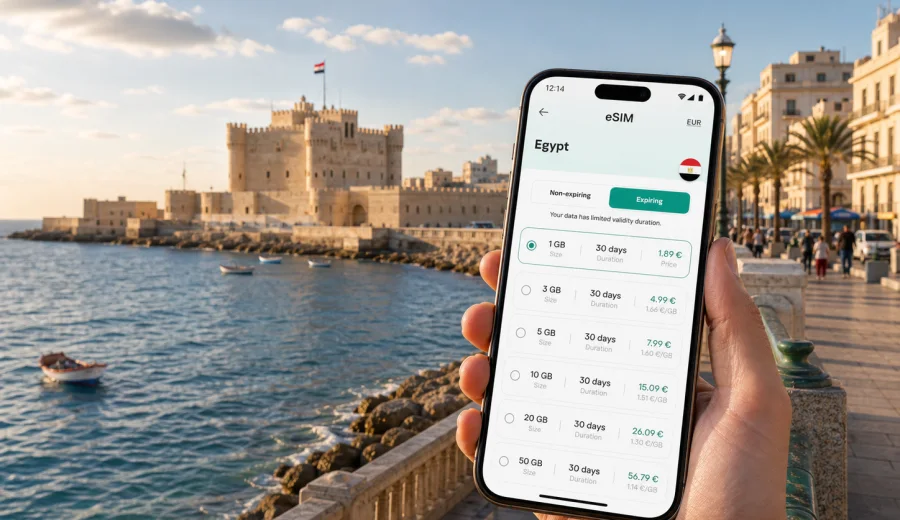
Alexandria eSIM: mobile connection and internet for your trip
Alexandria is a city where mobile internet quickly becomes part of the travel plan. You may arrive through Borg El Arab International Airport, continue toward the Corniche, check in near the sea, meet colleagues in Smouha, or spend an afternoon between the Bibliotheca Alexandrina and Qaitbay Citadel. In each case, a working data connection helps with maps, ride-hailing, hotel messages, translation, banking notifications, and route checks along a long coastal city.
An eSIM is useful in Alexandria because the city is stretched along the Mediterranean. Distances can feel simple on a map, but the route between a hotel near San Stefano, a meeting near Roushdy, the old center around Mansheya, and a dinner near the Eastern Harbor can involve traffic, local transport choices, and several changes of plan. With an eSIM prepared before the trip, you can use mobile internet without looking for a physical SIM card shop immediately after arrival.
This guide focuses on Alexandria itself: arrival, movement around the city, districts, hotels, business trips, short stopovers, and trips from Alexandria to other parts of Egypt. It also explains how to think about data allowance, device compatibility, activation timing, and practical eSIM use in a city where the sea, business districts, historical sites, and transport hubs are spread across a long urban coastline.
Why mobile internet matters in Alexandria
Alexandria is easier when you can check routes in real time. The city has famous landmarks, but many day-to-day travel decisions happen between them: which entrance to use, whether a route along the Corniche is slow, where the driver is waiting, how far the hotel is from the next meeting, or whether it is better to continue by car instead of walking.
Mobile internet is especially helpful for:
- airport pickup coordination after landing at Borg El Arab;
- navigation along the Corniche, Stanley, Sidi Gaber, Raml Station, Mansheya, and Montaza;
- messaging hotels, hosts, drivers, guides, and colleagues;
- checking train times for Cairo or onward trips;
- using translation when reading menus, signs, or local instructions;
- confirming restaurant bookings and museum opening plans;
- receiving payment, banking, and travel app notifications.
Public Wi-Fi can be useful in hotels, cafes, and some business venues, but it is not a complete travel connection. You still need data between buildings, in taxis, near stations, on the waterfront, or while looking for the correct entrance to a meeting location. An eSIM helps keep these small moments from becoming delays.
Arrival scenarios: airport, train, port, and road
Most international visitors arriving by air use Borg El Arab International Airport, which is outside the dense coastal core. This is one of the moments when mobile internet matters most. You may need to contact a driver, open your hotel address, compare the planned route, message your host, or confirm whether your booking includes pickup. If your eSIM is already installed, you can turn on the data line after landing and avoid depending only on airport Wi-Fi.
If you reach Alexandria by train, Sidi Gaber and Misr Station are common arrival points. A working connection helps you check the last part of the route, share your live location, and confirm whether your accommodation is better reached by car, tram, or a short walk. The older central areas can be busy, and the correct pickup point may not be exactly where you first exit.
Travelers arriving by road from Cairo or the North Coast often need data before they reach the hotel. A driver may ask for the exact building, a host may send a pin, or a meeting time may change while you are still outside the city.
Where eSIM helps most inside the city
Alexandria rewards flexible movement. A morning can start with a hotel breakfast near the sea, continue to the Bibliotheca Alexandrina, move toward the old harbor, and end in Montaza or Stanley. Mobile connection helps you make these changes without returning to the hotel lobby for Wi-Fi.
| City situation | Why data helps | Practical eSIM use |
|---|---|---|
| Airport arrival | Pickup and route checks | Activate data after landing and message your driver |
| Corniche transfers | Traffic and drop-off points | Keep maps open and share location when needed |
| Sightseeing | Walking routes and opening updates | Save places, check directions, and translate details |
| Business meetings | Schedule changes and file access | Use messaging, email, calendar, and cloud documents |
| Hotel changes | New address and check-in messages | Contact reception and open booking details |
| Day trips | Longer routes outside the city | Track the route and keep essential apps online |
Choosing data for Alexandria
The right data allowance depends on your travel style. A traveler who mostly uses maps and messaging needs less data than someone who works from a laptop hotspot, joins video calls, uploads photos, or streams while moving between meetings. In Alexandria, you should also think about how often you will be away from hotel Wi-Fi.
For a short city stay, data usually goes to maps, ride apps, messaging, restaurant searches, and photo sharing. For a business trip, email attachments, cloud files, and calls can use much more. For a family trip, one person may become the navigation and coordination point for everyone else, which makes a larger allowance more comfortable.
Use this planning model:
- light use: maps, messaging, occasional browsing, hotel Wi-Fi for heavier tasks;
- moderate use: maps, rides, social apps, photo backup on selected days, regular searches;
- heavy use: video calls, hotspot use, large uploads, streaming, and long days outside Wi-Fi.
Before choosing any tariff, check the data amount, validity period, destination, activation conditions, and whether your device supports eSIM. eSIM is for mobile internet in travel; ordinary voice calls and SMS are not included unless the tariff clearly says otherwise.
Districts and routes where a connection saves time
The Corniche is the city’s visual spine, but it is not one single travel zone. A hotel near San Stefano feels different from a guest stay near Raml Station or a meeting in Smouha. Around the Bibliotheca Alexandrina, data helps with walking routes and meeting points. Near Qaitbay Citadel and the Eastern Harbor, it helps with pickup pins. In Stanley, Gleem, Sidi Gaber, and Montaza, it is useful for restaurant searches, rail plans, and return routes.
Prepare your eSIM before you need it
The best time to prepare an eSIM is before the moment you urgently need mobile internet. You can choose a suitable data package for Egypt, install the eSIM on a compatible phone, and understand the activation steps while you still have stable Wi-Fi. Then, after arrival, you only need to turn on the correct mobile data line and follow the tariff conditions.
For Alexandria, this is useful because the first connection point may be an airport transfer, a station exit, or a hotel lobby at a busy hour. If you prefer to handle this in advance, you can use Kaspersky eSIM Store to choose an eSIM tariff for your trip to Alexandria and review the available data options for Egypt before you travel.
Kaspersky eSIM Store is an app and website where you can quickly choose, arrange, and activate an eSIM with a suitable mobile internet tariff for an international trip. It helps you prepare the connection without a physical SIM card, while still checking the details that matter: destination, data amount, validity period, price, and activation rules.
Installation and compatibility checklist
Not every device supports eSIM, and some phones may be locked to a carrier. Before you arrange an eSIM for Alexandria, check your device and confirm that it supports eSIM installation. This is a simple step, but it prevents the most frustrating travel problem: buying a data option that cannot be used on the device in your hand.
Use this checklist before departure:
- your phone supports eSIM;
- the device is not locked in a way that prevents another mobile data line;
- your operating system is updated enough for eSIM setup;
- you have stable Wi-Fi for installation;
- you know which SIM line will be used for mobile data;
- you understand when the tariff validity starts;
- you keep your primary SIM available if you need banking SMS or calls.
If you need setup guidance, use the Android installation guide or the iOS installation guide. Install while you have reliable Wi-Fi, follow the steps carefully, and avoid deleting an installed eSIM profile unless the tariff conditions allow reinstallation.
Business trips to Alexandria
Business travel in Alexandria often involves more movement than expected. Meetings may be in Smouha, Roushdy, Sidi Gaber, or near the waterfront, while hotels may be chosen for sea views, conference access, or proximity to a client office. Plan for email, calendar updates, map links, ride coordination, messenger calls, and hotel invoice details while moving between venues.
If you expect video calls or laptop hotspot use, choose data more conservatively. A few short map sessions use little data, but a long video meeting can use much more. Keep heavy uploads and backups for hotel Wi-Fi, and reserve mobile data for movement, coordination, and urgent tasks.
Stopovers and short stays
A short stay in Alexandria can be intense: one night on the Corniche, a morning at the library, a quick visit to Qaitbay Citadel, and an onward trip to Cairo or the North Coast. In this scenario, a small but dependable data allowance may be more useful than a larger package that you barely use.
For a stopover, focus on practical tasks:
1. Activate the eSIM data line only when you need mobile internet.
2. Save your hotel address and station or airport route.
3. Keep maps, translation, and messaging available.
4. Use hotel Wi-Fi for large photo backups.
5. Check the onward route before leaving the city.
The goal is not to be online constantly. The goal is to avoid being offline at the exact moments when a wrong turn, missed message, or unclear pickup point can cost time.
Hotels, apartments, and Wi-Fi gaps
Many Alexandria hotels and apartments offer Wi-Fi, but the experience can vary by room, floor, building, or time of day. A mobile data line gives you a backup when Wi-Fi is weak during check-in or inconvenient in a lobby. If you are traveling with family, decide who will handle navigation and bookings, because that phone will often use the most data.
Day trips from Alexandria
Alexandria can be part of a wider Egypt route. Some travelers continue to Cairo, the North Coast, Rosetta, or other destinations. Your eSIM choice should still match the country, because Alexandria belongs to Egypt and your mobile data needs may continue outside the city. Download key map areas when possible, keep your accommodation address saved, and check whether the selected validity period covers the whole route.
Quick recommendations for different travelers
| Traveler type | Alexandria data priority | Suggested habit |
|---|---|---|
| First-time visitor | Maps, translation, ride coordination | Install before departure and activate after arrival |
| Business traveler | Email, calendar, files, messenger calls | Choose more data if hotspot or video calls are likely |
| Stopover traveler | Essential route checks | Use mobile data for transfers and key updates |
The best choice is the one that matches how you actually move around the city. A hotel-based sea stay may need less data than a schedule with meetings, day trips, and frequent cross-city transfers.
FAQ: eSIM and mobile internet in Alexandria
Can I use an eSIM for normal phone calls in Alexandria?
An eSIM tariff for travel is usually focused on mobile internet. Ordinary voice calls and SMS are not included unless the specific tariff conditions say so. For calls and messages, you can use internet-based apps.
Should I install the eSIM before flying to Egypt?
It is usually more comfortable to install it before departure while you have stable Wi-Fi. Check the activation rules first, because the start of the validity period depends on the tariff conditions.
Do I need a separate city eSIM for Alexandria?
For a city trip, use the correct country destination. Alexandria is in Egypt, so choose an eSIM tariff that covers Egypt rather than looking for a separate city-only option.
What should I check before payment?
Check device compatibility, destination, data allowance, validity period, activation timing, price, and whether top-up or additional options are available for the selected tariff.
Travel checklist
Before you leave for Alexandria, make sure the connection plan is as ready as your hotel booking:
- save your hotel address and airport or station route;
- install the eSIM while connected to stable Wi-Fi;
- confirm which line will be used for mobile data;
- keep your primary SIM active if you need bank messages;
- download key map areas for backup;
- check the tariff validity period against your trip dates;
- keep installation instructions available until the eSIM is working.
Alexandria is more enjoyable when you are not solving connectivity at the curb, in a station hall, or outside a hotel entrance. Prepare the eSIM in advance, keep the details realistic for your data habits, and use mobile internet for the moments that matter most: arrival, navigation, transport, bookings, and communication. When you are ready to plan the connection, choose a mobile internet tariff for Egypt through Kaspersky eSIM Store and set up your eSIM before your trip to Alexandria.