
Travel connectivity guide
Algeria eSIM: mobile internet for travel
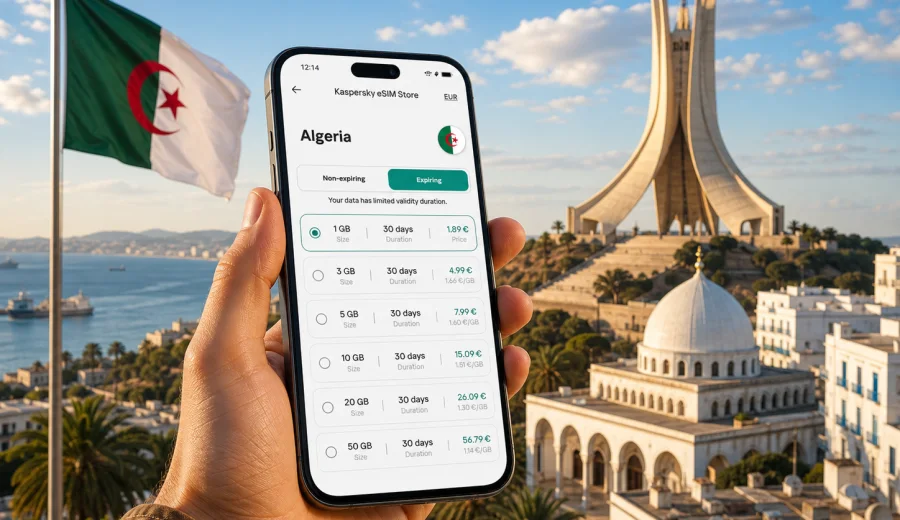
Algeria eSIM: mobile connection and internet for your trip
Planning mobile internet for Algeria is easier when you decide before the trip how your phone will connect, how much data you may need, and when the plan should start. Algeria is a large country: a weekend in Algiers, a coastal route through Oran and Constantine, and a longer journey toward the Sahara all create different data habits. An eSIM helps you prepare internet access without looking for a physical SIM card after arrival, while still keeping your main SIM in the phone for calls, banking messages, and important contacts.
For travelers who want to arrange mobile data before departure, mobile internet for a trip to Algeria options in Kaspersky eSIM Store can help you choose and activate a suitable eSIM plan for a trip. The service is designed for travel data: you select the destination, check the plan conditions, install the eSIM on a compatible device, and use mobile internet abroad according to the selected package.
Why mobile internet matters in Algeria
Algeria is not a one-city destination. Many travelers land in Algiers, visit the Casbah, continue to Oran or Constantine, take domestic transport, or join organized routes toward desert regions. A stable data plan is useful for everyday tasks: maps, hotel messages, ride details, translation, banking confirmations, weather, restaurant searches, and keeping family or colleagues updated.
Public Wi-Fi can be helpful in hotels and some cafes, but it is not a complete travel plan. It may be unavailable on transfers, slow in busy areas, or inconvenient when you need a quick confirmation code. Standard roaming from your home mobile operator may work, but the price and data rules can vary widely. A travel eSIM gives you a separate data option that you can prepare in advance and manage from your phone.
In practice, an eSIM is most useful when you want:
- mobile internet soon after arrival;
- no physical SIM card swap at the airport;
- a prepaid data package with visible size and validity;
- your main SIM left in place for calls and messages;
- an option that can be installed before the trip on a compatible device.
What an eSIM does and does not do
An eSIM is a digital SIM profile installed on a device that supports eSIM technology. For a trip to Algeria, it is usually used for mobile data. It does not necessarily include a local phone number, voice calls, or SMS. If calls and messages are not listed in the selected plan conditions, assume that the plan is for internet access only and use messengers or calling apps over data when needed.
Kaspersky eSIM Store is an app and website where you can quickly choose, arrange, and activate an eSIM with a suitable mobile internet plan for an international trip. It is not a mobile network operator and does not own mobile network infrastructure. The practical value is in the travel workflow: destination selection, plan comparison, installation guidance, and management of your eSIM and data package.
Short travel summary
| Question | Practical answer |
|---|---|
| Best time to prepare an eSIM | Before departure, while you have reliable Wi-Fi |
| Main use case | Mobile internet for travel tasks in Algeria |
| Physical SIM required | No, if your device supports eSIM |
| Calls and SMS | Usually not included unless stated in plan conditions |
| Main thing to check first | Device compatibility and any carrier lock |
| Useful backup | Keep hotel address and key documents available offline |
Algeria travel scenarios and data use
Your ideal data package depends on how you travel. A person who checks maps twice a day needs less data than someone who works remotely, uploads videos, and uses navigation for several hours. Before choosing a plan, look at the rhythm of your trip rather than only the number of days.
City break in Algiers
For a short stay in Algiers, mobile data is most often used for airport transfers, maps, restaurant searches, messaging, and occasional photo uploads. If your hotel has reliable Wi-Fi, you can keep mobile data for movement around the city. Download offline maps before the trip and use the eSIM for live navigation, ride coordination, and updates.
Coastal route: Algiers, Oran, Constantine
A multi-city route creates more frequent data use. You may check transport times, contact hosts, open reservation details, translate signs, and use maps in several places. In this case, choose a plan with enough validity for the full route and a data allowance that covers navigation days, not just evenings at the hotel.
Business trip
Business travel usually requires predictable access for email, calendars, messaging apps, document previews, and occasional video calls. Video meetings are data-heavy, so join them on hotel or office Wi-Fi when possible. Use the eSIM for urgent mobile access, taxi coordination, two-factor authentication through your main SIM, and work messages while moving.
Longer journey or desert itinerary
Longer routes need more careful expectations. Coverage and speed can vary by area, terrain, and local network conditions. An eSIM does not guarantee connection in every remote location. For remote travel, save maps offline, keep key contacts written down, and ask your accommodation or tour organizer about connectivity on the specific route.
How much data to choose
There is no universal number because travel habits differ. The safest approach is to estimate the daily tasks you expect and leave a margin. Messaging and maps use far less data than video, cloud backups, and social media uploads.
| Activity | Typical data impact | Travel advice |
|---|---|---|
| Messaging without many videos | Low | Good for small plans |
| Maps and live navigation | Low to medium | Download offline maps first |
| Email and document previews | Medium | Avoid large attachments on mobile data |
| Social media browsing | Medium to high | Limit auto-play videos |
| Video calls | High | Prefer Wi-Fi when available |
| Cloud photo backup | Very high | Disable on mobile data |
If you are staying only a few days and mostly need maps and messages, a smaller package may be enough. For a week or more, or for a route with several cities, choose a package that gives you room for unexpected tasks. If you need mobile hotspot for a laptop, check whether the selected plan and your device settings support it, and remember that laptop use can consume data quickly.
Before you buy: compatibility checklist
Not every phone supports eSIM, and some devices are restricted by the original carrier. Before choosing a plan, check the model, the software version, and whether the device is unlocked for adding an eSIM profile. You can also use the compatibility window: Check your device.
Use this checklist before payment:
- your smartphone or tablet supports eSIM;
- the device is not locked to one carrier;
- the operating system is updated enough for eSIM installation;
- you have Wi-Fi available for installation;
- you know which SIM will be used for mobile data;
- you understand when the plan validity starts;
- you have read the plan size, validity period, and destination.
If you travel with two phones, install the eSIM on the device you will actually carry and use for maps. An eSIM profile usually cannot be moved freely between devices after activation, so do not install it on a spare phone unless that is your main travel device.
How to install an eSIM for Algeria
Install the eSIM when you have stable Wi-Fi and enough time to follow the steps calmly. The exact flow depends on the phone model and operating system. Kaspersky eSIM Store provides installation guidance, and you can also use the detailed Android installation guide or iOS installation guide.
The usual preparation flow looks like this:
1. Open Kaspersky eSIM Store on the website or in the app.
2. Select Algeria as the destination.
3. Compare available eSIM plans by data size, validity, and price.
4. Choose the plan that fits your trip length and expected data use.
5. Complete the purchase flow.
6. Install the eSIM profile on your compatible device.
7. Set the eSIM as the mobile data line when you are ready to use it.
8. Keep your primary SIM available if you need calls or SMS from your home number.
Some phones require data roaming to be enabled for the eSIM line. This does not mean you are using your home operator roaming if the travel eSIM is selected for mobile data, but the setting may be needed for the eSIM data connection. Always check the line name before switching mobile data on.
When to activate the plan
Installation and activation are not always the same moment. Some plans begin validity when the eSIM first connects to a supported network; others may have different conditions. Read the selected plan details before you travel. If you are unsure, install the eSIM before departure but wait to use it for mobile data until you arrive in Algeria.
This simple sequence reduces confusion:
- before departure: install the eSIM using Wi-Fi;
- before landing: turn off data roaming on your primary SIM if you want to avoid unexpected roaming charges;
- after arrival: select the eSIM line for mobile data;
- once connected: check that maps and messages work;
- during the trip: monitor data use and top up or choose another suitable option if available.
Choose your travel data setup before the trip: open choose a suitable eSIM data plan for the trip plans in Kaspersky eSIM Store, compare the available data packages, and prepare the eSIM while you still have reliable Wi-Fi.
Practical settings for arrival
After landing in Algeria, your phone may need a few minutes to register on a network. Do not repeatedly delete and reinstall the eSIM if the connection is not immediate. First check basic settings.
Use this arrival checklist:
- airplane mode is off;
- the eSIM line is switched on;
- mobile data is assigned to the eSIM line;
- data roaming is enabled for the eSIM line if the instructions require it;
- your primary SIM is not selected for mobile data by mistake;
- low data mode is adjusted according to your preference;
- the phone has been restarted once if registration takes too long.
If you need support, keep screenshots of the selected plan and the phone settings. Clear details make troubleshooting faster.
How to save data in Algeria
Small phone settings can make a large difference. Travel data is easiest to manage when you stop background apps from using data silently.
Before departure:
- download offline maps for Algiers and any planned regions;
- save hotel addresses, booking numbers, and transport details;
- download translation packs if you use them;
- turn off cloud photo backup on mobile data;
- disable automatic app updates on mobile data;
- download music, podcasts, and entertainment over Wi-Fi.
During the trip:
- use hotel Wi-Fi for large uploads and video calls;
- keep video streaming quality low on mobile data;
- close hotspot when you are not using it;
- check data consumption in phone settings;
- avoid sending full-resolution videos unless necessary.
The goal is not to avoid using the eSIM. The goal is to keep mobile internet available for the moments when it matters: navigation, messages, tickets, payments, and urgent updates.
eSIM compared with roaming and local SIM cards
Different connection options fit different travelers. The right choice depends on your device, trip length, budget, and comfort with local setup after arrival.
| Option | Advantages | Things to consider |
|---|---|---|
| Travel eSIM | Can be prepared before arrival, no physical SIM swap, clear data package | Requires compatible unlocked device; usually data-focused |
| Home operator roaming | Uses your existing number and SIM | Price and fair-use rules may be less convenient |
| Local physical SIM | May suit longer stays or local calling needs | Requires buying a SIM locally and may take extra time |
| Public Wi-Fi | Useful for large downloads at hotels | Not reliable as the only connection plan |
For many short and medium trips, an eSIM is a practical middle path. It does not replace every possible local telecom option, but it can reduce the need to solve connectivity immediately after arrival.
Regional tips for Algeria
Algeria has coastal cities, mountain areas, and large desert regions. Mobile experience can differ between dense urban districts and remote roads. If your itinerary includes long transfers, keep essential information offline even if you plan to use mobile data.
In Algiers, mobile internet is useful for airport transfers, maps around the Casbah, restaurant searches, and coordination with hotels. In Oran, it helps with navigation between the waterfront, central districts, and day trips. In Constantine, maps can be especially useful because the city layout includes bridges, ravines, and viewpoints. For desert routes, do not rely on mobile internet as the only safety tool; follow the guidance of local organizers and keep offline backups.
Common mistakes to avoid
The most common eSIM problems are not complex technical failures. They are usually preparation issues.
Avoid these mistakes:
- buying a plan before checking device compatibility;
- installing the eSIM on the wrong phone;
- deleting the eSIM profile too quickly during troubleshooting;
- leaving the home SIM selected for mobile data after arrival;
- assuming the plan includes calls or SMS without checking;
- using mobile data for automatic cloud backups;
- waiting until airport Wi-Fi is weak or crowded to start installation.
Prepare while you are still at home or at your hotel. A few minutes of setup in a calm environment can prevent confusion when you are tired, in transit, or trying to find transport.
FAQ
Can I use an eSIM in Algeria without removing my main SIM?
Yes, on many compatible dual-SIM phones you can keep your physical SIM or primary eSIM active and add a travel eSIM for mobile data. Set the travel eSIM as the data line and keep your main line for calls or SMS if needed.
Does an Algeria eSIM include a phone number?
Usually travel eSIM plans are focused on mobile internet. Voice calls, SMS, and a local phone number are not included unless the selected plan clearly says so. Use internet-based calling and messaging apps when your plan is data-only.
Should I install the eSIM before I travel?
It is usually better to install it before departure using reliable Wi-Fi. Check the activation rules of your selected plan so you know whether validity starts after installation, after first network connection, or under another condition.
Can I use hotspot with an eSIM?
It depends on the selected plan and your device settings. If hotspot is important for a laptop or another phone, check the plan conditions first. Remember that tethering can use data much faster than normal phone use.
What if my phone does not support eSIM?
You will need another connection option, such as a physical SIM or roaming from your home operator. Check compatibility before purchase so you do not choose a plan that cannot be installed on your device.
Is eSIM enough for remote routes?
Use it as a mobile data option, not as a guarantee for every remote area. In less populated regions, coverage and speed can vary. Download maps, keep key documents offline, and ask local hosts or tour organizers about the route.
Final checklist before departure
Before you leave, make sure your phone is ready:
- eSIM compatibility checked;
- selected Algeria plan reviewed;
- installation completed over Wi-Fi;
- mobile data line settings understood;
- offline maps downloaded;
- hotel and transfer details saved;
- cloud backups limited on mobile data;
- primary SIM settings checked to avoid unwanted roaming;
- support information and purchase details available.
This checklist is especially useful if Algeria is part of a longer route across North Africa or the Mediterranean. If you cross borders, check whether your plan is country-specific or regional before relying on it outside Algeria.
Choose an eSIM plan for Algeria
Kaspersky eSIM Store helps you prepare mobile internet for your trip through a clear eSIM setup flow: choose the destination, review the available data packages, install the eSIM on a compatible device, and activate it according to the plan conditions. Before purchase, check your device, read the validity and data details, and decide how much data your itinerary is likely to need.
If you want to arrange travel data before departure, choose an eSIM plan for Algeria here: review mobile internet options for your destination.