
Travel connectivity guide
Algiers eSIM: Mobile Internet Travel Guide
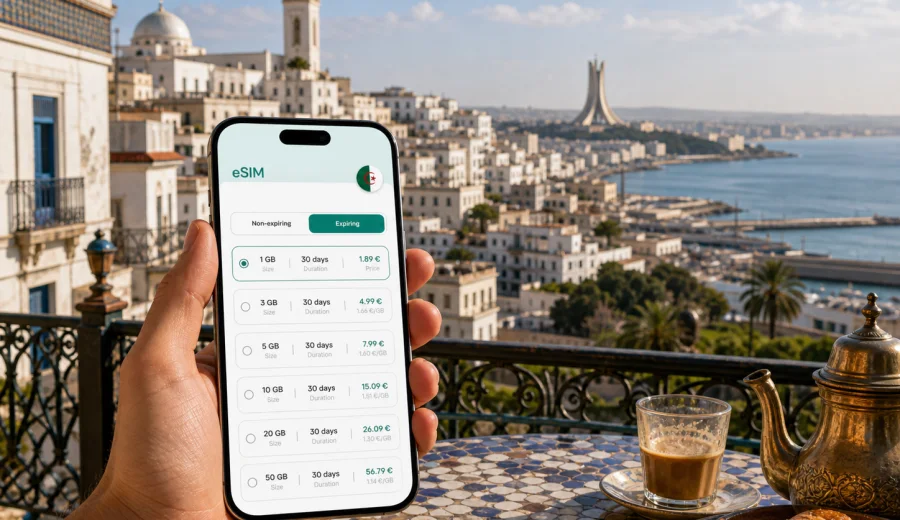
Algiers eSIM: mobile connection and internet for a smoother city trip
Algiers is a city where mobile internet becomes useful almost immediately. You may land at Houari Boumediene Airport, compare transfer options, message your hotel in Hydra or Bab Ezzouar, check the route into the center, and save a map before you even reach the arrivals hall. If your trip includes the Casbah, the seafront, business meetings, a short stopover, or a day trip toward Tipaza, an eSIM can help you prepare mobile data without looking for a physical SIM card after arrival.
This guide is focused on Algiers, not Algeria in general. It explains where an eSIM is practical in the city, how much data different travel styles may need, what to check before buying a plan, and how to install and activate an eSIM for mobile internet on a compatible device. Kaspersky eSIM Store is an app and website where you can choose, set up, and activate an eSIM with a suitable data plan for international travel.
Why mobile internet matters in Algiers
Algiers is spread along the Mediterranean coast and rises into hillside districts. Distances can feel short on a map but take longer in traffic, especially when you move between the airport, central streets, government and business areas, hotels, and coastal neighborhoods. Mobile data helps with the practical parts of the day:
- finding your driver or taxi pickup point at the airport;
- checking hotel addresses written in French, Arabic, or English;
- using maps around the Casbah, Didouche Mourad Street, El Madania, Hydra, El Biar, and the waterfront;
- receiving booking updates from hotels, apartments, restaurants, and tour contacts;
- translating menus, signs, and messages;
- coordinating with colleagues during a business visit;
- using ride-hailing, taxi, messenger, and banking apps where available;
- checking ferry, train, or day-trip plans before leaving the city.
Public Wi-Fi can be useful in hotels and some cafes, but it is not something to build your whole trip around. You may need internet while walking between streets, waiting for a transfer, or confirming a meeting location outside a lobby. An eSIM gives you a mobile data option on your phone, provided your device supports eSIM and the selected plan is active for Algeria.
Algiers arrival scenarios where an eSIM helps
The first hour in the city is often when mobile connection matters most. Algiers airport is east of the city center, and the transfer can involve traffic, several possible pickup areas, and unfamiliar address formats. If you already have an eSIM installed, you can switch on the travel data line after landing and handle the basics before leaving the terminal.
| Moment in the trip | What you may need mobile data for | Practical tip |
|---|---|---|
| Airport arrival | messages, map loading, transfer coordination | Install the eSIM before travel, then activate data after landing if the plan terms allow it |
| Transfer to hotel | route checks, driver contact, payment confirmation | Save the hotel address offline as a backup |
| First walk in the center | maps, translation, opening hours, restaurant search | Keep one navigation app ready with offline areas downloaded |
| Business day | email, calendar updates, meeting location changes | Choose a data amount that covers hotspot use only if your plan allows tethering |
| Stopover | boarding updates, quick city route, messaging | A smaller data plan may be enough if you stay near the airport or center |
An eSIM does not replace sensible preparation. Keep key addresses saved, carry a power bank if you plan a long day outside, and check the plan conditions before relying on tethering, video calls, or heavy downloads.
How Algiers travel style changes your data needs
Different visitors use data differently. A traveler who mostly walks around the Casbah and the seafront may need less data than a business visitor using email, shared documents, and video calls. A family trip can also use more data because several people may rely on one phone for navigation and coordination.
For a short Algiers break, light use usually means maps, messengers, translation, ride or taxi apps, and occasional web searches. Moderate use adds photo backup, social media, restaurant research, and daily route planning. Heavy use includes hotspot sharing, long video calls, streaming, cloud work, and frequent large file transfers.
Use this simple planning rule:
- 1-3 days in Algiers: focus on map and messaging needs, then add extra if you expect video calls.
- 4-7 days: choose a plan that covers daily navigation, translation, bookings, and photo sharing.
- 8-14 days: allow more margin for route changes, work tasks, and day trips from the city.
- Business travel: prioritize reliability of setup, plan validity, and enough data for email and document access.
- Family travel: consider whether each traveler needs their own data line or whether one phone will be the main navigation device.
The right eSIM plan depends on your route, the amount of data, the validity period, and the plan conditions shown before checkout. Avoid choosing only by the lowest data allowance if your itinerary includes long days outside the hotel.
Districts and local movement: where data is most useful
Algiers is not a city where every practical task happens in one compact tourist zone. Hotels and meetings can be in different areas, and a day may include the airport corridor, the central waterfront, the Casbah, and hillside neighborhoods. Mobile data helps you adapt when the plan changes.
In the Casbah, use mobile internet for maps and saved landmarks, but do not rely only on live navigation. Streets can be narrow and layered, so it is useful to mark your starting point and destination before walking. Around the waterfront and central boulevards, data helps with taxis, meeting points, and checking whether a route is better by car, metro, tram, or on foot. In Hydra, El Biar, and other business or residential districts, mobile data is useful for confirming exact entrances, office locations, and hotel pickup points.
Transport in and around Algiers can include taxis, airport transfers, metro, tram, suburban rail, and walking. An eSIM is especially practical when you switch between modes during the day. You can check a route, message a driver, open a ticketing or payment app if available, and share your live location with a colleague or travel partner. Keep in mind that transport apps, maps, and payment features may vary by provider and device settings.
What to check before buying an eSIM for Algiers
Before choosing a plan, confirm that your phone or tablet supports eSIM and is not locked to one carrier. This is important because an eSIM profile must be installed on a compatible device. If you are not sure, check your device before you buy a plan.
Also review:
- the destination: choose Algeria if your main city is Algiers;
- the data allowance: match it to your trip length and app use;
- the validity period: make sure it covers arrival, stay, and departure day;
- when the plan starts: some plans begin when installed, others when connected to a supported local network;
- hotspot rules: check whether tethering is allowed if you plan to share data with a laptop;
- voice and SMS: travel eSIM data plans usually focus on mobile internet and may not include a local phone number, calls, or SMS unless stated in the plan terms;
- device transfer rules: an activated eSIM may not be transferable to another phone.
For calls and messages, many travelers use internet-based messengers over mobile data. If you need regular phone calls or SMS for a bank, airline, or business contact, check your primary SIM roaming settings and costs separately.
Choosing an eSIM plan for an Algiers itinerary
The most practical way to choose an eSIM is to start with your real itinerary. Algiers has several common travel patterns, and each changes what you should look for in a data plan.
| Trip type | Typical route | Data priority |
|---|---|---|
| Weekend city visit | airport, hotel, Casbah, seafront, restaurants | maps, messaging, translation, reservations |
| Business trip | airport, hotel, office districts, meetings, airport return | email, calendar, document access, taxi coordination |
| Stopover | airport, central route, quick meal or short walk | fast setup, smaller allowance, clear validity period |
| Family visit | hotel or apartment, family addresses, shopping, day trips | shared coordination, maps, messaging, photo sharing |
| Algeria route starting in Algiers | Algiers plus Tipaza, Oran, Constantine, or other cities | country plan validity and enough data for travel days |
If you plan to start in Algiers and continue elsewhere in Algeria, choose a plan for Algeria rather than treating the trip as a one-city stop. If your route includes several countries, compare country and regional options where available, and check that every destination you need is included in the plan conditions.
For most travelers, the best preparation is to install the eSIM before departure while you have stable Wi-Fi, then activate or switch mobile data according to the plan instructions when you reach Algeria. To review options before your flight, you can choose an eSIM plan for your trip to Algiers through the Algeria destination page in Kaspersky eSIM Store.
How to install and activate an eSIM for Algiers
Installation is usually easiest before the trip, because you can use home or hotel Wi-Fi and avoid rushing at the airport. After choosing a suitable plan, follow the instructions shown in the app or website. If you need device-specific guidance, use the Android installation guide or the iOS installation guide.
A simple setup flow looks like this:
1. Confirm that your phone supports eSIM and is carrier-unlocked.
2. Choose Algeria as the destination and select a data plan for your stay in Algiers.
3. Install the eSIM profile using the on-screen instructions or QR code if provided.
4. Set the eSIM as the mobile data line when appropriate, while keeping your primary SIM for calls or SMS if needed.
5. After arrival, enable the eSIM data line, turn on data roaming for that eSIM if required, and test a small task such as opening a map.
Do not delete the eSIM profile after installation unless the instructions or support team tell you to. In many cases, deleting an installed profile can make it hard or impossible to reuse the same eSIM on the same or another device.
Data-saving, business, stopover, and day-trip tips
A moderate data plan can go further if you prepare the phone before landing. Download offline maps for the airport corridor, the city center, the Casbah, and any day-trip areas. Save hotel addresses, office locations, and pickup points in a notes app. Turn off automatic app updates and cloud photo backup on mobile data unless your plan has enough allowance.
Business visitors should plan extra data for email attachments, calendar changes, cloud documents, maps between meetings, and occasional hotspot use. If you expect video calls or laptop tethering, check whether hotspot use is allowed in the selected plan and keep important files available offline.
For a short stopover in Algiers, a smaller plan may be enough, but setup clarity matters. Install the eSIM before boarding, save the airport-to-city route, keep airline and messenger apps logged in, and protect your phone battery. If Algiers is the start of a wider Algeria route toward Tipaza, Oran, Constantine, or another city, check that your plan validity and remaining data cover the full route before leaving the capital.
Quick checklist before you fly to Algiers
- Your device supports eSIM and is not carrier-locked.
- Your primary SIM remains available if you need calls or SMS.
- You selected Algeria as the destination for your Algiers trip.
- The plan validity covers arrival and departure days.
- The data amount matches maps, messaging, work, and sharing needs.
- The eSIM is installed and labeled clearly.
- You know when to activate the plan according to its conditions.
- Android or iOS setup instructions are saved.
- Offline maps and hotel addresses are downloaded.
- Background app updates and cloud backups are limited on mobile data.
FAQ: eSIM and mobile internet in Algiers
Can I use an eSIM for mobile internet in Algiers?
Yes, if your device supports eSIM, is not locked to another carrier, and you choose a plan that includes Algeria. Always check the plan conditions before travel.
Does an eSIM give me a local Algerian phone number?
Many travel eSIM plans are designed for mobile data and may not include a regular phone number, voice calls, or SMS. Check the specific plan terms if calls or SMS are important.
Should I install the eSIM before I arrive?
Installing before departure is usually more convenient because you can use stable Wi-Fi and follow the instructions without airport pressure. Activation timing depends on the selected plan.
What if the eSIM does not connect after landing?
Check that the eSIM line is enabled, mobile data is assigned to the eSIM, and data roaming for the eSIM is turned on if required. If the issue continues, contact support while you still have Wi-Fi access.
Prepare your Algiers mobile internet before the trip
Algiers is easier to navigate when your phone is ready for airport transfer, maps, hotel messages, business updates, translation, and day trips. Before travel, check compatibility, review the data allowance and validity period, and install the eSIM while you have stable Wi-Fi.
To get ready, choose an eSIM plan for your trip to Algiers in Kaspersky eSIM Store and keep the setup instructions available before departure.