
Travel connectivity guide
Alicante eSIM: Mobile Internet for Your City Trip
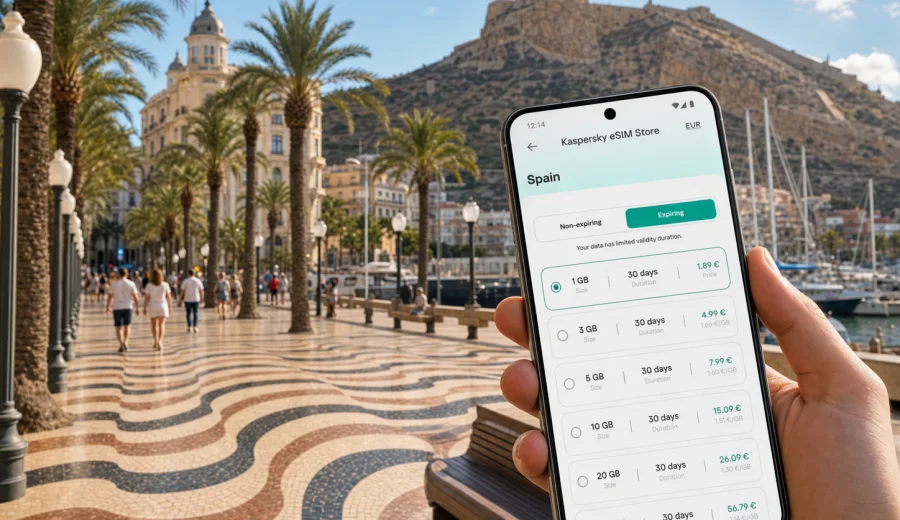
Alicante eSIM: mobile connection and internet for your Costa Blanca trip
Alicante is an easy city to enjoy when your phone is ready before you land. The airport is outside the city, the best first routes often depend on live maps, and many travelers move between the marina, the Old Town, beach districts, business hotels, tram stops, and day-trip towns along the Costa Blanca. An eSIM can make that first day simpler because you can prepare mobile internet before you need to find a kiosk, compare local SIM options, or rely on hotel Wi-Fi.
For a trip to Alicante, eSIM is mainly about practical control. You choose a data plan for Spain, install it on a compatible phone, and use mobile data for maps, ride-hailing apps, hotel messages, restaurant bookings, train times, and messaging. It is not a replacement for a local mobile operator contract and it usually does not include a standard phone number, voice calls, or SMS unless the selected plan says so. For most travel tasks in Alicante, however, mobile internet is the part that matters every hour.
Why eSIM is useful in Alicante
Alicante is compact in the center, but the travel pattern is rarely limited to one street. You may arrive at Alicante-Elche Miguel Hernandez Airport, take a bus or taxi into the city, walk through El Barrio, meet someone near the marina, check into a hotel around Playa del Postiguet, and then use the TRAM toward San Juan beach or Benidorm. Each step is easier when maps, booking confirmations, translation tools, and messaging apps are available without waiting for Wi-Fi.
The city also has a strong stopover and short-break profile. Some visitors spend only one or two nights before continuing along the coast. Others arrive for conferences, real estate viewings, university visits, language courses, or remote work near the sea. In these cases, a prepared eSIM helps reduce small delays: you can message your host from the arrival area, check the exact bus stop, follow the route into the center, and confirm where to leave luggage before a meeting or beach walk.
Arrival: the first hour after landing
The first hour in Alicante is where mobile data often has the highest value. You may need to decide between the airport bus, a taxi, a rental car, or a pre-booked transfer. If your accommodation is in the Old Town, the marina area, Mercado, San Juan, or a nearby coastal town, the route and travel time can change with traffic and time of day.
A prepared eSIM can help with:
- opening maps immediately after landing;
- checking the address of your hotel or apartment;
- messaging a host, driver, colleague, or family member;
- finding the correct airport bus stop or taxi area;
- checking whether your room, meeting, or rental desk is ready;
- using translation tools if a conversation becomes detailed;
- keeping boarding passes, reservation apps, and payment confirmations available.
If you prefer to install the eSIM at home, do it while you have stable Wi-Fi and enough time to follow the steps carefully. If you plan to install it after arrival, keep in mind that you still need internet access for the setup process. Airport Wi-Fi may be enough for that, but it is better not to make your first connection decision under time pressure.
Moving around Alicante with mobile internet
Alicante is walkable in the center, but mobile internet still matters because the city is built around several movement patterns. The marina and Postiguet beach are close to the Old Town, while San Juan beach, Albufereta, and nearby towns usually require public transport, taxi, or a planned route. Travelers also use Alicante as a base for Elche, Villajoyosa, Benidorm, Altea, Calpe, and other Costa Blanca stops.
Here is how mobile data typically helps during the day:
| City situation | Why mobile internet helps |
|---|---|
| Airport to city center | Compare bus, taxi, rental car, and transfer options in real time. |
| Old Town walks | Use maps in narrow streets without guessing where the next square or viewpoint is. |
| Beach plans | Check the route to Postiguet, San Juan, Albufereta, or coastal tram stops. |
| Marina and evening plans | Confirm restaurant bookings, meeting points, and return routes. |
| Business meetings | Stay reachable between hotels, offices, coworking spaces, and restaurants. |
| Day trips | Check train, tram, bus, and navigation details before leaving the city. |
Offline maps can help, but they do not replace live information. If a meeting location changes, a restaurant sends a message, or you need a taxi after dinner, mobile data turns the phone back into a useful travel tool instead of a folder of saved screenshots.
Districts and travel scenarios where eSIM helps
In the Old Town and El Barrio, streets are close together and plans often change quickly. You may move from Santa Maria Basilica to a tapas bar, then climb toward Santa Barbara Castle or meet someone near the Explanada de Espana. Mobile internet helps you avoid unnecessary detours and check walking times before the heat or evening crowds become a factor.
Around Playa del Postiguet and the marina, data is useful for beach timing, restaurant reservations, ride-hailing, and sharing live location with travel companions. This area is also common for short stays, so you may need to manage luggage storage, hotel messages, and onward transport on the same day.
Near Mercado, Luceros, and the main commercial streets, eSIM is helpful for everyday logistics: payment confirmations, store locations, tram routes, and quick searches while moving between errands. If you stay farther out in San Juan, Albufereta, or Cabo de las Huertas, mobile internet becomes even more important because you will likely combine walking, tram rides, taxis, and longer beach plans.
For business travelers, the advantage is less about sightseeing and more about predictable access. You can keep email, calendars, messaging apps, video-call links, and document sharing available between the airport, hotel, meeting room, restaurant, and train or tram station. A travel eSIM does not replace office Wi-Fi for heavy work, but it can cover the gaps that cause missed messages and late arrivals.
How to choose data for Alicante
The right eSIM plan depends on how you travel, not only how many days you stay. A traveler who uses maps, messaging, and hotel apps lightly may need far less data than someone who works remotely, uploads photos, uses cloud storage, or shares a hotspot with a laptop. Before choosing, look at the plan destination, data amount, validity period, price, and whether top-ups are available.
Use this quick guide as a starting point:
- Short city break, 2-3 days: maps, messaging, restaurant searches, and light social use usually need a modest data amount.
- One week in Alicante: choose more room if you plan beach days, day trips, taxi apps, video calls, or frequent photo uploads.
- Remote work or business travel: allow extra data for email attachments, calendar tools, document previews, and backup connectivity.
- Family or group travel: each traveler should have their own plan if they need independent navigation and messages.
- Costa Blanca route: choose a Spain plan that fits Alicante plus nearby towns, not only the first hotel address.
You should also decide when the plan should start and how long it should remain valid. Some travelers prefer to install the eSIM before departure and activate data after arrival. Others install it in Alicante once they are ready to use it. The correct choice depends on the plan conditions and your device, so read the activation details before purchase.
When your Alicante route is clear, you can use Kaspersky eSIM Store to choose a suitable eSIM data plan for Spain and prepare mobile internet for the city, the airport transfer, and nearby Costa Blanca trips.
Device compatibility before you buy
Before choosing a plan, make sure your phone or tablet supports eSIM and is not locked to another mobile operator. This check is especially important if you bought the device through a carrier, use an older model, or travel with a work phone managed by an organization. You can use the compatibility window to check your device before you complete the setup.
Also check these practical points:
- your device software is up to date enough to add an eSIM profile;
- you know which physical SIM or eSIM should stay active for calls and messages;
- mobile data will be assigned to the travel eSIM after arrival;
- data roaming for the eSIM may need to be enabled if the plan instructions require it;
- you have stable Wi-Fi available during installation;
- you understand whether the eSIM profile can be reinstalled or transferred after activation.
If you rely on a primary SIM for banking SMS, two-factor authentication, or calls from your home number, keep that line active for those services and use the travel eSIM for mobile data. Many travelers run both profiles at the same time: the home SIM remains available for calls or verification, while the eSIM handles data in Spain.
How to install and activate eSIM for Alicante
The setup process is usually straightforward, but it is worth doing it carefully. After choosing a plan, you add the eSIM profile to your device, select it for mobile data, and follow the activation instructions. If you need platform-specific steps, use the Android installation guide or the iOS installation guide.
A simple preparation flow looks like this:
1. Check that your device supports eSIM and is not carrier-locked.
2. Choose Spain as the destination for your Alicante trip.
3. Select a data amount and validity period that match your itinerary.
4. Install the eSIM while connected to stable Wi-Fi.
5. Name the profile clearly, for example "Spain travel".
6. On arrival, set the eSIM as the mobile data line.
7. Keep your primary SIM active only for calls or SMS if you still need it.
8. Monitor data use during the trip and adjust habits if needed.
Connection may take a few minutes and depends on the device, the selected plan, and the local network conditions. If mobile data does not start immediately, check the active data line, roaming setting for the eSIM profile, airplane mode, and the plan instructions before changing multiple settings at once.
Alicante travel checklist for mobile data
Before departure:
- save your hotel address and check-in instructions;
- install the eSIM if you prefer not to set it up at the airport;
- download essential documents for offline access;
- check whether your banking app needs SMS on your home number;
- save the route from the airport to your first stop;
- confirm that your phone battery and charger are ready for a long arrival day.
After arrival:
- switch mobile data to the travel eSIM when the plan should be active;
- test maps and messaging before leaving the airport;
- keep the address of your accommodation open until you arrive;
- avoid large app updates on mobile data;
- use hotel Wi-Fi for heavy uploads or long video calls when available;
- check remaining data before a day trip or remote-work session.
During the trip, treat mobile data as a travel resource. Maps, messaging, boarding passes, and transport apps are high-value uses. Automatic photo backup, video streaming, and large downloads can consume data quickly and are better left for trusted Wi-Fi when possible.
Stopovers, hotels, and short stays
Alicante is a common short-stay city because the airport connects well with the coast and the center is manageable without a car. If you have a late arrival or early departure, eSIM is useful for the small tasks that decide whether the trip feels smooth: finding the night bus or taxi, confirming a hotel entrance code, checking breakfast time, ordering a ride, or sharing your location with someone waiting for you.
Hotel Wi-Fi is useful once you are inside the building, but it does not help much while you are between the airport, bus stop, rental office, and reception. Public Wi-Fi can also be inconvenient when it requires registration, works only in a limited area, or disconnects while you walk. A travel eSIM helps you depend less on these moments without turning connectivity into a separate errand.
For apartment stays, mobile data is especially practical. You may need to message a host, open a smart-lock instruction, send a photo of a document already stored in your phone, or navigate to a different entrance. If you arrive during busy evening hours, having data before you leave the transport stop can save time.
Day trips from Alicante
Many Alicante trips include at least one route outside the center. The TRAM and regional transport make it possible to visit beaches and towns along the coast, while rental cars open more flexible plans inland. In all cases, mobile internet supports the same core tasks: live maps, timetable checks, messaging, translation, weather, ticket confirmations, and navigation back to the hotel.
Common examples include:
- San Juan beach for a longer beach day outside the compact center;
- Elche for palm groves, meetings, or a different city stop;
- Villajoyosa, Benidorm, Altea, or Calpe for coastal day trips;
- Santa Barbara Castle and viewpoints when you want to coordinate timing and routes;
- marina departures, excursions, or restaurant plans that require confirmations.
If your route stays inside Spain, a Spain-focused plan is usually the relevant direction to check. If you are combining Alicante with another country on the same trip, compare the conditions of country, regional, or broader travel plans before you choose. Do not assume one plan covers every route; the destination list and conditions matter.
Practical notes for calls, messages, and hotspot use
Most travel eSIM use is data-first. That means messaging apps, internet calls, maps, email, and booking apps can work over mobile data, but a regular phone number, traditional voice calls, and SMS are not included unless the specific plan states otherwise. Keep your primary SIM available if you need calls from your usual number or verification messages.
Hotspot use can be helpful in Alicante if you need to connect a laptop briefly, but it can also use data much faster than phone-only browsing. Before relying on it for work, check whether tethering is allowed by the plan and whether the data amount is realistic for your tasks. For video meetings, large files, cloud backups, and software updates, hotel or office Wi-Fi is usually a better primary connection, with eSIM as backup.
If you are traveling with family, avoid making one phone the single connection point for everyone unless that is part of the plan. Separate eSIM setups give each person independent maps, messages, and emergency contact options. This is useful at beaches, markets, festivals, and crowded evening streets where people may split up for a while.
Quick answers about eSIM in Alicante
Is eSIM useful if my hotel has Wi-Fi?
Yes, because much of the trip happens outside the hotel: airport transfer, walking routes, beach plans, day trips, taxi apps, and restaurant messages.
Should I choose Alicante or Spain as the destination?
For a city article, Alicante is the travel focus, but the data plan should match the country where the city is located. For Alicante, check Spain plan options.
Can I install eSIM before flying?
Often yes, but activation timing depends on the selected plan and device. Read the plan details and install while you have stable Wi-Fi if you want a calmer setup.
Does eSIM replace my usual SIM card?
Not necessarily. Many travelers keep their home SIM for calls or SMS and use the travel eSIM for mobile data in Spain.
Will eSIM help with public Wi-Fi security?
It can help you rely less on public Wi-Fi in airports, cafes, and public areas. You should still follow normal security habits and use trusted networks when possible.
What if mobile data does not connect right away?
Check the active data line, eSIM profile, data roaming setting if required, airplane mode, and plan instructions. If questions remain, contact support through the available help channel.
Prepare mobile internet before Alicante
Alicante is easiest when your phone is ready for the practical parts of travel: finding the airport route, reaching the hotel, checking tram options, navigating the Old Town, coordinating beach plans, and staying reachable during business or family trips. An eSIM gives you a way to prepare mobile internet without adding a physical SIM-card errand to your first day.
Before you travel, check device compatibility, review the plan conditions, install the eSIM with stable Wi-Fi, and decide which line should handle mobile data after arrival. Kaspersky eSIM Store helps you choose, arrange, and activate an eSIM with a suitable data plan for a foreign trip, so you can prepare an eSIM data plan for Spain and focus on Alicante instead of connection logistics.