
Travel connectivity guide
Alice Town eSIM: Mobile Connection and Internet
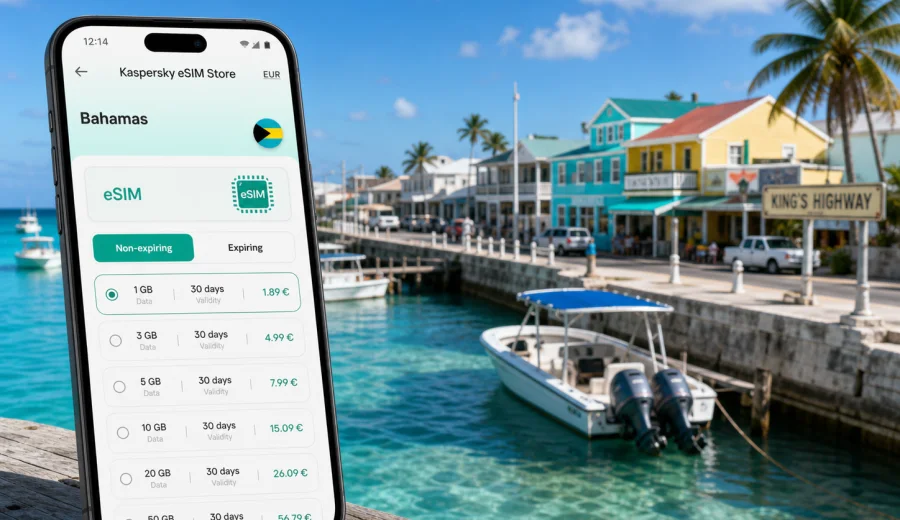
Alice Town eSIM: mobile connection and internet for a Bimini trip
Alice Town is a compact, waterfront base for exploring North Bimini, but a small island trip can depend on mobile internet more than a big-city break. You may need maps for the ride from the airport or ferry, messages with a hotel, marina updates, restaurant hours, weather checks, taxi or golf cart coordination, and quick access to bookings while moving between King's Highway, Radio Beach, the docks, and nearby beaches.
An eSIM can make that first hour easier because you do not need to search for a physical SIM card before checking routes or contacting your host. With a compatible phone, you can prepare a digital SIM profile before the trip, land or arrive by boat, and switch on mobile data for the selected travel plan when you are ready. In Alice Town, where many movements are short but timing matters, that kind of preparation can save practical friction.
This guide focuses on using eSIM for Alice Town, Bahamas: arrival, local movement, hotels, marina days, business stopovers, beach plans, and short trips around Bimini. It does not replace checking the conditions of a specific tariff before purchase, but it helps you estimate what kind of mobile data setup will fit your route.
Why mobile internet matters in Alice Town
Alice Town is often part of a focused island itinerary rather than a long urban stay. Travelers arrive for boating, diving, fishing, beach time, a resort weekend, a marina stop, or a short connection from South Florida. The town is small, but the travel tasks are spread across docks, hotels, beaches, ferries, and local roads.
Mobile internet is useful in Alice Town for practical reasons:
- checking directions between a dock, hotel, restaurant, beach, and cart rental point;
- messaging a host, captain, marina office, driver, or tour contact;
- opening booking confirmations when Wi-Fi is not available;
- checking ferry or flight updates before leaving for South Bimini Airport;
- using maps while walking or riding along King's Highway;
- sharing location with travel companions who split up for errands or beach time;
- checking weather, wind, and sea conditions before a boat trip;
- using messengers for voice calls when the eSIM plan includes mobile data but not a regular phone number.
The main point is not constant scrolling. It is having a reliable way to perform small travel actions without waiting for hotel Wi-Fi or asking several places for a password.
Arrival scenarios: airport, ferry, marina, and first transfer
Many Alice Town trips begin outside the town itself. You may arrive through South Bimini Airport, by ferry, by private boat, or through a marina itinerary. The first transfer can be short, but it may still involve a water taxi, a hotel shuttle, a golf cart, a taxi contact, or a meeting point at a dock.
If your eSIM is prepared in advance, the arrival sequence can be simpler:
1. Keep your primary SIM active for calls if you need it, but set mobile data to the eSIM profile when you are ready to use the travel plan.
2. Open your hotel, rental, or marina confirmation before you leave the airport, ferry area, or dock.
3. Save the address or meeting point in your map app.
4. Message the person who is expecting you if the ferry, flight, or boat arrival time changes.
5. Check whether your hotel has a specific pickup point or whether you should arrange your own transfer.
For Alice Town, this is especially useful because local movement can be informal compared with a large airport city. A driver, host, rental company, or boat contact may give a simple instruction such as a dock name, a road landmark, or a nearby hotel. Mobile data helps you confirm the details without depending on public Wi-Fi.
City movement: walking, carts, docks, and short rides
North Bimini is not a city of long metro lines or complicated interchanges. Movement around Alice Town is more likely to involve walking, a golf cart, a short taxi ride, a water taxi, or a boat transfer. That does not make internet less important. It changes how you use it.
You may use mobile data for:
| Alice Town moment | Why internet helps |
|---|---|
| Walking along King's Highway | Maps, restaurant checks, saved stops, and messages |
| Moving between a marina and a hotel | Driver coordination and arrival updates |
| Renting a golf cart | Location sharing, digital forms, and route planning |
| Going to Radio Beach | Weather, group chats, payment checks, and return pickup |
| Joining a boat or dive trip | Time changes, dock location, and contact with the organizer |
| Leaving for South Bimini Airport | Transfer timing and flight updates |
Where eSIM is most useful around Alice Town
Alice Town has several situations where mobile data can be more useful than waiting for a fixed connection:
- Radio Beach and beach stops. You may want tide, weather, messages, ride coordination, and map access without leaving the beach to find Wi-Fi.
- Marina and boating days. Plans can change with weather, docking time, fuel stops, or a captain's instructions.
- Small hotels and guest stays. Wi-Fi quality can vary by property, room, and time of day, so a mobile data fallback is useful.
- Restaurant and evening plans. Opening hours, menus, reservations, and group messages often change during a short island stay.
- Remote work or business calls. Mobile data can support essential messages and file checks when you need a backup connection.
- Stopovers from South Florida. If the visit is short, spending time looking for a physical SIM card is usually not worth it.
A practical setup through Kaspersky eSIM Store
Kaspersky eSIM Store is an app and website where you can quickly choose, order, and activate an eSIM with a suitable mobile data plan for an international trip. For an Alice Town article, the relevant destination is the Bahamas, so use the country landing page rather than looking for a separate city-only plan.
When you are ready to compare options, you can choose an eSIM plan for your Alice Town trip and review the available Bahamas tariffs, data amounts, validity periods, and conditions before purchase. Match the plan to your route, not only to the city name. If Alice Town is your base and your movements stay within the Bahamas, the Bahamas destination is the natural starting point.
Kaspersky eSIM Store should be treated as a practical tool for arranging a travel eSIM, not as a local mobile operator. The app and website help you select and activate a suitable plan; the exact conditions depend on the tariff you choose. Read the plan details before payment, especially if you need hotspot use, a longer validity period, or a larger data allowance.
Choosing a data plan for Alice Town
The right plan depends on how long you stay, how much you rely on maps and messengers, and whether you plan to work, upload media, or share data with other devices. Before you choose a tariff, check the destination, data allowance, validity period, activation rules, and whether hotspot use is allowed under the plan conditions.
A practical way to estimate your needs:
| Trip style | Typical data use | Planning note |
|---|---|---|
| One-day ferry or marina stop | Low to moderate | Maps, messages, bookings, weather, and a few photos |
| Weekend in Alice Town | Moderate | Beach plans, restaurants, transfers, social media, calls through apps |
| Diving, fishing, or boat-focused trip | Moderate | Weather checks, captain messages, maps, photos, and group chats |
| Business or remote-work stay | Higher | Email, documents, calls, hotspot needs, and backup connection |
| Family or group trip | Variable | More location sharing, ride coordination, and messaging |
If you mostly use maps, messengers, email, and booking apps, a smaller data package may be enough. If you plan to stream video, upload large files, run cloud backups, or use video calls every day, choose a larger allowance or be ready to top up if the selected plan allows it.
When to prepare the eSIM before travel
For Alice Town, advance preparation is usually the most convenient option. You may be moving from a plane to a water taxi, from a ferry to a hotel, or from a marina arrival to a meeting point. Installing the eSIM while you still have stable Wi-Fi at home or at your departure hotel reduces pressure on arrival.
Use this checklist before you leave:
- confirm that your phone supports eSIM;
- confirm that the phone is not locked to one mobile operator;
- choose the Bahamas as the destination if Alice Town is your city base;
- check data volume, validity period, and activation conditions;
- install the eSIM profile while you have stable Wi-Fi;
- keep the QR code or installation details available offline where possible;
- decide which SIM will handle calls and which profile will handle mobile data;
- turn off heavy cloud backups until you know how much data you want to use.
If your plans include several islands or a wider Caribbean route, compare the country plan with any regional options available for your itinerary. The right choice depends on where the plan is valid and how long you will be outside Alice Town.
How to install and activate eSIM for the trip
Install the eSIM before your travel day if possible. That gives you time to read the instructions, check the phone settings, and avoid trying to scan a QR code while moving through an airport, ferry terminal, dock, or hotel lobby.
The basic sequence is:
1. Choose the Bahamas destination and a suitable data plan.
2. Open the eSIM details in your account, email, or app after purchase.
3. Add the eSIM to your compatible phone.
4. Keep your home SIM available if you need your usual number for calls or bank messages.
5. Set mobile data to the eSIM profile when you want to use the travel plan.
6. Turn on data roaming for the eSIM profile if the plan instructions require it.
7. Test messaging, maps, and browser access after activation.
For device-specific steps, use the Android installation guide or the iOS installation guide. The menus can differ by phone model and software version, so follow the current instructions shown for your device.
Do not delete the eSIM profile after activation unless you are sure the plan conditions allow reinstalling it. Some eSIM profiles cannot be moved or restored once removed from a device.
Device compatibility and phone settings
Before buying any eSIM plan for Alice Town, check that your phone or tablet supports eSIM and is not locked to a single carrier. A modern phone may still be restricted by region, model version, or operator lock, so it is worth checking rather than assuming.
Use this quick compatibility check:
- your device supports eSIM in its hardware and software settings;
- your device is unlocked for mobile data from other carriers;
- you have stable Wi-Fi for installation;
- your operating system is up to date enough for eSIM setup;
- you can keep your primary SIM and the travel eSIM active in the arrangement you need;
- you understand which line handles mobile data, calls, and SMS.
If you are unsure, check your device before choosing a plan. This is especially important before a short Alice Town stay, because there may be little time to troubleshoot once the ferry, boat schedule, or hotel transfer is already underway.
FAQ: eSIM, mobile connection, and internet in Alice Town
Is eSIM useful for Alice Town if the town is small?
Yes. The town is compact, but mobile data is useful for arrival coordination, maps, hotel messages, marina updates, beach plans, and ferry or airport timing.
Should I choose Alice Town or Bahamas when selecting a plan?
Choose the country destination that covers the city. For Alice Town, that means looking at Bahamas plans and checking the specific tariff conditions.
Can I install the eSIM before I travel?
In most cases, that is the easiest option. Install while you have stable Wi-Fi, then activate mobile data according to the plan instructions.
Will eSIM give me a local phone number?
Not necessarily. Many travel eSIM plans are data-only. If voice calls or SMS are included, the tariff conditions should say so.
Final checklist before you go
Before leaving for Alice Town, check the essentials:
- your phone supports eSIM and is unlocked;
- the eSIM profile is installed while you have stable Wi-Fi;
- you know when the plan validity starts;
- your phone's mobile data line is set correctly;
- important confirmations are saved offline;
- heavy backups and updates are limited to Wi-Fi;
- your travel group knows how to contact you online;
- you have checked the selected plan conditions for data, duration, hotspot, and destination.
This preparation matters most on a weekend, marina stop, or ferry day, when the first hour is better spent reaching your hotel, dock, or beach plan than solving connectivity settings.
Prepare your eSIM plan for Alice Town
Alice Town is easy to enjoy when the practical details are already handled: arrival messages, marina coordination, maps, hotel contacts, beach plans, and departure updates. A travel eSIM can help you keep those tasks under control without depending only on public Wi-Fi or a physical SIM card.
Before your trip, review the available Bahamas options, compare the data amount and validity period, and choose a plan that fits your route. You can prepare an eSIM plan for your Alice Town trip through Kaspersky eSIM Store, then install it on a compatible device and activate it according to the plan instructions when you are ready to use mobile internet in the Bahamas.