Travel connectivity guide
Almaty eSIM: Mobile Internet for Your Trip
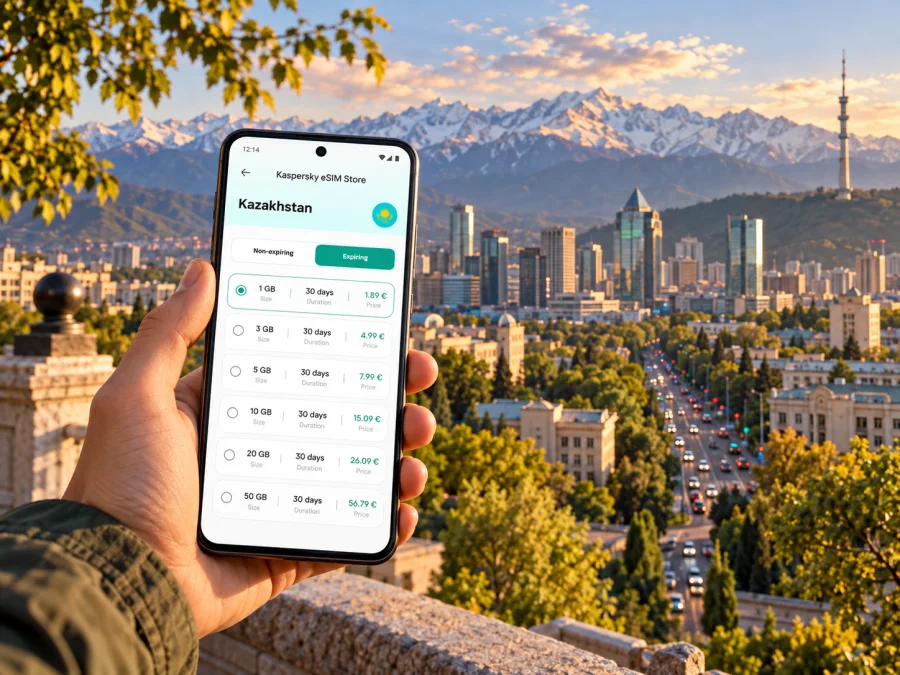
Almaty eSIM: mobile connection and internet for your city trip
Almaty is a large, spread-out city at the foot of the Zailiysky Alatau mountains. A first visit can involve a flight arrival, a ride across town, a hotel check-in, and then several different neighborhoods or a trip toward the mountains. Mobile internet helps you keep those pieces together: open a map, confirm an address, check a booking, message your host, or arrange a ride without relying on a public Wi-Fi connection at every stop.
An eSIM is a digital SIM profile that can be installed on a compatible, unlocked device. For a trip to Almaty, choose a plan whose destination is Kazakhstan and whose data allowance and validity match your itinerary. The city is not a separate country or a separate eSIM destination: local network access depends on the plan, its partner network, the device, and conditions where you use it. A travel data eSIM is also not automatically a local phone number or a replacement for every service provided by a Kazakhstan mobile operator.
Where mobile internet helps during an Almaty trip
Mobile data is especially useful during transitions: finding an airport pickup point, messaging a host, switching from metro to walking directions, or locating a café after a landmark.
Common city situations include:
- Arrival and transfer: check your accommodation address, share your arrival status, and use a map to follow the route from Almaty International Airport.
- Getting around: compare a walk with a metro or road journey, check station entrances, and keep directions available when streets or route names are unfamiliar.
- Hotel and apartment check-in: contact the host if the entrance is around the corner or the arrival time changes.
- Sightseeing: save the location of a museum, park, restaurant, or meeting point before leaving the hotel.
- Work travel: open calendar invitations, verify a venue, exchange documents, and let colleagues know if a journey is taking longer than expected.
- A short stopover: keep the essentials—directions, messages, and the next booking—available even when there is little time to settle in.
Download offline maps for areas you expect to visit and keep key addresses in your notes. Use live data for route and schedule updates when available; traffic, weather, and events can change a plan.
From the airport to your first address
Almaty International Airport (ALA) is the city’s main airport. It is roughly 15 kilometres from the city centre, so the arrival journey is long enough that it is useful to have your hotel name and full street address ready before landing. The airport’s official passenger information covers arrivals and onward travel; confirm current transport arrangements and pickup points there or at the terminal, since services and traffic conditions can change.
A simple arrival routine helps:
- Save your accommodation address and booking confirmation offline before flying.
- When online, check the live route and follow the pickup point shown by your transport app or driver.
- Match the car and pickup details in the app, then message your host when your arrival time is clear.
- Keep directions open to the final building entrance; large blocks and courtyards can make the last turn less obvious.
A travel eSIM can make this sequence easier, but installation and first connection are separate steps. Install the profile with a stable connection and follow its specific instructions. If setting it up after landing, use Wi-Fi if available, select the eSIM for mobile data, and review troubleshooting steps before considering removing the profile.
For a short connection, airport Wi-Fi may be enough if you stay in the terminal. If you leave, meet someone, or travel into the city, data can help with navigation and coordination. Allow time for airport procedures and traffic.
Moving around the city
Almaty’s metro is one option for journeys along its route. The official metro portal lists a service window from 06:20 to 00:00, using Astana time, and publishes station information and live schedules. Check the portal or station information on the day you travel rather than relying on a saved timetable. A metro journey may still involve a walk, a bus, or a road transfer at either end, so keep the final address visible in your map app.
The metro station list includes Райымбек батыр, Жібек жолы, Алмалы, Абай, Байқоңыр, Театр имени М. Ауэзова, Алатау, Сайран, Мәскеу, Сарыарқа, and Б. Момышұлы. Names may appear in Cyrillic or transliteration. Save a pin as well as the written station name to bridge spelling differences across maps and signs.
For other journeys, compare walking, public transport, and a car using the exact route and time of day. A short map distance can take longer if a crossing or entrance is on the far side of a large block. Check the next turn before leaving a station or vehicle.
| Trip pattern | What to check on your phone | A practical backup |
|---|---|---|
| Airport to accommodation | Correct address, current route, pickup instructions | Save the address offline and keep the booking confirmation accessible |
| Central sightseeing | Walking directions, opening details, meeting point | Pin the entrance, not only the general landmark |
| Metro plus a walk | Current station schedule and the station nearest your destination | Write down the station name and street address |
| Evening return | Ride details and the building entrance | Share your destination with a travel companion |
| Business meeting | Venue pin, calendar time, contact details | Save the invitation and a phone number before leaving |
Connectivity can vary indoors, between streets, and beyond the centre. A plan’s country label does not guarantee signal at every address. For a video call or large upload, choose dependable Wi-Fi or allow extra time.
Central districts, landmarks, and meeting points
These central and mountain-side names are useful route anchors, but they do not replace a hotel or venue’s exact address.
- Panfilov Park and Zenkov Cathedral: a central walking area where a saved pin can help distinguish a park entrance from a nearby street or café.
- Green Bazaar: add the specific entrance or stall location to your route if you are meeting someone; “the bazaar” may be too broad as a pickup point.
- Arbat and Zhibek Zholy: useful central references for a walk, shopping, or a meeting. Check the route from your exact starting point rather than estimating by district name.
- Abay Avenue: a long urban corridor with metro stations and many destinations along it. A venue name plus street number is more reliable than the avenue name alone.
- Medeu and Shymbulak: popular mountain-side outings south of the centre. Check the day’s transport, weather, opening information, and return plan before you leave the city centre.
- Kok-Tobe: a separate excursion from the central grid; check the current access arrangements and meeting point before setting out.
Group nearby places together and reserve a separate outing for a mountain-side destination. Save pins in advance and check any transport or access arrangements before setting out.
Almaty’s mountain setting means a trip from the centre to a highland attraction is different from another city block. Even with a Kazakhstan plan, signal depends on the network partner, terrain, buildings, and local conditions. Keep an offline map for mountain-side routes.
Choosing a Kazakhstan travel data plan
Start with the trip’s geography. For Almaty, look for a plan that explicitly covers Kazakhstan. If you continue to another country, check each destination or the stated regional coverage.
You can review eSIM options for a trip to Kazakhstan in Kaspersky eSIM Store. The app and website help you choose, order, and activate an eSIM with a suitable data plan for an international trip. Compare the plan’s stated destination, data amount, validity, and any activation conditions before you pay. Terms can differ, so use the details shown for the particular option rather than assuming that every plan has the same rules.
Estimate data from your expected use. Maps and messages differ from streaming, large uploads, and video calls; app settings also matter. Check hotspot terms for remote work and consider whether your phone can manage two lines as expected.
A quick selection table:
| Your itinerary | Plan detail to prioritize | Why it matters |
|---|---|---|
| Weekend in Almaty | Kazakhstan coverage and validity spanning the stay | The plan should remain valid for the dates you need it |
| Several days with day trips | Data allowance and stated destination | Navigation and trip coordination continue outside the centre |
| Work visit | Data amount, validity, and hotspot terms | Calls, files, and tethering can use data differently from maps |
| Almaty plus another country | Country or regional coverage for every stop | A Kazakhstan-only plan may not include the next destination |
| Short layover | Activation timing and trip duration | You need to know when validity begins and whether setup is practical |
Check whether validity begins at purchase, installation, or first network connection; do not assume the start point. Review the allowance, top-up terms, and what happens when data runs out. A data-only plan does not provide a local number, calls, or SMS unless the offer explicitly includes them. Messaging apps use data and depend on app availability and recipient setup.
Travel eSIM and Kazakhstan’s local operator market
An international travel eSIM and a domestic operator eSIM serve different purposes. Tele2 Kazakhstan, for example, describes its own eSIM flow for getting a new local number, transferring a number, or replacing a physical SIM. That is a local operator’s service with its own eligibility, identity, payment, and plan conditions. It should not be confused with a travel data plan selected for a visit, and the name of a local operator on a company page does not establish which network a separate travel plan will use in Almaty.
For a travel eSIM, read the plan details for its destination and network information where provided. The specific available partner network can be plan-dependent. It is not possible to infer from the city name alone that every eSIM connects through the same operator, supports the same features, or has identical indoor or mountain coverage. If you need a Kazakhstan phone number for local calls, SMS, or account registration, investigate local operator requirements directly and separately from a data-only travel plan.
Device versions also matter. A phone sold under the same model family can have different cellular hardware or eSIM support depending on its country or regional variant. Some devices may be carrier-locked, and a model name by itself does not confirm that the eSIM function is enabled. Before choosing a plan, check whether your device supports eSIM, confirm that it is unlocked, and verify the exact model number and regional version in the manufacturer’s settings or documentation.
Install and activate before you set out
If possible, install the eSIM before departure while you have stable Wi-Fi and enough time to read the plan instructions. Installation adds the profile to the phone; activation and the start of the plan’s validity may be governed by separate conditions. Follow the instructions for your plan and avoid switching off or removing a line unless you know how it will affect the profile.
- Confirm the device. Check eSIM support for the exact regional model and confirm that the phone is not locked to another carrier.
- Review the plan. Verify Kazakhstan is included, check the data allowance and validity, and read when the validity period starts.
- Install the profile. Use the plan’s QR code or in-app flow while online. Keep the installation details somewhere accessible until the profile is working.
- Set the data line. In mobile settings, select the travel eSIM for mobile data. Keep your regular line configured according to your own roaming and call preferences.
- Check data roaming requirements. Some travel eSIMs require data roaming to be enabled for that eSIM. Follow the plan’s instructions; this setting is not the same as enabling roaming on every line.
- Test carefully. When the plan should be active, check the signal and open a simple page or map. If it does not connect, review the plan’s activation steps and contact the relevant support channel before deleting or reinstalling the profile.
For device-specific steps, use the Android eSIM installation guide or the iOS eSIM installation guide. Menu names can differ by operating system and model. Keep the original SIM enabled only if you want its calls or messages and understand its roaming charges; a travel eSIM may be set as the data line while your usual number remains available for other functions.
A light data routine for a full day out
Before a full sightseeing day, download an offline map, save the accommodation and meeting points, and limit automatic uploads if you want to reserve data. Navigation can drain battery, so carry a power bank. Check remaining allowance and validity in the plan interface when needed.
Common scenarios
Airport arrival or business meeting
Keep the address, booking, and invitation available offline. When online, check the current route, share an updated arrival time, and confirm the building entrance. This is useful for airport pickups and meetings in large office or residential blocks.
Mountain-side excursion
Confirm transport, access, weather, and return timing on the day. Download the route and share your destination before leaving the centre. Signal can differ from central Almaty, so do not rely on a live map as your only directions.
Troubleshooting when the connection does not appear
Confirm the eSIM line is enabled and selected for mobile data. Check that Kazakhstan is covered, validity has started, and data remains. If required by the plan, enable data roaming for that eSIM. Then toggle airplane mode briefly or restart the phone and allow it time to register.
If there is no service, try an open area and check automatic network selection unless the plan says otherwise. Avoid deleting or reinstalling the profile; some have transfer restrictions. If needed, contact the plan’s support channel with your device model, location, and troubleshooting steps. Keep the QR code private.
Airport reception does not guarantee the same signal in every building or mountain area. Diagnose settings, validity, allowance, and local reception separately.
Frequently asked questions
Is there a separate Almaty eSIM destination?
Almaty is a city in Kazakhstan. For a city stay, check that the plan destination includes Kazakhstan; there is no need to assume a separate city-level network package. If your route continues beyond Kazakhstan, check each country or the stated region separately.
Does a travel eSIM give me a Kazakh phone number?
Not unless the specific plan says that it includes a number and voice or messaging services. Many travel options are designed for data. If you need a local number, check a Kazakhstan operator’s current requirements and offer separately.
Should I install the eSIM before flying?
Installing before departure can make arrival easier if you have reliable Wi-Fi and enough time to follow the plan instructions. Check whether installation itself starts validity. Some plans begin at a different stage, such as first connection, so rely on the specific plan terms.
What if my phone has a different regional version?
Check the exact model number and the manufacturer’s eSIM support information. Regional variants can differ, and carrier locks may prevent installation or use. Confirm support and unlock status before ordering a plan.
Prepare your connection for Almaty
Before departure, check your phone’s eSIM support and unlock status, save your first address, and review how the selected plan activates. After arrival, use current transport information, keep a map available, and check the plan’s data and validity as your itinerary changes. For a clear view of plans designated for the country, choose an eSIM option for Kazakhstan in Kaspersky eSIM Store, then follow the installation steps for your device using the Android guide or iOS guide.


