Travel connectivity guide
AlUla eSIM: Mobile Internet for Your Trip
AlUla eSIM for mobile connection and internet: a practical guide
AlUla rewards a little planning. Its historic oasis, Old Town, archaeological sites and sandstone formations are spread across a broad landscape in north-west Saudi Arabia, so a phone with mobile internet can be useful for checking directions, coordinating rides, confirming reservations and keeping travel details close at hand. An eSIM can be one way to prepare that connection, provided your device supports it and the plan you choose is suitable for Saudi Arabia.
This guide focuses on the practical side of using mobile data in AlUla: what to expect when you arrive, how to plan journeys between sites, how to choose a data allowance, and what to check before installing an eSIM. Coverage, speed and availability can vary by location, network, device and conditions. A travel eSIM is not a substitute for checking a particular attraction’s access rules or booking requirements.
AlUla is a destination, not one compact city centre
The name AlUla is used for the city and the wider destination in AlUla County. It is in north-west Saudi Arabia. Hegra, the Nabataean archaeological site and Saudi Arabia’s first UNESCO World Heritage site, is within the AlUla region, but it is a distinct place rather than another name for AlUla itself. That distinction matters when you search for directions or arrange a pickup: make sure the pin and meeting point match the specific site on your itinerary.
The landscape includes AlUla Old Town and the nearby AlJadidah Arts District, the oasis, Dadan, Jabal Ikmah, Hegra, Elephant Rock, Ashar Valley and other natural areas. These are not interchangeable stops along a single pedestrian route. Some visits are guided or timed, and distances between attractions can make transport planning as important as the data plan. Downloading confirmations and saving key addresses before leaving your accommodation gives you a backup if you lose signal or battery.
A useful way to think about the trip is in two layers:
- The central visit: Old Town, AlJadidah and nearby services, where you may walk between venues and use a map to find entrances, cafés or pickup points.
- The wider itinerary: heritage sites and landscape experiences outside the centre, where you will likely need a vehicle, a booked excursion or a ride service and should confirm the exact meeting point in advance.
Mobile internet helps with the transitions between these layers. It can support route checks and messages, but should not be treated as a promise of uninterrupted service in every valley, building or remote stretch of road.
Arrival: make the first connection predictable
Flights and seasonal routes to AlUla can change. Check your ticket and current airport information for the exact arrival terminal, transfer arrangements and operating times. Travellers may also reach the region by road from other Saudi cities; the drive from Madinah or Tabuk is several hours, so download maps and accommodation details before setting out rather than relying on a connection along the whole route.
At AlUla International Airport, give yourself a few minutes after landing to collect luggage, check transport and confirm where your driver or rental-car desk is located. The destination’s visitor information currently notes public Wi-Fi at the airport and a local SIM option before the exit. Airport facilities and availability can change, so confirm them on arrival. A local physical SIM and a travel eSIM are different choices: the provider or network available at an airport desk does not automatically tell you which network a particular travel plan uses.
If you have installed an eSIM before departure, keep the installation confirmation accessible offline. Depending on the plan’s instructions, installation and activation may be separate steps; a plan may start its validity when installed, when it first connects, or according to another stated condition. Read the exact terms before switching a line on. If you intend to install after landing, make sure you have a stable Wi-Fi connection and enough time to follow the steps without rushing.
A simple arrival sequence
- Before travel: save your hotel or camp name, booking reference, airport pickup details and a map area for offline use.
- After landing: connect to airport Wi-Fi if available, or use the data line that you have already prepared.
- Check the ride: confirm the pickup point and vehicle details in the app or message thread; do not assume the driver can see your location if your data connection is not active.
- At the accommodation: verify the address and the route for the next day while you have a dependable connection.
- Before a longer outing: share the plan with your travel companion and keep important booking details available offline.
This routine is useful whether you choose a travel eSIM, a local SIM, or roaming from your home operator. The right option depends on your phone, length of stay, data habits and the conditions of the service you already have.
Moving around AlUla: plan for distance
The official AlUla visitor guidance recommends hiring a car, with or without a driver, for many stays. Car rental desks are listed at the airport, while taxis, ride-hailing and local transport options are also described for the destination. Availability and operating arrangements can vary, so check current details and book any time-sensitive transfer ahead. A limited number of airport taxis may be available on a first-come basis; having a backup plan is sensible if you arrive during a busy period.
A Darb AlUla ride service is described by the destination as a way to request and track journeys. Public transit also operates on a year-round route linking Eskan with AlJadidah through several neighbourhoods; the published information describes buses every 30 minutes during operating hours. Routes, timetables and service status can change, and a bus route may not take you directly to every attraction. Check the current schedule and the stop closest to your destination before depending on it.
| Travel need | What to plan | How mobile data may help |
|---|---|---|
| Airport to accommodation | Pickup location, vehicle or rental desk, and arrival time | Confirm messages, locate the meeting point and check a changed pickup instruction |
| Old Town and AlJadidah | Walking route, opening hours and the right entrance | Navigate short walks, find a venue and coordinate if your group separates |
| Hegra or another booked heritage visit | Reservation, check-in time and operator meeting point | Retrieve the booking and contact the organiser if plans change |
| Elephant Rock at dusk | Transport there and back, plus enough time for the visit | Check the route, arrange a return ride and message your group |
| A longer road outing | Fuel, route, daylight, offline map and return plan | Recheck directions and share an update, where service is available |
The table is a planning aid rather than a guarantee about local transport or coverage. For a booked tour, follow the operator’s own meeting instructions. For an independent drive, rely on road signs and safe driving practices; never handle the phone while driving. Set navigation before moving or ask a passenger to manage it.
Choosing mobile data for AlUla
A travel eSIM is a digital SIM profile that can be added to a compatible, unlocked device. It can help you use mobile data abroad without removing your home SIM. Kaspersky eSIM Store is an app and website where you can choose, arrange and activate an eSIM with a suitable plan for mobile internet during an international trip. The service is not a mobile operator, and it does not own or operate the local network used by a plan.
When comparing options for Saudi Arabia, start with the trip rather than a headline data amount. Think about how many days you will be away, whether your accommodation has Wi-Fi, how often you will use maps and ride apps, and whether you plan to upload photos or video. Navigation and messages generally use less data than repeated video streaming, cloud backups or large uploads. Your phone’s mobile-data settings can help estimate normal daily use; if you have no reliable estimate, choose a plan with a little room for unexpected changes and review its stated validity period.
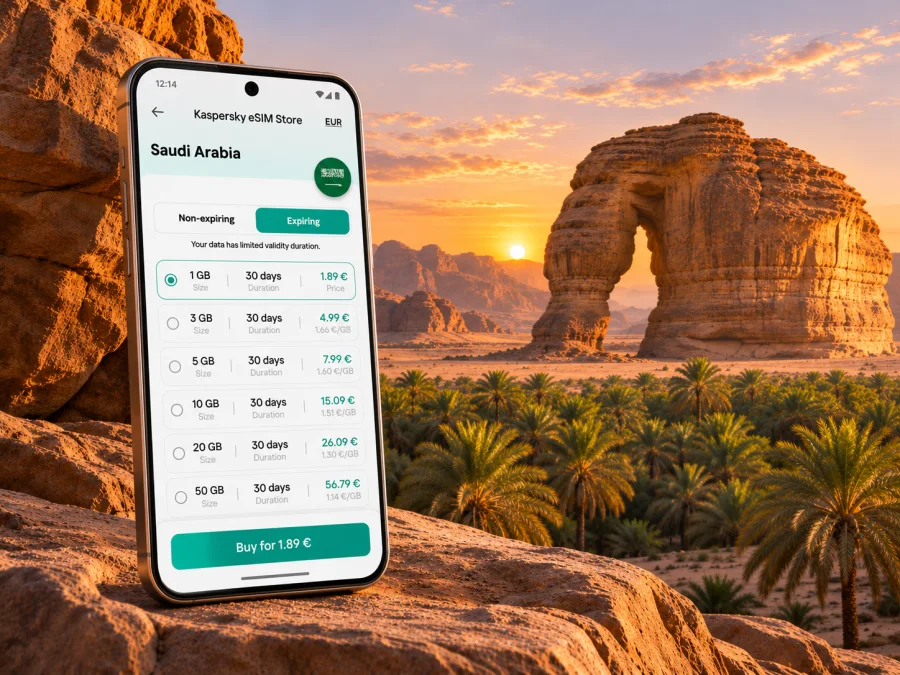
To review the current options for the country, compare eSIM plans for a trip to Saudi Arabia. The page is for Saudi Arabia, not a separate AlUla tariff. Read its current details and confirm that the destination and plan conditions suit your itinerary before placing an order.
The Saudi Arabia destination page in Kaspersky eSIM Store currently identifies Mobily as the local telecommunications provider for the plans displayed there. That is a plan-specific market detail, not a statement that every eSIM for Saudi Arabia uses Mobily or that the same provider is available at every location. The destination’s airport information separately mentions a local SIM option. Check the selected plan’s provider, coverage notes, activation rules, included data and validity in the current offer before purchase; terms may change.
What to compare before choosing
- Data allowance: estimate maps, messaging, browsing and media separately. Save large uploads for Wi-Fi if you want to conserve data.
- Validity: check when the validity period begins and how long it lasts. A short visit and an extended stay may call for different durations.
- Coverage and provider: review the network or local provider named for the specific plan. Coverage can differ between town areas, roads and remote landscapes.
- Tethering: if you need to connect a laptop or another device, verify whether hotspot use is supported by the plan and your phone.
- Calls and texts: a data eSIM may not include a local number, regular voice calls or SMS. Check the offer rather than assuming these are included. Internet calling apps can work over data where the app and service are available.
- Refund and activation conditions: understand whether the plan can be refunded before activation and what action starts its validity.
- Home SIM settings: decide which line should handle data and which line should remain available for calls or verification messages. Your home carrier may charge roaming fees if its line uses mobile data abroad.
Do not assume that a plan labeled for Saudi Arabia guarantees the same experience at every AlUla attraction. Buildings, terrain, congestion, device bands and local network conditions can affect service. If an activity depends on timely contact, confirm a backup such as a meeting time and place, a guide’s number or an offline copy of the booking.
Check your phone and prepare the eSIM
Before ordering, check whether your device supports eSIM. Support depends on the exact phone model and regional variant; two devices with a similar retail name can differ by market. The phone also needs to be unlocked if a carrier restriction prevents adding another provider’s profile. Check the manufacturer’s specifications for your exact variant and contact your home carrier if you are unsure about the lock status.
A quick pre-purchase check:
- Confirm eSIM support for the exact model and country variant, not just the product family name.
- Confirm that the device is unlocked and can add a travel profile.
- Check how many eSIM profiles the phone can store and which lines can be active together; this varies by model.
- Update the operating system before departure if practical, and keep access to your account credentials.
- Make sure you can connect to Wi-Fi during setup and that the phone has enough battery.
- Keep the QR code or activation details available on a second screen or printed copy if the installation method requires scanning it.
On iPhone, eSIM support and activation methods vary by model, country and carrier. Android settings also differ across manufacturers and regional versions. Follow the instructions for your specific device and the steps shown with the plan. If the phone is not compatible or remains carrier-locked, consider your home carrier’s roaming option or a compatible local SIM device rather than assuming an eSIM can be installed.
Install and activate with care
Install at a calm moment with reliable Wi-Fi and follow the plan’s own instructions. The QR code may be single-use, so do not delete the eSIM profile or scan it repeatedly unless the provider’s guidance says to do so. If you are using one phone to display the QR code, arrange another way to view it before starting.
- For an iPhone, use the iOS eSIM installation guide.
- For an Android phone, use the Android eSIM installation guide.
Menu names can differ by software version. Keep the home line selected for calls and texts if you need it, and set the travel profile as the mobile-data line only when you are ready to use it. Turn off data roaming on the home SIM if you do not want it to use data abroad, and check with your home provider about call, SMS and roaming charges. Follow the travel plan’s instructions on whether data roaming should be enabled for that eSIM; settings can differ by provider.
Once connected, verify the selected data line and test a simple webpage or map before leaving Wi-Fi. If it does not connect, check that the eSIM is enabled, the correct line is assigned to mobile data, and any provider-specific roaming setting is configured as instructed. Restarting the phone may help. Avoid deleting the profile as a first troubleshooting step, because reinstallation may not be available with the same QR code.
Use less data and keep a backup
Download offline maps for your accommodation, planned stops and return route while connected to Wi-Fi. Save tickets, booking references and meeting instructions as files or screenshots. Pause photo backups, app updates and video streaming when you need to conserve data, and check usage in your phone settings after the first day. Navigation, camera use and a bright outdoor screen can drain the battery, so carry a power bank on longer outings.
Mobile internet is useful for travel logistics, but it is not an emergency plan. In remote areas, coverage and battery can be limited. Tell someone where you are going, follow site guidance and keep essential contact details and route information offline.
Frequently asked questions
Is AlUla the same place as Hegra?
No. AlUla is the city and wider destination in north-west Saudi Arabia. Hegra is a distinct archaeological site within the AlUla region. Use the exact destination and meeting point when booking transport.
Will a Saudi Arabia eSIM work everywhere in AlUla?
No plan guarantees service at every location. Coverage depends on the provider and network named for the plan, terrain, buildings, congestion and device conditions. Keep key information offline.
Can I use my home number and travel eSIM together?
Many dual-SIM phones allow more than one line, but combinations vary by device and regional version. Check your model’s instructions. If you keep the home line for calls and use the travel eSIM for data, check possible roaming charges with your home carrier.
Does a travel eSIM include calls and SMS?
Not necessarily. Data plans may not include a regular number, voice calls or SMS. Check the offer; internet calling and messaging apps use data where available.
Should I install the eSIM before flying?
Check when validity begins. If it starts on installation, you may choose to install closer to travel; if it starts on first network connection, earlier installation may suit you. Follow the specific plan terms.
Is the eSIM provider the same as the airport SIM provider?
Not necessarily. An airport SIM and a travel eSIM are separate offers. The Saudi Arabia options currently shown in Kaspersky eSIM Store identify Mobily as the local telecommunications provider; check the selected plan for current details.
A final AlUla connectivity checklist
Before you leave for AlUla, make sure you can answer these questions:
- Is my phone’s exact regional variant eSIM-compatible and unlocked?
- Have I checked the plan’s country, listed provider, data amount, validity and activation rules?
- Are my airport transfer, accommodation address and attraction bookings saved offline?
- Do I know which line will handle mobile data and what my home carrier charges for roaming?
- Have I checked the current ride and public transport arrangements for the places I plan to visit?
- Do I have a backup meeting point, charged battery and offline route for a longer outing?
A little preparation makes it easier to use mobile internet for the tasks that matter in AlUla: finding the right meeting point, checking a route, confirming a tour and staying in touch when plans change. Kaspersky eSIM Store helps you choose, arrange and activate an eSIM with a suitable plan for an international trip. Review the current details for Saudi Arabia and choose an eSIM plan for your AlUla trip before travelling.


