
Travel connectivity guide
American Samoa eSIM: mobile internet guide
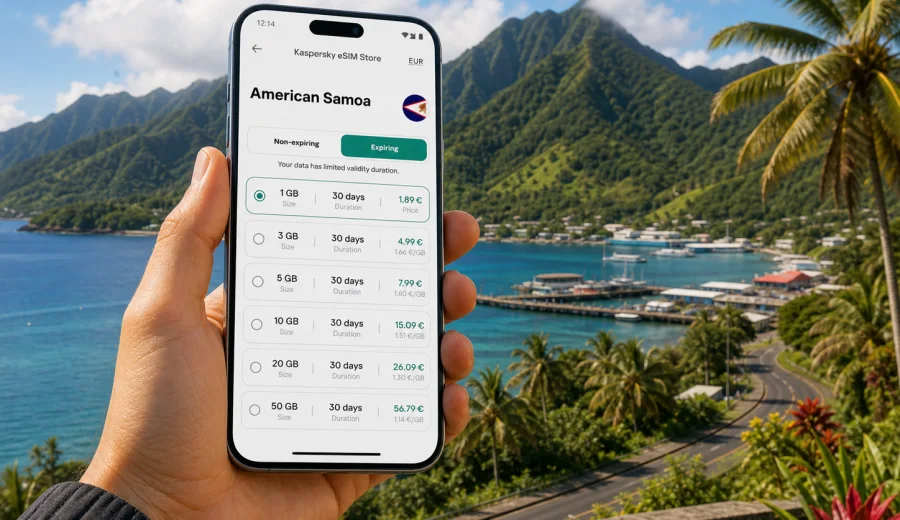
American Samoa eSIM: mobile connection and internet for your trip
For a trip to American Samoa, preparing eSIM mobile data in advance is a practical way to arrange mobile connection and internet before you land in the South Pacific. American Samoa is compact on the map, but a visit can involve airport transfers, harbor roads, national park trails, beach stops, hotel check-ins, and ferry or short-hop plans between islands. In those moments, mobile data is useful for maps, messaging, ride coordination, translation, weather checks, banking alerts, and keeping travel documents close at hand.
American Samoa is a U.S. territory in the South Pacific, with Tutuila as the main island and Pago Pago as the administrative and travel center. Visitors may also plan time around Aunu'u, the Manu'a Islands, Ofu, Olosega, or Ta'u. The islands combine mountainous terrain, coastal villages, rainforest, and beaches, so your internet needs can change during the same day.
An eSIM is not magic coverage and it is not a full replacement for a local phone line. It is a digital SIM profile that can give a compatible device access to mobile data through a selected tariff. For travel, the main advantage is preparation. You can choose a data package before departure, install the eSIM on your phone, and keep your physical SIM available for calls, bank messages, or your usual number.
Why mobile internet matters in American Samoa
American Samoa travel often feels relaxed, but the practical parts of a trip still depend on being online. You may need to confirm accommodation details, check road directions around Pago Pago Harbor, message a host, review flight information for Pago Pago International Airport, or share a location when meeting a guide. Public Wi-Fi may be available in some hotels, cafes, or offices, but you should not build your whole trip around it.
Mobile internet is especially helpful when:
- you arrive after a long international connection and need directions immediately;
- you are moving between airport, hotel, harbor, and coastal villages;
- you want maps available while driving through hilly areas;
- you rely on messaging apps for calls and updates;
- you need payment confirmations or banking notifications;
- you want to check weather before beach, boat, or hiking plans;
- you need to manage travel documents, bookings, or digital tickets.
The calmer approach is to prepare data access before the trip and then use local Wi-Fi as a supplement when it is convenient.
What an eSIM gives you during the trip
For a traveler, eSIM is mainly about mobile data with less friction. You do not need to remove your physical SIM card, carry a second plastic card, or spend your first hours looking for a store. You can keep your primary number active for important messages while using the eSIM as the data line.
In practical terms, an eSIM can help you:
1. Choose a data tariff for American Samoa before departure.
2. Install the digital SIM profile on a compatible phone.
3. Activate mobile data according to the tariff conditions.
4. Use maps, messengers, email, browsers, and travel apps.
5. Monitor your data use and top up or adjust your habits when needed.
The exact experience depends on your phone, the selected tariff, local network conditions, and where you are on the islands. Coastal roads, indoor locations, rain, hills, and remote areas can all influence the connection. That is why it is useful to download key maps, save hotel addresses, and keep important documents available offline even when you have an eSIM prepared.
Choosing the right amount of data
Your best eSIM tariff is the one that matches your trip length and habits. A short stay on Tutuila with hotel Wi-Fi needs less data than a longer itinerary with daily navigation, cloud backup, and video calls. If you are unsure, start by estimating your main online activities rather than choosing by price alone.
| Traveler profile | Typical online behavior | Practical data approach |
|---|---|---|
| Light traveler | Messaging, maps, email, ride coordination, occasional browsing | Choose a modest package and keep media uploads for Wi-Fi. |
| Active explorer | Maps, photo sharing, weather checks, frequent search, social apps | Choose a medium package and review data use daily. |
| Family traveler | Multiple chats, bookings, location sharing, entertainment for children | Consider a larger package or strict app limits. |
| Remote worker | Email, work chat, file access, calls, hotspot when allowed | Choose more data and confirm hotspot needs in the tariff conditions. |
| Long-stay visitor | Daily use across accommodation, transport, and local errands | Prioritize duration as well as data volume. |
For many trips, maps and messaging are not the main data problem. Background app updates, automatic photo backup, short videos, and streaming can consume data quickly. Before departure, switch heavy updates to Wi-Fi only, download offline maps, and check whether your phone allows separate data settings for each SIM.
To prepare mobile internet before departure, choose a suitable eSIM tariff for the trip that fits your trip length, data habits, and device. Kaspersky eSIM Store is an app and website where you can quickly choose, arrange, and activate an eSIM with a suitable tariff for mobile internet in an international trip.
Compatibility comes first
Before choosing any eSIM tariff, check that your phone or tablet supports eSIM and is not locked to one carrier. This step is important because eSIM support depends on the exact device model, region, and carrier restrictions. A phone name alone is not always enough.
Check your device before purchase, especially if:
- the phone was bought through a carrier contract;
- you are using an older model;
- you bought the device in a region where eSIM features vary;
- you plan to use a tablet or secondary device;
- you want to keep your physical SIM active at the same time.
Also check that you know where your phone stores SIM settings. On many devices, you can set one SIM for calls and messages and another SIM for mobile data. For a trip to American Samoa, a common setup is to keep your home SIM available for important SMS messages while assigning mobile data to the travel eSIM.
Once your route and approximate data needs are clear, you can choose a suitable eSIM data plan for the trip and compare data volume, validity period, and activation conditions before installation.
How to install and activate your eSIM
The installation process usually starts with adding the eSIM profile to your phone, then selecting when to activate mobile data. The exact screens vary by operating system, model, and software version. If you need step-by-step help, use the Android installation guide or the iOS installation guide.
A simple preparation flow looks like this:
1. Check that your device supports eSIM and is unlocked.
2. Choose American Samoa as your destination.
3. Select a tariff by data volume and validity period.
4. Install the eSIM while you still have stable Wi-Fi.
5. Keep your primary SIM active if you need calls or bank messages.
6. On arrival, set the eSIM as the mobile data line.
7. Turn on data roaming for the eSIM if the tariff instructions require it.
8. Test a lightweight page or messaging app before relying on maps.
Do not delete an installed eSIM profile unless you are sure you no longer need it. Some eSIM profiles cannot be reinstalled after removal, depending on the tariff conditions. If something does not work immediately, first check the selected data line, roaming setting for the eSIM, airplane mode, and whether the profile is active.
Practical scenarios in American Samoa
| Scenario | How mobile data helps | Smart habit |
|---|---|---|
| Arrival in Pago Pago | Contacting a host, opening maps, confirming transport | Test data before leaving the airport area. |
| Driving around Tutuila | Route checks, weather, messages, location sharing | Download offline maps before the trip. |
| Beach and village visits | Messaging, translation, photo sharing, payment alerts | Save large uploads for Wi-Fi. |
| Hiking and national park plans | Pre-walk checks and post-walk updates | Keep route details and contacts offline. |
| Work across time zones | Email, chat, file access, meeting coordination | Use audio for long calls when data is limited. |
The main rule is simple: use mobile data for live travel decisions and keep essential information stored offline. That gives you more control if the signal weakens in hilly areas, inside buildings, or away from the main roads.
Data-saving checklist before you fly
Use this checklist to make your eSIM data last longer:
- Download offline maps for Tutuila and any planned island areas.
- Save hotel addresses, booking references, and flight details offline.
- Disable automatic app updates on mobile data.
- Pause cloud photo backup until Wi-Fi is available.
- Turn off autoplay video in social media apps.
- Set messaging apps to download media on Wi-Fi only.
- Check which SIM is assigned to mobile data.
- Keep a power bank ready for long travel days.
- Review your data use after the first full day.
Small settings matter. A few minutes of preparation can save hundreds of megabytes during a short trip, especially if your phone normally backs up photos, downloads podcasts, or refreshes apps in the background.
eSIM compared with other connection options
| Option | Strengths | Limits |
|---|---|---|
| Travel eSIM | Prepared before arrival, no physical SIM swap, useful for mobile data | Requires compatible unlocked device and correct setup. |
| Standard roaming | Uses your existing SIM and number | Costs and data limits depend on your home operator. |
| Local physical SIM | Can be useful for longer stays or local calling needs | Requires finding a point of sale and changing SIM cards. |
| Public Wi-Fi | Useful in hotels or cafes and good for large uploads | Not available everywhere and less convenient while moving. |
For many visitors, the practical setup is not one option only. Use the eSIM for everyday mobile internet, keep your home SIM for important messages, and use trusted Wi-Fi for large downloads, system updates, and long video calls.
Managing calls, messages, and dual SIM settings
Most travel eSIM tariffs are focused on mobile data. They usually do not include a standard local phone number, voice calls, or SMS unless the selected tariff says so. For calls, travelers often use internet-based apps. For bank confirmations or important account messages, keep your primary SIM active if roaming conditions allow it.
Before departure, check whether your bank can send confirmations through an app, whether your hotel has your email address, and whether your phone can keep two SIM profiles active. The key setting is mobile data: assign it to the travel eSIM so your home SIM does not accidentally use roaming data in the background.
Common setup mistakes to avoid
Many eSIM issues come from settings rather than the eSIM itself. Before contacting support, check the basics:
- The eSIM profile is installed and switched on.
- The eSIM is selected as the mobile data line.
- Data roaming is enabled for the eSIM if required.
- Airplane mode is off after landing.
- Your phone software is up to date.
- You are not in an area with limited signal.
- Your data package still has available traffic and validity.
If the phone connects but apps do not load, test a simple browser page and a messaging app. If only one app fails, the issue may be that app, permissions, or cached data. If nothing loads, recheck the data line and restart the phone once.
FAQ
Is eSIM useful for American Samoa?
Yes, if your device supports eSIM and you want mobile data without buying a physical SIM after arrival. It is most helpful for maps, messaging, travel apps, email, and coordination.
Does an eSIM include a local phone number?
Travel eSIM tariffs are usually for mobile data. Voice calls, SMS, and a standard local number are not included unless the selected tariff states otherwise.
Should I keep my physical SIM in the phone?
In many cases, yes. Keep your primary SIM available for important messages while the eSIM handles mobile data. Check roaming costs and data settings first.
Can I install the eSIM before I travel?
Usually, yes. Installing before departure is convenient because you can use stable Wi-Fi. Read the tariff conditions so you know when validity begins.
Will the connection be the same everywhere on the islands?
No. Signal and speed may vary by island, terrain, indoor space, weather, local network conditions, and device. Download important information offline before remote activities.
How much data do I need?
For light messaging and maps, a modest package may be enough. For frequent photo sharing, work calls, hotspot use, or longer stays, choose more data and monitor usage.
What should I do if the eSIM does not connect?
Check that the eSIM is active, selected for mobile data, and allowed to use roaming if required. Restart the phone once and review whether your package is valid and has remaining traffic.
Choose an eSIM tariff for American Samoa
American Samoa rewards slow travel, but your mobile setup should be ready before the slow part begins. Prepare maps, bookings, and key contacts offline, then use an eSIM for everyday mobile internet: messages, navigation, weather, payments, and travel coordination.
Choose an review mobile internet options for your destination tariff through Kaspersky eSIM Store before your trip. Select the data volume and validity period that match your route, install the eSIM on a compatible device, and activate mobile data when you are ready to use it in American Samoa.