Travel connectivity guide
Amman eSIM: Mobile Internet and Connection Guide
Amman eSIM: Mobile Connection and Internet for Your Trip
Amman is a city where a short ride can take you from a Roman-era theatre to a modern business district, from a busy downtown market to a quiet hillside café. A reliable mobile data plan can make those transitions easier: you can check directions, contact your hotel, look up opening hours and coordinate a ride without relying on a public Wi-Fi connection at every stop.
An eSIM is a digital SIM profile installed on a compatible phone. For a visit to Amman, it can be a practical way to prepare mobile internet before departure or shortly after arrival, while keeping your regular physical SIM in the phone if you need it. The exact service, network, data allowance, validity period and activation conditions depend on the selected plan. Check those details for Jordan before you buy.
This guide focuses on using mobile data around Amman: arriving at Queen Alia International Airport, finding your way through the city’s hills, choosing a plan for a city break or business visit, and preparing for day trips beyond the capital.
Why mobile data helps in Amman
Amman spreads across hills and valleys rather than a flat grid. A short map distance can mean a steep walk or a longer drive around a hill. Online maps help compare routes, confirm a destination pin and share your location with a driver.
Mobile internet is useful for more than navigation. You may need it to:
- check a hotel’s exact entrance or message the host about arrival;
- look up current opening information for a museum, café or archaeological site;
- request a ride, check a pickup point or share a destination in Arabic or English;
- use translation, currency conversion, email and work tools while away from your hotel;
- keep tickets, reservations and travel documents available in cloud services;
- coordinate a meeting when plans change or traffic affects arrival time.
A data-focused travel eSIM generally provides mobile internet rather than a local number, standard calls or SMS; check the plan terms. Messaging apps can work over data. Keep your usual number available for essential calls or verification texts if your phone supports it, and check home-provider roaming charges.
Before you leave: prepare the phone and plan
Start with the device, then review the plan. eSIM support differs by exact model and regional version; a familiar product name does not guarantee the same SIM features everywhere. A carrier-locked phone may also prevent another eSIM from working.
Before choosing a plan, confirm all of the following:
- Check exact-model support. Confirm the regional model number with the manufacturer. If unsure, check whether your device is compatible.
- Check carrier-unlock status. An eSIM cannot remove a carrier lock.
- Confirm Jordan is included. Review the plan’s destination list and exclusions; a regional label does not guarantee service on every route.
- Match data and validity to your trip. Video, hotspot use, backups and updates can consume far more data than maps or messaging.
- Find the activation trigger. Validity may begin at installation, first connection or another event; follow the plan’s stated timing.
- Prepare installation details. Keep the QR code accessible and install over stable Wi-Fi if required.
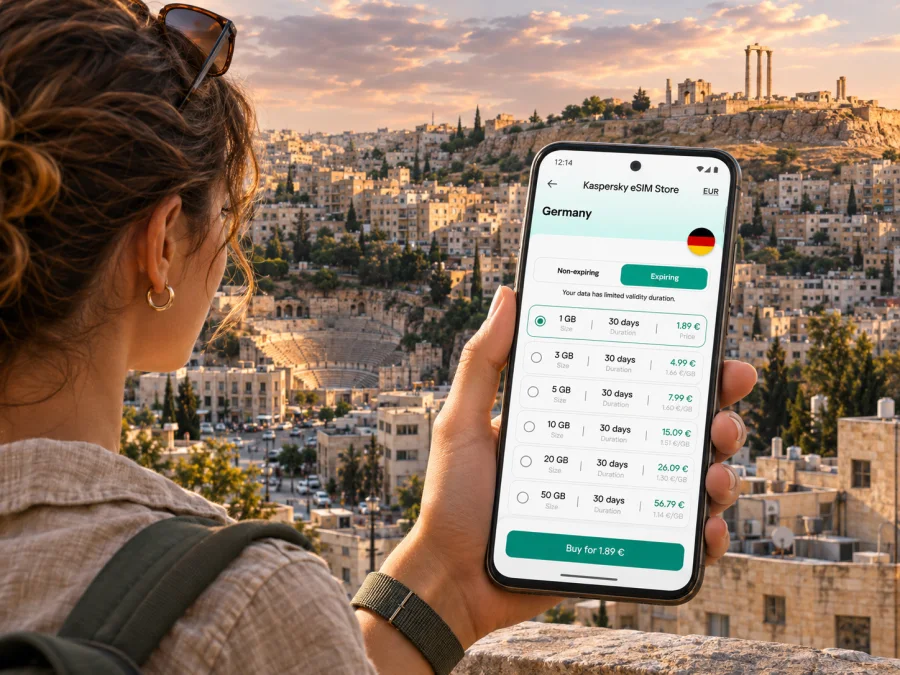
A travel eSIM is usually easiest to prepare while you still have access to stable internet and your account credentials. You can choose the destination and review available conditions in the Kaspersky eSIM Store app or website. The service helps you select, purchase and activate an eSIM plan for mobile data on an international trip; it is not the mobile network operator. Plan availability and conditions can change, so read the current offer for Jordan rather than relying on an old screenshot or a price shown for another country.
Arriving at Queen Alia International Airport
Queen Alia International Airport (QAIA) is the main airport serving Amman, outside the urban centre. After landing, you may need mobile data to tell your accommodation when you expect to arrive, open a map, or compare ways to reach the city. The airport lists taxi, bus and transportation-app options for onward travel. Which is most convenient depends on your arrival time, luggage, destination and current operating details.
A simple arrival sequence is:
- finish entry formalities and collect your baggage;
- connect to Wi-Fi if available, or enable the travel eSIM after confirming its activation instructions;
- check the airport’s current transport information and your accommodation’s precise location;
- choose an official taxi, airport bus or app-based ride and confirm the pickup point before leaving the terminal;
- save the destination address and, if useful, a map area for offline reference.
Do not assume the airport bus is the best option for every hotel. It may suit a traveller with light luggage and a destination near a stop, while a taxi or app-based ride may be more practical for a late arrival, several bags or a steep final walk. Check the airport’s live information for route, stop and fare details; those operational details can change.
Save your accommodation address, phone number and a nearby landmark in a screenshot. Keep the booking confirmation available offline; the landmark can help if a driver cannot find a small street or entrance.
Getting around the city’s hills and neighbourhoods
Plan by area. Downtown (Al-Balad) sits below the Citadel near the Roman Theatre; Jabal Amman and Rainbow Street are known for cafés and restaurants, Jabal Al-Weibdeh for galleries, and Abdali for newer offices, hotels and shopping. These are orientation points, so confirm each venue’s address.
The uphill and downhill character matters. A route between nearby pins may include stairs or steep streets. Compare route options and consider a short ride with bags or children. In older areas, a pin may indicate a nearby road rather than the entrance, so look for a landmark or host instructions.
| Area or destination | What a visitor may be doing there | How mobile data can help |
|---|---|---|
| Downtown / Al-Balad | Visiting the Roman Theatre, shops, cafés and traditional markets | Find the correct entrance, check a walking route back uphill and share a meeting point |
| Amman Citadel (Jabal Al-Qal’a) | Exploring archaeological remains and city views | Confirm the hilltop destination, check site information and arrange transport down |
| Jabal Amman and Rainbow Street | Dining, browsing cafés and walking between venues | Locate a restaurant entrance, check opening details and arrange a ride after dark |
| Jabal Al-Weibdeh | Visiting galleries, cultural venues and neighbourhood cafés | Navigate smaller streets and confirm a venue’s location before setting out |
| Abdali | Staying near offices, hotels and the modern Boulevard area | Coordinate meetings, find a building entrance and manage work messages |
| Ras Al-Ayn | Visiting the Jordan Museum and nearby cultural sites | Check the route from Downtown and keep tickets or reservation details at hand |
Amman’s Bus Rapid Transit (BRT) is part of the city’s transport network. Verify current routes, stops, hours and payment locally before travelling. Taxis and app-based rides may be more direct for other journeys; data helps compare options but cannot guarantee availability, fare or journey time.
Traffic can make a short cross-city trip take longer than expected, particularly around busy periods and main junctions. If you have a timed museum entry, meeting or airport departure, leave a buffer and check the route again before setting off. Keep the destination name and address ready to show a driver; a map pin alone may not communicate which entrance you need.
Choosing a plan for a city stay or a wider Jordan trip
Choose an eSIM plan around the whole itinerary, not just the first hotel. A two-night stay spent mostly around Downtown and Abdali has different data needs from a week that includes remote work, navigation every day and excursions outside Amman. If your route continues to Jerash, Madaba, the Dead Sea, Petra or another destination, verify that the plan covers the relevant places in Jordan and read any fair-use or network conditions shown with it.
To compare plans sensibly, look at these factors together:
- Destination coverage: confirm Jordan is explicitly included. A regional plan can have different country coverage from a single-destination plan.
- Data allowance: think about maps, messaging, browsing, video calls and whether you will upload photos over mobile data.
- Validity: make sure the duration covers your travel days and account for the stated activation trigger.
- Tethering: if you plan to connect a laptop or tablet through your phone, check whether hotspot use is allowed and whether it changes how quickly data is used.
- Top-up or renewal terms: check whether additional data can be added and how long it remains valid, if that matters for your trip.
- Network and service conditions: review the plan information for the local network arrangements and any speed or usage limits. Coverage can vary by location, building, terrain and network conditions.
You can browse the current eSIM options for Jordan in Kaspersky eSIM Store and compare the displayed data allowance, duration and conditions for your travel dates. This is a country-level destination page, not a promise of a particular Amman tariff, network, speed or coverage at a named address. Confirm the current plan terms before purchase.
A practical data estimate
There is no single correct data amount for every visitor. A traveller who uses maps for directions, messaging and light web browsing may consume far less than someone who streams video, joins long video meetings, uploads large files or shares a hotspot. Your hotel Wi-Fi may reduce mobile use, but it should not be treated as guaranteed.
Use this quick planning method:
- List the activities you expect to do away from Wi-Fi: maps, translation, calls in messaging apps, email, social media, video or work.
- Check your phone’s recent mobile-data usage as a reference, then adjust for the length and style of this trip.
- Disable automatic photo backups and large app updates over mobile data if you want to preserve the allowance.
- Recheck the plan’s validity and top-up rules; a larger allowance is not useful if its duration does not fit your travel dates.
- Keep some data in reserve for navigation, transport changes and contacting your accommodation.
These steps help you make a reasonable estimate, not predict an exact total. App behaviour, map downloads, photo quality and background processes all affect usage. If a plan has a clear usage monitor, check it during the trip and change settings before the allowance becomes inconveniently low.
Installing and activating an eSIM
Installation menus differ slightly across phone brands and operating-system versions. Follow the instructions supplied with your plan. In general, you add the eSIM profile through the phone’s cellular or mobile-network settings, then select it for mobile data when you are ready to use it. If a QR code is required, display it on another screen or use the provider’s supported manual entry method.
For step-by-step device guidance, follow the Android eSIM installation instructions or the iPhone and iOS eSIM installation instructions. Menu names can change with software updates, so use the instructions that match your operating-system version.
Before travel, a cautious setup looks like this:
- Check device compatibility and carrier-unlock status.
- Purchase only after confirming the destination, allowance, validity and activation rules.
- Install the profile when you have a stable connection, if the plan permits installation in advance.
- Label the new line clearly, such as “Jordan data,” so it is easy to identify beside your regular SIM.
- Keep your home line configured for calls or texts if you need it, and select the eSIM for mobile data according to the plan’s directions.
- Turn off data roaming on the home line if you want to avoid unexpected charges; enable it on the travel eSIM only if its instructions require it.
- When you arrive, enable the eSIM line and allow it time to register. If it does not connect, check the plan instructions, data-line selection, roaming setting and local signal before changing other settings.
Do not delete a profile as a first troubleshooting step: some cannot be reinstalled without support. If setup stalls, note the error, connect to Wi-Fi if possible and contact the plan’s support channel.
Using one connection for maps, work and messaging
Your regular SIM may remain available for calls or verification messages while the eSIM handles data, depending on your phone’s dual-SIM settings. Confirm which line is selected before calling or enabling roaming. Download an offline map and save your hotel address and reservations before leaving Wi-Fi. For work, test email and authentication in advance; video calls and hotspot use can consume data quickly and indoor reception varies. On a short layover, prioritize airport directions, transport updates and a way to contact your next destination.
Day trips from Amman
Amman can serve as a base for visits to places such as Jerash, Madaba or the Dead Sea. Before leaving, confirm transport, opening details and the return plan. Check that your eSIM plan covers the full route; reception may differ outside central Amman. Download maps and booking details in advance, and share a clear meeting point with your group in case someone loses signal or battery power.
If mobile data does not work as expected
First check the simple settings rather than repeatedly reinstalling the profile:
- Confirm the eSIM line is switched on and selected for mobile data.
- Check that airplane mode is off and restart the phone if the connection appears stuck.
- Follow the plan’s instructions about data roaming and network selection; do not change settings that the plan tells you to leave automatic.
- Move to an open area or another location. Hills, thick walls, basements and crowded sites can affect reception.
- Confirm that the plan is active, valid for Jordan and still has data available.
- If the issue continues, record the time, location and any error message, then contact the plan’s support channel over Wi-Fi or another available connection.
Check plan status and settings before assuming the cause. Use the support channel listed with the plan for activation questions.
Questions travellers ask about Amman eSIM
Will an eSIM work everywhere in Amman?
No mobile plan should be treated as a guarantee of service at every point. Reception depends on the plan’s network arrangements, location, building materials, terrain, device and temporary network conditions. Check the coverage information and keep offline access to essential addresses and directions.
Does an eSIM give me a Jordanian phone number?
Not necessarily. Many travel eSIMs are for mobile data and do not include a local number, standard calls or SMS. Check the exact plan conditions. You can usually use internet messaging and calling apps when connected, while keeping your regular number for services that require it if your phone supports dual SIM.
Can I install the eSIM before I fly?
Often a profile can be installed ahead of travel, but the correct timing depends on the plan’s instructions and activation policy. Read when validity starts. If installation needs internet access, do it while you have a stable connection and keep the QR code or manual details available until setup is complete.
Should I use mobile data or Wi-Fi in my hotel?
Use whichever connection is appropriate and secure for the task. Hotel Wi-Fi can reduce mobile-data use, while an eSIM provides a mobile option when you are out exploring or moving between locations. Do not assume either connection is always available or suitable for every task.
A simple checklist before you head out
- [ ] The exact regional version of your phone supports eSIM and is not carrier-locked.
- [ ] Your selected plan includes Jordan and fits your travel dates and expected data use.
- [ ] You know when validity starts and whether activation requires a setting such as data roaming.
- [ ] The eSIM is labelled clearly and selected for mobile data when appropriate.
- [ ] Your airport transfer, hotel address and key reservations are available offline.
- [ ] Your home SIM’s roaming settings are understood so you can avoid unexpected charges.
- [ ] You have a route or meeting-point backup for areas where reception may be limited.
Prepare your Amman connection
Before your trip, review the current plan options for Jordan, check your device and compare the data allowance and validity with your itinerary. Kaspersky eSIM Store is an app and website that helps you choose, purchase and activate an eSIM plan for mobile internet while travelling abroad. Read the terms for the specific plan you select and follow its setup guidance.
Explore eSIM options for your trip to Jordan and prepare your phone before you set out for Amman.


