
Travel connectivity guide
Amwaj Islands eSIM for mobile internet
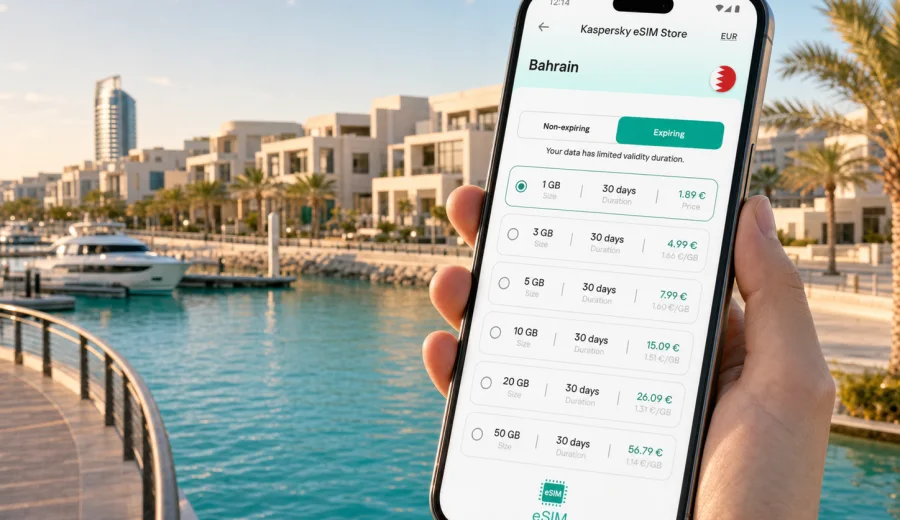
Amwaj Islands eSIM: mobile connection and internet for a trip to Bahrain's waterfront district
Amwaj Islands is one of Bahrain's most convenient places to stay if your trip depends on smooth movement, quick navigation and steady mobile internet. The district sits off Muharraq, close to Bahrain International Airport and within easy reach of Manama, so many visitors use it as a waterfront base for business meetings, family stays, marina days or a short stopover in the Gulf.
For this kind of trip, an eSIM can be a practical way to prepare mobile data before you start moving around. Instead of looking for a physical SIM card after landing, you can choose a suitable data plan for Bahrain, install the eSIM on a compatible phone and use mobile internet for maps, ride-hailing apps, hotel messages, restaurant bookings and calls through messengers.
This guide focuses on Amwaj Islands specifically: arrival from the airport, local movement, hotels, marina plans, work scenarios, day trips and the checks worth making before you buy and activate an eSIM.
Why mobile internet matters in Amwaj Islands
Amwaj Islands feels relaxed, but the practical travel pattern is active. You may land at Bahrain International Airport, go straight to a hotel or apartment, meet someone in Manama, return to the waterfront for dinner, then leave early the next morning for a meeting or a family plan. In these moments, mobile data is less about entertainment and more about control.
You are likely to need internet access for:
- checking the exact pickup point at the airport;
- following the route from Muharraq to Amwaj Islands;
- contacting your hotel, host or driver;
- opening booking confirmations without relying on hotel Wi-Fi;
- checking restaurant locations around The Lagoon and nearby waterfront areas;
- using maps when moving between Amwaj Islands, Muharraq and Manama;
- keeping work chats and email available during a business trip;
- sharing your live location with family or colleagues;
- using messenger calls if your eSIM plan does not include a regular phone number.
Public Wi-Fi can help in hotels and cafes, but it is not something to build the whole trip around. You may need a map while standing outside, a payment confirmation in a taxi, or a message from a colleague while walking between venues. A prepared eSIM reduces the number of small moments where you have to stop and search for a network.
Arrival: from Bahrain International Airport to Amwaj Islands
The first useful eSIM scenario usually begins before you see the waterfront. Bahrain International Airport is close to Amwaj Islands compared with many island or resort destinations, yet the first hour still involves several small decisions: immigration, baggage, ride booking, hotel address, meeting point and payment confirmation.
If your eSIM is already installed, you can switch mobile data to the eSIM profile after arrival, once the phone is allowed to connect to a local network. This can make the arrival flow easier because you do not need to look for a SIM counter before checking your address or contacting your accommodation.
A practical arrival checklist:
- install the eSIM before travel while you still have a stable connection;
- keep the QR code or installation details available in your email or profile;
- check that your phone supports eSIM and is not locked to one carrier;
- after landing, turn on the eSIM line for mobile data;
- enable data roaming for the eSIM if the setup instructions require it;
- open your hotel address and ride app before leaving the terminal;
- keep your primary SIM active only if you need calls or SMS from your home number.
The short airport transfer can be deceptive. Because it is close, travellers sometimes assume they can manage without mobile data until the hotel. That works if everything is already arranged, but it becomes less convenient if the driver asks for a building name, the hotel sends a room update, or your meeting moves from Amwaj Islands to Muharraq or Manama.
Where eSIM helps around the islands
Amwaj Islands combines residential blocks, hotels, restaurants, marina areas and waterfront promenades. The district is not complicated, but addresses, building entrances and pickup points can be less obvious to a first-time visitor than they look on a map. Mobile internet helps you turn a general location into a precise arrival point.
Common local scenarios include:
| Travel moment | Why mobile data helps |
|---|---|
| Checking into a hotel | You can message reception, open booking details and share arrival time. |
| Meeting near the marina | Maps and live location help avoid confusion between waterfront entrances. |
| Going to The Lagoon area | You can check restaurant location, opening status and ride pickup points. |
| Moving to Manama | Navigation helps estimate traffic and choose a suitable departure time. |
| Working from a cafe or apartment | Mobile data can back up Wi-Fi for urgent messages and authenticator apps. |
| Family travel | You can coordinate separate taxis, beach plans or evening pickups. |
The most useful approach is to think of the eSIM as your travel data layer. It does not replace every connection option, and it does not give a regular phone number unless that is stated in the plan conditions. Its main value is that your compatible phone can use mobile internet when Wi-Fi is unavailable, inconvenient or not yet trusted.
Choosing the right data plan for Amwaj Islands
For a city-focused stay, the best eSIM plan is usually not the largest one by default. It should match the way you will actually use mobile data in Bahrain. A traveller staying two nights in Amwaj Islands and mostly using hotel Wi-Fi has different needs from someone driving between Amwaj Islands, Manama, Riffa and multiple business venues.
Start with these questions:
- How many days will you stay in Bahrain?
- Will you remain mostly in Amwaj Islands, or move around the country?
- Do you expect video calls, hotspot use or cloud file access?
- Will your hotel, office or apartment have reliable Wi-Fi?
- Do you need data immediately after landing?
- Are you travelling alone, with family or with colleagues?
For light use, mobile data may cover maps, messages, ride apps, restaurant searches and email. For a working trip, data use can rise quickly if you join video meetings, sync documents or use your phone as a hotspot for a laptop. For a family stay, the total need can increase because several people may rely on maps, chat, bookings and entertainment at different times.
As a rough planning model, compare your trip with these profiles:
| Visitor profile | Typical data use in Amwaj Islands | Planning note |
|---|---|---|
| Short stopover | Maps, ride apps, hotel messages, a few browsing sessions | A smaller plan may be enough if Wi-Fi covers most of the stay. |
| Weekend visitor | Navigation, photos, restaurant searches, messenger calls | Choose a plan that covers the full stay, not only arrival day. |
| Business traveller | Email, calendar, authentication, document access, calls through apps | Leave extra data for unexpected meetings and transfers. |
| Family trip | Shared logistics, maps, bookings, entertainment, separate routes | Consider each traveller's device and expected usage separately. |
| Regional route | Bahrain plus possible onward travel | Check whether a country, regional or global plan fits the itinerary. |
Before you choose, read the plan conditions carefully: data volume, validity period, destination, activation rules, top-up options and whether tethering is allowed. Kaspersky eSIM Store helps you compare available options and prepare an eSIM for the destination, but coverage and plan details depend on the selected tariff and local network conditions.
For this kind of city stay, you can prepare an eSIM plan for Bahrain before travelling and then use it as your mobile data option for Amwaj Islands, the airport, Muharraq, Manama and nearby trips. Review the plan details before purchase so the data volume and validity match your route.
When to install and activate the eSIM
The safest routine is to install your eSIM before departure and activate mobile data when you arrive, unless the specific plan instructions say otherwise. Installation usually needs a stable internet connection, so doing it at home, in the office or on trusted Wi-Fi is easier than trying to complete the whole setup after a flight.
Typical steps:
1. Check that your phone supports eSIM.
2. Choose Bahrain as the destination and review the available data plans.
3. Select a plan with suitable data volume and validity.
4. Complete the order and open the eSIM details.
5. Install the eSIM using the on-screen steps or QR code.
6. On arrival, set the eSIM as the line for mobile data.
7. Follow the plan instructions for data roaming and activation.
For setup guidance, use the installation guide for Android or the installation guide for iOS. The exact screens can vary by phone model and operating system version, so keep the instructions open while you complete the setup.
One important detail: many eSIM data plans do not include traditional voice calls or SMS. If you need bank texts, airline alerts or calls to your home number, keep your primary SIM configured appropriately. For ordinary trip communication, many visitors use messengers over mobile data.
Movement, hotels and work around Amwaj Islands
Amwaj Islands is close to Muharraq and within easy reach of Manama, so a stay there often includes more than the waterfront. You might land at the airport, check into a hotel, meet someone near the marina, go to Manama for dinner or a meeting, then return late in the evening. Mobile internet helps most when the plan changes during the day.
Useful local routes and data tasks:
- Amwaj Islands to Bahrain International Airport: confirm terminal timing, ride pickup and flight status.
- Amwaj Islands to Muharraq: use maps for heritage areas, cafes and meeting locations.
- Amwaj Islands to Manama: check traffic, destination entrances and drop-off points.
- Hotel to waterfront restaurants: share live location and avoid confusion between entrances.
- Apartment or cafe work session: keep email, calendar and authentication apps available.
Use hotel or apartment Wi-Fi for heavier tasks when it is stable: long video calls, laptop updates, large file uploads and photo backups. Use mobile data for tasks where timing matters outside your room: maps, ride apps, two-factor authentication, urgent work chat, payment confirmations and messenger calls.
For business travellers, Amwaj Islands can be a quiet base near the airport while meetings happen across Bahrain. Before departure, install the eSIM on stable Wi-Fi, save hotel and meeting addresses, check whether your work apps need SMS on your primary number and confirm whether hotspot use is allowed by the selected plan. Hotspot use can consume data faster than phone-only navigation and messaging, so plan extra if you expect to connect a laptop.
For families, the main value is coordination. Mobile data helps when one person handles transport, someone else checks restaurant availability, and plans change because of timing, heat or tiredness. If several travellers need data, plan per device: an eSIM is installed on a compatible phone, and transfer rules depend on the eSIM profile and plan conditions.
Device compatibility before you buy
Not every phone supports eSIM, and some phones may be locked to one carrier. Check this before choosing a plan, especially if the trip is close and you will need data right after landing.
Before purchase, confirm:
- your smartphone supports eSIM;
- the device is not carrier-locked;
- the operating system is up to date enough for eSIM setup;
- you can access the email or profile where the eSIM details will appear;
- you understand whether the validity period starts at purchase, installation or first network connection;
- you know whether data roaming must be enabled for the eSIM.
Check your device before buying, then review the plan conditions for Bahrain. This step is simple, but it prevents the most frustrating eSIM problem: discovering after arrival that the phone cannot install or use the profile as expected.
How much data to plan for
Data use varies, so avoid choosing only by the number of travel days. A quiet stay with hotel Wi-Fi may use little mobile data. A trip with hotspot use, video meetings, social uploads and constant navigation may need much more.
Use this guide as a planning aid:
| Activity | Data impact | Amwaj Islands example |
|---|---|---|
| Messaging and email | Low to moderate | Coordinating hotel, driver and meeting details. |
| Maps and ride apps | Moderate | Moving between Amwaj Islands, airport, Muharraq and Manama. |
| Voice calls through apps | Moderate | Calling family or colleagues from the waterfront or taxi. |
| Video calls | High | Joining a work meeting away from hotel Wi-Fi. |
| Hotspot for laptop | High | Working from a serviced apartment, cafe or car. |
| Streaming and cloud backups | Very high | Better saved for reliable Wi-Fi when possible. |
A good rule is to reserve mobile data for tasks that must work while you are outside. Use Wi-Fi for heavy uploads and streaming when the network is reliable and appropriate. If your plan allows top-up, check how that works before you run low.
What eSIM does and does not do
An eSIM for travel is a digital SIM profile used with a compatible device. For Amwaj Islands, the main reason to use one is mobile internet during a Bahrain trip without installing a physical SIM card.
It can help you:
- prepare mobile data before arrival;
- avoid searching for a SIM shop during the first hour;
- use maps, messengers and booking apps around the city;
- see plan conditions such as data volume, validity and destination;
- manage the eSIM through the website or app.
It does not automatically mean:
- a regular local phone number is included;
- SMS and voice calls are included;
- every device is compatible;
- every location has identical network performance;
- every plan starts counting validity at the same moment.
Read the selected plan details carefully. If ordinary calls or SMS are essential, check the conditions before relying on an eSIM data plan for that purpose.
Common mistakes to avoid
Most eSIM problems are avoidable with a few checks before departure. Do not buy before confirming compatibility, do not wait until the airport exit to install the eSIM from scratch, and do not assume that voice calls or SMS are included. Also check the validity period: for Amwaj Islands, you may still need data for checkout, the airport transfer, flight updates and last-minute messages.
Quick checklist for Amwaj Islands
Before you fly:
- confirm your phone supports eSIM;
- choose Bahrain as the destination;
- review data volume, validity and activation rules;
- install the eSIM on stable Wi-Fi;
- save hotel and airport details offline;
- keep your main SIM available if you need home-number SMS.
After arrival:
- turn on the eSIM line for mobile data;
- follow the plan instructions for roaming settings;
- test maps and messaging before leaving the airport;
- keep hotel Wi-Fi for heavy data tasks;
- monitor data use if you plan to hotspot.
Before departure:
- check remaining data before leaving Amwaj Islands;
- confirm the airport route and pickup point;
- keep boarding pass and booking details accessible;
- avoid deleting the eSIM until the trip is fully over.
FAQ
Is an eSIM useful for a short stay in Amwaj Islands?
Yes, it can be useful even for a short stay if you need maps, taxi apps, hotel messages and mobile internet soon after landing. For a very short stopover, choose a plan with validity and data volume that match the actual time in Bahrain.
Can I use an eSIM in Amwaj Islands and Manama on the same trip?
For a Bahrain destination plan, the eSIM is intended for use in the country covered by the selected plan. Amwaj Islands, Muharraq and Manama are all part of a typical Bahrain itinerary, but you should still read the plan conditions before purchase.
Does an eSIM include calls and SMS?
Many travel eSIM plans are data-only. That means you can use mobile internet for messengers and apps, but ordinary calls and SMS are not included unless the plan clearly says so.
Should I install the eSIM before flying to Bahrain?
Installing before departure is usually more convenient because you can use a stable connection and fix setup questions before the trip. Activation timing depends on the selected plan, so follow the plan instructions.
Can I rely only on hotel Wi-Fi?
You can use hotel Wi-Fi for heavy tasks, but mobile data is useful when you are outside, in a taxi, at the airport, at a marina meeting point or moving between Amwaj Islands and Manama.
Prepare mobile internet for Amwaj Islands
Amwaj Islands is close to the airport, comfortable for waterfront stays and practical as a base for moving around Bahrain. That convenience is easier to use when your phone is ready for maps, transport, hotel messages, work chats and messenger calls from the moment you need them.
Before the trip, check device compatibility, review the Bahrain plan conditions and install the eSIM while you have reliable internet access. When you are ready, you can choose an eSIM plan for your Bahrain trip through Kaspersky eSIM Store and prepare mobile data for Amwaj Islands, Manama, Muharraq and the airport transfer.