Travel connectivity guide
Andijan eSIM: Mobile Internet for Your Trip
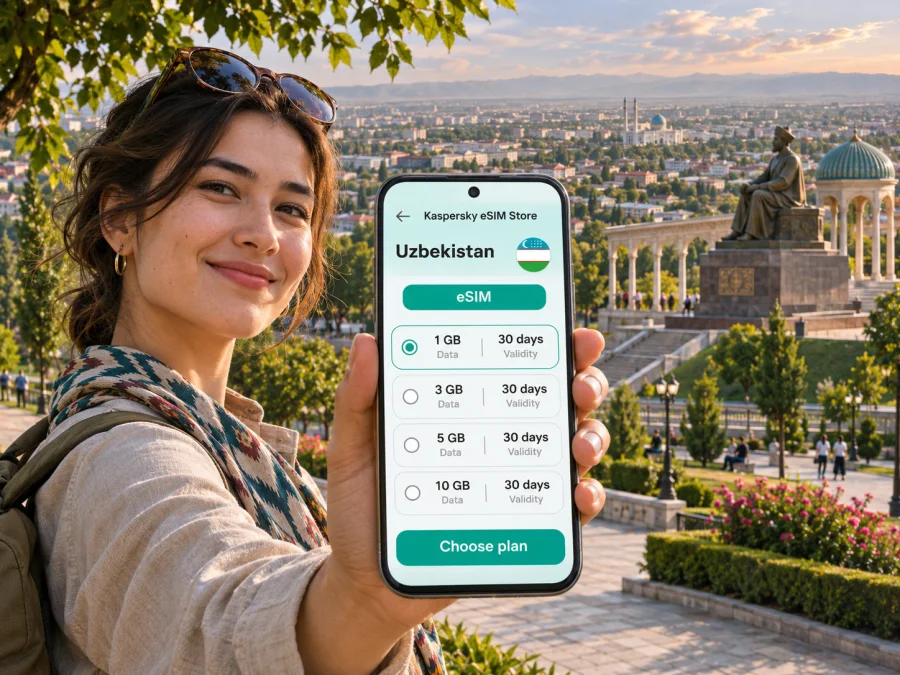
Andijan eSIM: mobile connection and internet for your trip
Andijan sits at the eastern end of Uzbekistan’s Fergana Valley, close to the region’s borders and far from the country’s best-known western Silk Road cities. It is a working regional centre as well as a place to visit for Babur’s history, lively markets, mosques and everyday valley life. A dependable mobile data plan can make the practical parts of a visit easier: checking your arrival details, arranging a ride, finding a hotel entrance, translating a menu or keeping a map available while you walk.
An eSIM is a digital SIM profile installed on a compatible phone. For a trip to Andijan, it can provide mobile data without replacing the physical SIM already in your phone. The precise network, coverage, speed, data allowance, validity period and activation rules depend on the specific plan and its local network partners. Check those details before purchase; a city name on a travel itinerary does not guarantee a signal in every building or on every road.
Why mobile data helps in Andijan
Andijan is not a compact museum district where every stop is next door. You may move between the airport, accommodation, central streets, a market and Babur Memorial Park on Bogishamol hill. Mobile internet is useful for planning each leg and confirming where a driver should meet you. It also helps when a plan changes, opening hours need checking or you need to share your location with someone travelling with you.
Typical uses include maps and saved pins, messages to a host or driver, short translations, weather checks, booking details and onward travel information. Save essential addresses offline and carry a power bank if you will navigate for much of the day. Hotel or café Wi-Fi can be a backup, but availability and sign-in requirements vary.
Arriving in the city: airport, train and road
Andijan has an airport serving the city, and In an August 2025 announcement, Uzbekistan Airways said it was launching scheduled service on the Tashkent–Andijan route. That announcement is not a live timetable: routes and frequencies can change, so confirm your own flight directly with the carrier before travelling. If you arrive by air, download the hotel address and any onward booking details before boarding; once you land, mobile data can help you contact your host and coordinate a pickup.
Some visitors arrive by rail from other parts of Uzbekistan. The train, departure station and journey duration depend on the route and date, so check current ticket information and leave time for a pickup. For onward travel in the Fergana Valley, verify the exact station or bus stop; similar place names can be confusing on a quick map search.
For your first transfer, keep the booking address and map pin ready. If a driver cannot find the entrance, share the pin by message. An installed travel eSIM should be selected and enabled for data; if you plan to install it after arrival, you will need reliable internet for setup. Follow the plan’s instructions.
A city route that benefits from a map
Start with the address of your accommodation, then group visits by area rather than crossing town repeatedly. The central area is a convenient base for several cultural stops, while Babur Memorial Park is on Bogishamol hill outside the immediate centre. Uzbekistan’s official tourism site places the park about seven kilometres from Andijan and describes a museum, gardens and a cable car at the site. Check current access and operating details locally before setting out, especially if the park is the main reason for your visit.
A simple day plan might look like this:
| Part of the day | Possible focus | How mobile data helps |
|---|---|---|
| Morning | Jome (Jami) Complex or another central cultural stop | Check the map pin and confirm the entrance before walking or arranging a ride. |
| Midday | Lunch and a market visit | Translate a dish name, message your host, or adjust the next stop if you are taking a break. |
| Afternoon | Babur Memorial Park on Bogishamol hill | Compare the route options and confirm where a driver should wait for the return trip. |
| Evening | Alisher Navoi Park or the city centre | Find your accommodation again and coordinate a safe, clear pickup point. |
Use the table as a planning framework, not a promise about opening hours or travel times. Check access arrangements locally at religious sites, dress respectfully and avoid interrupting worship. Transliteration can vary between Uzbek and English; if map results are ambiguous, ask your accommodation for a pin. Save an offline map before setting out.
Choosing a plan for a city stay or a regional route
The right eSIM plan depends on what you will do, how long you will stay and how much data your phone typically uses. A short visit focused on messaging, maps and email has different needs from a work trip with frequent video calls or a journey that continues to other cities. Andijan is in Uzbekistan, so choose a destination option that explicitly covers Uzbekistan. If your itinerary crosses a border or includes several countries, check the covered destinations for the whole route rather than assuming a single-country plan will extend beyond it.
Before choosing, compare these details in the plan conditions:
- Destination coverage. Confirm that Uzbekistan is listed and read any regional restrictions. Coverage is provided through the relevant local network, and indoor reception or service outside city areas may vary.
- Data allowance. Estimate your likely use. Maps, messaging and browsing are generally lighter than video streaming, large downloads, cloud backups or video meetings. Turn off automatic app updates and photo backups over mobile data if you want to conserve the allowance.
- Validity. Match the plan period to your travel dates and check when the validity clock starts. The trigger can differ by plan, so do not assume it begins at purchase, installation or first arrival until the terms say so.
- Tethering. If you need to connect a laptop or another device, check whether personal hotspot use is allowed and whether it affects the allowance or speed.
- Top-ups and renewal. Check whether additional data can be added to the same eSIM, whether a plan renews automatically and what happens when the allowance is used up.
- Voice and SMS. Many travel data plans are data-only. Unless the selected plan explicitly says otherwise, do not expect a local phone number or ordinary cellular calls and SMS. Internet calling and messaging apps may work over data, subject to the app and connection.
- Network selection and device requirements. Review any instructions about manual network selection, roaming data for the eSIM line or APN settings. Follow the plan’s instructions rather than changing unrelated settings.
For a city-only stay, a country plan may be the simplest option if its conditions list Uzbekistan and the expected coverage suits your route. If you are travelling through several countries, compare a multi-country option against separate destination plans by coverage, data and validity. The cheapest-looking amount is not necessarily the best fit if it expires too soon or does not cover the next leg.
When you are ready to compare current options, review eSIM plans for Uzbekistan. This is the country destination page; the available options and their conditions can change, so check the details shown for the plan you select.
Neighborhoods, stays and practical use
Accommodation, work and busy streets
Choose accommodation around your itinerary and confirmed transport rather than assuming one area is always best. For a late arrival, request an entrance pin and pickup instructions in advance. If you have an early departure, verify the route and station or airport the night before. At check-in, save the address, host contact and reservation reference offline.
For work, download meeting details over Wi-Fi. Video calls use more data and are more sensitive to signal changes than email, so use a stable connection where possible. In a bazaar, step aside to check directions and keep your phone secure in the crowd.
Compatibility and setup before you leave
An eSIM works only on a device that supports eSIM and is not restricted by a carrier lock or other device limitation. Support can differ between regional versions of the same phone model, and an identical model name is not enough to confirm compatibility. Check the exact device variant in its settings or manufacturer information, confirm that it is unlocked, and use the device compatibility checker before purchase.
If the phone has two SIM lines, decide which one will handle mobile data and which line should remain available for calls or verification messages. Check the roaming terms of your home SIM before travel; keeping it enabled for calls can have separate charges. A travel eSIM usually does not replace the home number, but the behavior depends on the handset and plan configuration.
A practical setup sequence is:
- Confirm that your exact device supports eSIM and is unlocked.
- Choose a plan whose destination and conditions match your dates and route.
- Install the profile while you have a stable internet connection, following the plan’s instructions. Some plans allow installation in advance; others specify a different timing.
- Label the line clearly, for example “Uzbekistan data,” so you can recognize it in the mobile settings.
- Before departure, leave your home line settings as intended and avoid deleting the eSIM profile. A profile may not be reusable after removal.
- After arrival, enable the travel eSIM line and choose it for mobile data. Turn on data roaming for that line only if the plan instructions require it.
- Open a simple webpage or map to confirm data access. If it does not connect, check the selected data line, signal, plan validity and any network-selection instructions before reinstalling or deleting anything.
For device-specific steps, use the Android eSIM installation guide or the iPhone and iOS eSIM installation guide. The labels in your settings may differ by manufacturer and operating system version, so follow the on-screen steps for your model.
If mobile data does not work
A failed connection does not always mean the eSIM profile is defective. Work through the least disruptive checks first:
- Confirm that the eSIM is installed, enabled and selected for mobile data.
- Check that the plan’s destination, validity period and remaining data cover your current use.
- Move to a place with a clearer signal, such as outdoors, and wait briefly for the phone to register.
- Check the plan instructions for data roaming, APN or manual network selection requirements.
- Toggle airplane mode off and on once, or restart the phone if the line still does not register.
- Keep Wi-Fi available for support contact while troubleshooting; do not delete the eSIM profile unless the plan’s support team tells you to do so.
If the issue continues, note your phone model, location and displayed network status, then contact the support channel provided with the plan. Do not post QR codes or account details publicly.
Short visits and onward travel
For a short visit, save your hotel pin, pickup instructions, Babur Memorial Park location and an offline map. Estimate data use from your habits rather than trip length alone. For a longer stay or regional route, save station names and tickets, check destination coverage and download large files over Wi-Fi.
If you need a local Uzbek number, check current local operator requirements separately. Local eSIM issuance or device registration rules may differ from those for an international travel data plan. An eSIM is for data unless the chosen offer explicitly includes calls or SMS; keep essential bookings and contacts available offline.
Andijan eSIM checklist
Before you travel:
- [ ] Confirm that Uzbekistan is covered by the plan you selected.
- [ ] Check exact device compatibility, carrier-unlock status, validity and data allowance.
- [ ] Read whether the plan is data-only and whether tethering is allowed.
- [ ] Install the eSIM at the time specified by its instructions and keep the profile on your phone.
- [ ] Save your accommodation address, pickup point, tickets and an offline map.
- [ ] Verify your flight or train schedule with the carrier and check the departure or arrival point.
After you arrive:
- [ ] Select the travel eSIM for mobile data and enable only the settings its instructions require.
- [ ] Confirm that a basic webpage or map loads before relying on the connection.
- [ ] Keep Wi-Fi or offline details available as a backup.
- [ ] Check the plan’s remaining allowance before a longer day trip or work call.
Frequently asked questions
Is Andijan in Uzbekistan?
Yes. Andijan is a city in eastern Uzbekistan and the administrative centre of Andijan Region, in the Fergana Valley. The article’s plan guidance is for a trip to the city, while coverage conditions are set by the selected Uzbekistan destination plan.
Is there an airport in Andijan?
Yes, Andijan has an airport. Scheduled routes and frequencies can change; confirm the itinerary with your airline for the travel date. Uzbekistan Airways announced a Tashkent–Andijan route in August 2025, but that announcement is not a guarantee of service on a future date.
Can I use an eSIM for maps and messaging in Andijan?
You can use a travel eSIM for mobile data if the specific plan covers Uzbekistan, the device is compatible and the eSIM connects to a supported local network. Actual service can vary by location, building and network conditions. Download an offline map as a backup.
Will a travel eSIM give me an Uzbek phone number?
Do not assume so. Many travel eSIM plans are data-only. Check the selected plan’s terms for calling, SMS and number availability. You can continue using internet-based messaging apps over data where the app and connection permit.
Should I install the eSIM before reaching Andijan?
That depends on the plan’s activation instructions. If advance installation is allowed, setting it up while you have reliable Wi-Fi can simplify arrival. Check when validity begins and when to enable the line; installation and activation are not always the same event.
Do all versions of my phone support eSIM?
No. Regional device variants can differ, and a carrier lock may prevent use even when the model family supports eSIM. Confirm the exact variant and unlock status, then check compatibility before purchase.
Can I use the same plan outside Andijan?
Only if its destination coverage includes the places on your route. Check the country or regional list, plus any stated limitations, before travelling onward. A city-focused article does not imply city-specific network coverage.
Prepare your connection for Andijan
A little planning makes arrival and movement around Andijan easier: save your addresses, verify your transport details, check the exact phone variant and choose a plan that covers the full Uzbekistan itinerary. Kaspersky eSIM Store is an app and website where you can choose, arrange and activate an eSIM with a suitable data plan for an international trip. Review the current eSIM options for Uzbekistan, compare allowance and validity, and complete setup according to the selected plan’s instructions before you set out.


