
Travel connectivity guide
Anguilla eSIM: mobile internet for travel
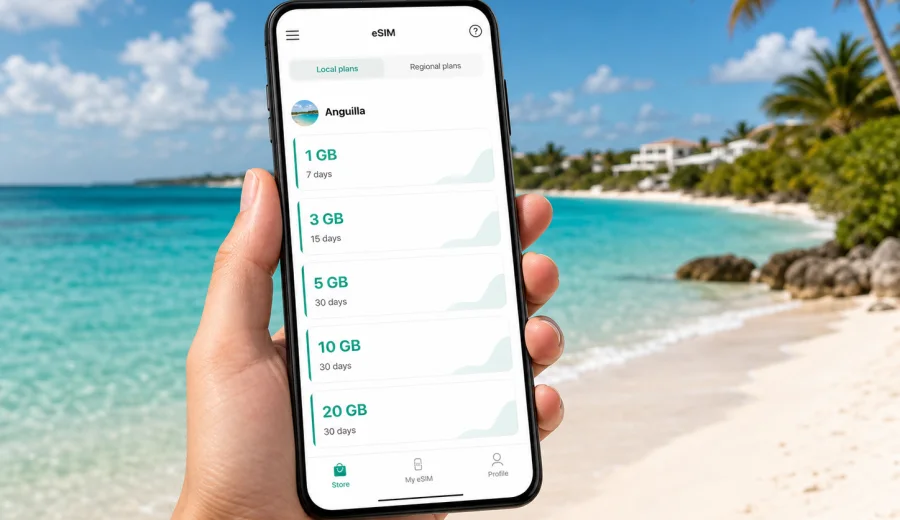
Anguilla eSIM: mobile connection and internet for your trip
If you are planning a trip to Anguilla, mobile internet is not just a convenience. You may need it before you reach your hotel, while checking ferry updates, confirming a restaurant booking, calling a ride, sharing your location, or paying for a service online. This setup helps you prepare a data plan for the trip without looking for a physical SIM card after arrival.
Anguilla is compact, but travel there often includes several connected steps: an international flight, a transfer through a nearby island, a ferry or small aircraft, and then local movement between beaches, hotels, marinas, restaurants, and work locations. In this kind of route, having mobile data ready on a compatible phone can make the first day much smoother.
Kaspersky eSIM Store is an app and website where you can choose, arrange, and activate an eSIM with a suitable data plan for mobile internet during an overseas trip. It is not a mobile network operator and does not replace local telecom coverage. It helps you prepare the eSIM setup, review the plan conditions, and manage the data plan from your device.
Why mobile internet matters in Anguilla
Anguilla is known for beaches, quiet resorts, villas, sailing, and short transfers between scenic spots. That also means many practical travel tasks happen away from a hotel desk. Mobile internet can be useful when you need:
- maps and route planning between beaches, restaurants, and accommodation;
- ferry, flight, and transfer coordination;
- messaging with hosts, drivers, family, or colleagues;
- online check-in and booking confirmations;
- payment verification and banking notifications;
- weather checks before boat trips or beach days;
- restaurant reservations and opening-hour checks;
- remote work, email, and light cloud access.
Public Wi-Fi may be available in hotels, cafes, airports, marinas, and some villas, but it is not always convenient when you are moving. A travel eSIM gives you another way to connect to mobile data on a compatible device, so you are less dependent on finding Wi-Fi at the exact moment you need information.
The practical value is control. Before you travel, you can check the data amount, validity period, destination, and price of the selected plan. Instead of waiting until arrival to decide how to connect, you can prepare the eSIM in advance and activate it according to the instructions for your device and plan.
What an eSIM does and does not include
An eSIM is a digital SIM profile installed on a compatible phone or tablet. For travel use, it is commonly used for mobile data. It can be installed without inserting a plastic SIM card, which is useful when you want to keep your regular SIM in the device for calls, banking messages, or account access.
For a trip to Anguilla, an eSIM data plan can help you get online for typical travel tasks: messaging, maps, email, browsing, bookings, and app-based calls. Voice calls and SMS through a regular phone number are usually not included unless the selected plan explicitly says so. For calls, many travelers use internet-based apps over mobile data.
Keep these points in mind:
| Topic | What to check before you buy |
|---|---|
| Device support | Your phone or tablet must support eSIM and must not be locked to one carrier. |
| Data allowance | Choose a data amount that matches your trip length and app habits. |
| Validity period | Confirm how many days the plan remains active after the start conditions are met. |
| Destination | Make sure the plan is suitable for Anguilla or for the wider route you will use. |
| Calls and SMS | Do not assume a regular phone number is included unless the plan conditions say so. |
| Hotspot use | If you plan to share data, check whether tethering is allowed by the plan and device. |
This is especially important for Anguilla because visitors often combine the island with nearby travel connections. If your route includes another island before or after Anguilla, compare a country-specific option with a regional plan when that is relevant to your itinerary.
When an eSIM is useful during an Anguilla trip
The strongest eSIM scenarios are the moments when a small delay or lack of internet becomes annoying. Anguilla travel is usually relaxed, but the logistics can be precise.
Arrival and transfer. You may arrive via Clayton J. Lloyd International Airport or come by ferry from a nearby island. Mobile data helps with messages from your accommodation, pickup details, map checks, and travel updates before you settle in.
Hotel, villa, and beach movement. Anguilla has many places where you may move between accommodation, beaches, restaurants, and boat points. A data connection helps when you need directions, arrival times, or quick contact with a host.
Restaurant and activity planning. For popular dining spots, beach clubs, diving, sailing, or spa bookings, mobile data helps you confirm times and make changes without returning to hotel Wi-Fi.
Remote work and longer stays. If you plan to work during the trip, an eSIM can support email, messaging, calendars, document previews, and backup access. For video calls or large file transfers, estimate your data needs carefully.
Family travel. Parents often need mobile data for maps, tickets, transport messages, weather, and keeping in touch when the group splits up for short periods.
How much data to choose for Anguilla
There is no universal data amount for every traveler. The right choice depends on trip length, hotel Wi-Fi availability, app habits, and whether you use mobile data for work or streaming. The safest approach is to match the plan to your actual use rather than choosing only by price.
Use this simple guide:
| Traveler profile | Typical mobile data use | Practical planning tip |
|---|---|---|
| Light user | Messaging, maps, email, booking checks | A smaller data package may be enough if hotel Wi-Fi is reliable. |
| Standard traveler | Maps, social apps, browsing, photo sharing | Choose a plan with room for daily use outside Wi-Fi. |
| Active planner | Navigation, reservations, cloud documents, frequent uploads | Consider a larger package and monitor usage in your phone settings. |
| Remote worker | Email, calls, shared files, backup access | Avoid relying on mobile data for heavy video or large uploads unless the plan fits. |
| Family coordinator | Multiple chats, maps, tickets, ride coordination | Pick a plan that covers travel days as well as beach and activity days. |
Apps can use more data than expected. Automatic photo backup, cloud sync, video autoplay, app updates, and high-resolution navigation downloads can quickly consume a small plan. Before your flight, adjust background data settings, download offline maps if useful, and pause automatic updates on mobile data.
Choosing an eSIM plan before the trip
For most travelers, the best time to choose an eSIM is before departure. You can review the available plan conditions calmly, install the eSIM while you still have stable Wi-Fi, and keep the activation steps ready for arrival. Some travelers install the eSIM before the flight and activate mobile data only when the plan should start being used.
Before selecting a plan, answer five questions:
1. How many days will you be in Anguilla?
2. Will you also travel through nearby islands or countries?
3. Will you mostly use hotel Wi-Fi or mobile data?
4. Do you need data for work, navigation, or only messaging?
5. Does your phone support eSIM and allow adding a new mobile plan?
You can choose a suitable option for the country page here: select an eSIM plan for Anguilla. Review the data amount, validity period, destination, and activation details before payment, because the exact terms depend on the selected plan.
This mid-trip preparation step is useful even if you do not activate the eSIM immediately. It gives you a fallback if the airport, ferry terminal, hotel lobby, or cafe Wi-Fi is busy, weak, or unavailable when you need to get online.
Device compatibility comes first
Before buying any eSIM plan, check that your device supports eSIM. Not every phone does, and some models differ by region, carrier, or generation. A device may also be locked to a mobile operator, which can prevent adding another mobile plan.
Check your device before you make a purchase. This is one of the most important steps because an eSIM cannot help if the phone cannot install or activate the profile.
Your pre-purchase checklist:
- confirm that the phone or tablet supports eSIM;
- check that the device is not carrier-locked;
- make sure the operating system is up to date enough for eSIM setup;
- keep a stable Wi-Fi connection available for installation;
- check whether your regular SIM should remain active for calls or messages;
- review the selected plan’s validity period and start conditions.
If you use a dual-SIM phone, you can often keep your regular SIM active for calls and use the travel eSIM for mobile data. The exact settings depend on the device, so check the mobile network menu carefully after installation.
How to install and activate an eSIM for Anguilla
The installation process usually takes only a few steps, but it is worth doing it calmly. After purchase, the eSIM appears in your profile or app, and you can follow the setup instructions for your device. If you prefer a device-specific walkthrough, use the Android installation guide or the iOS installation guide.
A typical setup flow looks like this:
1. Choose Anguilla or the relevant destination in Kaspersky eSIM Store.
2. Select a data plan based on data amount and validity period.
3. Complete the purchase and open the eSIM details.
4. Install the eSIM on a compatible, unlocked device.
5. Name the new mobile plan clearly, for example “Travel data”.
6. Set the eSIM as the mobile data line when you want to use it.
7. Enable data roaming for the eSIM if the device or plan instructions require it.
8. Check that mobile data is working after arrival or when the plan is meant to start.
Do not delete the eSIM profile after installation unless you are sure you no longer need it. In many cases, an activated eSIM cannot simply be moved to another device. If something does not work, check device compatibility, mobile data settings, roaming settings for the eSIM line, and the plan conditions before removing the profile.
Practical settings for a smoother first day
Small phone settings can make a large difference. Before you leave for Anguilla, review these items:
- turn off automatic app updates over mobile data;
- pause cloud photo and video backup on mobile data;
- download offline maps for key areas if your map app supports it;
- save accommodation, ferry, airline, and transfer contacts;
- keep your eSIM QR code or setup details accessible;
- make sure your phone battery is charged before arrival;
- test where to switch mobile data between your regular SIM and eSIM;
- keep Wi-Fi enabled for installation, but use mobile data when you need connection on the move.
If your regular SIM remains active, watch for roaming settings. You may want to prevent your home SIM from using roaming data while allowing the eSIM line to use mobile data. On many phones, this is controlled separately in mobile network settings.
eSIM compared with roaming, Wi-Fi, and local SIM cards
Different connection options can work well in different situations. The goal is not to assume that one option is always best, but to choose the one that fits your trip.
| Option | Strengths | Trade-offs |
|---|---|---|
| Travel eSIM | Can be prepared before travel, no physical SIM swap, clear data and validity terms | Requires a compatible unlocked device and careful setup. |
| Home roaming | Uses your regular number and may require little setup | Costs and data limits depend on your home operator’s roaming terms. |
| Public Wi-Fi | Often available in hotels and cafes | Not always available on the move and may be inconvenient for quick tasks. |
| Local physical SIM | Can be useful for longer stays or specific local needs | Requires finding a seller, handling a plastic SIM, and checking conditions locally. |
For many Anguilla visitors, an eSIM works well as a practical travel data option. You can prepare it before arrival, avoid a physical SIM change, and keep your regular SIM in place if you need it for authentication messages or calls.
Data-saving tips while you are in Anguilla
Even a generous data plan can be used quickly if background services are active. Use these habits to make the plan last longer:
- use Wi-Fi for large app updates, operating system updates, and video uploads;
- send compressed photos in messaging apps when quality is not critical;
- disable autoplay for videos in social apps;
- use map downloads before long days out;
- close apps that continuously sync in the background;
- monitor mobile data usage by app in your phone settings;
- use video calls on Wi-Fi when possible;
- keep mobile hotspot use for essential devices only.
For short beach trips, messaging and maps may use little data. For remote work, streaming, video calls, and automatic backup, consumption can be much higher. If you are unsure, choose a plan with extra room rather than one that barely covers the minimum.
Common mistakes to avoid
The most common eSIM problems are usually preventable. Check these points before and during the trip:
| Mistake | Why it causes trouble | Better approach |
|---|---|---|
| Buying before checking compatibility | The device may not support eSIM or may be locked | Check compatibility first. |
| Installing with unstable Wi-Fi | Setup may fail or take longer | Install while connected to reliable Wi-Fi. |
| Leaving the wrong SIM as the data line | The phone may use home roaming data | Set the travel eSIM as the mobile data line. |
| Forgetting eSIM roaming settings | Some plans require roaming to be enabled on the eSIM line | Follow the plan and device instructions. |
| Deleting the eSIM too early | Reinstallation may not be possible in the same way | Keep the profile unless support confirms removal is needed. |
| Using heavy apps without monitoring | Data can run out faster than expected | Track usage and limit background activity. |
These checks are simple, but they are easier to handle before you are standing outside an airport, ferry terminal, or villa with limited Wi-Fi.
Quick recommendation
For a short vacation in Anguilla, prepare your eSIM before departure, install it over stable Wi-Fi, and keep it ready for mobile data after arrival. For a longer stay, remote work, or a route that includes nearby islands, choose a plan with enough data and confirm that the destination coverage matches the full itinerary.
The best setup is usually the one that gives you control: a compatible phone, a clear data allowance, a validity period that matches your travel dates, and settings that prevent your home SIM from using unexpected roaming data.
FAQ
Can I use an eSIM for mobile internet in Anguilla?
Yes, an eSIM can be used as a travel data option if your device is compatible, unlocked, and the selected plan is suitable for Anguilla. Check the destination, data amount, validity period, and activation rules before purchase.
Does an eSIM include a local phone number?
Travel eSIM plans are usually focused on mobile data. A regular phone number, voice calls, and SMS are not included unless the selected plan explicitly says so. You can use messaging and calling apps over mobile data.
Should I install the eSIM before I travel?
In many cases, yes. Installing before departure over stable Wi-Fi can reduce stress after arrival. Make sure you understand when the plan validity starts and when mobile data should be enabled.
Can I keep my normal SIM active?
On many dual-SIM devices, you can keep your regular SIM active and use the eSIM for mobile data. Check your phone settings so the correct line is selected for data and your home SIM does not accidentally use roaming data.
What if the eSIM does not connect immediately?
Check that the eSIM is installed, selected for mobile data, and allowed to use data roaming if required by the instructions. Restarting the phone can also help. If the issue continues, contact support and avoid deleting the eSIM profile unless instructed.
Is hotel Wi-Fi enough for Anguilla?
Hotel Wi-Fi may be enough for some travelers, especially if they mostly stay at one property. Mobile data is useful when you are moving between the airport, ferry, beaches, restaurants, activities, and accommodation.
Can I share eSIM data with a laptop or another phone?
Hotspot availability depends on the device and the selected plan conditions. If you need tethering for work or family travel, check the plan details before relying on it.
Choose an eSIM plan for Anguilla
Before your trip, check device compatibility, compare the available data plans, and choose the option that matches your dates and expected usage. Kaspersky eSIM Store helps you choose, arrange, and activate an eSIM with a suitable data plan for mobile internet in Anguilla, so you can spend less time solving connection questions after arrival.