Travel connectivity guide
Anse Marcel eSIM: Mobile Internet in Saint Martin
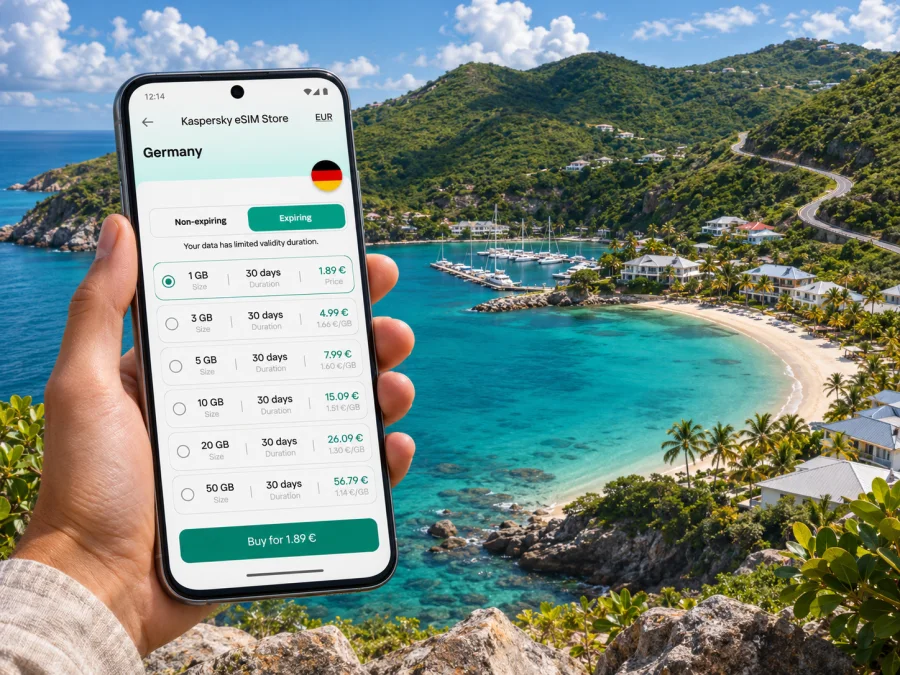
Anse Marcel eSIM: Mobile Connection and Internet for Your Stay
Anse Marcel is a quiet cove on the northern French side of Saint Martin, reached by a road that descends through green hills to the bay and marina. It is a very different arrival from a city centre: you may be checking a transfer, confirming your accommodation, following a winding approach road, or arranging a boat trip rather than navigating a grid of streets. Having mobile internet ready can make those small travel tasks easier, while offline maps and a little preparation remain useful in a sheltered coastal area.
This guide focuses on the practical details of using an eSIM around Anse Marcel: how to plan for the French side of the island, what to check before choosing a data plan, and how to prepare your phone for the drive, beach and nearby stops. Anse Marcel is a place name and coastal area in the French Collectivity of Saint Martin, not a separate country or a large city. The island is shared with Sint Maarten, the Dutch constituent country to the south. That distinction matters because your home carrier or travel eSIM plan may treat the two sides differently.
What to know before you travel
Anse Marcel sits at the end of a sheltered bay in northern Saint Martin. The marina and nearby accommodation make the cove a base for a relaxed stay, while Cul-de-Sac, Grand Case and Orient Bay are useful reference points for reaching other parts of the island. The access road leads down from the Cul-de-Sac area and includes bends and a steep descent. If you are driving, use navigation before you leave a place with dependable data, pay attention to road conditions, and avoid relying on a phone screen while moving.
The most important connectivity distinction is not between Anse Marcel and a neighbouring town, but between French Saint Martin and Dutch Sint Maarten. A phone can register on a network from either side as you travel around the island. A roaming agreement, local SIM or travel eSIM that works in one territory does not automatically include the other. Confirm the precise destination name in your plan details and check the network name shown on your phone, especially if your itinerary includes Philipsburg, Princess Juliana International Airport, Simpson Bay or other stops on the Dutch side.
Choosing an eSIM for Anse Marcel
An eSIM is a digital SIM profile installed on a compatible phone. It can provide a separate mobile-data option while you keep your regular SIM for calls or messages, depending on your device and home plan. Unless stated otherwise, a travel eSIM is for data and does not include a local number, standard calls or SMS.
Start with your itinerary. If you plan to cross to Sint Maarten, confirm that the plan names both Saint Martin and Sint Maarten; a broad regional label alone is not enough. Check included destinations, validity, data amount, activation rules and any fair-use limits.
For a short visit, a modest allowance may suit maps and messages if you use accommodation Wi-Fi for large downloads. Video calls, backups and photo uploads use more data, so choose according to your habits.
Match the plan to your itinerary
Before paying, check four things: the plan includes Saint Martin and any other planned territory; its data allowance and validity fit your trip; you know whether validity begins at installation or first connection; and your exact, unlocked phone model supports eSIM. Also review what happens when data runs out.
Arrival and the route to the cove
Visitors may arrive through Princess Juliana International Airport on the Dutch side or Grand Case-Espérance Airport on the French side. Confirm your pickup point with the driver or host and save the address offline.
The final approach to Anse Marcel comes via Cul-de-Sac and descends by a winding road. Download an offline map, pin your lodging and access road, and check directions before leaving the airport or a larger settlement. Pull over safely before looking at your phone.
A useful arrival checklist
- Confirm your arrival airport and transfer meeting point.
- Save your accommodation address, host contact and pickup instructions offline.
- Download maps for Anse Marcel and planned stops; carry a charging cable or power bank.
- Install and test the eSIM on reliable Wi-Fi if its activation terms allow it.
- Check which SIM line is selected for mobile data.
If renting a car, confirm handover and return details. A saved map and written accommodation address are useful if data pauses or your battery runs low.
Getting around Anse Marcel and nearby areas
Anse Marcel is compact around the cove, but nearby places are reached by road rather than an easy flat city walk. A car or pre-arranged ride can connect you with Cul-de-Sac, Grand Case, Orient Bay and Marigot. Ask your accommodation or activity provider about current taxi arrangements, pickup points and return options; save the driver’s number and booking confirmation offline.
| Situation | Preparation that helps |
|---|---|
| Going from lodging to the beach | Save the walking route and check whether the property has a separate access path or gate. |
| Meeting a taxi or transfer | Share the exact accommodation or marina name and agree on a visible pickup point. |
| Driving to Grand Case or Orient Bay | Load directions before departure and follow road signs as well as navigation. |
| Visiting Marigot for errands | Save the destination, parking location and return route before you leave. |
| Taking a boat from the marina | Store the operator’s check-in time, contact number and booking reference offline. |
| Crossing to the Dutch side | Recheck your plan’s territorial coverage and the selected data network. |
Using mobile internet at the beach, marina and accommodation
At the bay, your phone may be used for weather, messages, reservations or boat-trip coordination. Download what you need before leaving. Data availability can vary with terrain, buildings, network load and the plan’s roaming partner; a signal is not guaranteed at every beach, room or offshore location.
Use accommodation Wi-Fi for large downloads and backups when convenient. Keep your phone locked and use your usual security settings, especially when connecting to a public hotspot.
For a boat trip, save the departure point and check-in instructions. Follow the operator’s safety guidance; mobile data is not a substitute for marine safety equipment or a reliable way to contact help offshore.
Estimate your data use
The exact amount depends on the apps and settings you use, but the pattern is predictable: text messages and basic map searches are usually lighter than continuous video, large photo uploads or video meetings. You can keep usage under control by:
- downloading maps, playlists and travel documents over Wi-Fi before a day out;
- turning off automatic photo and cloud backups over mobile data;
- using lower video quality when streaming is necessary;
- checking the phone’s mobile-data usage screen during the trip;
- keeping app updates and operating-system downloads on Wi-Fi;
- saving important information offline instead of repeatedly refreshing pages.
If you need a laptop hotspot, confirm that the plan and phone support tethering and test it before a work call. Data use and performance vary; keep Wi-Fi or rescheduling as a backup for essential meetings.
Keep the two sides of the island straight
Saint Martin is the French collectivity; Sint Maarten is the Dutch constituent country. Plans and roaming terms can differ, and a signal bar alone does not show whether data is included.
Before travelling to Philipsburg, Maho, Simpson Bay or the Dutch-side airport, check your plan. Automatic network selection may connect to a network outside its terms. If unsure, turn off data until you confirm coverage; pull over before changing settings.
The reverse also applies: a plan listing Sint Maarten may not include Saint Martin. On the French side, the mobile market is distinct from mainland France, so check your carrier’s terms instead of assuming an allowance applies.
Kaspersky eSIM Store is an app and website where you can choose, purchase and activate an eSIM with a suitable plan for mobile internet during an overseas trip. Plan details can change, so review the current options for a trip to Saint Martin and confirm that the listed destinations match your itinerary.
Check your device before purchase
eSIM compatibility can depend on the exact model, market variant, software and carrier lock. Check the manufacturer’s specifications for your model and confirm the phone is unlocked. You can also check your device’s eSIM compatibility.
On a dual-SIM phone, choose which line handles data and whether to keep your home line for calls or verification messages. Controls vary by operating system. Check reinstall conditions before deleting an eSIM profile.
Before you install
- Make sure the phone supports eSIM and is not carrier-locked.
- Update the operating system and keep account access available.
- Use reliable Wi-Fi for setup and check when plan validity begins.
- Keep the QR code or manual installation details accessible.
Install and activate your eSIM
Screens vary by device. Installation does not always start the data allowance, so follow the plan’s activation notes.
- Prepare your connection. Connect to Wi-Fi and keep the phone charged.
- Open the eSIM details. Find the purchased plan in the app or website account and review its included destination and activation rules.
- Add the mobile plan. Follow the on-screen steps or scan the supplied QR code. On some phones, you may be able to enter the details manually.
- Label the line. Use a clear name such as “Travel data” so it is easy to distinguish from your usual number.
- Choose the data line. Set the travel eSIM as the mobile-data line when you want to use it in Saint Martin.
- Check roaming settings. Some travel eSIMs require data roaming to be enabled on that eSIM. Follow the plan instructions, and check your home SIM’s roaming settings separately to avoid unintended charges.
- Test after arrival. Allow time for the phone to register, then check the network name and open a simple webpage or map.
For step-by-step help, see the Android eSIM installation guide or the iOS eSIM installation guide. The exact labels can differ by operating-system version. If service does not start, confirm that the eSIM line is enabled, mobile data is assigned to it, the selected plan includes your current territory and the phone has registered on a supported network. Restarting the phone can help in some cases; avoid deleting the profile before checking its reinstallation rules.
If mobile data does not connect
Troubleshooting is easier when you change one setting at a time. First make sure you are in a destination covered by the plan and that its validity is active. Then check whether the eSIM profile is turned on and selected for mobile data. If the plan instructions require roaming, enable it for the travel profile. Verify that the phone has not selected your home SIM for data by mistake.
If a network appears but pages do not load, move to a different spot and try again; signal can vary between the shore, a room and the road. Restart the phone or restore automatic network selection if the plan instructions suggest it. If the issue continues, use Wi-Fi to confirm the destination and contact support with your model, location and displayed network. Do not share passwords or one-time codes.
Frequently asked questions
Is Anse Marcel in Saint Martin or Sint Maarten?
It is on the French side, in the Collectivity of Saint Martin. Sint Maarten is the Dutch side of the same island.
Will one eSIM work on both sides?
Only if the plan includes both destinations. Check its territory list and roaming terms; do not infer cross-island coverage from a broad Caribbean label.
Does an eSIM include a phone number?
Not necessarily. Many travel eSIM plans are data-only. Check the terms if you need standard calls or SMS.
What if my phone does not support eSIM?
Check the exact model and regional variant with the manufacturer. You can ask your home carrier about roaming, use Wi-Fi or consider a compatible physical SIM.
A simple plan for staying connected
For Anse Marcel, prepare around the geography: save the route to the cove, confirm your airport transfer and keep local bookings accessible offline. Choose an eSIM only after checking that its destination list matches French Saint Martin and any planned stops in Sint Maarten. Confirm your phone’s compatibility, understand when the plan activates and decide which SIM line will use mobile data. These checks help you travel with clearer expectations, whether you are navigating the final hillside road, meeting a taxi or spending the day by the marina.
Choose your eSIM for Saint Martin
Before departure, review the current destination and plan conditions, then choose an eSIM plan for your trip to Saint Martin in Kaspersky eSIM Store. Install the profile according to the instructions for your device, keep your route and booking details available offline, and check the selected network when you arrive. That gives you a practical starting point for mobile internet around Anse Marcel and the rest of your itinerary.


