Travel connectivity guide
Antofagasta eSIM: Mobile Internet in Chile
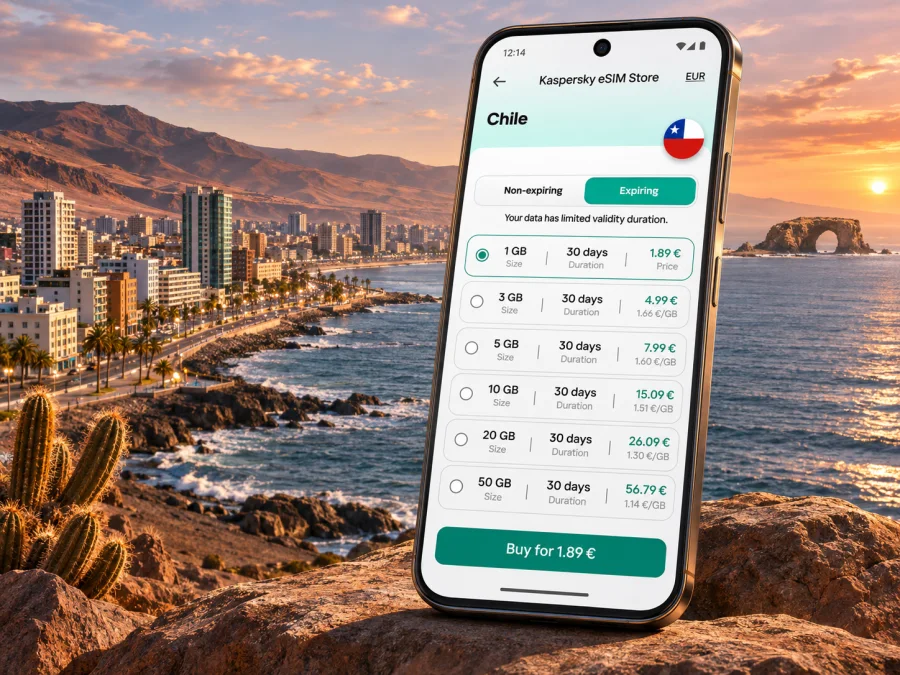
Antofagasta eSIM: mobile connection and internet for your city trip
Antofagasta is a long coastal city in northern Chile, between the Pacific and the desert hills. Whether you arrive for a work visit, a stopover, or a few days by the sea, mobile internet can help with the first ride from the airport, hotel directions, bookings, messages, and checking plans as they change. An eSIM can provide mobile data without replacing your physical SIM, provided your phone supports eSIM and the selected plan covers Chile.
This guide focuses on using an eSIM around Antofagasta: what to prepare before landing, how to think about data use across the city and nearby sights, and what to check before buying. A travel eSIM is usually intended for mobile data; voice calls, SMS, a local number, and specific network access are included only if the individual plan says so. Coverage and performance can vary by location, indoor conditions, device, and the network used by the plan.
Your first connection after landing
Andrés Sabella Airport (ANF) is north of the built-up city. Chile’s civil aviation authority places it about 26 kilometres from the city centre, so plan for a road transfer rather than assuming you can walk into town. A working data connection is useful for checking a pickup point, sharing your arrival details, looking up the address of your accommodation, and contacting a driver or host. Save the hotel address and booking details offline as a backup.
Before leaving the terminal, check whether your eSIM has registered on a supported network and whether mobile data is assigned to that line. If it has not connected yet, use airport Wi‑Fi if available, confirm the installation status, and follow the plan’s activation instructions. Do not delete an installed eSIM profile just to troubleshoot: some profiles cannot be reinstalled after removal. If you are unsure, check the plan instructions or contact support first.
A simple arrival checklist:
- Keep your accommodation address and transfer details available offline.
- Confirm which SIM is selected for mobile data; retain your home SIM for calls or texts if needed.
- Check that the plan’s destination includes Chile and that its validity period fits your dates.
- Use a trusted transport option and confirm the destination before starting the ride.
- Once connected, test a map, a message, and one essential booking rather than downloading large files immediately.
Using data across a spread-out coastal city
Antofagasta stretches along the shoreline, and the distance between places can make a map more useful than relying on a landmark name alone. Share a precise pin when meeting someone, especially if you are heading to a hotel, office, restaurant, or a point along the waterfront. Street names and similar-sounding places can be confusing when you are new to the city; confirm the address and comuna or neighbourhood in the booking before you set out.
For short city days, data is often used in small bursts: navigation, checking a route, messaging, ride coordination, translation, and looking up opening times. A video call or remote work session uses more. Your total depends on how often you stream, upload photos, use cloud backups, and leave apps refreshing in the background. Download offline maps on Wi‑Fi if the app supports them, turn off automatic media backups over mobile data, and choose standard rather than high-definition video when bandwidth matters.
| Travel situation | Useful preparation | Data habit |
|---|---|---|
| Airport to accommodation | Save the address and pickup instructions | Use maps and messages; avoid starting large downloads |
| Walking along the central waterfront | Pin meeting points and save a return route | Check directions at intersections, then lock the screen |
| Work meetings | Confirm the venue and Wi‑Fi details in advance | Keep video off when audio or chat is enough |
| Day trip beyond the centre | Check the return plan before leaving | Download maps and tickets where possible |
| Short stopover | Save the onward transport details | Use data for essential updates and navigation |
Antofagasta’s busy urban corridors, the port area, residential districts, and outer coastal sights are different environments for a mobile connection. A signal that works outside may weaken inside a concrete building, underground area, or enclosed vehicle. Treat navigation as a helpful aid, not as the only record of your route. Keep a charger or power bank available if you rely on your phone for maps, tickets, and work.
Choosing an eSIM plan for Antofagasta
The city does not require a special city-only eSIM. Look for a plan whose destination coverage explicitly includes Chile, then compare its data allowance, validity, price, and any usage limits with your itinerary. If your trip continues to another country, check whether the plan covers that destination too; a Chile-only plan may stop being suitable when you cross a border. Regional coverage names do not automatically mean every country on your route is included.
Kaspersky eSIM Store is an app and website where you can select, purchase, and activate an eSIM with a suitable plan for mobile internet abroad. The underlying mobile service and coverage depend on the selected plan and its network arrangements. Review the plan details before checkout, including when validity begins, whether tethering is allowed, and what happens when the included data is used. These terms can differ between plans and may change.
If you are preparing ahead, browse the current eSIM options for Chile and compare the displayed terms with your travel dates. This is the country destination page; it does not imply that every plan has identical service in every Antofagasta neighbourhood or at nearby attractions.
Estimate your data needs by activity
A useful estimate starts with what you will do, not just how many days you will stay. A traveller who checks maps and messages may use far less data than someone who works remotely, streams video, or backs up every photo while away. Review your usual phone usage for a typical day and add a margin for unfamiliar routes and delays.
- Light use: messaging, email, occasional map searches, and ticket checks. Prepare maps and documents offline where practical.
- Regular use: frequent navigation, social media, photo sharing, and some browsing. Disable automatic app updates and photo backup over cellular data.
- High use: video meetings, hotspot use, streaming, or large uploads. Check the plan’s tethering terms and consider using accommodation Wi‑Fi for heavy transfers.
These are planning categories, not guaranteed data totals. Apps consume different amounts, and a map session with live traffic or a video call can use more than a quick text exchange. If your plan supports top-ups, check their availability and conditions before relying on them.
Routes, day trips, and places beyond the centre
La Portada Natural Monument is a distinctive coastal landmark north of the city. It is a protected area, not simply a beach stop: follow the marked paths and current visitor guidance, and do not assume that access to the shore is permitted. CONAF’s visitor information lists the site as open daily from 09:30, with last entry at 17:30 and closing at 18:00; it also warns that trails may close at times, including for wildlife protection. Confirm the current conditions before setting off, because operating details and access can change.
CONAF notes that there is no permanent public transport service to La Portada. Its page describes a seasonal TransAntofagasta service, line 129, during the summer period from December to the first week of March. Treat this as a seasonal possibility rather than a year-round timetable: verify whether it is operating on your travel date and plan a return journey before you go. If you arrange a car or taxi, save the pickup point and agree how you will reconnect if the mobile signal is weak.
Other outings from Antofagasta may involve longer drives across sparsely settled desert landscapes. Signal availability can change outside the urban area, so download route information, accommodation details, and tickets in advance. Do not count on mobile data for emergency navigation in remote stretches. Share your itinerary with someone, carry water and sun protection, and check local road and attraction conditions before departing.
For a trip that combines Antofagasta with Calama, San Pedro de Atacama, or another destination in Chile, check each segment separately. A city plan may cover the country at a plan level, while actual connection quality is still affected by terrain, distance from infrastructure, and the local network. A route through open desert is not equivalent to service in a city centre. Keep offline maps and essential reservations available even if your phone has been connected reliably so far.
Device and plan checks before purchase
An eSIM requires a compatible device that is not restricted by a carrier lock. Support can vary by exact model and regional version, so a familiar product name alone is not enough to confirm compatibility. Check the manufacturer’s specifications for your exact variant and look in the phone settings for an option to add an eSIM. On many devices, an EID in the device information is another useful indicator, but the manufacturer’s guidance for your model should take priority. Check whether your device is compatible before you buy.
Chile has local operator eSIM services, but that fact does not establish which Chilean network a travel eSIM will use. Do not assume that a plan connects to a particular operator based on the country alone. The plan’s terms should identify relevant service details where provided. If the phone was bought abroad, local registration requirements that apply to a local operator’s service may differ from the setup for an international travel eSIM; check the selected plan’s requirements rather than applying one operator’s rules to every eSIM.
Use this pre-purchase checklist:
- Device: the exact phone variant supports eSIM, and the phone is unlocked for use with another provider.
- Destination: Chile is explicitly included; check other countries separately if your itinerary crosses a border.
- Validity: understand when the plan’s validity starts—installation, activation, or first connection may be treated differently.
- Data: match the allowance to your likely use and read any fair-use or speed limits stated in the plan.
- Calls and messages: assume the plan is data-only unless voice, SMS, or a phone number is specifically listed.
- Installation: make sure you can access Wi‑Fi or another internet connection when adding the profile.
- Support: keep your order details and installation instructions available in case setup takes longer than expected.
Install and activate before travel or after arrival
Installing a profile and beginning to use its data are not always the same event. Follow the instructions shown with your chosen plan and note the stated activation trigger. If you install before departure, keep the profile on your device and avoid switching off your home line unless you intend to. The exact menus vary by operating system and device model.
- Check the phone. Confirm eSIM compatibility, carrier-unlocked status, and an up-to-date operating system.
- Prepare a connection. Use stable Wi‑Fi when you install the profile, especially if you are still at home.
- Add the eSIM. Follow the in-app steps or scan the provided QR code, if your plan uses one. Do not scan or install the same profile repeatedly unless instructions say to.
- Label the line. Give it a clear name such as “Chile data” so it is easy to distinguish from your home SIM.
- Select mobile data. When you are ready to use the plan, select the eSIM for cellular data. Enable data roaming for that eSIM only if the plan’s instructions require it.
- Test the connection. Open a lightweight webpage or send a message, then check the plan and device settings if data does not work.
For device-specific steps, see the Android eSIM installation instructions or the iOS eSIM installation instructions. The available options and menu wording may differ across models and software versions.
Keep your connection useful without overspending data
A few phone settings can make a city visit easier. Download offline maps while connected to Wi‑Fi, disable automatic app updates over mobile data, and restrict background refresh for apps that do not need it. Set your preferred data line before starting navigation. If you use a hotspot for a laptop, remember that computer updates and cloud sync can consume data quickly; review tethering conditions and pause nonessential syncing.
Use mobile internet for live information when it helps, but keep a small offline kit: accommodation address, airport transfer details, booking confirmations, a map of central Antofagasta, and the return plan for day trips. Save these as screenshots or accessible files rather than relying on a single app login. If you need to contact someone while data is unavailable, your regular SIM may still provide calls or texts under its own roaming terms.
At the end of the trip, check which line is selected for data before you travel onward. Switch data back to your preferred line if the Chile eSIM is no longer needed, and review the plan conditions before removing the profile. Some eSIMs are intended for one-time installation; deleting one may make it impossible to add again.
Common questions
Will an eSIM work everywhere in Antofagasta?
No plan can be assumed to work everywhere. Service depends on the selected plan, its partner network, the location, terrain, buildings, and device. Confirm Chile coverage in the plan details, and keep offline directions for day trips outside the city.
Is a city-specific plan necessary?
Usually the relevant choice is a plan that includes Chile, not a separate Antofagasta-only product. Check the destination and conditions shown for the specific plan. A country listing does not guarantee the same signal or speed at every point in the city or surrounding region.
Can I keep my usual number active?
Often you can keep a physical SIM or another eSIM enabled for calls and messages while choosing the travel eSIM for data, if your phone supports dual SIM use. Settings differ by model. Check which line is selected for data and review your home operator’s roaming charges for calls and texts.
Does a travel eSIM include calls and SMS?
Only if those services are explicitly included in the plan. Many travel eSIMs are designed for mobile data, so messaging and internet calls can work through apps while the plan itself does not provide a standard phone number. Check the plan details if you need ordinary calls or SMS verification.
What if the phone shows no service?
First confirm that the plan is active for the current destination and that the correct eSIM is selected for data. Check whether data roaming is required by the plan, then restart the phone or select a network automatically if the instructions recommend it. If the issue continues, use Wi‑Fi to consult the plan guidance or contact support. Avoid deleting the profile before receiving advice.
Can I install the eSIM at the airport?
You may be able to install it there if you have a reliable internet connection and have not already used the profile’s installation allowance. Preparing it in advance reduces setup steps after landing. Follow the plan’s activation instructions so that the validity period begins when intended.
Get ready for your Antofagasta trip
Before departure, confirm device compatibility, read the plan’s Chile coverage and validity terms, and install the eSIM using a stable connection. Save your airport transfer and accommodation details offline, then select the eSIM for data when you are ready to use it. Kaspersky eSIM Store helps you choose, purchase, and activate an eSIM with a plan for mobile internet abroad. Review the current options for Chile and select one whose terms fit your Antofagasta dates and onward route.


