
Travel connectivity guide
eSIM Argentina: mobile internet for travel
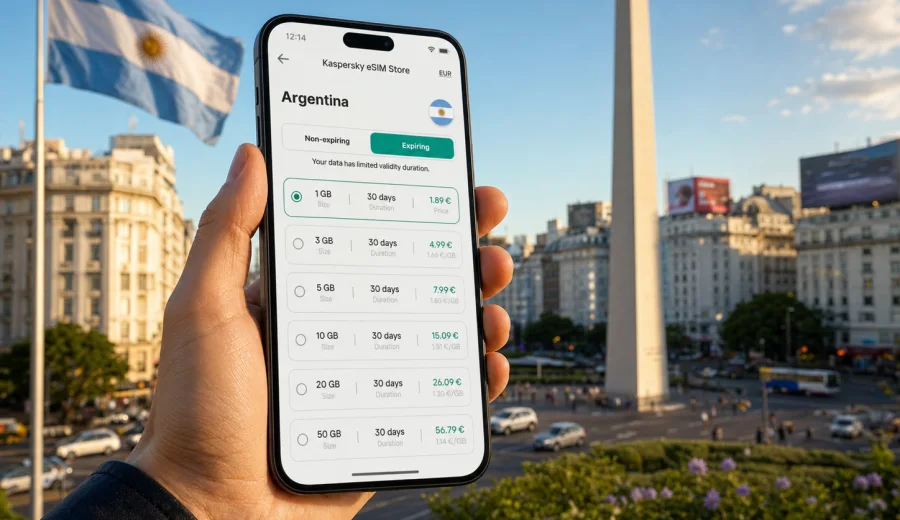
eSIM in Argentina: mobile connection and internet for your trip
Argentina is a country where mobile internet becomes useful from the first hour of the trip. You may land in Buenos Aires, take a domestic flight to Patagonia, visit wine regions around Mendoza, or move between hotels, buses, taxis, and guided tours. Maps, messages, bookings, ride apps, translation tools, and banking notifications all depend on a stable way to get online.
An eSIM can make that preparation simpler. Instead of looking for a physical SIM card after arrival, you can choose a data plan for Argentina before the trip or shortly after landing, install it on a compatible device, and use mobile data through a digital SIM profile. Kaspersky eSIM Store is an app and website where you can quickly choose, arrange, and activate an eSIM with a suitable tariff for mobile internet during an international trip.
This guide explains how to use eSIM in Argentina, estimate data needs, and check roaming, compatibility, and activation details.
Why mobile internet matters in Argentina
Argentina is large and itinerary-heavy. A city break in Buenos Aires has different internet needs from a route through El Calafate, Bariloche, Ushuaia, Salta, or Iguazu.
Typical online tasks during an Argentina trip include:
- opening maps while walking in Buenos Aires neighborhoods such as Palermo, Recoleta, San Telmo, or Puerto Madero;
- checking taxi, transfer, and public transport details after arrival;
- receiving airline and hotel updates;
- using messengers to coordinate with guides, hosts, colleagues, or family;
- translating menus, signs, or short service messages;
- confirming card payments or banking operations;
- looking up opening hours and route changes during the day;
- uploading photos when Wi-Fi is not available or not convenient.
Public Wi-Fi can help in airports, hotels, cafes, and coworking spaces, but it is not a complete travel plan. You may need internet outside an apartment, at a bus terminal, before a domestic flight, or while contacting a driver. A prepared eSIM gives you a mobile data option without changing your primary physical SIM card.
What an eSIM does for a trip to Argentina
An eSIM is a digital SIM profile installed on a compatible smartphone or tablet. For travel, it is usually used for mobile data. It does not automatically replace your home number, and voice calls or SMS are not included unless the selected tariff explicitly says so. For most travelers, that is enough: calls can often be handled through messengers, while the eSIM profile handles maps, search, bookings, and app notifications.
The main benefit is control. Before choosing a plan, you can compare the available data amount, validity period, destination, and price. This is useful in Argentina because trip styles vary widely:
| Travel scenario | Typical internet use | What to consider |
|---|---|---|
| 3-4 days in Buenos Aires | Maps, rides, restaurant searches, messaging | A small or medium data package may be enough if hotel Wi-Fi is reliable |
| 7-10 days across two cities | Navigation, bookings, photos, messaging, daily research | Choose a plan with enough validity for the whole route |
| Patagonia or long outdoor route | Maps, weather, tickets, backup communication | Download offline maps too, because remote areas can have limited local coverage |
| Business trip | Email, calendars, calls through apps, hotspot use | Check whether tethering is allowed |
An eSIM does not guarantee a signal in every place. Local network conditions, terrain, building density, device settings, and the selected tariff can affect the experience. In remote parts of Patagonia, mountain roads, national parks, or long-distance routes, mobile coverage may be less consistent than in major cities. Treat eSIM as a convenient mobile data setup, not as a promise that every location will have the same connection quality.
eSIM, roaming, local SIM card, or Wi-Fi
Travelers usually compare four options before a trip: international roaming from a home operator, a local physical SIM card, public Wi-Fi, and travel eSIM.
| Option | Strengths | Possible limits |
|---|---|---|
| Home operator roaming | Keeps your usual SIM active and may be simple to use | Price and conditions depend on your home operator |
| Local physical SIM card | Can be useful for long stays or local voice needs | Requires time, a store visit, and device SIM slot access |
| Public Wi-Fi | Good for hotels and planned stops | Not available everywhere and may be inconvenient on the move |
| Travel eSIM | Can be prepared before arrival and used without a physical SIM swap | Requires a compatible unlocked device and careful plan choice |
For many trips, eSIM is a practical middle ground. You keep your main SIM for your usual number, install a separate data profile for Argentina, and decide which SIM handles mobile data in your phone settings.
How much data you may need in Argentina
Data use depends less on the country and more on habits. A traveler who checks maps and messages will use far less data than someone who streams video, uploads high-resolution files, or uses a laptop through hotspot.
Use this rough planning guide:
| Usage pattern | Examples | Suggested approach |
|---|---|---|
| Light | Messaging, maps, short searches, boarding passes | Start with a smaller package and monitor usage |
| Moderate | Daily maps, social media, photo sharing, travel apps | Choose a mid-size package for the full trip period |
| Heavy | Video calls, cloud backups, streaming, hotspot | Pick a larger package and disable automatic media uploads |
Ways to reduce unnecessary data use:
- download offline maps for Buenos Aires and any long-distance route before departure;
- update apps on Wi-Fi before the trip;
- disable automatic cloud photo and video backups on mobile data;
- set streaming apps to low data mode;
- keep hotel Wi-Fi for large downloads;
- avoid using mobile hotspot for laptops unless your package is sized for it.
If your itinerary includes Argentina plus neighboring countries, such as Uruguay, Chile, Brazil, or Paraguay, check whether a regional or global plan is more appropriate than a single-country option. Conditions vary by tariff, so review the destination list and validity period before you activate anything.
When to set up eSIM before the trip
The best time to prepare eSIM is usually before leaving home, while you still have reliable Wi-Fi and time to check settings. You can install the eSIM profile before departure and activate mobile data when you arrive, depending on the rules of the selected tariff.
Before the trip, prepare this checklist:
- confirm that your phone supports eSIM;
- check that the device is not locked to one mobile operator;
- make sure the phone software is up to date;
- keep your main SIM active if you need calls or SMS from your home number;
- save installation instructions offline or in email;
- read when the validity period starts for the chosen tariff;
- know which SIM will be used for mobile data after arrival.
If you land at Ezeiza International Airport, you may need data for transfer details, a ride app, a message to your host, or the address of your hotel. Having mobile data prepared is usually easier than solving connectivity after arrival.
Choosing an eSIM data plan for Argentina
The right plan is the one that fits your route, trip length, data habits, and device setup. A short stay in Buenos Aires does not require the same package as a multi-week itinerary through several provinces.
When comparing options, look at five details:
1. Destination: make sure Argentina is included in the tariff.
2. Data volume: choose enough GB for maps, messaging, travel apps, and expected media use.
3. Validity period: the plan should cover the full time you need mobile data.
4. Activation rules: check when the plan starts and whether it must be activated in a certain way.
5. Device use: review whether hotspot or tethering is allowed if you plan to share data.
Kaspersky eSIM Store helps you review these conditions in one place and choose a suitable package for a foreign trip. After you have estimated your trip length and data needs, you can choose an eSIM data plan for Argentina and prepare mobile internet before you need it on the road.
Do not choose only by the largest number or the lowest price shown. A plan with more data than you can use may be unnecessary, while a very small package can run out quickly if you use navigation, video calls, or hotspot every day.
Check device compatibility before buying
An eSIM works only on devices that support eSIM and are not restricted in a way that prevents adding another mobile profile. Before choosing a plan, check your device and confirm that it can use eSIM for mobile data abroad.
Important checks include:
- the exact smartphone or tablet model supports eSIM;
- the device is not locked by your mobile operator;
- you can access the phone settings needed to add a mobile plan;
- you have a stable internet connection during installation;
- you understand whether your primary SIM should remain active;
- you know how to switch mobile data between SIM profiles.
Compatibility can vary by model, region, and carrier configuration. Two phones with similar names can have different SIM capabilities depending on where they were purchased. Checking this before payment is easier than troubleshooting after arrival.
How to install and activate eSIM
The exact screens depend on the phone model and operating system. After choosing a tariff, the eSIM profile becomes available through the website or app, and you follow the installation steps on your device.
General setup steps:
1. Connect the phone to reliable Wi-Fi.
2. Open the eSIM details after purchase.
3. Add the eSIM profile using the on-screen instructions or QR code.
4. Give the profile a clear name, such as Argentina data.
5. Keep your home SIM for calls or SMS if you need it.
6. Select the eSIM profile for mobile data when appropriate.
7. Turn on data roaming for the eSIM if the instructions or tariff conditions require it.
8. Test mobile data after arrival in Argentina.
For device-specific guidance, use the Android installation instructions or the iOS installation instructions. Read the steps before departure, especially if this is your first time using a digital SIM.
Do not delete an installed eSIM profile unless you are sure you no longer need it. In many cases, deleting an eSIM can make it difficult or impossible to reuse the same profile.
Using eSIM after arrival in Argentina
Once you are in Argentina, switch mobile data to the eSIM profile and wait for the device to register on a local network. This can take a few minutes and depends on the device, local network conditions, and selected tariff. If mobile data does not work immediately, do not repeatedly reinstall the profile. Work through settings step by step.
Useful checks after arrival:
- mobile data is enabled;
- the eSIM profile is selected for data;
- data roaming is enabled for the eSIM if required;
- airplane mode is off;
- the phone has had time to connect to a local network;
- the APN or network settings match the provided instructions if any are shown;
- the plan is active and has remaining data.
In cities such as Buenos Aires, Cordoba, Mendoza, Rosario, and Mar del Plata, mobile data is often needed for daily navigation and bookings. In national parks, mountain areas, long bus routes, or remote roads, download important information offline in advance.
FAQ about eSIM and internet in Argentina
Does an eSIM for Argentina include a phone number?
Usually, travel eSIM tariffs are designed for mobile data. Calls and SMS are not included unless the tariff conditions specifically state otherwise.
Can I keep my regular SIM active?
Yes. On many dual SIM devices you can keep your home SIM active for calls or SMS and use the eSIM for mobile data.
Should I install eSIM before I fly?
It is often easier to install the profile before departure while you have reliable Wi-Fi. Check the tariff rules so you understand when the validity period starts and when to activate mobile data.
Will eSIM work in every part of Argentina?
No mobile option can promise the same signal in every place. Cities and tourist areas differ from remote roads, mountains, and national parks. Keep offline backups for critical travel information.
Final checklist before your Argentina trip
Before departure, make sure you have:
- an eSIM-compatible, unlocked device;
- a selected data plan that includes Argentina;
- enough validity for your whole travel period;
- enough data for maps, messaging, and bookings;
- installation instructions saved or bookmarked;
- offline maps for remote routes;
- roaming data settings checked for the eSIM profile;
- a backup way to reach support or your accommodation.
This preparation makes the first day smoother. You arrive with a clear mobile data plan instead of treating internet access as a problem to solve after landing.
Prepare mobile internet for Argentina with Kaspersky eSIM Store
Kaspersky eSIM Store helps you choose, arrange, and activate an eSIM with a suitable data tariff for international travel. For Argentina, the practical goal is simple: prepare mobile internet before you need maps, transfers, hotel details, messages, or booking updates on the move.
Review your route, check your device, estimate your data needs, and prepare an eSIM data plan for your trip to Argentina. Then install the eSIM on a compatible device, follow the activation instructions, and keep offline backups for remote areas or long-distance routes.