
Travel connectivity guide
Armenia eSIM: mobile internet for travel
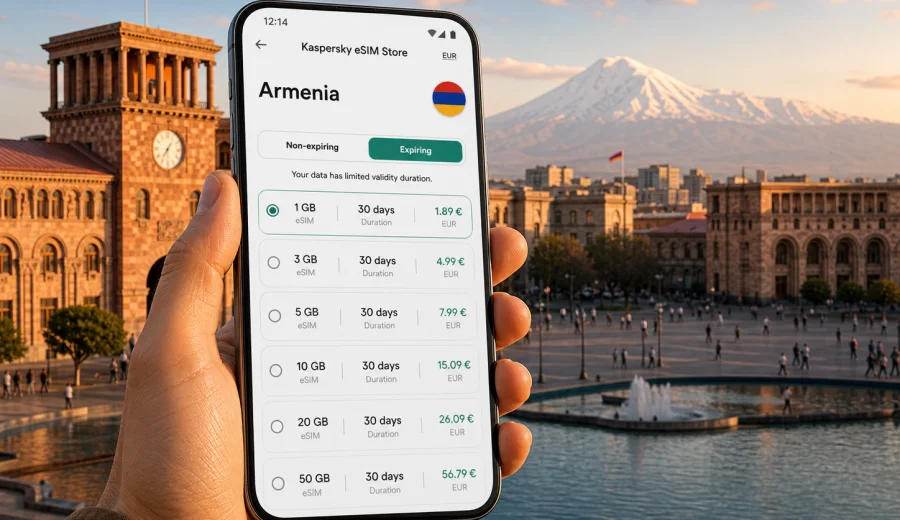
eSIM in Armenia: mobile connection and internet for your trip
Armenia is compact on the map, but travel inside the country can be surprisingly varied. One day you may be walking through Yerevan with maps, ride-hailing apps and restaurant bookings open on your phone. The next day you may be driving toward Lake Sevan, Garni, Geghard, Dilijan or the Areni wine region, where a stable mobile connection becomes part of navigation, payments, messaging and basic trip planning.
An eSIM is a practical way to prepare mobile internet for Armenia without replacing your physical SIM card. Instead of looking for a local SIM after arrival, you install a digital SIM profile on a compatible smartphone and use a prepaid data plan for the trip. Kaspersky eSIM Store is an app and website where you can choose, order and activate an eSIM with a suitable data plan for international travel.
This guide explains how eSIM works in Armenia, when it is useful, what to check before buying, how to estimate data needs and how to avoid common setup mistakes.
Why mobile internet matters in Armenia
Armenia is an easy country to explore independently, but many everyday travel actions depend on internet access. Public Wi-Fi can help in hotels, cafes and airports, yet it is not always available when you are moving between places or trying to solve something quickly.
Mobile internet is useful for:
- opening maps in Yerevan, Gyumri, Vanadzor and smaller towns;
- coordinating airport transfers after landing at Zvartnots International Airport;
- checking hotel messages, reservation details and entry codes;
- using translation apps in restaurants, shops and transport situations;
- sharing documents with tour operators or business contacts;
- paying attention to route changes on mountain roads;
- using messengers for calls and updates when ordinary voice service is not included in your data plan;
- checking weather before visiting higher-altitude places.
The main advantage of eSIM is timing. You can prepare mobile internet before departure, keep your home SIM in the phone and switch to the eSIM profile for data when you need it.
What an eSIM gives you during a trip
An eSIM is a digital SIM profile built into the phone. For travel, it is usually used for mobile data. It does not require a plastic SIM card, and it can be installed through a QR code or an in-app flow, depending on the device and instructions.
For Armenia, an eSIM can help with three typical travel goals:
| Travel goal | Why eSIM helps | What to check |
|---|---|---|
| Short city break | You can use maps, taxis, messengers and bookings without hunting for a SIM card | Data amount and validity period |
| Road trip or guided route | You keep mobile data available for navigation and coordination between stops | Coverage conditions of the selected plan and offline map backup |
| Remote work or business visit | You can keep work chats, email and calendar access separate from hotel Wi-Fi | Data volume, tethering rules and device compatibility |
An eSIM data plan is not the same as a full local mobile subscription. Unless the plan conditions say otherwise, it normally does not include a local phone number, standard voice calls or SMS. For calls and messages, many travelers use internet-based messengers over mobile data.
Armenia travel scenarios where eSIM is useful
Arrival in Yerevan
Most international visitors arrive through Zvartnots International Airport near Yerevan. The first hour after landing is often when mobile internet is most useful: you may need to message a host, check a transfer point, open a map, call a ride, or confirm the address of your hotel.
If your eSIM is installed before the flight, you can turn on the travel data line after landing and follow the activation instructions. Connection can take a few minutes and depends on the device settings and local network conditions, so it is better to set it up calmly rather than while standing in a taxi queue.
City days in Yerevan
Yerevan is walkable in the center, but mobile internet still makes the day smoother. You may use it for routes between Republic Square, Cascade, Vernissage, museums, restaurants and metro stations. It is also useful for checking opening hours, sending location pins and translating menus.
For this kind of trip, the main question is not only how many days you stay, but how often you use maps, video, cloud photo backup and social media. A light traveler may use little data; a traveler who uploads videos or uses constant navigation may need more.
Trips beyond the capital
Armenia's most memorable routes often lead outside Yerevan. Lake Sevan, Dilijan, Garni, Geghard, Khor Virap, Noravank, Gyumri and Tatev are common choices. On these routes, mobile internet is useful for navigation and communication, but you should also plan for places where signal conditions may vary. Download offline maps before leaving the city and keep key addresses saved.
An eSIM does not replace basic trip preparation. It gives you a convenient data option, but mountain roads, remote monasteries and border-adjacent areas can still have changing network conditions. Treat mobile data as part of your toolkit, along with offline maps, a charged power bank and saved contact details.
How much data to choose for Armenia
Data needs depend on your habits more than on the destination itself. Armenia is photo-friendly, and travelers often use maps, messengers and translation tools all day. Still, not every trip requires a large data package.
Use this practical estimate:
| Traveler type | Typical use | Suggested approach |
|---|---|---|
| Light user | Maps, messaging, email, occasional browsing | Choose a smaller plan and use hotel Wi-Fi for updates and backups |
| Standard traveler | Daily maps, messengers, searches, tickets, social posts | Choose a medium plan with enough validity for the full stay |
| Heavy user | Video calls, cloud sync, frequent uploads, tethering | Choose a larger data allowance and check whether tethering is allowed |
| Family organizer | Manages transport, bookings and group chats | Prioritize reliability, validity period and some data reserve |
Before choosing a plan, check three details: data amount, validity period and destination coverage. A plan with more data is not always better if the validity period is too short for your itinerary. A smaller plan can be enough if you use Wi-Fi for heavy tasks and keep mobile data for travel moments.
When to prepare your eSIM
The calmest option is to choose and install the eSIM before you travel, while you still have a stable internet connection. Do not wait until you are already in a busy arrival hall unless you are comfortable troubleshooting phone settings on the spot.
A simple timeline:
1. A few days before departure, check that your phone supports eSIM.
2. Compare data amounts and validity periods for Armenia.
3. Order the selected eSIM plan through the website or app.
4. Install the eSIM profile while connected to reliable Wi-Fi.
5. Keep your home SIM active for calls or banking messages if you need it.
6. After arrival, select the eSIM for mobile data and follow the activation instructions.
If your trip includes both Armenia and nearby countries, check whether you need a country plan, a regional plan or separate plans for each destination. Do not assume that one plan covers every border crossing unless the plan conditions clearly say so.
Choosing an eSIM plan for Armenia
The best eSIM plan is the one that matches your actual route, phone and data habits. For a weekend in Yerevan, you may prefer a shorter validity period and modest data volume. For a longer itinerary with Lake Sevan, Dilijan and southern Armenia, a longer validity period and a larger allowance may be more comfortable.
At this point in planning, you can choose an eSIM data plan for Armenia in Kaspersky eSIM Store and compare the available options by data volume, duration and destination. The store helps you choose, order and activate an eSIM for mobile internet in an international trip; it is not a mobile operator and does not own or operate a telecom network.
When comparing plans, look at:
- destination: the plan should include Armenia;
- data amount: enough for maps, messages and your usual apps;
- validity: long enough for your full stay;
- activation conditions: when validity starts and what action begins usage;
- device requirements: your phone must support eSIM and be unlocked for mobile network use;
- hotspot rules: if you plan to share data with a laptop or another device, check the plan conditions first.
Compatibility: check your device before buying
Before ordering any eSIM, make sure your device can use it. eSIM support depends on the phone model, region of sale and carrier lock status. Some model names look identical but differ by market, so it is worth checking the exact device settings rather than relying only on a general product name.
Before purchase, check your device and confirm that:
- the device supports eSIM;
- it is not locked to a carrier that prevents adding another mobile plan;
- your operating system is up to date enough for eSIM installation;
- you can access Wi-Fi during installation;
- you understand which SIM line will be used for mobile data after arrival.
If you use a dual-SIM setup, label your lines clearly. For example, keep your home SIM for calls and SMS, and set the Armenia eSIM as the mobile data line. This reduces the risk of accidentally using roaming data on the wrong line.
How to install and activate eSIM for Armenia
The exact installation flow depends on your device. In general, you receive an eSIM profile after ordering, then add it to the phone through the provided instructions. You may install it before travel and activate mobile data when you arrive, depending on the plan rules.
For detailed setup, use the Android installation guide or the iOS installation guide.
Typical steps:
1. Connect your phone to stable Wi-Fi.
2. Open the eSIM installation instructions from your profile or email.
3. Add the eSIM profile using the QR code or guided setup.
4. Give the line a clear name, such as Armenia data.
5. Keep your primary SIM selected for calls if you still need it.
6. Set the eSIM as the mobile data line when you are ready to use it.
7. If the instructions require it, enable data roaming for the eSIM line.
8. Wait a few minutes for the phone to register on the local network.
Do not delete the eSIM profile after installation unless you are sure you no longer need it. In many cases, an activated eSIM cannot simply be moved to another device or restored by reinstalling it. Follow the plan instructions and keep your order details available during the trip.
eSIM, roaming and local SIM: what is different
Travelers usually compare three options: home-carrier roaming, a local physical SIM and eSIM. None is automatically right for everyone.
| Option | Strengths | Limitations |
|---|---|---|
| Home roaming | Keeps your usual number and may require no setup | Can be expensive or limited, depending on your home carrier |
| Local physical SIM | May suit long stays or people who need local services | Requires finding a point of sale and replacing or adding a plastic SIM |
| Travel eSIM | Can be prepared in advance and used without a physical SIM swap | Requires compatible device and careful setup of data line |
For many short and medium trips, eSIM is attractive because it reduces arrival friction. You can make the data decision before the trip, keep the plan details visible and avoid spending your first day comparing unfamiliar mobile options in person.
Short answers for travel planning
Can I use eSIM in Armenia for mobile internet?
Yes, if your device supports eSIM, is not carrier-locked and the selected plan includes Armenia. Check the plan conditions before ordering.
Do I get a local Armenian phone number?
Usually no. Travel eSIM plans are commonly intended for mobile data. Standard calls and SMS are not included unless the specific plan says otherwise.
Can I install the eSIM before departure?
In many cases, yes. It is usually convenient to install the eSIM profile while you have reliable Wi-Fi, then activate mobile data according to the plan instructions.
Should I keep my physical SIM in the phone?
You can keep it if your phone supports this setup. Many travelers keep the home SIM for calls or banking messages and use the eSIM for mobile data in Armenia.
Will eSIM remove the need for offline preparation?
No. It helps with mobile internet, but you should still save addresses, download maps and keep important documents available offline.
Final checklist before you fly to Armenia
Before departure, make sure you have:
- confirmed that your phone supports eSIM;
- checked that the device is not carrier-locked;
- chosen a data plan that includes Armenia;
- matched the validity period to your travel dates;
- installed the eSIM profile on reliable Wi-Fi;
- downloaded offline maps for longer routes;
- decided which SIM line will handle mobile data after arrival.
Prepare mobile internet for Armenia
If Armenia is your next destination, choose the eSIM option before the trip and keep the setup steps ready on your phone. Kaspersky eSIM Store helps you choose, order and activate an eSIM with a suitable data plan for mobile internet abroad, while you stay in control of the destination, data amount and validity period.
You can prepare an eSIM data plan for your trip to Armenia and complete the setup before departure or shortly after arrival, depending on the plan instructions and your travel schedule.