
Travel connectivity guide
Aruba eSIM: mobile internet for travel
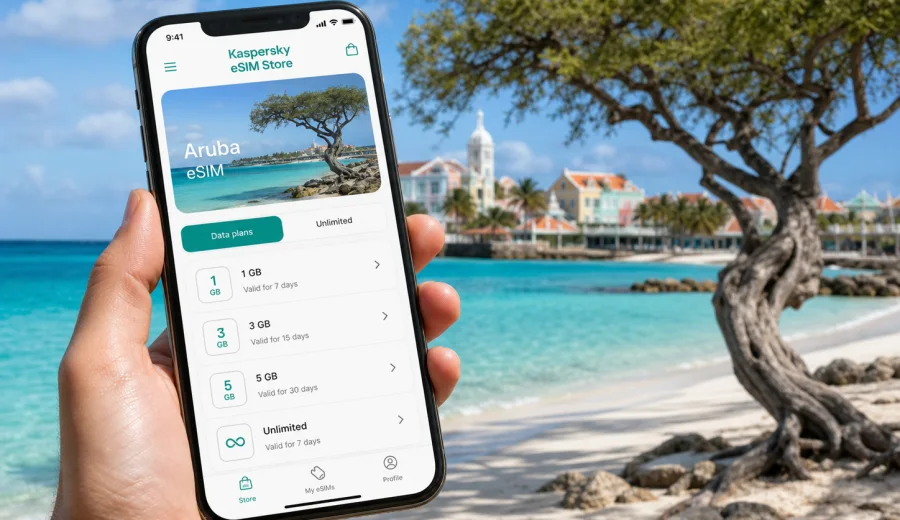
Aruba eSIM: mobile connection and internet for your trip
Aruba is a compact island, but mobile internet can become important before you have even reached your hotel. You may need maps at Queen Beatrix International Airport, a message from your transfer driver, a booking confirmation in Oranjestad, a restaurant reservation near Palm Beach, or weather updates before a day at Arikok National Park. An eSIM helps you prepare mobile data for these moments without searching for a physical SIM card after arrival.
For many travelers, the main value is not only convenience. It is control. You can review the data amount, validity period, destination, and price of a selected plan before the trip. Then you can install the eSIM on a compatible device over stable Wi-Fi and keep your regular SIM available for calls, banking messages, or account verification if you need it.
Kaspersky eSIM Store is an app and website where you can choose, arrange, and activate an eSIM with a suitable data plan for mobile internet during an overseas trip. It is not a mobile network operator, does not own a mobile network, and does not replace the coverage conditions of local telecom networks. It helps you handle the eSIM setup in a clear, practical way before or during travel.
Why mobile internet matters in Aruba
Aruba travel often looks simple on the map: the airport is near Oranjestad, the resort areas are close together, and many popular beaches are within a short drive. In practice, you may still use your phone dozens of times a day for practical tasks:
- checking transfer or rental-car details after landing;
- using maps between Oranjestad, Palm Beach, Eagle Beach, San Nicolas, and inland sights;
- messaging a hotel, host, dive school, tour operator, or restaurant;
- opening digital tickets, vouchers, and booking confirmations;
- checking weather before boat trips, beaches, and national park routes;
- using ride, taxi, parking, or payment apps when available;
- keeping family, friends, or colleagues updated;
- handling email or light work tasks during a longer stay.
Hotel and cafe Wi-Fi can be useful, but it is tied to places. Mobile data is useful in between those places: at the airport, in a taxi, outside a restaurant, near a beach, or while checking the next stop on a route. An eSIM gives you another way to use mobile internet on a compatible device, so you do not have to rely only on public Wi-Fi when you are moving.
This matters especially on the first day. A travel day usually includes the highest number of small decisions: where to meet a driver, whether the room is ready, how long the route takes, where to get food, and which documents you need to show. Having data ready can reduce friction at exactly the moment when you are tired, carrying luggage, and dealing with a new place.
What an eSIM can do for an Aruba trip
An eSIM is a digital SIM profile installed on a compatible phone or tablet. For travel, it is commonly used for mobile data. You do not need to remove your plastic SIM card, and on many dual-SIM devices you can keep your usual number active while using the eSIM line for data.
For a trip to Aruba, an eSIM data plan can support common travel tasks such as messaging, maps, browser searches, email, online check-in, translation, transport coordination, and app-based calls. Regular voice calls and SMS through a local phone number are usually not included unless the selected plan explicitly says so. If you need calls, you can often use internet-based calling apps over mobile data.
Before choosing a plan, separate three ideas:
| Topic | What it means for your trip |
|---|---|
| eSIM profile | The digital SIM profile added to your compatible device. |
| Data plan | The selected amount of mobile data and validity period for the destination. |
| Device settings | The phone settings that decide which SIM line uses mobile data and roaming. |
Most setup issues come from mixing these up. Installing an eSIM profile is not the same as choosing the correct data line. Buying a plan is not the same as confirming that the device is unlocked. A calm setup before departure is the easiest way to avoid confusion after landing.
Aruba travel scenarios where eSIM is useful
Different travelers use mobile data differently. The right plan depends on the way you will spend time on the island.
Short resort stay. If you mostly stay near a hotel or resort, you may use mobile data for airport transfer, maps, restaurant searches, and messaging when away from Wi-Fi. A smaller plan may be enough if you avoid video streaming and large uploads on mobile data.
Beach and activity trip. If you move between Eagle Beach, Palm Beach, Baby Beach, snorkeling points, boat tours, and restaurants, mobile data becomes more useful during the day. You may need navigation, booking updates, weather checks, and group messaging.
Road trip and inland sightseeing. Travelers who rent a car often use maps, parking information, route changes, and location sharing. Downloading offline maps before the trip can reduce data use, but mobile data is still helpful for live updates and last-minute searches.
Remote work or long stay. If you need email, calendars, video calls, cloud documents, or hotspot use, choose data more carefully. Video calls and file transfers can consume a plan quickly. Check whether hotspot use is allowed by the selected plan and your device.
Family travel. One person often becomes the organizer for tickets, reservations, maps, and messaging. That phone needs reliable data more than the rest of the group. A little extra data can be useful when plans change.
How much data to choose for Aruba
There is no single correct data amount for every trip. A traveler who uses only maps and messages may need much less data than someone who uploads videos, works remotely, or uses mobile hotspot for a laptop. The better question is: what will you do away from Wi-Fi?
Use this planning table as a practical starting point:
| Travel style | Likely mobile data use | Planning tip |
|---|---|---|
| Light user | Messaging, maps, email, boarding passes | Choose enough for arrival, routes, and daily essentials. |
| Standard vacation | Maps, browsing, social apps, photo sharing | Allow extra room for beach days and restaurant searches. |
| Active explorer | Navigation, weather, bookings, uploads, group chats | Consider a larger data allowance and monitor usage daily. |
| Remote worker | Email, calls, documents, hotspot, backups | Avoid heavy video and cloud sync unless the plan fits. |
| Family organizer | Tickets, maps, chats, confirmations, location sharing | Choose a plan that covers the whole stay, not just arrival. |
Apps can use mobile data in the background. Before leaving, review these settings:
- pause automatic app updates on mobile data;
- turn off automatic cloud photo and video backup;
- disable video autoplay in social apps;
- download offline maps for key areas if your map app supports it;
- save hotel, transfer, airline, and activity contacts;
- keep important vouchers available offline;
- monitor mobile data by app in your phone settings.
For most Aruba trips, the most useful plan is the one that matches your itinerary with some margin. Choosing only by the lowest price can be inconvenient if you run out of data during a transfer, a day trip, or a work call.
Choosing an eSIM plan before departure
The best time to choose and install an eSIM is usually before you fly, while you have stable Wi-Fi and time to read the plan conditions. You do not have to solve mobile internet at the airport, and you can check the setup steps without luggage, queues, or weak public Wi-Fi.
Before selecting a plan, answer these questions:
1. How many days will you be in Aruba?
2. Will you stay mostly in one resort area or move around the island?
3. Will you rely on hotel Wi-Fi or use mobile data throughout the day?
4. Do you need data for work, hotspot, or only travel essentials?
5. Will your route include another country or only Aruba?
6. Does your device support eSIM and allow adding a new mobile plan?
When you are ready to compare the available options, you can choose an eSIM plan for Aruba and review the data amount, validity period, destination, and activation details before payment. The exact conditions depend on the selected plan, so check the plan page carefully instead of assuming that all eSIM options work the same way.
If you are also visiting nearby destinations, compare the country-specific plan with any relevant regional option available for your route. A country plan can be a good fit when Aruba is the only destination. A regional plan may be more practical when your trip includes several places and the conditions match your itinerary.
Device compatibility comes first
Before buying an eSIM plan, confirm that your phone or tablet can use eSIM. Not every device supports it, and some models differ by market, carrier, or generation. A device can also be locked to one mobile operator, which may prevent adding another mobile plan.
Check your device before purchase. This step is important because an eSIM cannot help if the device cannot install or activate the profile.
Use this checklist:
- the device supports eSIM;
- the device is not carrier-locked;
- the operating system is updated enough for eSIM setup;
- you have stable Wi-Fi for installation;
- you understand whether the plan starts on installation or first network use;
- you know which SIM line should be used for mobile data;
- you can keep your regular SIM active if you need calls or SMS from your home number.
On many phones, you can name the eSIM line, for example “Travel data” or “Aruba data”. This makes it easier to avoid selecting the wrong SIM for mobile data. After arrival, check that the eSIM is selected as the mobile data line and that your home SIM is not using roaming data by mistake.
How to install and activate an eSIM for Aruba
The exact screens depend on your device, but the general flow is straightforward. After purchase, the eSIM details appear in your profile or app, and you can follow the setup instructions. For device-specific steps, use the Android installation guide or the iOS installation guide.
A typical setup looks like this:
1. Choose Aruba as the destination in Kaspersky eSIM Store.
2. Select a data plan based on data amount and validity period.
3. Complete the purchase and open the eSIM details.
4. Install the eSIM on a compatible, unlocked device.
5. Give the new mobile plan a clear name.
6. Set the eSIM as the mobile data line when you want to use it.
7. Enable data roaming for the eSIM line if the plan or device instructions require it.
8. Check mobile data after arrival or when the plan should become active.
Do not delete the eSIM profile if something does not work right away. In many cases, an activated eSIM cannot simply be moved to another device or reinstalled in the same way. First check mobile data selection, roaming settings for the eSIM line, APN or network settings if shown in the instructions, and the selected plan conditions. If the issue continues, contact support.
eSIM, roaming, Wi-Fi, and local SIM cards
There are several ways to get online during an Aruba trip. The practical choice depends on your device, travel style, and expectations.
| Option | Strengths | Trade-offs |
|---|---|---|
| Travel eSIM | Can be prepared before travel, no plastic SIM swap, clear data and validity terms | Requires a compatible unlocked device and careful setup. |
| Home roaming | Uses your regular SIM and may need little setup | Cost, speed, and data limits depend on your home operator’s roaming terms. |
| Public Wi-Fi | Useful in hotels, cafes, and airports | Not always available when moving and may be inconvenient for urgent tasks. |
| Local physical SIM | Can suit some longer stays or local needs | Requires finding a seller, handling a plastic SIM, and checking terms locally. |
An eSIM is often a practical middle option. You can prepare it before departure, keep your usual SIM in the phone, and use mobile data for travel tasks without depending on a store visit after landing. It is still important to check device compatibility and plan details before purchase.
Practical first-day setup in Aruba
The first day is when preparation matters most. Use this short sequence before and after arrival:
1. Install the eSIM before departure over stable Wi-Fi.
2. Save your hotel address, transfer contact, and booking confirmations offline.
3. Keep your regular SIM available if you need account verification messages.
4. On arrival, set the eSIM as the mobile data line.
5. Confirm whether data roaming should be enabled for the eSIM line.
6. Open a map, send a test message, and check that mobile data works.
7. Keep heavy uploads, app updates, and video streaming for Wi-Fi.
If you are traveling with other people, agree in advance who will handle maps, bookings, and group messages. That person should have the most reliable data setup. It is easier than trying to coordinate several phones during a transfer.
Common mistakes to avoid
Most eSIM issues are preventable. Review these points before the trip:
| Mistake | Why it causes trouble | Better approach |
|---|---|---|
| Buying before checking compatibility | The phone may not support eSIM or may be locked | Confirm support and carrier status first. |
| Installing with weak Wi-Fi | Setup may fail or take longer | Install over reliable Wi-Fi before departure. |
| Leaving the wrong SIM as the data line | The phone may use home roaming data | Set the eSIM as the data line when needed. |
| Ignoring validity rules | The plan may start earlier than expected | Read activation and validity details before purchase. |
| Deleting the eSIM too soon | Reinstallation may not be available | Keep the profile unless support tells you otherwise. |
| Using hotspot without checking | Tethering may depend on plan and device conditions | Review plan details before relying on hotspot. |
These checks take a few minutes, but they can save time when you arrive. They also help you avoid unnecessary roaming use from your home SIM.
Data-saving tips during your stay
To make your plan last longer, use mobile data for travel essentials and keep heavy tasks for Wi-Fi where possible:
- download maps and playlists before leaving the hotel;
- send photos in compressed mode when quality is not critical;
- use video calls on Wi-Fi when possible;
- turn off background refresh for apps you do not need;
- avoid automatic cloud backup on mobile data;
- check which apps are using the most data;
- use hotspot only for essential laptop or tablet tasks;
- keep a small data reserve for your departure day.
Quick recommendation
For a short Aruba vacation, prepare the eSIM before departure, install it over stable Wi-Fi, and keep it ready for airport arrival, maps, messages, bookings, and beach-day planning. For a longer stay, remote work, or frequent movement around the island, choose a plan with enough data and monitor background usage.
The strongest setup is simple: compatible unlocked device, clear data allowance, validity period that matches your dates, correct mobile-data line, and phone settings that prevent unexpected roaming on your home SIM.
FAQ
Can I use an eSIM for mobile internet in Aruba?
Yes, you can use an eSIM as a travel data option if your device is compatible, unlocked, and the selected plan is suitable for Aruba. Check the destination, data amount, validity period, and activation details before purchase.
Does an Aruba eSIM include calls and SMS?
Travel eSIM plans are usually focused on mobile data. A regular phone number, voice calls, and SMS are not included unless the selected plan explicitly says so. For calls and messages, many travelers use internet-based apps over mobile data.
Should I install the eSIM before flying to Aruba?
In many cases, yes. Installing before departure over reliable Wi-Fi can make arrival easier. Check when the plan validity starts and when mobile data should be enabled.
Can I keep my normal SIM active?
On many dual-SIM devices, you can keep your regular SIM active and use the eSIM for mobile data. Review your phone settings carefully so the correct line handles mobile data and your home SIM does not use roaming data unexpectedly.
What if mobile data does not connect immediately?
Check that the eSIM is installed, selected for mobile data, and allowed to use data roaming if the instructions require it. Restarting the phone can help. If the issue continues, contact support and avoid deleting the eSIM profile unless instructed.
Is hotel Wi-Fi enough in Aruba?
Hotel Wi-Fi may be enough if you stay mostly on one property. Mobile data is useful when you are moving between the airport, beaches, restaurants, tours, rental cars, and accommodation.
Can I share eSIM data with another device?
Hotspot availability depends on the selected plan and your device. If you need to connect a laptop or another phone, check the plan conditions before relying on tethering.
Choose an eSIM plan for Aruba
If you want mobile internet ready before your trip, prepare your device first, review the plan details, and choose a data allowance that matches your route and travel style. Kaspersky eSIM Store helps you choose, arrange, and activate an eSIM with a suitable data plan for an overseas trip, while you stay in control of the device settings and plan conditions.
You can select an eSIM plan for Aruba before departure, install it on a compatible device, and keep mobile data ready for maps, messages, bookings, and everyday travel tasks on the island.