Travel connectivity guide
Asuncion eSIM: Mobile Internet for Your Trip
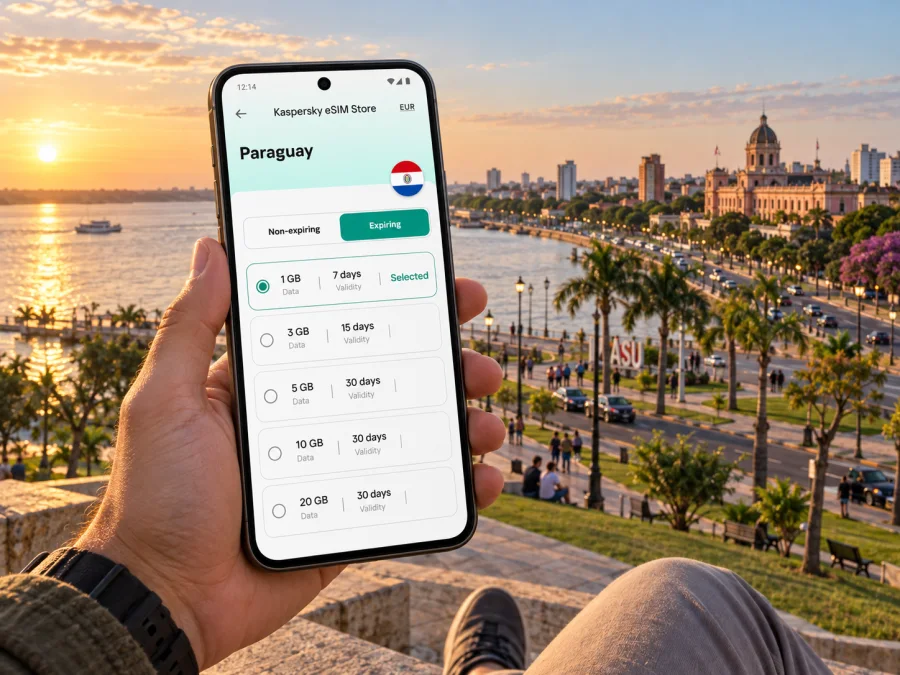
Asuncion eSIM: mobile connection and internet for your city trip
Asuncion rewards travelers who leave room for changing plans. You might arrive at Silvio Pettirossi International Airport, cross the metropolitan area to a hotel, spend the afternoon around the historic center, then head toward the Costanera as the light softens over the Paraguay River. A working mobile connection helps with the practical links between those moments: checking a route, confirming an address, arranging a ride, translating a message, or letting someone know you have arrived.
An eSIM can prepare mobile internet for your stay without inserting a physical travel SIM. It is especially useful when your itinerary begins with a transfer from the airport in Luque or includes meetings at several addresses around the capital. The city itself is not especially difficult to understand, but distances, heat, traffic and the distinction between Asuncion and its neighboring municipalities make it worth keeping maps and booking details close at hand.
Start with the arrival, not the first sightseeing stop
Silvio Pettirossi International Airport is in Luque, part of the wider metropolitan area, rather than in central Asuncion. That matters when you estimate a transfer: the ride is a cross-city journey, and the time can vary with traffic, the time of day and your exact destination. Before landing, save the hotel name and full address, plus a map pin if your accommodation has supplied one. A street name alone may not be enough to distinguish similarly named roads or entrances.
At the airport, decide how you will get to your accommodation before you are tired and trying to coordinate several tasks at once. Follow the airport's current transport arrangements, use a licensed or otherwise clearly identified service, and confirm the destination in the booking or with the driver. If you arrange a ride by app, mobile data makes it easier to enter the correct pickup point and check that the vehicle details match. Keep a screenshot of the address and booking confirmation as a fallback in case your connection is temporarily unavailable.
Before departure, save the hotel address, booking confirmation and a map of the first route offline. Share your expected arrival time, and check that you know which SIM line is selected for mobile data. This helps you avoid depending on airport Wi-Fi for directions or a ride request. Recheck the route after landing because traffic and pickup instructions can change.
Understand the shape of Asuncion
The historic center and the riverfront are useful reference points, but the city is spread across distinct areas rather than arranged around one compact pedestrian core. A hotel described as being in Asuncion may be near the center, in a residential district, or closer to business and shopping areas farther out. Confirm the exact neighborhood before booking, and compare it with the places you expect to visit rather than relying on the city name alone.
The central area suits visitors interested in historic architecture and civic landmarks. The Palacio de López, Panteón Nacional de los Héroes, Metropolitan Cathedral and old Cabildo area can anchor a walking itinerary. Access and opening arrangements vary, so check locally before planning an interior visit.
The Costanera José Asunción Flores offers open river views and room for a walk or evening pause. Weather and heat shape the experience. Use a map to identify the specific stretch you want; “the riverfront” is not a precise pickup point.
Villa Morra and nearby commercial districts can be practical for meetings, restaurants and shopping, but allow time to reach historic sights. Office clusters may suit business trips, while a central hotel can reduce transfers for a short sightseeing stay. Check the actual hotel and meeting addresses.
| If your priority is… | A useful base to investigate | What to check before booking |
|---|---|---|
| Historic sights and civic buildings | Central Asuncion | Walking distances, opening information and evening transport |
| Offices, restaurants and shopping | Villa Morra or nearby commercial areas | Meeting address, traffic at appointment time and hotel access |
| River views and an outdoor break | A route to the Costanera | Weather, daylight and the exact section you plan to visit |
| An early airport departure | A hotel with a clear airport-transfer plan | Pickup arrangements and likely road conditions |
Mobile data for the way the city is actually navigated
Mobile internet is useful in small, repeated ways: compare walking and driving routes, share a pickup pin, locate a restaurant, retrieve a reservation or message a colleague about traffic. It also keeps translation and directions available when you are away from hotel Wi-Fi.
Search by venue name, then verify the street address, neighborhood and map marker. Confirm the destination with a driver before setting off. Allow for delays on cross-town routes and treat map estimates as guidance, not a guaranteed arrival time.
For walking, consider shade, crossings, weather and the condition of the route; a short ride may be more comfortable in heat or rain. Save an offline map as a backup if service pauses or the battery runs low.
Keep hotel contacts, meeting locations and reservations accessible on the phone, with essential details copied to a note or screenshot in case Wi-Fi or mobile service is unavailable.
Choose transport around the journey
Buses serve Asuncion and the metropolitan area. Routes, stops and payment practices can change, so check current local information before relying on a line for a time-sensitive trip. If the system is unfamiliar, ask your hotel to confirm the stop and direction; a live map is helpful but does not replace route confirmation.
A taxi or app-based ride may be simpler for an airport transfer, late arrival, luggage or an unfamiliar address. Walking may suit a short central visit. For cross-town meetings, compare travel time and pickup details before setting out.
Think in terms of door-to-door trips:
- Put the exact destination into your map, including the venue or hotel name.
- Check whether the route is a walk, a bus journey or a ride, considering heat, rain and luggage.
- If taking a bus, confirm the route and stop with current local information.
- If arranging a ride, verify the pickup point and vehicle details in the app or booking.
- Send an updated arrival message if the route is delayed.
Check the route before leaving and stay aware of your surroundings. After dark, choose a direct, familiar route or arrange a ride if that is more comfortable.
Select an eSIM plan for your itinerary
Choose a plan around the length of your stay and how you use data. Maps and messaging use less than frequent video calls, large uploads or streaming. Consider available Wi-Fi and any destinations beyond Asuncion, then review the plan's data allowance, validity, coverage and activation conditions.
Kaspersky eSIM Store is an app and website where you can choose, order and activate an eSIM with a suitable plan for mobile internet during an international trip. It helps you prepare the data connection in advance; network availability and service conditions depend on the applicable plan and local network. To compare options for this trip, review eSIM plans for Paraguay and read each plan's terms before purchase.
The largest allowance is not automatically the best fit. Check whether the plan is limited by data, validity or both, when its validity begins, and whether it covers each stop on your route. Do not assume it includes a regular phone number, calls or SMS; check the individual terms. Messaging apps can be used over data.
A quick planning table:
| Your pattern | What to estimate | A sensible preparation |
|---|---|---|
| Weekend in central Asuncion | Maps, messages, bookings and occasional searches | Check the data allowance and validity for the complete stay |
| Several meetings across town | Maps, email, messaging and document access | Include work use and keep meeting addresses saved offline |
| Longer visit with day trips | Navigation and communication beyond the capital | Verify that the destination coverage matches the full itinerary |
| Frequent video or hotspot use | Higher and less predictable data consumption | Review the plan limits carefully and identify Wi-Fi alternatives |
Your habits, device settings and Wi-Fi access affect consumption. Disable automatic updates or large background downloads over mobile data if you want to reserve data for navigation and communication.
Prepare and install before you leave
An eSIM is a digital SIM profile for a compatible, unlocked device. Before choosing a plan, check whether your device supports eSIM and confirm it is not restricted by your home carrier. Support can vary by model and market. Keep a stable connection and your order details available for installation.
Install when you can follow the steps without rushing, and check when validity begins: activation rules differ by plan. Do not delete the profile to troubleshoot unless instructed. See the Android eSIM installation guide or iOS eSIM installation guide.
Before departure, review these settings:
- Confirm the eSIM profile appears in your device's cellular or SIM settings.
- Label it clearly, for example “Paraguay data,” so it is easy to identify while traveling.
- Check which line is selected for mobile data and whether data roaming is required by the plan instructions.
- Keep your regular line's call and messaging settings as you intend to use them; understand any charges from your home provider.
- Save the support and plan details in a place you can access without mobile data.
When you arrive, follow the plan instructions to enable the eSIM and select it for mobile data. Allow the phone time to register, then test a simple web page or map. If data does not work, check that the correct line is selected, the plan is active and the required roaming setting is enabled. Restarting the device may help in some cases. If the problem continues, consult the plan's support information rather than repeatedly deleting and reinstalling the profile.
From Asuncion to other destinations
Many itineraries use Asuncion as a base before continuing elsewhere in Paraguay. The city's bus station connects travelers with intercity services, but departure points, timetables and ticket arrangements depend on the route and operator. Check current details before the travel day and confirm the terminal, departure time and luggage rules directly with the service provider. Leave time to reach the station from your accommodation, especially when traffic is heavy.
A trip beyond the capital changes what you need from mobile data. You may rely more on saved tickets, meeting points and offline maps, and less on a steady sequence of city addresses. Before leaving Asuncion, download the next region's map where possible, share your itinerary with someone, and check whether the eSIM plan covers the destination. Do not assume that conditions in the capital describe service on a rural road or in another city.
For nearby outings, first identify whether the destination is within Asuncion or in a neighboring municipality. The metropolitan area crosses local boundaries, and the name used informally for a place may not identify the exact address. Search the venue and town, save a pin, and allow enough time for the return journey. If you are booking a car or bus, use the operator's confirmed location and departure information rather than relying on an old screenshot.
Frequently asked questions
Is the airport in Asuncion?
Silvio Pettirossi serves the capital from neighboring Luque. Use your accommodation's exact address to plan the metropolitan transfer.
Can I rely on buses to get around?
Buses serve the city, but check current routes and stops. For luggage, a late arrival or a time-sensitive trip, compare them with a taxi or ride service.
Will the eSIM give me a Paraguayan phone number?
Not necessarily. Check the individual plan; travel eSIMs are often for data. Apps can use data for messages and calls, while your regular number follows your home provider's terms.
Should I install the eSIM in Asuncion?
Install before departure if the plan permits, after checking when validity begins. Enable the profile and select it for data according to the plan instructions.
A practical connection plan for your Asuncion visit
Before traveling, confirm the hotel neighborhood, save the airport transfer details, check your device and read the eSIM plan conditions. Once in Asuncion, use mobile data for maps and communication, check transport information for each unfamiliar journey, and leave a buffer for traffic. Keep offline copies of the addresses and reservations that matter most. This combination makes it easier to move between the airport, central sights, business districts and the riverfront while keeping the itinerary adaptable.
When you are ready to prepare data for the trip, choose an eSIM plan for Paraguay in Kaspersky eSIM Store. Review its destination, data allowance, validity and activation conditions, then install it on your compatible device in time to follow the setup instructions calmly.


