
Travel connectivity guide
Aua eSIM for Mobile Internet in American Samoa
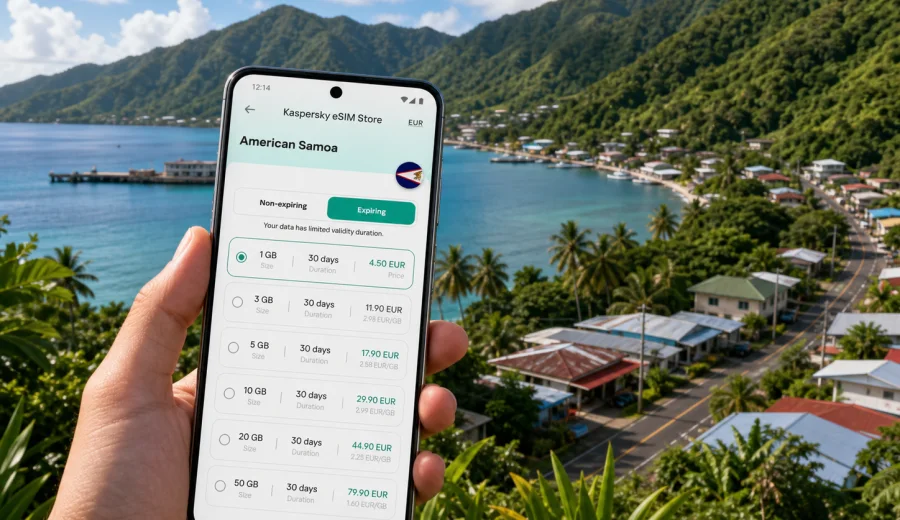
Aua eSIM: mobile connection and internet for your trip to American Samoa
Aua is a small coastal village on Tutuila, close to Pago Pago Harbor and the everyday movement of American Samoa. Its travel rhythm is built around short drives along the bay, village roads between the sea and green ridges, hotel check-ins near Pago Pago, early starts for meetings or boat trips, and quick searches for the right turn before the road bends around the harbor.
That is exactly why mobile internet matters in Aua. You may need maps before you understand local landmarks, a message to your host after landing, a ride coordination note from Tafuna airport, or a weather check before heading toward the eastern side of Tutuila. Public Wi-Fi can be useful in hotels and some businesses, but it is not a reliable travel plan by itself. An eSIM gives you a practical way to prepare mobile data before the trip and reduce the number of small connectivity tasks you have to solve on arrival.
This guide focuses on Aua as a destination and base: arrival, local movement, navigation, hotels, business travel, short stays, and trips from the village to Pago Pago, the airport area, and other parts of Tutuila.
Why Aua travelers should plan mobile internet early
Aua is close to central services around Pago Pago, but travel still depends on timing, local directions, and practical coordination. If you are visiting family, working with a local organization, joining a vessel, attending meetings, or staying nearby for a few days, your phone will likely become your main travel tool.
Mobile data helps with:
- checking the route from Pago Pago International Airport in Tafuna to Aua;
- messaging your hotel, host, driver, or business contact after landing;
- using maps along the coastal road and around Pago Pago Harbor;
- confirming ferry, bus, taxi, or pickup details when plans shift;
- sharing documents, photos, or location pins during a work trip;
- checking weather before a village walk, harbor visit, or drive across Tutuila;
- keeping family or colleagues updated when your schedule changes.
The key point is simple: Aua is compact, but your trip may not be. You may arrive through the airport on the western side of Tutuila, spend time near Pago Pago, move through several villages, and take short trips along the coast.
Arrival in American Samoa and the route toward Aua
Most international visitors arrive at Pago Pago International Airport in Tafuna. Aua sits east of Pago Pago Harbor, so the first practical question is often how to get from arrival to the first address without losing time. Mobile internet can help after baggage claim, during pickup coordination, and on the road toward the harbor.
Useful arrival tasks include:
1. Message your host or driver once your flight has landed.
2. Save the address or landmark for your accommodation in Aua or nearby Pago Pago.
3. Check the route before you leave the airport area.
4. Keep your booking confirmation available offline and online.
5. Share your estimated arrival time if traffic or baggage takes longer than expected.
For a short trip, you may only need enough data for maps, messages, email, and light browsing. For a longer stay or work trip, video calls, cloud documents, and photo uploads can require more data.
How Aua differs from a typical city eSIM scenario
Many city eSIM guides focus on subway exits, large shopping districts, and airport-to-downtown train routes. Aua is different. It is a village environment within the wider Pago Pago area, so your connectivity needs are more local and more practical.
| Travel situation in Aua | Why mobile data helps | What to prepare |
|---|---|---|
| Airport pickup from Tafuna | Flight timing, baggage delays, and pickup points may change | Messaging app, map, booking details |
| Staying near Pago Pago Harbor | You may move between Aua, Pago Pago, Utulei, and nearby villages | Saved places, route checks, local contacts |
| Business visit | Meetings may involve offices, harbor areas, schools, public services, or partner sites | Email, cloud files, video-call backup |
| Family or community visit | Plans can be flexible and arranged through messages | Reliable messaging and photo sharing |
| Short stopover | Time is limited, so small delays matter | Preinstalled eSIM and offline documents |
| Island drive | Mobile data helps with navigation, but offline backup is still sensible | Offline maps, charged power bank |
Choosing an eSIM plan for Aua
For a trip to Aua, choose your plan based on how you will use Tutuila, not only on the village name. If you are mainly visiting relatives, using maps, and sending messages, a moderate data package may be enough. If you are working, uploading files, or using hotspot where allowed by the selected plan, check the plan conditions carefully.
Ask yourself these questions before buying:
- How many days will I be in American Samoa?
- Will I stay around Aua and Pago Pago, or travel across Tutuila?
- Do I need video calls, or only messaging and email?
- Will I upload photos, documents, or work files?
- Do I need data on arrival, or only after hotel check-in?
- Does my device support eSIM and is it unlocked for travel use?
Short stays usually need predictable access for maps, messaging, and bookings. Longer stays need more attention to validity period, total data volume, and top-up options.
Device readiness before you travel
Before you rely on an eSIM in Aua, check your phone or tablet. The device must support eSIM, and it should not be locked in a way that prevents adding another mobile plan.
Use this simple readiness list:
- Your device supports eSIM.
- The operating system is up to date enough for eSIM installation.
- The device is not locked to one carrier.
- You know where the cellular or mobile data settings are.
- You can receive the installation details before departure.
- You have Wi-Fi available during installation if required.
If you are unsure, check your device before choosing a plan. It is better to confirm compatibility at home than to discover a limitation after landing in American Samoa.
Local movement around Aua, Pago Pago, and Tutuila
Aua works well as a base for practical trips around the harbor side of Tutuila. You may move toward Pago Pago for services, meetings, shopping, or port-related tasks, then return to Aua later in the day. You may also head west toward Tafuna and the airport area, or east along village roads for coastal views and visits.
Mobile internet is useful because local movement is often based on a mix of known landmarks, spoken directions, and changing plans. A map can help you orient yourself, while messages from a local contact can confirm the next step.
For smoother movement:
- save your accommodation and meeting points in maps;
- keep important contacts pinned in your messaging app;
- download offline maps as a backup before longer drives;
- carry a power bank if you will be out all day;
- avoid starting large app updates on mobile data;
- take screenshots of key addresses and confirmations;
If you want to prepare before arrival, you can use Kaspersky eSIM Store to choose a mobile internet plan for American Samoa and install it on a compatible device before the trip. The store helps you choose, arrange, and activate an eSIM plan for travel mobile data; the actual conditions, data volume, validity period, and destination are shown in the selected plan before purchase.
Practical data planning for common Aua trips
Data needs are personal, but travel patterns in Aua are easy to separate into a few scenarios. Use the table below as a planning frame, then check the details of the plan you choose.
| Scenario | Typical phone use | Data approach |
|---|---|---|
| One or two nights near Aua | Maps, messages, flight updates, light browsing | Small to moderate package with enough validity for arrival and departure |
| Family visit | Messaging, photos, calls through apps, local coordination | Moderate package; consider more data if sharing many photos |
| Business trip | Email, documents, calendars, messaging, occasional calls | Larger package and careful validity check |
| Island exploration | Maps, weather, search, photos, route checks | Moderate to larger package plus offline maps |
Do not choose only by price. The practical balance is data volume, validity period, destination coverage, and your actual phone habits.
Installing eSIM before or during the trip
Many travelers prefer to install the eSIM before departure while they still have stable Wi-Fi and time to check settings. Activation timing can depend on the selected plan, so read the plan details carefully.
A careful installation flow looks like this:
1. Check that your phone supports eSIM and is unlocked.
2. Choose American Samoa as the destination.
3. Select a plan by data volume and validity period.
4. Complete the order and follow the installation instructions.
5. Keep your primary SIM active if you need calls or SMS on that number.
6. Set the eSIM as the mobile data line when you are ready to use it.
7. Test basic internet access when you arrive.
For device-specific setup, use the Android installation guide or the iOS installation guide. Keep the instructions available before you travel.
Hotels, business trips, and short stays in Aua
If you are staying in or near Aua, use hotel or guesthouse Wi-Fi for heavier tasks when it is stable: app updates, cloud backups, streaming, and long video calls. Use eSIM mobile data for the moments away from Wi-Fi: airport pickup messages, maps, booking confirmations, weather checks, and location sharing.
Business visitors should prepare calendar entries, local contacts, PDF documents, and cloud files for offline viewing. Aua and the wider Pago Pago area often rely on practical landmarks and direct coordination, so mobile data is useful when meeting points change.
For a one- or two-day stopover, keep the setup simple:
- install the eSIM before departure;
- save the airport pickup contact;
- save your hotel address offline;
- keep return flight details available;
- pack a charger or power bank;
- keep your primary SIM active if you need bank or airline SMS.
Short trips make small delays feel bigger. A prepared eSIM can remove one common source of friction: waiting for stable Wi-Fi before you can message, navigate, or confirm the next step.
Trips from Aua across Tutuila
Aua can be part of a wider Tutuila itinerary. You might drive toward the airport side, visit Pago Pago, continue to coastal villages, or plan short outdoor stops when weather and timing allow.
Before heading out, download offline maps, save return routes, check weather, carry a power bank, and keep key contacts available without search.
Managing data and avoiding common mistakes
Most travel data is consumed by video, automatic backups, app updates, cloud sync, satellite map layers, and social media uploads. Before or soon after arrival, pause heavy background activity and monitor usage in phone settings.
Avoid these common eSIM problems on Aua trips:
- buying a plan before checking device compatibility;
- confusing installation with activation timing;
- deleting an eSIM profile too early;
- selecting the wrong line for mobile data;
- assuming the eSIM includes a local phone number;
- relying on public Wi-Fi for airport pickup coordination.
An eSIM for travel is mainly a mobile data tool. You can use internet-based calls and messages through apps, but ordinary phone calls and SMS on a local number are not part of the typical data-only setup unless the selected plan says otherwise.
FAQ: eSIM and mobile internet in Aua
| Question | Short answer |
|---|---|
| Is Aua the destination to select? | Aua is the city focus, but the plan destination is American Samoa. |
| Should I install before flying? | Usually yes, because you can use stable Wi-Fi and review settings calmly. |
| Do I still need my physical SIM? | Keep it if you need your usual number for calls, SMS, banking, or airline messages. |
| Can I rely only on Wi-Fi? | Wi-Fi can help at hotels or offices, but mobile data is more useful during arrival and movement. |
| How much data do I need? | Light users need less; work trips, uploads, and hotspot use require more careful plan selection. |
Prepare your eSIM for Aua
Aua is a practical, local destination where good mobile internet helps from the first hour of the trip: airport pickup, harbor-side movement, hotel messages, work coordination, route checks, and day trips across Tutuila. Prepare before departure, check your device, and choose a plan that matches your stay.
You can use Kaspersky eSIM Store to prepare an eSIM plan for your trip to Aua and American Samoa. Select the destination, review the data volume and validity period, install the eSIM on a compatible device, and keep your phone ready for the practical parts of travel: navigation, messages, bookings, and mobile internet when you are away from Wi-Fi.