Travel connectivity guide
Auckland eSIM: Mobile Internet for Your Trip
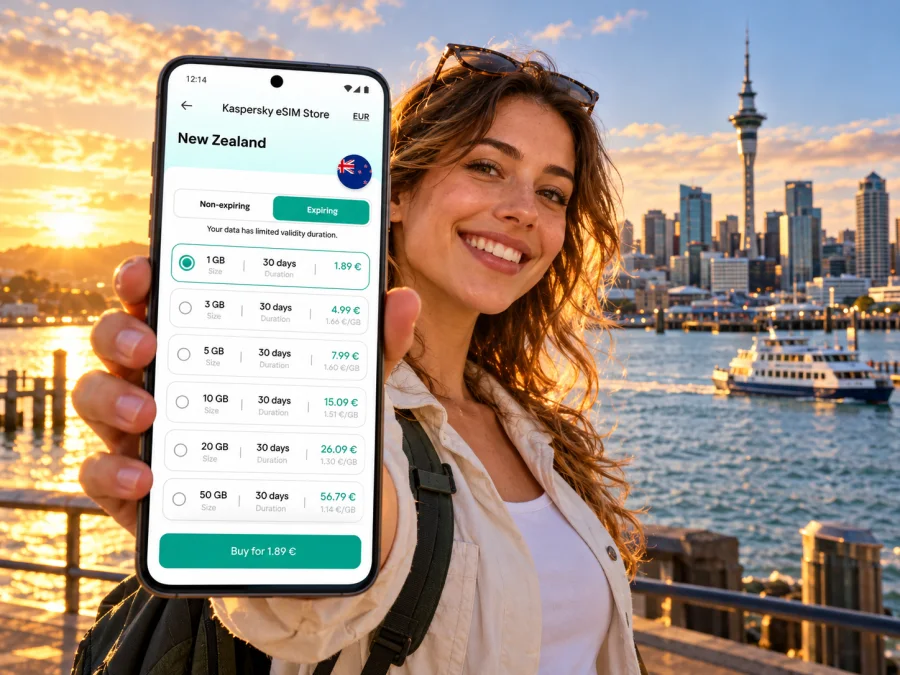
Auckland eSIM: mobile connection and internet for your trip
Auckland spreads around two harbours, so a day can move from the airport to a city hotel, a ferry terminal, a meeting in the central business district, and a waterfront walk. A dependable way to check maps, messages and bookings on the move makes those transitions simpler. An eSIM can provide mobile data without replacing your physical SIM, provided your device supports it and the selected plan covers New Zealand.
This guide focuses on the practical moments when visitors need data in Auckland: arriving at Auckland Airport, finding ground transport, navigating the central city, travelling by bus, train or ferry, and deciding whether a short stop or a longer stay calls for a different setup. Network availability and performance can vary by location, building, device and plan, so treat mobile data as a useful travel tool rather than a guarantee of uninterrupted service.
Before you fly: prepare for the first hour
Save the details you may need before leaving home: your accommodation address, airport transfer information, flight and booking references, and an offline map of central Auckland. Keep the airport’s transport options in a note or screenshot as well. That way, you can follow directions even while your phone is connecting or if you temporarily have no data.
Check these items before departure:
- Your phone is unlocked and supports eSIM. Some devices with similar names have regional hardware variants, so confirm the exact model and sales region rather than relying on a general model list. Check whether your device is compatible.
- The plan’s destination is New Zealand, and its validity period, data allowance, supported network arrangements and activation conditions fit your dates. A city article cannot confirm a specific plan’s current terms; read those shown for the plan you choose.
- You know whether validity starts at purchase, installation, or first network connection. This detail differs by plan, so check its terms before installing if you want to control when use begins.
- You have access to Wi-Fi during setup, such as at home or at the airport. Keep the QR code or installation details available on a second screen or printed copy if your phone cannot scan its own display.
- Your existing number remains available for calls or SMS if you need it. A travel data eSIM is not automatically a replacement for your regular mobile service.
Kaspersky eSIM Store is an app and website where you can choose, arrange and activate an eSIM with a suitable data plan for an international trip. It does not replace the need to check the selected plan’s destination, conditions and device compatibility.
Arriving at Auckland Airport
Auckland Airport has separate international and domestic terminals. If your itinerary continues on a domestic flight, allow time to collect luggage, complete the required arrival procedures and transfer between terminals. The airport provides a free terminal bus, which currently runs about every 15 minutes during its operating hours; a signposted walkway is also available. Check current airport information and your airline’s instructions before relying on a transfer time, especially when connecting flights are involved.
For trips into the city, the orange AirportLink bus connects the airport with Puhinui Station and Manukau Bus Station. From Puhinui, trains connect with the Southern and Eastern lines. Auckland Airport currently lists AirportLink as operating about every 10 minutes from early morning to shortly after midnight, every day; check the live timetable on your travel date. The 38 bus runs between the airport and Onehunga via Māngere Town Centre during the day. An express shuttle called SkyDrive connects the airport and SkyCity in central Auckland. These services have different stops, routes and payment arrangements, so check the destination and departure point before boarding.
At the international terminal, public transport stops are in the Transport Hub. Follow the airport’s signs for the correct bus stop: AirportLink and route 38 use one stop, while SkyDrive departs from another. At the domestic terminal, bus stops are outside the terminal. Exact stop locations and service times can change, so use the airport map and live journey information rather than an old screenshot.
Mobile data is useful here for checking a route, reading a rideshare pickup message or letting someone know you have landed. Still, do not make your transfer depend on a single app loading immediately. Before leaving the terminal, confirm your destination, identify the pickup or bus area, and keep the hotel address accessible offline. If an app shows a location pin on the wrong terminal side, use the airport’s signs and staff directions to verify it.
Getting around the central city
Central Auckland is compact enough for many visitors to combine walking with public transport, but its waterfront, steep streets and spread-out destinations can make a map helpful. Britomart and the Downtown Ferry Terminal are useful reference points near the harbour. The Viaduct Harbour and Wynyard Quarter are waterfront areas west of the downtown ferry terminal; Queen Street runs through the commercial centre, while the university and Auckland Domain sit farther east. Use these as orientation points rather than assuming a straight-line walk will be comfortable with luggage or in poor weather.
For each journey, check the exact entrance or meeting point. A venue described as “central” may still be several blocks from your hotel, and a large building can have more than one street entrance. If you are meeting a driver, send the street address or a clearly identified pickup point instead of only a business name. A map pin can land on a service lane or the opposite side of a large block.
| Situation | What mobile data helps with | A useful backup |
|---|---|---|
| Airport to hotel | Checking a bus, train or shuttle route and sharing arrival updates | Saved address and route screenshot |
| City-centre walk | Following turn-by-turn directions and finding an entrance | Offline map and street address |
| Bus or train transfer | Reviewing the journey planner and service updates | Note the stop or station name before boarding |
| Waterfront ferry trip | Checking the terminal, sailing information and meeting point | Confirm the operator and ticket before going to the pier |
| Work meeting | Opening calendar, email and location details | Save the address and dial-in information in advance |
For buses, trains and most ferries, Auckland Transport accepts an AT HOP card or contactless payment methods, including eligible bank cards and phone wallets. Payment rules differ by service: for example, contactless payment is not accepted on Fullers360’s Waiheke commercial ferry, though an AT HOP card or a purchased ticket may be used. Always check the specific service before travelling, and use the same card or device to tag on and off where required. Mobile internet helps you plan and check disruptions; it does not replace a valid fare or ticket.
Choosing a data plan for Auckland
Start with your itinerary, not a generic data estimate. A visitor who mainly uses maps, messaging and occasional searches may use less data than someone who uploads video, joins frequent video calls or uses a phone as a hotspot. Hotel Wi-Fi can reduce mobile use, but do not assume it will be available or suitable at every stop.
A practical selection process:
- Confirm the coverage destination. Choose a plan whose stated coverage includes New Zealand. Auckland is in New Zealand, but a city name in an article does not mean a plan is city-specific.
- Estimate your use. Include maps, messaging, email, ride or transit apps, social media, video and tethering. Streaming or hotspot use can consume substantially more data than simple navigation.
- Match the validity to your dates. Check the plan’s start condition and expiry period. Include any arrival day or onward travel if the same plan is expected to cover more than Auckland.
- Review the details before paying. Confirm the allowance, validity, price, supported network arrangements, top-up options if offered, and any restrictions in the plan information.
- Keep a backup. Download maps and important documents, and retain another way to contact your accommodation or travel companion.
Kaspersky eSIM Store can help you review available eSIM options for New Zealand and choose a plan for your itinerary. The page is for the country, not a special Auckland-only tariff. Availability and plan details can change; use the current terms displayed for your selected option.
Install and activate your eSIM
Set up the profile when you have a reliable internet connection and enough time to follow the prompts. The precise labels vary by phone and operating system, so follow the instructions for your device and the steps supplied with the chosen plan.
- Check that your device supports eSIM and is not locked to a different carrier.
- Open the order or installation details and keep the QR code available. If you use the same phone to scan it, you may need to open the code on another device or use a manual installation option if the plan provides one.
- Add the eSIM in your phone’s mobile or cellular settings. Give it a clear label, such as “New Zealand data,” so you can distinguish it from your regular line.
- Choose which line should use mobile data. Keep your usual line active only if you want it for calls or messages and understand any roaming charges from your home provider.
- Follow the plan’s activation instructions. Some plans may require data roaming to be enabled for the eSIM; only change that setting when the plan instructions say to do so.
- Once in New Zealand, allow the profile to connect and check that mobile data is assigned to the travel eSIM. Connection time and availability depend on the device, settings and local service.
Use the relevant step-by-step guide for Android eSIM installation or iPhone eSIM installation. Keep the installation details until the eSIM is active. Do not delete a profile to troubleshoot unless the plan instructions or support team advise you to; some profiles cannot simply be reinstalled.
Use data thoughtfully while you explore
Auckland days often mix navigation with spontaneous changes: a ferry departure moves, weather changes a walking plan, or a meeting runs late. A small set of downloaded information makes those changes easier to handle.
- Download an offline map for the city centre and the airport area.
- Save your hotel’s full address and check-in instructions in a note.
- Keep booking references, ferry tickets and meeting details available offline.
- Use Wi-Fi for large operating-system or media downloads when practical.
- Turn off automatic video playback and background downloads if you need to stretch a limited allowance.
- Check which SIM is selected for data before using the phone as a hotspot.
- Keep a power bank or charger available on a long day with navigation and camera use.
Coverage and speed are not uniform. Signals can weaken indoors, in lifts, underground areas, crowded venues, or beyond the city. A device may also select a different network or band than expected. If data stops working, first check that the travel eSIM is switched on, mobile data is assigned to it, the plan remains valid, and any required roaming setting is enabled. Then move to a place with a clearer signal and restart the connection if needed. If the issue continues, consult the plan instructions or support rather than deleting the profile immediately.
An eSIM designed for data may not include a standard mobile number, voice calls or SMS. Check the plan details rather than assuming those features are included. You can use internet-based messaging and calling apps where the service, your account and the other person’s connection allow it. Keep your regular number available if you need calls or verification texts, and review your home carrier’s roaming terms before travel.
Scenarios: choose the setup around your stay
A work trip with meetings across the city. Save each venue’s street address and entrance details, keep calendar attachments accessible, and consider how often you will need email, video calls or hotspot use. If you expect to tether a laptop, confirm that the plan permits hotspot use and select an allowance with that use in mind.
A day trip by ferry. Check the departure terminal, operator, sailing time and payment method before leaving the central city. For Waiheke, the payment options depend on the ferry operator; do not assume that the contactless method accepted on an AT bus will work for the sailing you selected. Keep your ticket and return details accessible if mobile data becomes unreliable.
A longer New Zealand itinerary. Check whether the same plan remains valid for your entire stay and covers each destination. Auckland is a useful starting point, but rural drives, islands and distant regions have different service conditions. Review coverage information for the route and download directions before leaving the city.
If the connection does not work
Work through the basic checks in order:
- Confirm that the eSIM profile is enabled and selected for mobile data.
- Check the plan’s destination, validity period and remaining data in the account or plan details.
- Verify whether the installation instructions require data roaming for that profile.
- Turn airplane mode on briefly and then off, or restart the phone.
- Move outdoors or closer to a window and allow the device time to register.
- If the problem persists, contact the support channel listed with the plan and provide the device model, location, time and steps already tried.
Frequently asked questions
Is there a separate eSIM tariff for Auckland?
Auckland is a city within New Zealand, and the relevant country plan page is the place to review available options. A plan’s coverage and terms come from its own listing; do not infer a city-specific tariff from the destination guide.
Can I use an eSIM as soon as I land?
Possibly, if the profile is installed, the plan is valid, the device is compatible and the local connection is available. Activation rules vary, so read the selected plan’s instructions and validity conditions. Keep an offline copy of your airport transfer details in case the connection takes time.
Does an eSIM include a New Zealand phone number?
Not necessarily. A travel data eSIM may provide data only and may not include an ordinary number, voice calls or SMS. Check the plan details. Your existing SIM can remain available for those services, subject to your home provider’s roaming terms.
Can I pay for Auckland buses or trains with my phone?
Auckland Transport accepts eligible contactless cards and phone-wallet payments on buses, trains and most ferry services. Exceptions apply, including Fullers360’s Waiheke commercial ferry for contactless payments. Confirm the payment method for the exact service and use the same card or device to tag on and off.
Will the eSIM work throughout Auckland and beyond?
No plan can be assumed to work everywhere. Availability depends on its coverage arrangements, local conditions, device and location. Check plan information for the places on your itinerary and keep offline maps and booking details for areas where service may be limited.
A simple Auckland connectivity checklist
Before leaving for the airport, make sure you have:
- checked device compatibility and carrier-lock status;
- chosen a plan whose destination and validity match the trip;
- saved your arrival address, transfer route and bookings offline;
- installed the eSIM according to its instructions, if activation timing allows;
- decided which SIM will handle mobile data and which will handle calls or texts;
- checked the latest transport timetable, terminal and payment method;
- packed a charging cable or power bank for a day out.
This preparation leaves you free to use mobile data for the parts of Auckland where it is most useful—finding the right airport stop, navigating between central-city neighbourhoods, coordinating a meeting or checking a ferry plan—while keeping a practical backup for changes along the way.
Choose a plan for your trip
When you are ready, use Kaspersky eSIM Store—the app and website for choosing, arranging and activating an eSIM with a suitable data plan for an international trip—to review eSIM options for New Zealand. Check the current allowance, validity, coverage and activation terms, confirm compatibility, then install the eSIM using the instructions for your device.


