
Travel connectivity guide
Australia eSIM: mobile connection and internet
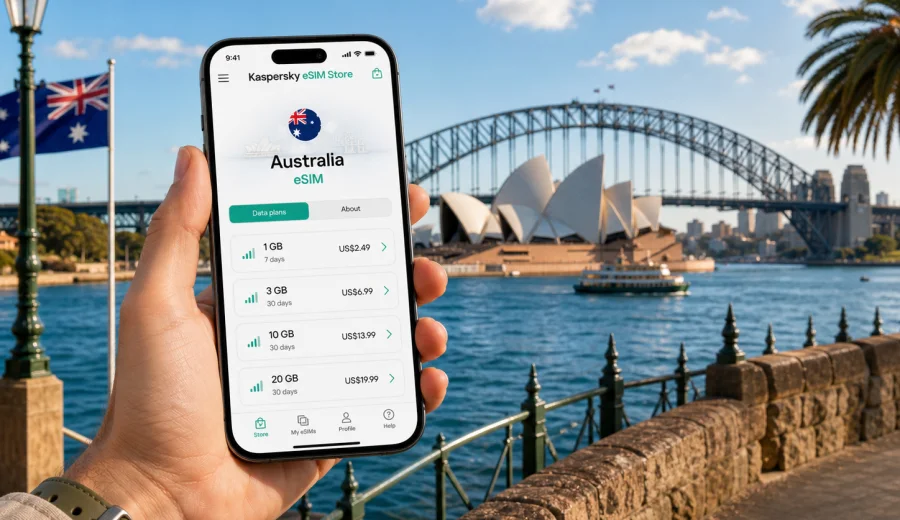
eSIM for Australia: mobile connection and internet for your trip
Australia is easy to love and surprisingly demanding to plan. A single trip can include dense city days in Sydney or Melbourne, long drives along the coast, national parks, island transfers, remote beaches, wine regions and airport connections spread across several time zones. Mobile internet becomes part of the route itself: you use it to check transport, open maps, manage hotel details, call a ride, confirm a tour, translate a menu, share your location and stay in touch with people at home.
An eSIM can make this part of the trip simpler. Instead of looking for a physical SIM card after arrival, you install a digital SIM profile on a compatible phone and use a data tariff for Australia. The main benefit is control: before you travel, you can compare the amount of data, validity period and destination, then activate the eSIM when it fits your itinerary.
Kaspersky eSIM Store is an app and website where you can quickly choose, arrange and activate an eSIM with a suitable mobile internet tariff for an international trip. It is useful for travelers who want to prepare internet access in advance, avoid unnecessary steps at the airport and keep their regular SIM for calls, banking messages or two-factor authentication.
Why mobile internet planning matters in Australia
Australia is not just one city with a few day trips around it. Distances are large, and travel plans often change during the day. A morning in the city can turn into an afternoon at the beach, a train ride to a suburb, a ferry across the harbour or a domestic flight to another state. In each case, the phone is not a luxury. It is the tool you use to keep the trip organized.
Common situations where mobile internet helps:
- opening maps before driving out of a city;
- checking public transport changes in Sydney, Melbourne, Brisbane, Perth or Adelaide;
- confirming check-in instructions for apartments and hotels;
- using ride-hailing or taxi apps at airports;
- receiving booking updates for tours, cruises and domestic flights;
- comparing restaurant options while walking through a new neighborhood;
- keeping messaging apps available when Wi-Fi is slow or unavailable;
- using mobile banking, travel insurance apps and airline apps.
Australia also rewards flexible travel. Weather, ferry schedules, road closures and tour availability can affect the day. If you rely only on hotel Wi-Fi, every change becomes harder. If you depend only on roaming, costs and limits may be unclear. An eSIM gives you another option: a preselected mobile data tariff installed directly on the device you already use.
What an eSIM does for an Australia trip
An eSIM is a digital SIM profile built into compatible smartphones and tablets. For travel, it is usually used for mobile data. You choose a tariff for the destination, install the eSIM profile and use mobile internet without inserting a physical SIM card.
For Australia, this can be useful because you may need data immediately after landing. At Sydney, Melbourne, Brisbane, Perth, Adelaide, Gold Coast and Cairns airports, the first hour often includes transport decisions, accommodation messages and navigation. If the eSIM is already installed, you can start the mobile data setup without searching for a shop, waiting in a queue or removing your home SIM card.
Important details to understand before you choose a tariff:
| Point to check | Why it matters in Australia |
|---|---|
| Data volume | Long routes, maps, video calls and photo backups can use more data than a city weekend. |
| Validity period | A short city break and a three-week route across several states need different durations. |
| Destination | The tariff should match Australia or a wider regional route if your trip includes nearby countries. |
| Device support | Your phone or tablet must support eSIM and must not be locked to one carrier. |
| Calls and SMS | Many travel eSIM tariffs are for mobile data; voice calls and SMS are not included unless stated in the tariff conditions. |
| Activation timing | Some tariffs begin counting validity after installation, others after first network use; check the terms before travel. |
In practice, many travelers keep their regular SIM active for calls and messages and use the eSIM for data. This helps preserve access to banking alerts, work accounts and familiar messenger contacts while reducing dependence on public Wi-Fi.
How much data to choose
There is no universal amount of data for Australia. The right choice depends on your apps, route and Wi-Fi habits. A practical approach is to estimate the daily tasks that must work without Wi-Fi, then add a margin for delays and changes.
Use this simple guide:
| Travel style | Typical mobile data behavior | What to consider |
|---|---|---|
| Light user | Maps, messengers, tickets, email | A smaller package may be enough if you use hotel Wi-Fi for media. |
| Standard tourist | Navigation, social apps, restaurant searches, photo sharing | Choose enough data for daily use without constant monitoring. |
| Road-trip traveler | Maps, weather, route changes, accommodation messages | Add a buffer and download offline maps before remote sections. |
| Remote worker | Email, cloud documents, video calls, hotspot use | Look for a larger data allowance and check whether tethering is allowed. |
| Family organizer | Transport, bookings, messaging for several people | More data may be useful because one phone often handles the whole group’s logistics. |
If you are unsure, choose a tariff that gives you comfortable room rather than the absolute minimum. A travel day can include far more data use than expected: airport delays, rides across the city, digital boarding passes, last-minute accommodation messages and map searches all happen at once.
Choosing an eSIM tariff for Australia
When you compare options, focus on the trip rather than on a single number. Data volume, duration and activation rules should fit your itinerary. If you are arriving late, driving the next morning and changing hotels often, convenience may matter as much as the size of the package.
For a trip focused on one city, start with expected daily use: maps, messaging, local searches, tickets and occasional social updates. For a route that includes the coast, national parks or regional airports, add more room for navigation and unexpected changes. For a longer stay, check the full validity period instead of assuming you can stretch a short tariff across the whole journey.
This is the right point to prepare the tariff itself: you can choose an eSIM tariff for your trip to Australia in Kaspersky eSIM Store and compare the data amount, duration and price before you travel. The link should not replace your own planning; it should help you match the tariff to the route you already have in mind.
Check device compatibility before you travel
Before arranging an eSIM, confirm that your device supports eSIM and is not locked in a way that prevents adding another mobile profile. Many recent iPhone, Google Pixel, Samsung Galaxy and other premium models support eSIM, but support depends on the exact model, region and carrier settings.
Check your device before you choose a tariff. This step is especially important if you bought the phone through a carrier, use a regional model or have never installed an eSIM before.
Also check these points:
- your phone is updated to a current operating system version;
- you know where the mobile network and SIM settings are located;
- you can access the email or account where installation details are delivered;
- your battery is charged before installation;
- your regular SIM remains available if you need calls or SMS;
- you understand whether the travel eSIM is data-only.
Do not leave the compatibility check until you are standing at the airport with limited Wi-Fi. It is easier to solve device questions at home, where you can use another connection and read the installation steps calmly.
How to install and activate an eSIM for Australia
Installation is usually straightforward, but it is worth doing in the right order. First, choose the destination and tariff. Then install the eSIM profile using the details provided after the order. Finally, enable the eSIM for mobile data when you are ready to use it.
For device-specific steps, use the official installation pages: Android installation guide and iOS installation guide. Keep the instructions open on another device if possible, or read them before starting.
A practical sequence looks like this:
1. Check that your phone supports eSIM and is not carrier-locked.
2. Choose Australia as the destination and compare available tariff conditions.
3. Arrange the tariff before travel or while connected to reliable Wi-Fi.
4. Install the eSIM profile on your phone.
5. Keep your home SIM as the default line for calls and SMS if needed.
6. Set the eSIM as the line for mobile data when you want to start using it.
7. If required by the tariff instructions, enable data roaming for the eSIM line.
8. Test messaging, maps and browser access before leaving the airport or hotel.
Do not delete the eSIM profile unless you are sure you no longer need it. Some eSIM profiles cannot simply be moved to another device after activation, and reinstalling may depend on the tariff conditions.
Australia travel checklist for mobile internet
Use this checklist before departure:
- Confirm that your phone supports eSIM.
- Check that the phone is unlocked for adding another mobile profile.
- Choose a data amount that covers maps, messages, tickets and booking changes.
- Download offline maps for long drives and remote areas.
- Save hotel addresses and airport transfer details offline.
- Keep installation instructions available before you start the setup.
- Decide which SIM line will handle mobile data and which line will handle calls.
- Turn off automatic cloud backups on mobile data if your package is limited.
- Review app settings for photo uploads, video autoplay and background refresh.
- Keep a charger or power bank ready for long sightseeing days.
This preparation is especially useful in Australia because travel days can be long. Even if you are mostly in cities, moving from the airport to accommodation, then to dinner or a ferry, can use several apps before you ever open a laptop.
Common mistakes to avoid
The most common eSIM problems are preventable. They usually happen because the traveler waits too long, chooses a tariff that does not match the route or skips device checks.
Avoid these mistakes:
- choosing a data package without checking the validity period;
- assuming every eSIM tariff includes calls and SMS;
- installing the eSIM on the wrong device;
- deleting the profile after activation;
- using mobile data for automatic photo backups;
- starting a long drive without offline maps;
- relying only on airport Wi-Fi to solve setup questions;
- forgetting to set the eSIM as the mobile data line.
If something does not work as expected, check the basics first: whether the eSIM line is enabled, whether it is selected for mobile data, whether data roaming is required for that line, and whether the phone has a mobile signal in your current location.
FAQ about eSIM and internet in Australia
Can I install an eSIM before arriving in Australia?
In many cases, yes. You can usually arrange and install the eSIM while connected to Wi-Fi before departure, then enable mobile data for the eSIM when you are ready to use it. Check the tariff conditions so you understand when the validity period begins.
Does an eSIM give me an Australian phone number?
Many travel eSIM tariffs are intended for mobile data and do not include a regular phone number, voice calls or SMS unless this is clearly stated in the tariff conditions. For calls and messages, you can use internet-based apps or keep your regular SIM active.
Should I remove my home SIM?
Usually, no. One advantage of eSIM is that you can keep the physical SIM or primary eSIM you already use, while adding a travel eSIM for mobile data. Set the correct line for data in your phone settings.
Is eSIM enough for remote areas?
An eSIM is useful for mobile internet where mobile coverage is available under the selected tariff conditions, but Australia has remote regions where connectivity can be limited. Download maps, booking details and emergency information before long drives or national park visits.
When should I choose a larger data package?
Choose more data if you plan to work remotely, use hotspot mode, upload many photos, travel between cities, rely heavily on maps or coordinate a group. A small package is better suited to light messaging, tickets and occasional browsing.
Prepare your Australia eSIM before departure
Mobile internet in Australia is not just about posting photos. It supports airport transfers, route changes, hotel access, transport apps, maps, payments, messaging and travel decisions across a large country. Preparing an eSIM in advance helps you land with a clearer plan and fewer connection tasks to solve on arrival.
Before you travel, check device compatibility, review the tariff details and decide how much data your route needs. Then use Kaspersky eSIM Store to quickly choose, arrange and activate an eSIM with a suitable mobile internet tariff for your trip. You can prepare an eSIM tariff for Australia before departure and keep your mobile connection ready for the first travel day.