Travel connectivity guide
Awala-Yalimapo eSIM: Mobile Internet & Travel Tips
eSIM in Awala-Yalimapo: mobile connection and internet
Awala-Yalimapo is a quiet coastal commune in the northwest of French Guiana, rather than a dense city with a large public transport network. A phone with mobile internet can still make the trip easier: use a map for the road through Mana, keep accommodation details available, coordinate with a driver, and check practical information before setting out for the coast. Since services are spread across small settlements, it helps to prepare for gaps in shops, transport options, and mobile coverage instead of assuming every task can be handled at the last minute.
The commune includes the settlements of Awala and Yalimapo, facing the Atlantic coast near the mouths of the Mana and Maroni rivers. Visitors often come for the shoreline and the natural setting, including the beach at Yalimapo known for marine turtle nesting. The experience is very different from staying in Cayenne or Saint-Laurent-du-Maroni: there are fewer urban conveniences, and a successful visit depends more on planning the journey and confirming the arrangements around your stay.
What mobile internet is useful for in Awala-Yalimapo
Connectivity matters most when it helps with a specific decision. Before leaving a larger town, you may need to confirm where you are staying, save directions, contact the person meeting you, or check whether a planned ride is still available. Once in Awala-Yalimapo, mobile data can help you orient yourself between the villages, share an updated arrival time, translate a short message, or look up information you have not saved in advance.
Think of mobile internet as a practical tool, not a substitute for local arrangements. Signal strength and data availability can vary with location, buildings, terrain, weather, and the network used by the selected tariff. A connection that works in one place may be weaker elsewhere, including along a beach or on the road. Download maps and essential details before travelling, and keep important information accessible offline.
| Travel moment | Useful preparation |
|---|---|
| Before leaving a larger town | Save the address, contact, and offline map |
| On the road through Mana | Agree on a meeting point and update your host |
| At the coast | Keep directions offline and arrange your return |
Complete information-heavy tasks while you have a dependable connection: check messages, save directions and bookings, and send an arrival estimate. At the destination, keep a fallback for places where signal is inconsistent.
Plan the arrival before you leave
For many visitors, the journey begins at Cayenne-Félix Éboué Airport, followed by travel overland toward the west of French Guiana. Awala-Yalimapo is reached from the Mana area by the departmental road RD 22. The route is not a short hop from the main airport area, so treat arrival as a planned transfer rather than assuming that a taxi or ride will be waiting on demand at the final stop.
If you are travelling from Saint-Laurent-du-Maroni, Mana is also an important point to check before continuing toward Awala-Yalimapo. The regional transport network lists a route linking Awala-Yalimapo, Mana, and Saint-Laurent-du-Maroni, but departure times and operating details can change. Confirm the current service locally and do not build a tight onward connection around an old timetable. If the journey depends on a private driver, agree on the pickup place, approximate time, luggage, and a way to reach one another if plans shift.
Before departure, save the following on your phone:
- The full name and address or location description of your accommodation.
- A map covering Mana, the road toward Awala-Yalimapo, and your final destination.
- The name of the person meeting you and the agreed meeting point.
- Any booking confirmation, check-in information, and arrival instructions.
- A note with your plan for the return journey and a backup contact method.
If you arrive late, have a long wait, or are travelling with children or bulky luggage, ask your host or driver about the final leg in advance. Do not assume that a navigation app will show every local access detail or that a car service can be ordered immediately. An eSIM can help you communicate when a connection is available; it cannot arrange transport or replace a confirmed pickup.
Before setting out, split the journey into legs and save a map for each one. If an address is imprecise, ask your host for a landmark or directions from Mana. Share a location pin only after checking that it marks the intended meeting point. Keep your phone charged; a power bank is useful on a long travel day.
Getting around once you arrive
Awala-Yalimapo is made up of small settlement areas rather than a grid of named urban districts. Awala and Yalimapo are the main names visitors are likely to encounter, and local place names may appear in different forms on booking details, maps, and signs. Confirm with your accommodation which settlement it is in and how to reach the entrance. This small check can prevent a driver from taking you to the wrong part of the commune.
The road network and distances between services make independent movement different from walking around a city centre. Depending on your plan, you may arrive by private vehicle, use a regional bus connection, or arrange transport with your accommodation. Ask what is realistic for your exact dates. If you expect to visit the coast, go out for dinner, or return after dark, discuss the return ride before leaving rather than treating transport as an on-demand service.
Use a map to understand direction and distance, but verify the final details with a local contact. A pin can be imprecise in a rural area; a road closure, weather, or a change in the condition of the coast may also alter the most practical route. Save the route and contact details before leaving a larger town, where you are more likely to have time and a stable connection to make adjustments.
Awala, Yalimapo, and the coast
Awala and Yalimapo give a visitor a sense of the commune’s settlement pattern. The beach at Yalimapo is a reason people travel here, but a shoreline visit is not simply another city attraction. Conditions, access, and wildlife activity can vary. Follow local guidance, respect protected areas, and do not disturb nesting or resting animals. Ask locally about the appropriate time and way to visit, especially if your plans involve observing turtles.
On a beach outing, take only what you need and decide in advance how you will get back. Store your accommodation details and the return plan offline. Do not assume that mobile data will be available at every point on the shore; a mapped route may not represent beach access accurately, and a displayed signal indicator does not guarantee that calls or data will work well. If you are going with a guide or host, agree on a meeting place and return time before setting out.
For short walks between nearby places, a phone can still be useful for a saved map, translation, and messaging. Keep it protected from sand, humidity, and rain, and avoid carrying it in a way that makes you less aware of the surroundings. When the landscape is the main reason for the visit, plan for stretches when you are offline instead of checking the screen continuously.
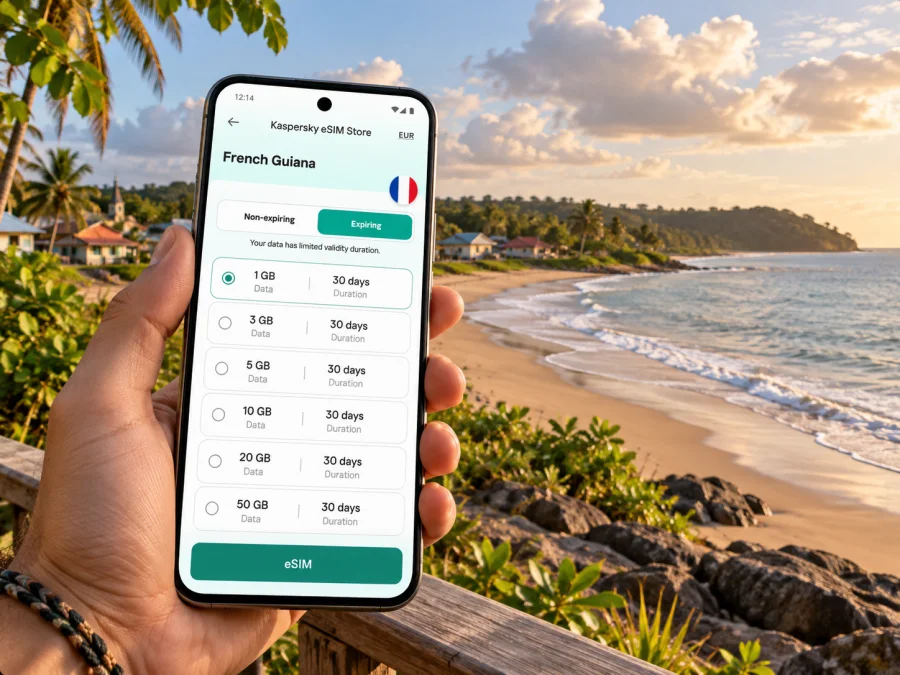
You can review eSIM options for French Guiana and compare the details with your itinerary. Check that your device supports eSIM and is not restricted by its current carrier before you complete an order. Device support can vary by model and regional version, so check your device rather than relying only on a product-family name.
Choosing an eSIM tariff for this trip
The right tariff depends on what you will do in Awala-Yalimapo and how much of the wider region you plan to cover. A traveller staying in one place and using data mainly for messages and occasional map checks will have different needs from someone sharing photos, joining video calls, or making frequent route changes. Consider the whole itinerary, not only the time at the beach: airport transfers and drives through western French Guiana may also require navigation and coordination.
Kaspersky eSIM Store is an app and website where you can choose, arrange, and activate an eSIM with a suitable tariff for mobile internet during an international trip. Before choosing, check the tariff’s destination, data allowance, validity period, activation conditions, and other terms shown at the time of purchase. Availability and performance depend on the plan and the local network; do not assume one tariff will have the same experience at every stop.
Estimate use across the full stay and onward route. Searches, route recalculations, photo uploads, and video can use more data than basic messaging. Actual use depends on settings and habits.
| Travel style | Tariff detail to check |
|---|---|
| Short stay with saved maps | Data allowance and validity |
| Several stops in the west | Destination coverage for the full route |
| Frequent uploads or uncertain dates | Data amount and activation rules |
Prepare your phone before travelling
Set up the eSIM on a stable internet connection and follow the selected tariff’s instructions; installation and activation rules vary. Do not delete a profile while troubleshooting unless the instructions tell you to.
A practical preparation sequence is:
- Check the device. Confirm eSIM support for your exact model and make sure it is not carrier-locked.
- Review the tariff. Check destination, data, validity, activation rules, and route coverage.
- Install the profile. Use the supplied details on a reliable connection and keep the confirmation.
- Set mobile data. Label the travel eSIM and select it when you are ready to use the tariff; follow its roaming instructions.
- Save offline details. Download maps and keep bookings, contacts, and arrival instructions accessible.
Use the Android eSIM installation instructions or the iOS eSIM installation instructions. Activation may take a few minutes. To start using the tariff after arrival, follow its activation conditions and leave your usual line configured as needed.
If Awala-Yalimapo is part of a work trip, confirm workspace and connectivity with your host before scheduling video calls. Keep key files offline and tell colleagues when you will be on the road. For personal travel, share your itinerary and update someone when you reach the planned stop.
Accommodation may be more limited than in a regional centre, and check-in arrangements vary. Book ahead, confirm whether your lodging is in Awala or Yalimapo, and ask about the final transfer. For an overnight stop, keep the host’s number, directions, check-in details, and a backup battery accessible offline. Leave flexibility in the schedule in case a road delay affects your arrival.
Mana and Saint-Laurent-du-Maroni are useful reference points for regional travel. Confirm the complete route, pickup locations, current departure details, and any onward connection before leaving. If your trip continues to another territory or country, check that your eSIM tariff covers it; a French Guiana plan should not be assumed to include neighbouring destinations. Save addresses and tickets offline and leave time between connections.
A simple checklist for arrival day
Use this list before setting off for Awala-Yalimapo:
- [ ] Confirm whether you are staying in Awala, Yalimapo, or another nearby location.
- [ ] Save the address, host’s contact details, and check-in instructions.
- [ ] Confirm how you will travel from the airport or your previous stop to Mana and onward.
- [ ] Download an offline map for the route and the area around your accommodation.
- [ ] Check eSIM compatibility, tariff validity, and activation conditions before departure.
- [ ] Carry a charger or power bank and keep your phone protected from rain and sand.
- [ ] Arrange return transport before an evening outing or a trip to the coast.
- [ ] Keep a backup way to find your accommodation if mobile data is unavailable.
Common questions
Is an eSIM useful in Awala-Yalimapo?
It can help with maps, messages, booking details, and coordination. Performance depends on the tariff and local network, so keep key information offline.
Is there frequent public transport?
Awala-Yalimapo is a small commune, not a large city. A regional line links it with Mana and Saint-Laurent-du-Maroni, but confirm current times and arrange the final leg ahead.
Will mobile data work at the beach?
It may, but signal varies by location. Download what you need beforehand and plan your return without depending on live navigation at the shoreline.
When should I install an eSIM?
Install it in advance with a stable connection, then follow the tariff’s activation conditions. Check when validity begins, especially if you want to start using it only after arrival.
Stay connected with a plan that fits the route
A visit to Awala-Yalimapo is easier when travel and connectivity are planned together. Confirm the final ride, save your lodging details, download a map, and set realistic expectations for data availability along the road and coast. Then choose a tariff that matches your time in French Guiana, expected data use, and onward itinerary.
Kaspersky eSIM Store lets you choose, arrange, and activate an eSIM with a suitable tariff for mobile internet on an international trip. Review the terms, check your device, and choose an eSIM tariff for French Guiana before departure. Keep offline directions as a backup so you can focus on the coast, the local communities, and the journey itself.


