
Travel connectivity guide
Baby Beach eSIM for Aruba Travel
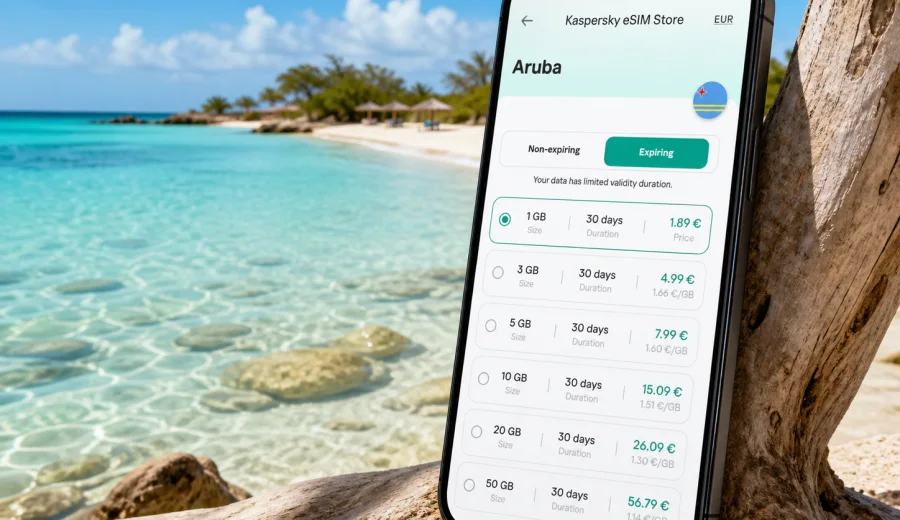
Baby Beach eSIM: mobile connection and internet for a trip to Aruba
Baby Beach is the kind of place where mobile internet matters more than it seems at first. The beach itself feels simple: turquoise water, soft sand, and a quieter rhythm than the hotel zone around Palm Beach. But the trip usually includes airport arrival, rental-car pickup, navigation across the island, parking, lunch plans around San Nicolas, messages with a hotel or villa host, and photo backups once you are back on Wi-Fi. A prepared eSIM helps you handle those tasks without waiting for a physical SIM card or relying on public Wi-Fi.
This guide focuses on Baby Beach as a destination, not on Aruba in general. It explains when mobile connection is useful, how much data you may need, what to check before you travel, and how to use an eSIM for navigation, transport, hotels, short stopovers, and day trips from the southeastern coast of the island.
Why mobile internet is useful around Baby Beach
Baby Beach sits near the southeastern end of Aruba, close to San Nicolas and Seroe Colorado. Many visitors reach it by rental car, private transfer, or a guided beach stop rather than by walking from a major resort area. That makes mobile data useful before you even see the water.
Common situations where a stable connection helps:
- checking the route from Queen Beatrix International Airport or your hotel;
- confirming a rental-car pickup, taxi, or tour departure;
- sharing a live location with friends or family;
- checking beach conditions and opening hours for nearby restaurants;
- using translation tools in shops or cafes around San Nicolas;
- paying attention to data-heavy apps such as maps, cloud photo backup, and video calls;
- contacting your accommodation if you return later than planned.
Baby Beach is relaxed, but the logistics around it can be spread out. If you are staying in Palm Beach, Eagle Beach, Oranjestad, or a vacation rental away from the southeast, you will probably cross a large part of Aruba to get there. Offline maps are useful, but mobile internet gives you flexibility when the route changes, when parking is full, or when you decide to continue to another stop.
Arrival scenarios: airport, hotel, rental car, then the beach
Many Baby Beach trips begin at Queen Beatrix International Airport near Oranjestad. After landing, you may need mobile data for several practical steps: messaging your transfer driver, finding the rental-car desk, checking the address of your hotel, or sending passport and booking details through a secure app if your accommodation requires online check-in.
If Baby Beach is your first stop after arrival, do not wait until the beach to think about connectivity. The useful window starts at the airport:
| Trip moment | Why data helps | Practical note |
|---|---|---|
| Before passport control or baggage claim | Messaging, arrival updates, saved booking details | Airport Wi-Fi may not be the best option for every task |
| Rental-car pickup | Maps, insurance documents, route planning | Download the route in advance, then use mobile data for updates |
| Drive to the southeast | Navigation, fuel stops, detours | Keep the phone charged before leaving the airport area |
| Beach arrival | Group coordination, parking, restaurant search | Signal quality can vary by exact spot and network conditions |
| Return trip | Directions after sunset, food stops, hotel messaging | Save hotel address offline as a backup |
For travelers who prefer to install everything before the flight, eSIM is convenient because there is no physical card to collect. You can prepare the mobile internet setup in advance and then activate it according to the instructions for the selected tariff and device.
What to check before choosing an eSIM for Baby Beach
Before you arrange an eSIM tariff for Aruba, check three things: device compatibility, trip length, and expected data use. The first check matters most. Not every smartphone or tablet supports eSIM, and some devices may be locked to a specific mobile operator.
Check your device before you pay for a tariff. Also confirm that your phone supports the frequency bands and settings required by the selected eSIM profile, especially if it was bought through a carrier plan.
Use this quick checklist:
- Your phone supports eSIM.
- The phone is not carrier-locked.
- You know whether your primary SIM will stay active for calls or SMS.
- You have a stable internet connection for installation before departure or on arrival.
- You know when the selected tariff starts counting validity.
- You understand whether voice calls and SMS are included; many travel eSIM tariffs are data-only.
- You have saved the eSIM installation details in a place you can access while traveling.
If you are traveling with family, check each device separately. One person with data can help everyone for a while, but relying on a single phone is risky if the group splits between the beach, a restaurant, and the parking area.
How much data do you need for Baby Beach?
Data needs vary widely. A traveler who uses maps and messaging may need very little. A traveler who uploads reels from the beach, runs video calls, and backs up photos on mobile data can use several gigabytes quickly. Baby Beach encourages photo and video use because the water is clear and shallow, but that does not mean every file needs to upload immediately.
| Travel style | Typical mobile tasks | Data guidance |
|---|---|---|
| Light beach day | maps, messaging, restaurant search, ride coordination | A small package may be enough for a short stay |
| Family day trip | maps, messaging, shared photos, occasional browsing | Choose extra room so one device is not under pressure |
| Remote-work add-on | email, documents, hotspot for a laptop, video calls | Pick a larger allowance and verify hotspot rules |
| Content-heavy travel | cloud backup, video uploads, social media, streaming | Use hotel Wi-Fi for heavy uploads where possible |
| Multi-stop Aruba route | Baby Beach, San Nicolas, Oranjestad, Palm Beach | Match the tariff duration to the full stay, not only one beach day |
For most visitors, the best approach is not to chase the smallest possible data package. Pick a tariff that fits the whole Aruba itinerary, then reduce waste by controlling background apps. Turn off automatic video backup on mobile data, download offline maps, and save entertainment before leaving the hotel.
Navigation from resort areas to Baby Beach
Baby Beach is often a day trip from the main accommodation zones. If you stay near Palm Beach or Eagle Beach, the route crosses the island toward San Nicolas. If you stay in Oranjestad, the trip is shorter but still benefits from navigation because exits, roundabouts, and local road names may be unfamiliar.
Practical navigation tips:
1. Save Baby Beach, your hotel, and the nearest fuel stop in your map app before departure.
2. Download an offline map of Aruba as a backup.
3. Start live navigation while you still have a strong connection.
4. Keep a charging cable in the car because maps and a bright screen drain battery quickly.
5. Save your parked-car location when you arrive, especially if you plan to walk around nearby spots.
Mobile internet is not only for finding the beach. It also helps when you change plans. You may decide to visit San Nicolas murals, stop for food, look for a supermarket, or drive back through another route. An eSIM gives you a prepared data option for those decisions without searching for a local SIM shop during vacation time.
Preparing mobile internet through Kaspersky eSIM Store
For a Baby Beach trip, the practical goal is simple: have mobile internet ready before you need it. Through Kaspersky eSIM Store, you can choose Aruba as the destination, review available tariff details such as data volume and validity period, arrange the selected eSIM tariff, and install it on a compatible device.
If you want to prepare before departure, you can choose an eSIM tariff for your Aruba trip and keep the setup ready for airport arrival, hotel check-in, and the drive to Baby Beach. Check the terms of the selected tariff before activation, because validity, data allowance, renewal options, and supported features depend on the specific offer.
This positioning is important: Kaspersky eSIM Store is an app and website that helps you select, arrange, install, and activate an eSIM tariff for mobile internet abroad. It is not a mobile network operator, and coverage or performance depends on the selected tariff, local network conditions, device settings, and location.
Installing eSIM before or during the trip
If your phone supports eSIM, installation is usually easiest before you leave home or while you still have reliable Wi-Fi. Read the instructions, add the eSIM profile, label it clearly, and decide which SIM will handle mobile data. If you keep your home SIM active for calls or bank messages, make sure mobile data is assigned to the travel eSIM when you arrive.
For setup steps, use the relevant guide: Android installation instructions or iOS installation instructions. Follow the instructions for your device model and operating system version, because menu names can differ.
Useful setup habits:
- Name the line “Aruba data” or “Travel eSIM” so you do not confuse it with your home SIM.
- Keep your QR code or activation details available until installation is complete.
- Do not delete an installed eSIM profile unless you are sure you no longer need it.
- Check whether data roaming must be enabled for the eSIM line.
- Test basic browsing before starting the drive from the airport or hotel.
If activation does not happen instantly, stay patient and check the selected tariff instructions. Sometimes the phone needs a few minutes, a restart, or a manual network selection. Avoid repeatedly deleting and reinstalling the profile unless the support instructions tell you to do so.
Local movement: car, taxi, tours, and hotel shuttles
Baby Beach is not the same type of destination as a compact city center where you can step outside and find everything within a few blocks. Movement usually involves a vehicle. That changes how you should think about connectivity.
Rental car: mobile internet supports maps, fuel searches, parking notes, and route changes. If you drive with children or a group, it also helps coordinate restroom, food, and shade stops.
Taxi or private transfer: data lets you confirm pickup time, send your location, and message the driver if you are at the wrong hotel entrance or beach access point.
Guided tour: you may need the voucher, meeting point, operator message, or timing update. Save essential documents offline too.
Hotel shuttle or arranged transport: messaging is useful when pickup is delayed or when you decide to stay longer near San Nicolas.
If you are traveling as a group, agree on a simple rule: one person should not be the only holder of all booking details and maps. Shared access makes the day easier if someone goes for snacks, returns to the car, or stays in the shade while others swim.
Baby Beach with kids, snorkeling, and beach gear
Baby Beach is known for a shallow lagoon, which makes it popular with families and casual snorkelers. Mobile internet helps with practical questions, but you should not rely on your phone while you are in the water. Keep waterproof protection, use a dry bag, and decide who watches valuables before everyone heads into the lagoon.
A practical data plan for a beach day:
- Download maps and hotel details before leaving.
- Use mobile data for navigation and messages on the way.
- At the beach, keep the phone mostly for coordination, payments, and emergency contact.
- Wait for Wi-Fi to upload large photo and video batches.
- Turn on low data mode if your tariff allowance is limited.
Do not let cloud backup consume your travel data in the background. On iOS and Android, photo sync, app updates, podcast downloads, and messaging apps can use data while the phone is in a bag. Review these settings before a long beach day.
Where mobile data helps near San Nicolas
San Nicolas adds a different dimension to a Baby Beach trip. Visitors often combine the lagoon with street art, local food, or a short walk through the area. Mobile internet helps you find murals, opening hours, cafes, your parked-car point, and the route back to your accommodation.
If Baby Beach is part of your last day before a flight, mobile internet becomes more important. You may need airline notifications, traffic timing, rental-car return details, and hotel luggage coordination. Avoid using your last available data on entertainment before the airport transfer is complete.
Business trips and remote-work add-ons
Baby Beach can be a leisure extension after meetings in Oranjestad or a resort conference area. If you have work tasks, prepare more carefully than a pure vacation traveler. Data-only eSIM can support email, chat, file access, and hotspot use if the selected tariff and device settings allow it, but video calls can consume a lot of data and need stable conditions.
For a work-and-beach day:
1. Schedule calls from the hotel or a quiet indoor location, not the beach.
2. Save presentation files offline before leaving.
3. Check whether hotspot use is permitted under the selected tariff.
4. Keep a power bank in your bag.
5. Use mobile data for urgent work tasks and Wi-Fi for large uploads.
Baby Beach is not an office environment: sun glare, wind, heat, and battery drain all matter. Treat the eSIM as a travel connectivity tool, not as a guarantee that every work task will be comfortable from the sand.
Short stopovers and cruise-style visits
Some visitors see Aruba on a short schedule: a cruise call, a stopover, or a single free day around a longer Caribbean route. In that situation, wasting time on connectivity setup feels especially expensive. The value of an eSIM is the ability to prepare the mobile data plan before the day begins.
For a short visit, prioritize:
- installing the eSIM before arrival;
- saving port, airport, or pickup points offline;
- keeping the return time visible in your calendar;
- using mobile data for maps and transport, not heavy uploads;
- checking the tariff validity so it matches your actual travel window.
If you are moving between islands or countries, do not assume that one country tariff covers every stop. Review the destination and regional terms in the selected offer. For an Aruba-focused Baby Beach day, choose the Aruba option or a suitable regional tariff only if it clearly matches your route.
Data-saving settings before you leave for Baby Beach
Good travel connectivity is partly about choosing the tariff and partly about managing the phone. A few settings can stretch your data allowance and reduce surprises.
Before leaving the hotel:
- download the Aruba map area for offline use;
- disable automatic app updates over mobile data;
- pause cloud photo and video backup on mobile data;
- download playlists, podcasts, and kids’ videos over Wi-Fi;
- turn off autoplay in social apps;
- close hotspot access when nobody needs it;
- check which SIM is assigned to mobile data.
At the beach:
- use messaging instead of video calls when possible;
- send compressed photos rather than full-resolution batches;
- keep the phone out of direct sun to protect battery and performance;
- use airplane mode briefly if you only need the camera;
- switch mobile data back on before the return drive.
These steps do not make the trip less connected. They make the connection more deliberate, so your data is available when navigation, transport, or communication matters.
Quick answers about Baby Beach eSIM use
Can I use eSIM only for Baby Beach?
Yes, but it is usually better to think about the whole Aruba stay. The same mobile data setup can help at the airport, hotel, restaurant areas, and on the road to Baby Beach.
Does an eSIM include a local phone number?
Many travel eSIM tariffs are data-only. If ordinary voice calls or SMS matter, check the selected tariff terms before you arrange it. Internet-based calls and messages can work over mobile data.
Should I install the eSIM before flying to Aruba?
Often yes. Installation is easier with stable Wi-Fi and time to check settings. Activation timing depends on the selected tariff, so read the instructions before turning the line on.
Will mobile internet be perfect on the beach?
No travel connection should be treated as perfect everywhere. Performance can depend on the selected tariff, local network conditions, terrain, device settings, and the exact spot where you are standing.
Is hotel Wi-Fi enough?
Hotel Wi-Fi helps for large downloads and backups, but it does not help during the airport process, drive to Baby Beach, taxi coordination, or changes of plan away from the property.
Practical summary for your Baby Beach trip
For Baby Beach, eSIM is most useful when it supports the full travel chain: arrival in Aruba, movement to the southeastern coast, navigation around San Nicolas, beach-day coordination, and the return to your hotel or airport. Prepare it before the trip, check device compatibility, choose a data allowance that fits your real habits, and control background data so maps and messages remain available when you need them.
Before you travel, choose an eSIM tariff for Aruba through Kaspersky eSIM Store, review the data volume and validity period, install it on a compatible device, and keep the setup ready for your Baby Beach itinerary. That way, your mobile internet plan is handled before the first airport message, route change, or beach-day photo backup becomes urgent.