
Travel connectivity guide
eSIM Bahamas: mobile internet for travel
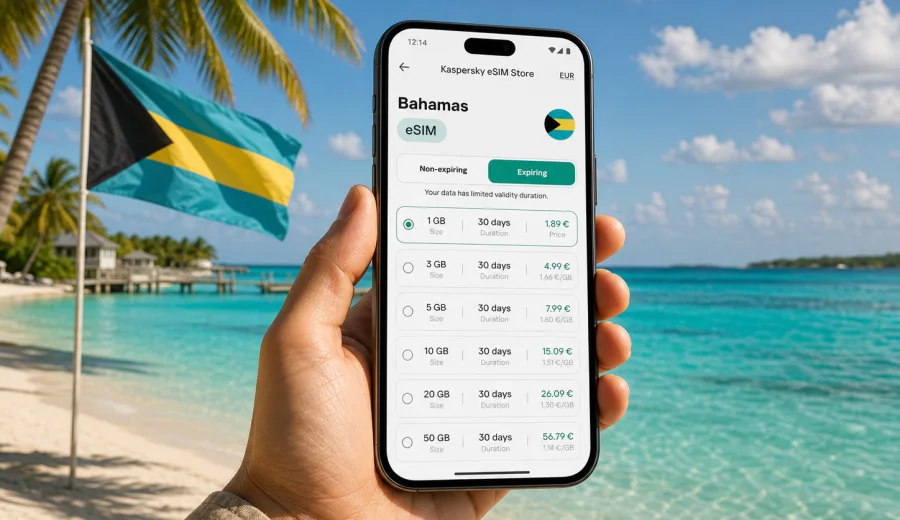
eSIM in the Bahamas: mobile connection and internet for your trip
The Bahamas is a country of isles, ferry routes, marina stops, beach resorts, family holidays, business visits and short cruise extensions. For many travelers, the practical question is simple: how do you keep mobile internet ready when your itinerary may move between Nassau, Paradise Island, Grand Bahama, Exuma, Eleuthera, Abaco or smaller cays? An eSIM can make this part of the trip easier because it lets you prepare mobile data without buying a physical SIM card after arrival.
An eSIM is a digital SIM profile that works on a compatible phone or tablet. In a travel scenario, it is mainly useful for mobile internet: maps, ride apps, hotel messages, restaurant bookings, flight updates, online check-in, banking notifications and messenger calls. It does not automatically replace a local phone number, and ordinary voice calls or SMS are not included unless a specific plan says so.
Kaspersky eSIM Store is an app and website where you can quickly choose, arrange and activate an eSIM with a suitable plan for mobile internet during an international trip. The useful part for a Bahamas journey is that you can compare the data amount, validity period and destination before you travel, then install the eSIM on a compatible device when it fits your timing.
Why mobile internet matters in the Bahamas
The Bahamas rewards flexible travel planning. You may fly into Lynden Pindling International Airport in Nassau, connect through a domestic flight, take a ferry, move between resorts, rent a car for a day, or spend time on a boat where plans change with weather and schedules. Mobile internet helps you keep the trip organized when Wi-Fi is not nearby or when you prefer not to depend on public networks.
Typical travel moments where mobile data is useful:
- checking airport transfers, ferry times and domestic flight updates;
- opening maps before a taxi ride or rental car route;
- messaging your hotel, host, tour operator or marina;
- using mobile banking and card notifications while abroad;
- sharing location with family or colleagues;
- confirming restaurant reservations and excursion details;
- using translation, weather and travel apps when you are away from hotel Wi-Fi.
The value of an eSIM is not only the connection itself. It is the preparation. You can decide before departure how much data you expect to need, check the plan validity, install the profile and know which line on your phone should handle mobile data when you land.
eSIM for the Bahamas in one minute
For a trip to the Bahamas, an eSIM is best understood as a travel data option. You keep your physical SIM card in the phone for your usual number, if you want, and add a separate eSIM profile for mobile data abroad. On many modern smartphones, you can choose which line handles mobile data and which line remains available for calls or SMS from your home operator.
This setup is useful when you want to avoid looking for a SIM counter, changing tiny cards or relying only on hotel and café Wi-Fi. It is also practical for short trips, island-hopping routes and business travel, where the first hour after arrival often matters.
| Travel situation | Why eSIM can help |
|---|---|
| Weekend in Nassau | Mobile data is ready for airport transfer, maps and bookings. |
| Resort stay on Paradise Island | You can use data away from hotel Wi-Fi, for navigation and messaging. |
| Exuma or Eleuthera trip | A prepared plan helps reduce setup time when moving between islands. |
| Cruise stop or short visit | You avoid spending limited time looking for a physical SIM card. |
| Remote work day | You can keep a separate mobile data option for email, calls and documents. |
Network experience can depend on the selected plan, local network conditions, device settings, location and weather. An eSIM does not guarantee coverage in every bay, beach, marina or remote island. Treat it as a convenient way to prepare mobile data, then check the plan conditions before relying on it for critical tasks.
How to choose an eSIM plan for the Bahamas
The right data plan depends on how you travel. A person staying mostly at one resort and using Wi-Fi for streaming may need less mobile data than someone using maps, video calls, cloud documents and social media throughout the day. The aim is to choose a plan that matches your route and habits, not simply the largest option.
Start with four questions:
1. How many days will you be in the Bahamas?
2. Will you stay mostly in one place or move between islands?
3. Which apps will you use on mobile data?
4. Do you need mobile data for work, or only for travel tasks?
For light use, mobile data may cover messaging, maps, email and travel apps. For moderate use, add social media, photo sharing and frequent browsing. For heavy use, include video calls, hotspot use, large file transfers or streaming. If you use your phone as a hotspot for a laptop, data can disappear much faster than expected.
Practical data planning
| Usage style | Typical activities | Planning tip |
|---|---|---|
| Light | Messages, maps, booking apps, email | Keep app updates and cloud backups off mobile data. |
| Moderate | Social media, photo sharing, browsing, calls in messengers | Monitor data use daily and download offline maps on Wi-Fi. |
| Heavy | Work calls, hotspot, video, large files | Choose more data and keep a backup plan for important tasks. |
Before selecting a plan, check the validity period. A plan that covers 30 days may be more comfortable for a long stay, while a shorter plan may fit a quick visit. Also check when the validity period starts and whether data roaming needs to be enabled for the eSIM profile on your device.
What to check before you arrange an eSIM
Before you arrange an eSIM for the Bahamas, make sure your device can actually use it. eSIM support depends on the model, the region where the device was sold and whether the device is locked by a mobile operator. Some phones that look identical may have different eSIM support in different markets.
Use this checklist before you proceed:
- confirm that your phone or tablet supports eSIM;
- check that the device is not locked to one operator;
- update the operating system if an update is required for eSIM setup;
- keep a stable internet connection available for installation;
- read the plan destination, data amount and validity period;
- check whether the plan includes only mobile data or also other services;
- decide when you want to install and activate the eSIM;
- save your order details and QR code or profile access where you can find them.
If you are unsure about compatibility, check your device before you choose a plan. This is especially important if you bought the phone in another region, use a dual-SIM model, or have a device issued by an employer.
When to prepare mobile internet for the Bahamas
You can usually prepare an eSIM before your trip, but the best timing depends on the plan conditions. Some travelers prefer to install the profile at home while they still have reliable Wi-Fi, then activate mobile data after arrival. Others prefer to complete the full setup once they reach the destination. The safest approach is to read the plan instructions and avoid activating data too early if the validity period starts at activation.
If your trip includes several countries or a Caribbean route, check whether a country plan or a regional plan fits better. For a Bahamas-only holiday, a Bahamas plan may be the clearest option. For a broader route, the destination coverage and validity period become more important.
When you are ready to compare options, you can choose an eSIM plan for your Bahamas trip and review the available data amounts and validity periods before deciding.
How to install and activate eSIM for the Bahamas
Installation is usually a short setup process, but it should be done carefully. You need a compatible device, an internet connection for the setup stage and access to the eSIM profile or QR code. If you want device-specific instructions, use the Android eSIM installation guide or the iOS eSIM installation guide.
A practical setup flow looks like this:
1. Check that your device supports eSIM and is not operator-locked.
2. Choose the Bahamas as your destination and select a plan by data amount and validity.
3. Complete the arrangement process in Kaspersky eSIM Store.
4. Open the eSIM profile or scan the QR code using your phone settings.
5. Name the new line clearly, for example Travel Data or Bahamas eSIM.
6. Set the eSIM as the mobile data line when you want to use it.
7. Enable data roaming for the eSIM profile if the plan instructions require it.
8. Wait a few minutes for the connection to register with the local network.
Do not delete the eSIM profile unless you are sure you no longer need it. In many cases, an activated eSIM cannot simply be moved to another phone. If something does not work immediately, check that mobile data is assigned to the eSIM, airplane mode is off, data roaming settings match the instructions and the device has had a few minutes to register.
How eSIM compares with roaming, Wi-Fi and a local SIM
There is no single best option for every traveler. The right choice depends on your device, trip length, data habits and how much setup you want to handle after arrival.
| Option | Strengths | Points to check |
|---|---|---|
| eSIM for travel | Can be arranged before or during the trip, no physical card, separate mobile data profile | Device compatibility, plan validity, data amount, activation timing |
| Standard roaming | Uses your existing number and operator relationship | Daily fees, data limits, throttling rules, destination coverage |
| Public Wi-Fi | Often available in hotels, cafés and airports | Security, reliability, login pages, limited availability outside venues |
| Local physical SIM | May suit long stays or users who need local services | Store opening hours, setup time, SIM slot, identification or local rules |
For many travelers, the most practical setup is mixed: use hotel Wi-Fi for large downloads, use eSIM mobile data for movement and essential apps, and keep your home SIM available for important messages if your device supports dual SIM.
Tips to reduce mobile data use
Even with a suitable plan, it is worth controlling background data. Travel days often include more map checks, photos, social media and messaging than expected.
Use these settings before or during the trip:
- download offline maps for Nassau, your resort area and planned island routes;
- disable automatic app updates on mobile data;
- pause cloud photo backup until you are on trusted Wi-Fi;
- reduce video streaming quality if you stream at all;
- turn off background refresh for apps you do not need while traveling;
- use messenger calls over Wi-Fi when possible for long conversations;
- check mobile data statistics each evening;
- keep your eSIM line name clear so you know which profile is active.
For work trips, prepare separately. Download documents before travel, test meeting apps on Wi-Fi and avoid using a laptop hotspot for large sync tasks unless your plan has enough data. A single video meeting can use more data than a full day of maps and messaging.
FAQ about eSIM and mobile internet in the Bahamas
Can I use eSIM for mobile internet in the Bahamas?
Yes, if your device supports eSIM and you choose a plan that includes the Bahamas as a destination. Check the plan conditions, data amount and validity period before arranging it.
Does an eSIM give me a Bahamas phone number?
Usually no. Travel eSIM plans are typically designed for mobile data. Ordinary calls and SMS are not included unless the selected plan clearly says otherwise. You can use messengers and internet-based calling apps over mobile data.
Should I install eSIM before I fly?
You can often install it before departure while you have stable Wi-Fi. Read the plan instructions first, because activation timing and validity rules can differ. If the validity period starts when the eSIM connects or activates, avoid starting it too early.
What if my phone does not support eSIM?
If the device does not support eSIM, you will need another option, such as roaming, Wi-Fi or a physical SIM card. Some phone models also vary by region, so check the exact model and operator lock status.
Can I use my regular SIM and a travel eSIM at the same time?
Many modern phones support using a physical SIM and an eSIM together, or two eSIM profiles with one active for mobile data. The exact options depend on your device. Set the travel eSIM as the mobile data line when you want to use it for internet abroad.
What should I do if the eSIM does not connect immediately?
Wait a few minutes, then check that mobile data is assigned to the eSIM profile, data roaming is enabled if required, airplane mode is off and the phone has network signal. Restarting the phone can also help. If the issue continues, contact support through the channel provided in Kaspersky eSIM Store.
Choose an eSIM plan for your Bahamas trip
A good mobile internet setup should make the trip simpler, not more complicated. For the Bahamas, the main steps are clear: check device compatibility, choose a plan that matches your itinerary, install the eSIM carefully and manage mobile data settings during the trip.
Kaspersky eSIM Store helps you choose, arrange and activate an eSIM with a suitable tariff for mobile internet during an international trip. Before you fly to Nassau, Grand Bahama, Exuma, Eleuthera, Abaco or another island, you can review eSIM plan options for the Bahamas and prepare your phone for travel data in advance.