Travel connectivity guide
Baie Rouge eSIM: Mobile Internet in Saint Martin
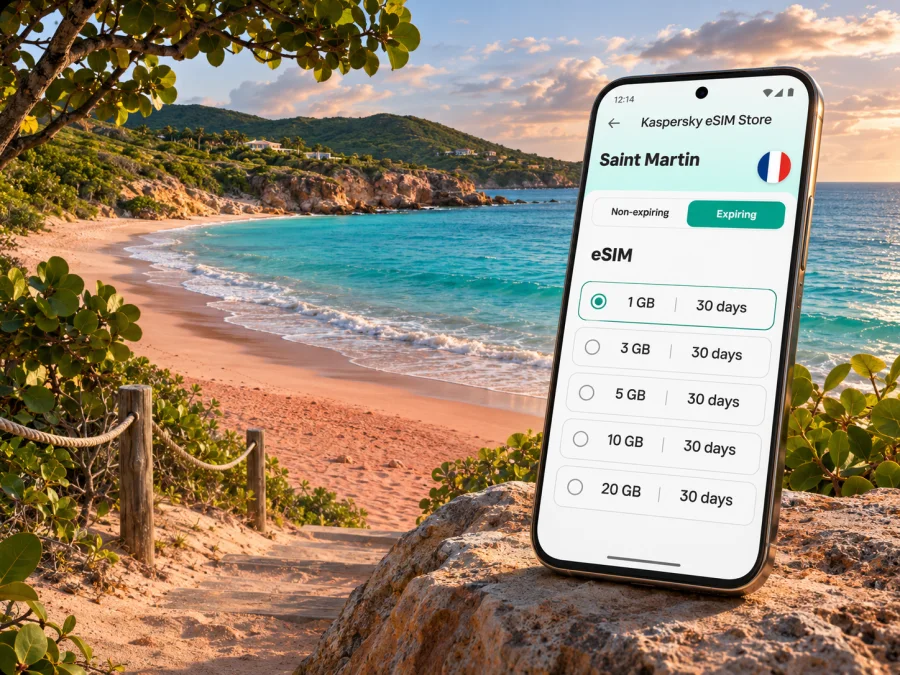
Baie Rouge eSIM: mobile connection and internet for your Saint Martin trip
Baie Rouge is a beach destination, not a town centre with services on every corner. It lies in Terres Basses on the French side of the island of Saint Martin, west of Marigot. A day here often involves a drive or taxi, a stretch of sand, and time away from shops and busy streets. Planning mobile internet around that kind of visit is mostly about being prepared before you leave your accommodation: confirm the right destination plan, save essential information offline, and make sure your phone can use eSIM.
The name can be confusing when you are booking connectivity. Saint Martin is the French overseas collectivity in the north of the island; Sint Maarten is the separate Dutch constituent country in the south. The two names refer to distinct jurisdictions and mobile markets on one island. A plan listed for Saint Martin should not be assumed to include Sint Maarten, or the reverse. Read the destination and coverage terms for the exact plan you choose, especially if your itinerary includes both sides.
What to know before heading to Baie Rouge
Baie Rouge, also known as Red Bay, is a broad Caribbean shoreline in the Lowlands/Terres Basses area. The French-side tourism information places it on the west coast near Terres Basses and describes its sand as having a subtle red or ochre tone. It is a natural beach setting rather than a compact resort strip, so your connectivity needs are different from a day spent around central Marigot: you may want directions, a ride contact, booking details, and a way to message your group without relying on finding a café Wi-Fi network.
A useful plan for the day has three parts:
- Before leaving: download a map of the island or save the route to the beach, your lodging address, and the driver or taxi contact.
- On the way: keep mobile data available for navigation and messages, while watching which SIM is selected for data.
- At the beach: assume the signal may vary with location, device, local network load, and weather or infrastructure conditions. A plan gives access to a participating network where available; it does not guarantee reception at every point on the sand.
Baie Rouge has a more open, natural character than many organized beach areas. Conditions and services can change, so check locally before setting out if you need a particular facility, accessibility arrangement, or transport pickup. Bring water, sun protection, and any essentials you would otherwise expect to find in a built-up area. Mobile data is useful for coordination, but it is not a replacement for having a meeting point and a backup plan if someone’s battery or signal runs out.
Where Baie Rouge fits into an island itinerary
| Trip situation | Why mobile internet helps | Offline backup |
|---|---|---|
| Going directly from your accommodation to Baie Rouge | Route guidance, pickup coordination, and checking messages | Save the lodging address, beach access point, and driver number |
| Spending the day between beaches | Rechecking directions and coordinating a meeting time | Download maps and agree on a clear meeting place |
| Returning to Marigot for errands or dinner | Finding a venue and arranging a ride | Keep the address and reservation confirmation saved |
| Crossing to Sint Maarten during the same trip | Checking itinerary details and staying in touch | Confirm the second destination is covered by your plan before travel |
| A short stop between flights or ferry connections | Updates and contact with your host or driver | Store tickets, booking references, and the next address offline |
The island’s principal international gateway is Princess Juliana International Airport (SXM), on the Sint Maarten side. Grand Case–Espérance Airport (SFG), on the French side, serves regional flights. Which one you use affects the first leg of the journey, but the onward route to Baie Rouge still needs planning. Confirm your transfer in advance, and make sure the driver has the correct destination name: “Baie Rouge” can be confused with other similarly named bays or lodging addresses.
Choosing a data plan for Baie Rouge
Start with the whole itinerary, not only the beach name. The country or region shown in the plan details must match the places where you expect to use mobile data. If you will stay on the French side only, check the Saint Martin listing. If you plan to visit Sint Maarten as well, verify explicitly whether the plan includes that destination. For a multi-island itinerary, check every stop rather than inferring coverage from a nearby island or a regional name.
Then estimate what you will actually do online. Navigation, messaging, email, and occasional browsing usually use less data than long video calls, streaming, frequent photo or video uploads, and tethering several devices. The right package depends on the length of your trip, your habits, and the plan’s own terms. Compare the data allowance, validity period, activation conditions, and any restrictions shown before purchase. Do not select a plan solely because its name sounds close to the place you are visiting.
For a beach day, consider these questions:
- Will you use maps online, or can you download the map in advance?
- Do you expect to upload photos and video while away from Wi-Fi?
- Are you sharing a connection with another device, and does the selected plan allow tethering?
- Does the plan start on purchase, on installation, or when it connects in the destination? Check its specific activation terms.
- Will you travel to both Saint Martin and Sint Maarten, and are both destinations named in the coverage details?
Kaspersky eSIM Store is an app and website that helps you choose, arrange, and activate an eSIM with a suitable data plan for an overseas trip. You can review the available Saint Martin eSIM options and read the current terms for the destination, data allowance, and validity before deciding. The destination page is for Saint Martin; do not assume it is a tariff for Sint Maarten unless the plan details say so.
Mobile data around the beach: set expectations
An eSIM data plan is generally for internet access. It does not automatically add a standard local phone number, cellular voice service, or SMS; confirm the selected plan’s included services. Internet-based calling and messaging apps may work over data, subject to the app, the other person’s connection, and local service conditions. Keep your regular number available for calls or texts if you need it, and check potential roaming charges with your home provider.
Prepare your phone before you leave
Compatibility is a device-level question. Check that your exact phone variant supports eSIM and is not locked to a carrier. Some phones with the same retail name have different capabilities depending on model number, sales region, or carrier configuration. The manufacturer’s specifications and your carrier can confirm those details. Check whether your device supports eSIM before choosing a plan.
A short preparation checklist helps prevent avoidable problems:
- Connect to reliable Wi-Fi before installation.
- Make sure you can access the email or account containing your QR code or activation instructions.
- Keep your device charged and update its operating system if needed.
- Leave your existing SIM or eSIM profile in place until you understand how the new data line is configured.
- Note whether the destination plan’s validity begins at a particular activation step.
- Save the Saint Martin address and directions offline, including the final approach to Baie Rouge.
- Keep your home provider’s roaming settings and charges in mind when choosing which line handles data.
Install timing depends on the instructions for the selected plan. Some travelers prefer to add the eSIM while they still have a stable Wi-Fi connection at home; others wait until shortly before departure. Follow the plan’s activation guidance, since installing a profile and beginning to use its data are not always the same event. If the selected plan has a fixed validity window, confirm when that period starts before installing or activating it.
Installing and activating an eSIM
The exact menus vary by phone model and operating system, so use the current instructions for your device:
- Open the eSIM installation flow in your order or app.
- Add the mobile plan using the QR code or manual details provided.
- Label the new line clearly, such as “Travel data,” so you can identify it later.
- Select that line for mobile data when you are ready to use the travel plan.
- Follow the plan guidance for data roaming and network selection. Some eSIMs require data roaming to be enabled for that line; check the supplied instructions rather than assuming.
- Once connected, test a lightweight task such as opening a map or sending a message.
For device-specific steps, follow the Android eSIM installation instructions or the iPhone and iOS eSIM installation instructions. Keep the installation details available until you have confirmed that the profile is working. Do not delete an eSIM profile to troubleshoot unless the instructions or support team tell you to do so; an installation code may be single-use.
A practical Baie Rouge day plan
Before leaving your accommodation
- Confirm the beach access and the route with your host or driver.
- Download an offline map and save the return route as well as the outbound route.
- Check the selected line for mobile data and leave automatic updates or cloud photo uploads paused if you want to conserve data.
- Agree on a pickup time and a backup meeting point in case mobile messaging is unavailable.
On the road
- Keep navigation visible, but do not depend on live rerouting as the only source of directions.
- If the route or pickup changes, send the new details while you have a connection and save them locally.
- Use place names and the exact address together when confirming the destination.
At the beach
- Do not assume that coverage is identical at the entrance, on the sand, or near rocky edges.
- Keep your phone protected from heat, sand, and water; use it briefly when needed and store it safely.
- Set a meeting time and place with your group before people spread out.
- If conditions in the water look rough or unfamiliar, ask locally and follow posted advice. A map app cannot assess surf or swimming safety.
Before heading back
- Check the return route and transport arrangement before leaving the shoreline.
- Confirm that everyone has essentials and that no one is relying on a nearly depleted phone.
- If you are going onward to another part of the island, recheck whether the destination remains in your plan’s coverage area.
Troubleshooting when data is not working
Common questions
Is Baie Rouge a town?
No. Baie Rouge is the name of a beach on the French side of Saint Martin, in the Terres Basses/Lowlands area. Use the beach name together with your lodging or pickup address when arranging transport.
Is Saint Martin the same destination as Sint Maarten?
They share one island, but they are separate jurisdictions: Saint Martin is the French collectivity and Sint Maarten is the Dutch country. Their mobile markets and plan coverage can differ. Check the exact destinations named in your eSIM plan if you will visit both sides.
Will a Saint Martin eSIM work on every part of the island?
Do not assume that it will. Coverage depends on the chosen plan, its local network arrangements, and where you are. A Saint Martin plan should not be treated as including Sint Maarten unless the plan terms specifically confirm that destination.
Can I use eSIM at Baie Rouge without Wi-Fi?
An active travel eSIM can provide mobile data where its supported local network is available. It does not require beach Wi-Fi, but reception at a specific point is not guaranteed. Download directions and essential information before travelling.
Does an eSIM provide a local phone number?
Not necessarily. A data-only eSIM does not automatically include a standard telephone number, voice calls, or SMS. Check the selected plan’s details, and use internet-based calling apps only when you have a working data connection.
Can I install the eSIM after arriving?
Usually you can install using an internet connection, but the available connection and plan activation rules matter. Installing before departure over reliable Wi-Fi can make setup easier; check when the plan starts and follow its own instructions.
How much data should I choose for a beach visit?
There is no single amount that fits every traveler. Navigation and messaging are relatively light compared with video streaming, frequent uploads, and tethering. Estimate your use for the complete trip, then compare the plan’s allowance and validity.
What if I lose reception at the beach?
Try a more open location and check the line and plan settings. If there is still no service, use your offline map and contact the accommodation or provider through another available connection. Keep pickup details and emergency contacts saved before you leave.
Stay connected while keeping a backup
Baie Rouge is best approached as a beach outing with a little preparation: confirm the exact destination, arrange transport, download directions, and decide how you will contact your group. An eSIM can make maps and messaging easier during a Saint Martin trip where mobile service is available, while offline copies keep the essential pieces accessible if reception changes.
Before you travel, check device compatibility and the plan’s current destination, allowance, validity, and activation conditions. Kaspersky eSIM Store helps you choose, arrange, and activate an eSIM data plan for an overseas trip. Choose an eSIM option for your Saint Martin visit, review its terms, and install it using the instructions for your phone before setting out for Baie Rouge.


