Travel connectivity guide
Balzers eSIM: Mobile Internet in Liechtenstein
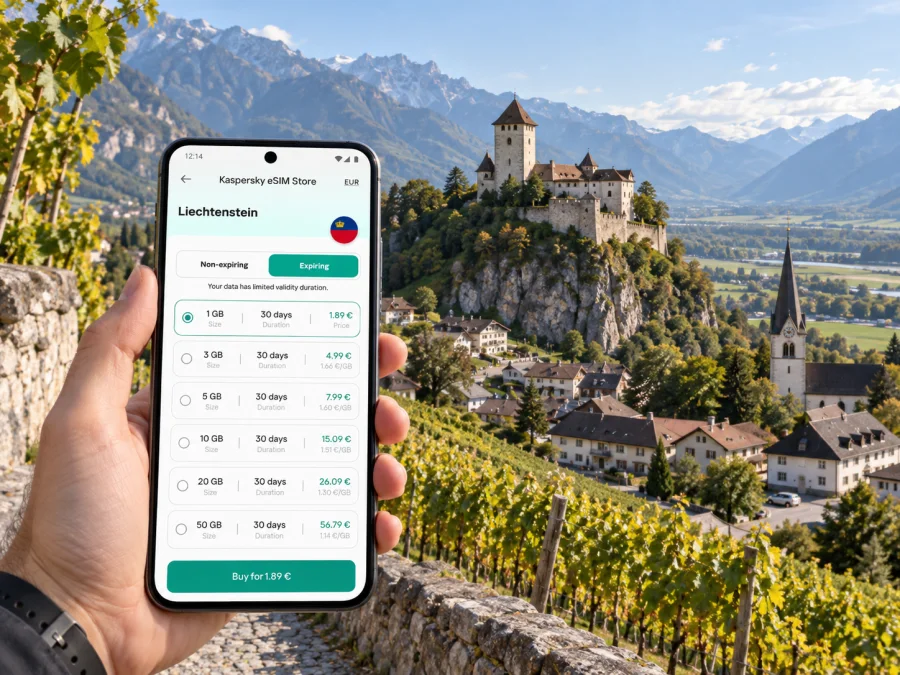
Balzers eSIM: mobile connection and internet for a Liechtenstein visit
Balzers is a small municipality in the south of Liechtenstein, set between the Rhine and the rising Alpine slopes. The village is compact, but a visit may involve more than a walk around the centre: you might arrive by bus from a railway station across the border, find your accommodation, visit Gutenberg Castle, follow a section of the Liechtenstein Trail, or continue north toward Vaduz. Mobile internet helps with each handover, especially when you need a current timetable, a map, or a message to your host.
An eSIM can be a practical way to prepare mobile data for a trip without swapping a physical SIM. Before choosing one, check that the plan explicitly includes Liechtenstein, understand when its validity starts, and confirm that your phone supports eSIM. Balzers sits beside Switzerland, so the country shown in your plan matters: nearby geography does not mean that a Liechtenstein plan automatically includes Switzerland, or vice versa.
What to expect when you arrive in Balzers
Liechtenstein has no commercial passenger airport. The nearest airports listed by the country’s tourism service are Zurich, Altenrhein and Friedrichshafen. From a railway station at Sargans, Buchs or Feldkirch, visitors can transfer to the LIEmobil bus network. For Balzers, that means the final leg is usually a road journey, not a train arriving in the village.
If you are travelling from Zurich Airport, check the complete connection for your date rather than assuming that the airport-to-village journey is one direct ride. The rail leg and the bus leg may be run by different services, and a missed connection can change the waiting time. A phone with mobile data is useful for checking live departures and service notices while you are en route; download the key route details before boarding as a backup.
Balzers is the southernmost municipality in Liechtenstein. Its two village areas, Balzers and Mäls, sit in a valley setting with the Rhine to the west and mountains rising to the east. Gutenberg Castle stands on the distinctive rocky hill between them. This layout makes location awareness useful: a map can help distinguish a bus stop in the village from a trail entrance or a destination across the valley.
A simple arrival checklist
- Save your accommodation address and check-in instructions before leaving the airport.
- Search for the full route to your Balzers destination, including the bus stop name and any transfer.
- Check the date-specific timetable shortly before travel; bus schedules and connections can change.
- Keep a screenshot of the final leg and the address in case your connection becomes unreliable.
- Confirm whether your mobile plan covers Liechtenstein and whether it also covers any transit through Switzerland or Austria.
Getting around: bus stops, village streets and the castle hill
LIEmobil connects Balzers with other municipalities and neighbouring rail hubs. Its current network includes regional services through Balzers, and the official timetable should be used for exact departure times and stop names. The route pattern is more useful than memorising a single line number: check your origin and destination for the date and time you plan to travel, particularly in the evening, on weekends and around public holidays.
The local geography is walkable in places, but do not treat every journey as a short level stroll. The approach to Gutenberg Castle is on foot, and the municipality describes access via Egon-Rheinberger-Weg from the community centre or via Burgweg. If you are carrying luggage, have limited mobility, or are visiting in wet weather, check the walking route and conditions before setting off. The castle’s outer courtyard is accessible throughout the year; access to other areas and opening arrangements are seasonal and may require advance booking.
| Journey in or from Balzers | What a connected phone can help you do |
|---|---|
| Railway station to the village | Check the onward bus, stop location and any changes to the connection. |
| Village centre to Gutenberg Castle | Follow the pedestrian approach and confirm the permitted access route. |
| Balzers to Vaduz or Schaan | Compare the next LIEmobil departures and allow time for a transfer. |
| Balzers toward Sargans or Buchs | Check cross-border connections and the relevant ticket or fare area. |
| Walk or ride along the Rhine | Keep a route map available and check the return connection before starting. |
Maps and timetables may need data to refresh, though some details can be saved offline. Download them before a long transfer or walk. Mobile data then helps with live delays or route changes.
Balzers is also on Liechtenstein’s Rhine cycling corridor. Before riding farther north, check distance, weather and the return plan; save the route and keep enough battery for navigation.
Gutenberg Castle and the places that shape a day out
Gutenberg Castle is Balzers’ best-known landmark. It sits on a prominent hill in the middle of the village, with the surrounding slopes and vineyards giving it a clear visual reference point from several approaches. The castle is not a venue with daily general opening hours: the municipality states that the complex is available for events and guided visits during the warmer season, while the outer courtyard is open year-round. The chapel and rose garden have their own seasonal access schedule. Check the current arrangements before making a tight itinerary.
Seeing the castle from the village is different from entering its buildings. Guided visits and some uses are arranged in advance, so check current conditions before travelling. Mobile data can help you coordinate with a host or guide on the day.
Balzers is also a useful starting point for exploring the southern part of the country. You might take a bus north toward Triesen and Vaduz, or head toward the Swiss side of the Rhine and the St. Luzisteig pass. These are different directions across a border-rich landscape. When a route crosses into Switzerland, check both transport and mobile-plan conditions; a road or river crossing does not make the two countries one mobile-data destination.
The Liechtenstein Trail connects all eleven municipalities, with Balzers among its southern points. Download trail information in advance, carry water and a power bank, and do not rely on continuous reception in remote terrain.
Choosing mobile data for a trip to Balzers
Start with the route rather than a headline data allowance. A short stay based in Balzers may need maps, bus timetables, messaging and occasional browsing. A work visit with video calls, cloud files or tethering can use data much faster. If your itinerary includes Switzerland or Austria, check that each country is included in the chosen plan, or plan separate connectivity for those parts of the trip.
Kaspersky eSIM Store is an app and website where you can choose, purchase and activate an eSIM with a suitable plan for mobile internet on an international trip. Plans are subject to their stated destination, allowance, validity and other terms. Review those details before purchase; the country page is a starting point for checking the available options for the trip.
Once you have estimated your usage and confirmed the countries on your route, you can review eSIM plan options for Liechtenstein. Choose based on your likely data use and trip length, and read the plan conditions rather than assuming every option has the same start date or coverage terms.
Match the plan to the way you travel
| Travel pattern | Planning questions |
|---|---|
| One or two days in Balzers | Will you mainly use maps, messaging and timetable searches? Can you save larger files over Wi-Fi before arrival? |
| Several days in Liechtenstein | How much data do navigation, photos, browsing and calls through internet apps usually use for you? |
| Day trips into Switzerland or Austria | Does the specific plan name each country on your itinerary? Is cross-border use included under the same conditions? |
| Remote work from a hotel | Will you need video meetings, file uploads or a laptop hotspot? Check whether tethering is permitted and estimate usage accordingly. |
| A walking or cycling day | Can you download maps and trail details in advance, and keep your phone charged for the return journey? |
Offline maps, Wi-Fi for large downloads and limited photo backups can reduce data use. Video, hotspot use and cloud syncing can consume it quickly; your device’s usage screen is a better guide than a generic daily estimate.
Liechtenstein, Switzerland and the border-network detail
Liechtenstein is a separate country and a distinct mobile market, even though Balzers directly borders Switzerland and the two countries have close transport and economic links. The Liechtenstein Office for Communications lists three licensed mobile communications companies with their own transmitting networks: Telecom Liechtenstein AG, Swisscom (Switzerland) AG and Salt (Liechtenstein) AG. That local operator market is not the same thing as the roaming network or partner arrangements available to a particular travel eSIM.
A plan’s destination listing and terms determine where it is intended to work. Do not infer coverage in Liechtenstein from a plan marked Switzerland, or infer Swiss coverage from a Liechtenstein plan. For a multi-country trip, confirm the exact country list and any conditions for each destination before you pay. Signal strength and data performance can vary by place, device, building, terrain, congestion and network partner.
There is a particular border consideration in Balzers. The national authority notes that phones near borders can sometimes connect to a foreign network because radio signals extend across the boundary. If your phone unexpectedly displays a Swiss network, that does not change your location or the plan’s destination terms. Check the network name and the active data line in your settings; if needed, review the plan conditions and ask your service provider what network selection options apply.
This is also why “regional variant” matters when checking a device. Phones with the same retail name can differ by sales market, and eSIM support depends on exact model and carrier lock status. Confirm that eSIM can be added and the phone is unlocked. Check whether your device is compatible before choosing a plan.
Prepare your eSIM before the trip
Installing an eSIM usually requires a compatible, carrier-unlocked device and an internet connection for setup. Follow the instructions for your phone’s operating system, and do not delete an installed profile unless you understand the plan’s reinstallation rules. The exact steps can vary between device versions.
- Check the device. Confirm eSIM support for the exact model and sales-region variant, and check whether the phone is carrier-unlocked. Check device compatibility.
- Choose the destination and plan. Confirm that Liechtenstein is included and add Switzerland or Austria only if the plan explicitly covers them.
- Read the plan details. Check the data amount, validity period, activation conditions and any tethering restrictions.
- Install while you have a reliable connection. Use the Android eSIM installation guide or the iOS eSIM installation guide, as appropriate.
- Label the eSIM. A label such as “Liechtenstein trip” can make it easier to identify the travel line alongside your regular SIM.
- Choose the data line. In your phone settings, select the eSIM for mobile data when the plan should be used. Keep your usual number available for calls or messages if you need it and your home carrier permits that setup.
- Activate according to the plan. Some plans begin their validity at installation; others begin when they first connect in the destination. Follow the plan’s stated rule and avoid activating early if that would start the validity period before your trip.
An eSIM travel plan is generally designed for mobile data. It does not necessarily provide a regular phone number, voice calls or SMS; check the selected plan’s description. Messaging and voice apps can work over data, but they still depend on the app, the person you are contacting and your device settings. Keep another way to reach your accommodation or travel companion if a call is important.
Using mobile data thoughtfully in Balzers
Maps and transit searches are small tasks individually, but background activity can add up. Turn off automatic video playback and large photo backups on mobile data if you want to conserve an allowance. Download maps, tickets, documents and entertainment over Wi-Fi before leaving your accommodation.
For work, use Wi-Fi for large files or long video calls when practical. If you use your phone as a hotspot, check the plan rules and watch for laptop updates or cloud syncing. A laptop can use much more data than a phone used for directions and messaging.
After landing, check that the travel eSIM is enabled and selected for mobile data. Confirm that your primary SIM is not unexpectedly selected for data roaming. Follow the plan’s instructions about data roaming for the eSIM; requirements vary. If service does not start, review activation instructions and contact the provider. Keep automatic network selection enabled unless your provider advises otherwise.
Practical itineraries and connection needs
A short stop around Gutenberg Castle. Save the village map and castle approach before setting out. Check access arrangements and the return bus departure. The outer courtyard is open year-round, but do not assume the interior is open without checking.
A workday with a hotel base. Save your accommodation and meeting addresses. Use Wi-Fi for large downloads, then mobile data for maps, messages and changes to your bus connection. If you need a laptop hotspot, estimate video-call and file-transfer use before choosing an allowance.
A transfer through Sargans. Keep train and bus details accessible and check the LIEmobil timetable before leaving the station. Live updates can help if a delay changes the onward connection; retain a screenshot in case data drops between stops.
A cross-border walk or ride. Decide whether you are heading into Switzerland or continuing within Liechtenstein. Check transport and eSIM country coverage separately. Near the Rhine, the phone may see a network from across the border, so monitor the network display and data line.
Common questions about eSIM and internet in Balzers
Is Balzers in Switzerland?
No. Balzers is a municipality in Liechtenstein, directly beside the Swiss border. The two countries are geographically close, but they remain separate plan destinations. Check the exact country coverage before purchase.
Can I rely on one eSIM plan for Liechtenstein and Switzerland?
Only if the specific plan terms include both countries. A provider may offer single-country and regional options, but the coverage list and conditions for the selected plan are what matter. Check before paying, particularly if your route crosses the Rhine or passes through Switzerland on the way to Balzers.
Why is my phone showing a Swiss network in Balzers?
The border is close, and radio signals can extend across it. Liechtenstein’s communications authority warns that a phone in a border area may connect to a foreign network. Check your eSIM’s data status and terms; if the display seems inconsistent, contact the provider for guidance on supported networks and selection settings.
Will every phone that has eSIM work with my travel plan?
No. eSIM availability can vary by exact device model, the regional version and carrier lock status. Confirm compatibility for your particular phone before purchase, and check that it is unlocked for use with another SIM profile.
Does an eSIM include calls and text messages?
Not necessarily. Travel eSIM plans commonly focus on mobile data, and voice calls, SMS or a regular phone number may not be included. Read the plan details and keep your regular SIM active if you need its number and your home carrier’s terms allow it.
Can I install the eSIM before travelling?
Often, yes, if you have a reliable internet connection and the plan permits advance installation. The point at which validity begins differs between plans. Read the activation rule so you know whether installing the profile also starts the plan period.
What should I do if the eSIM does not connect?
Check that installation is complete, the travel line is enabled and the correct line is selected for mobile data. Follow the plan’s instructions about data roaming, then review its activation conditions. If those checks do not resolve the issue, contact the provider using the support details associated with your plan.
A reliable Balzers connection starts with a clear plan
For a visit based in Balzers, prepare the whole journey: the route from the airport or railway station, the bus connection, your walks around the village and any cross-border day trips. Liechtenstein is the destination to verify for the village itself; Switzerland and Austria are separate checks if your itinerary continues there. Keep offline maps and travel details available, confirm device compatibility, and choose data based on the way you expect to use your phone.
When you are ready, choose an eSIM plan for your trip to Liechtenstein through Kaspersky eSIM Store. Review the coverage, allowance, validity and activation terms, install the eSIM on a compatible device, and follow the plan instructions when you arrive.


