
Travel connectivity guide
Bambari eSIM for mobile internet
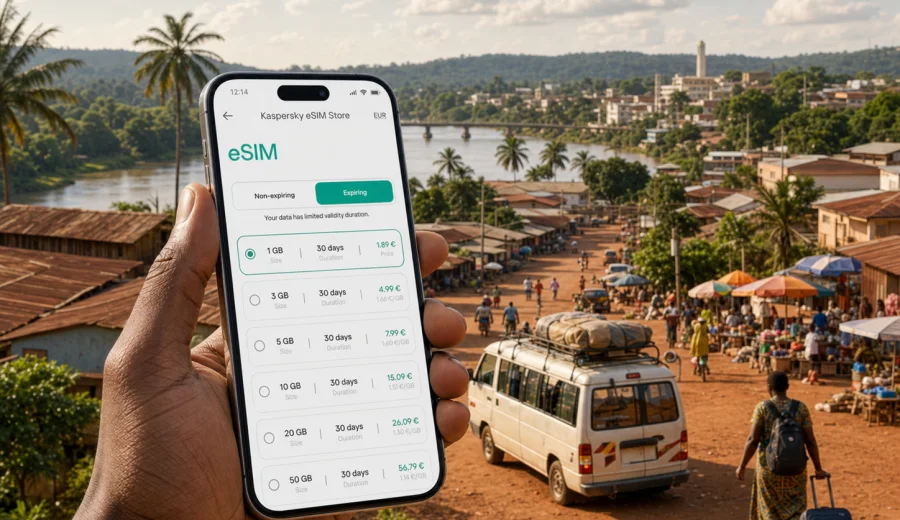
Bambari eSIM: mobile connection and internet for your trip
Bambari is a practical stop in the center of the Central African Republic, on the Ouaka River and on routes that can connect travelers with Bangui, regional project sites, local markets, hotels, offices, and onward road journeys. A trip here often depends on coordination: meeting a driver, confirming a hotel gate, checking a road plan, messaging a host, or sharing your location when street addresses are not enough.
That is why mobile internet matters in Bambari. It is not only for browsing or social updates. It helps you move through the city with fewer pauses, keep documents close, translate short messages, confirm pickup times, and stay reachable while plans change. If you arrive after a long transfer or need to start work soon after reaching town, it is better to have your mobile data setup ready before you need it.
An eSIM can help because it lets you install a digital SIM profile on a compatible phone without looking for a physical SIM card after arrival. For Bambari, the value is strongest in the first day of travel: when you are still learning the city, moving between a hotel and meeting points, or preparing for a route outside town. This guide explains how to plan eSIM, mobile connection, and internet use for Bambari without turning the trip into a general country checklist.
Why mobile internet matters in Bambari
Bambari is the capital of Ouaka prefecture and one of the main urban centers in the interior of the Central African Republic. Visitors may come for humanitarian work, business, logistics, public-sector projects, family reasons, field travel, or a short stop before moving farther east or back toward Bangui. The city is not built around the same travel assumptions as a major airport hub, so your phone often becomes a basic planning tool.
Mobile internet is useful in Bambari for:
- confirming pickup points with a driver or local contact;
- sharing a live location when written directions are unclear;
- checking a route before leaving a hotel or office compound;
- opening maps near the market, river, or transport points;
- keeping copies of reservations, permits, schedules, and ID scans;
- receiving last-minute changes to meetings or vehicle plans;
- using messaging apps when voice calls are not convenient;
- translating short notes between English, French, Sango, or another language;
- coordinating onward travel toward Bangui or other towns in the country.
The main planning question is timing. If you wait until the first urgent moment, you may have to solve several things at once: find Wi-Fi, buy a physical SIM, check whether the shop is open, understand local terms, and test the connection. With an eSIM, much of the setup can happen earlier, as long as your device supports eSIM and the selected plan covers the Central African Republic.
Where an eSIM helps most during a Bambari stay
Bambari rewards simple preparation. The city experience may include short town movements, long road transfers, work meetings, errands, and periods when hotel Wi-Fi is not enough. Think of mobile data as a backup layer for the small moments that keep the day moving.
| Trip moment in Bambari | Why data helps | What to prepare |
|---|---|---|
| Arrival after a road transfer | You may need to confirm a driver, hotel, or meeting point | Install the eSIM before the final leg and save contacts offline |
| First hotel check-in | Exact entrances and reception points may be easier to confirm by message | Screenshot the booking and pin the hotel location |
| Moving between offices or compounds | Plans can change during the day | Keep maps, names, and phone numbers available |
| Market and town errands | You may need directions, translation, or payment coordination | Use lightweight apps and avoid large downloads on mobile data |
| Field visits from Bambari | Signal, power, and Wi-Fi access may vary outside town | Carry a power bank and offline copies of key documents |
| Return or onward travel | Road timing can shift | Confirm route notes and contacts before departure |
For a short visit, a small data package may be enough for maps, messages, and email checks. For work travel, field coordination, or a longer stay, a larger data package gives more room for document access, photo sharing, and hotspot use. The right plan depends on what you actually do in Bambari, not only on how many days you stay.
Arrival planning before you reach Bambari
Many international travelers first enter the Central African Republic through Bangui and then continue to Bambari by organized road transfer, project vehicle, private transport, or another local arrangement. Other travelers may arrive through work logistics. However the route is arranged, mobile internet should not be the first unsolved task when you step out of a vehicle with luggage and a changing schedule.
Before you travel to Bambari:
1. Confirm that your smartphone supports eSIM and is not locked to one operator.
2. Choose a data plan that covers the Central African Republic for your full stay.
3. Install the eSIM while you still have stable Wi-Fi.
4. Save the eSIM installation details or QR code securely.
5. Download offline maps for Bambari and your road route.
6. Save hotel, driver, office, and emergency contacts outside cloud-only apps.
7. Keep a power bank ready for long transfers.
8. Decide which SIM line you will use for calls and which one for mobile data.
This preparation matters even if your hotel or office expects to have Wi-Fi. The first connection need often happens before you reach that Wi-Fi: at a pickup point, outside a gate, on the road, or while confirming where someone is waiting. A ready eSIM gives you a better chance of handling that moment calmly.
How much mobile data do you need in Bambari?
The best data plan is the one that matches your behavior. A traveler who mainly uses messaging and offline maps needs less data than someone who uploads field photos, joins video calls, synchronizes cloud folders, or uses a laptop through a phone hotspot.
Use this estimate as a starting point:
| Traveler type | Typical mobile internet use in Bambari | Practical plan choice |
|---|---|---|
| Short stopover | Messaging, pickup coordination, light maps, email checks | Smaller package with enough validity for travel days |
| Business visitor | Email, documents, calendar changes, driver coordination | Medium package and careful background-data controls |
| Field or project team member | Route notes, photos, reports, group chats, days away from Wi-Fi | Larger package and offline backups |
| Longer stay | Daily messaging, maps, browsing, occasional hotspot | Larger package or a plan with top-up options |
| Family or personal trip | Messaging, local movement, light browsing, travel updates | Medium package if Wi-Fi reliability is uncertain |
You can reduce data use before you leave. Turn off automatic app updates, cloud backup on mobile data, video autoplay, and background sync for apps you do not need during travel. Download maps, documents, translation packs, and entertainment while on Wi-Fi. If you share your connection with a laptop, watch for operating system updates and cloud sync because they can consume data quickly without being obvious.
Choosing an eSIM plan for Bambari
For a Bambari city trip, choose the destination as the Central African Republic rather than looking for a city-only product. City planning is about how you will use internet in Bambari; eSIM plan availability is normally organized by country or region. The key question is whether the plan covers the Central African Republic for the full period of your travel, including arrival and departure days.
When comparing plans, check:
- destination coverage: Central African Republic or a suitable regional option;
- data amount: enough for maps, messages, email, documents, and expected hotspot use;
- validity period: long enough for the whole stay and any road travel days;
- activation rules: when the plan starts and how installation should be completed;
- device compatibility: eSIM support and no operator lock;
- top-up or additional plan options if your route may change.
If you want to prepare before departure, Kaspersky eSIM Store helps you choose, arrange, and activate a suitable eSIM data plan through its app or website. For Bambari, use the Central African Republic destination page to choose an eSIM plan for your trip to Bambari and review the available data amounts, validity periods, and plan conditions before you travel.
Do not judge a plan only by price. A plan that expires too early, has too little data, or does not fit your full route can become inconvenient at the exact moment you need maps or messages. In Bambari, the practical choice is the plan that gives you enough data for real movement: arrival, hotel coordination, meetings, errands, field visits, and the route out of town.
Local movement: hotels, drivers, river crossings, and town errands
Many movements in Bambari are short, but they still benefit from mobile data. You may go between a hotel, a project office, a government building, a market area, a river-side location, a restaurant, or a vehicle meeting point. In places where formal street addresses are not the main navigation method, a map pin, screenshot, and direct message can be more useful than a written address alone.
For smoother local movement:
- save your hotel and regular meeting points as map pins;
- ask hosts to send a location pin, not only a name or description;
- keep your driver, hotel reception, and local coordinator in your phonebook and messaging apps;
- take screenshots of important addresses and route notes before leaving Wi-Fi;
- agree on visible pickup points such as a gate, courtyard, fuel station, office entrance, or market landmark;
- keep your phone charged before evening movement or long transfers;
- avoid relying on one cloud app for all travel details.
If you are in Bambari for work, keep a simple offline note for each day: names, phone numbers, meeting locations, vehicle details, and expected timing. Mobile data helps you update the plan; the offline copy protects you if signal, battery, or cloud access is temporarily unavailable.
Business trips, field work, and short stopovers
Bambari is often part of a wider work itinerary. You may use the city as a base for meetings, supply coordination, field visits, training, monitoring trips, or logistics planning. In these scenarios, mobile internet supports team coordination: vehicle times, updated meeting places, document photos, route checks, and messages from a remote office.
Short stopovers have a different pattern. You may only need data for hotel check-in, route confirmation, a few messages, and next-day departure. In both cases, the main value of eSIM is readiness. Install the plan before arrival, keep driver and accommodation contacts offline, and limit background data so the package is used for the tasks that matter.
Installing and activating your eSIM
The best time to install an eSIM is when you have stable Wi-Fi, enough battery, and no pressure from a waiting driver or meeting. Many travelers install the eSIM before departure and activate it according to the plan instructions when they are ready to use mobile data.
General setup flow:
1. Check that your device supports eSIM and is unlocked.
2. Choose the destination and data plan.
3. Complete the order in the app or on the website.
4. Install the eSIM using the provided QR code or manual details.
5. Label the eSIM clearly, for example "CAR data" or "Travel data".
6. Select the eSIM for mobile data when you are ready to use it.
7. Enable data roaming for the eSIM if the plan instructions require it.
8. Test light data use, such as opening a map or sending a message.
For device-specific steps, follow the Android installation guide or the iOS installation guide. Menu names can vary by phone model and operating system version, so it is worth checking the steps before you are on the road to Bambari.
Device compatibility: check before ordering
Not every modern-looking phone supports eSIM, and some phones are locked to one mobile operator. This is one of the easiest travel problems to avoid because you can check it before buying a plan. If your device cannot use eSIM, the plan will not solve your mobile internet needs in Bambari.
Before ordering, check your device and confirm:
- the phone supports eSIM;
- the device is not locked to a single operator;
- the operating system is up to date enough for eSIM setup;
- you know where the mobile network or SIM settings are;
- you can access Wi-Fi during installation;
- you have enough battery and time to complete setup.
If you travel with two phones, install the eSIM on the device you will actually carry during transfers and local movement. Depending on the profile and plan conditions, an eSIM may not be transferable after activation. Treat the installation device as an important choice, especially if one phone stays in a hotel room while the other goes with you around town.
FAQ: eSIM and mobile internet in Bambari
Is eSIM useful for Bambari?
Yes, if your phone supports eSIM and the selected plan covers the Central African Republic. It is useful for maps, messaging, email, pickup coordination, local movement, and work travel.
Do I need a Bambari-specific eSIM plan?
Usually no. For a city trip, choose a plan for the country that covers the city: Central African Republic. The city focus helps you plan usage, while the plan itself is normally organized by country or region.
Can I keep my regular SIM active?
On many compatible phones, yes. You can often keep your regular SIM for your home number and select the eSIM for mobile data. Check your phone settings and plan conditions before travel.
Does a travel eSIM include calls and SMS?
Many travel eSIM plans are data-only. If calls, SMS, or a phone number are important for your trip, read the plan conditions carefully before ordering. For many travelers, internet-based messaging and calls are the main communication method.
When should I install the eSIM?
Install it when you have stable Wi-Fi and time to follow the instructions carefully. For many travelers, that means before departure, in Bangui before the final transfer, or before leaving a reliable Wi-Fi location for Bambari. Activate it according to the plan instructions.
Choose your eSIM setup before you travel to Bambari
Bambari is a city where mobile internet supports practical travel moments: arrival coordination, hotel check-in, road movement, town errands, business meetings, field visits, and onward routes. The best setup is simple: check device compatibility, choose a plan that covers the Central African Republic, install the eSIM while you have Wi-Fi, and keep offline backups for essential details.
Kaspersky eSIM Store is an app and website where you can choose, arrange, and activate an eSIM with a suitable data plan for mobile internet in an international trip. Before you travel, review the available options and prepare an eSIM plan for Bambari so your phone is ready for maps, messages, and everyday coordination when you arrive.