
Travel connectivity guide
Bamiyan eSIM: Mobile Internet for Travel
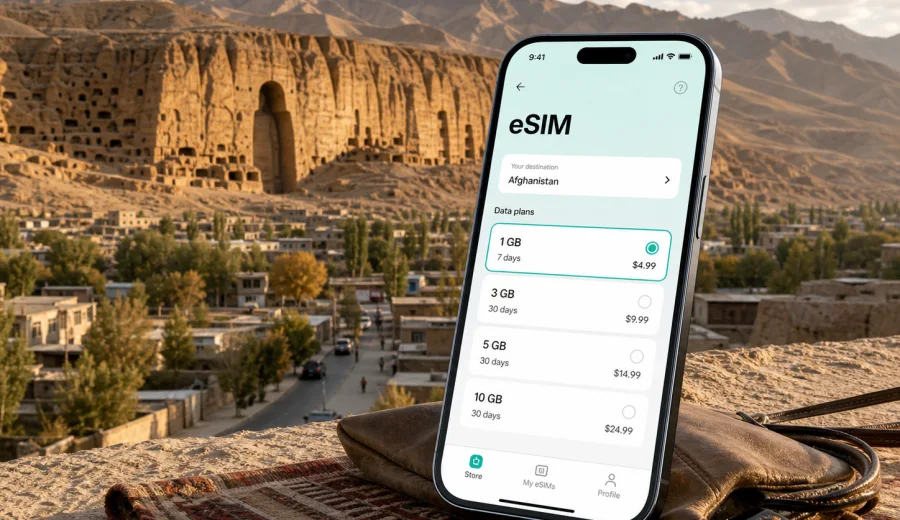
Bamiyan eSIM: mobile connection and internet for your Afghanistan trip
Bamiyan is a mountain city where mobile internet matters before you even reach your hotel. The distances feel wider than they look on a map, routes may involve long road transfers from Kabul or other Afghan cities, and the places you will want to find are often spread between the town center, guesthouses, valley viewpoints, archaeological sites and day-trip roads. An eSIM can make the practical side of the trip easier: maps, calls through messaging apps, hotel contacts, driver coordination, translation, banking notifications and work messages all depend on a reliable data plan.
This guide focuses on using eSIM for a trip to Bamiyan, not on turning the city into a generic Afghanistan page. You will find advice for arrival, local movement, stopovers, hotels, business travel, sightseeing around the valley and onward routes. The goal is simple: prepare mobile internet before the moments when you need it most.
Why mobile internet is useful in Bamiyan
Bamiyan is not a city where you should assume every step will be covered by hotel Wi-Fi or easy in-person help. Even when your accommodation has internet, you may need data before check-in, during a transfer, at a viewpoint, while confirming a driver, or when sending your location to someone waiting for you.
An eSIM is a digital SIM profile installed on a compatible phone. It lets you use a prepaid data plan for the destination without replacing your physical SIM card. For Bamiyan, that can be useful because the trip often includes several communication-heavy moments:
- confirming pickup times with a driver or host;
- checking maps before leaving the town center;
- saving hotel addresses and pins for offline use;
- keeping travel documents and booking emails accessible;
- using messaging apps instead of ordinary calls or SMS;
- sharing location with colleagues, family or a local contact;
- checking weather and road updates through the channels you already use.
The most important point is planning. Install and prepare your eSIM while you still have a stable connection, then use it as one layer of your communication setup once you are in Afghanistan.
Bamiyan travel scenarios where eSIM helps
The right data plan depends on how you will use the city. A short cultural visit, a work trip and a long road itinerary create different mobile internet needs.
| Scenario in Bamiyan | Why data matters | Practical eSIM use |
|---|---|---|
| Arrival by road | Transfers can take several hours and plans may shift | Keep driver, host and map messages available |
| Hotel check-in | Addresses and entrances may need clarification | Message the property, send a location pin, open booking details |
| Valley sightseeing | Sites and viewpoints are spread out | Use maps, translation, camera backup and group messaging |
| Business visit | Meetings may happen outside standard hotel spaces | Keep email, calendars and messaging apps online |
| Short stopover | You have little time to solve connectivity issues | Prepare eSIM before arrival and avoid looking for a SIM card |
| Trips beyond Bamiyan | Routes may continue toward other Afghan cities or valleys | Choose a plan that fits the whole Afghanistan route |
For a city like Bamiyan, the best plan is usually not the one with the biggest data allowance by default. It is the one that matches how long you will be in Afghanistan, how much navigation and communication you expect, and whether you will rely on hotel Wi-Fi for heavy tasks.
Before you arrive: prepare your phone and offline basics
Do not leave every connectivity task until the day of travel. Bamiyan rewards preparation because the first useful internet connection may be needed while you are still in transit.
Use this checklist before departure:
- Confirm that your phone supports eSIM and is not locked to one carrier.
- Save your accommodation address, phone number and map pin.
- Download offline maps for Bamiyan and any road route you expect to use.
- Keep copies of bookings, travel documents and emergency contacts on the device.
- Install messaging apps you will use for local coordination.
- Charge a power bank before long transfers.
- Decide which SIM line will handle mobile data and which line will handle ordinary calls.
- Read the selected eSIM plan conditions, including country coverage, validity period and data volume.
If you plan to work while in Bamiyan, also download essential files in advance. A mobile data plan is useful for email, chats and light browsing, but large uploads, cloud sync and video calls can use data quickly.
How to choose an eSIM plan for Bamiyan
For a Bamiyan trip, choose the plan by destination first. The city is in Afghanistan, so the country coverage should match Afghanistan or a relevant regional plan that includes Afghanistan. Then compare data volume and validity against your actual itinerary.
Key questions:
1. How many days will you spend in Afghanistan, including travel days?
2. Will Bamiyan be the main destination or one stop on a longer route?
3. Will you use mobile data mainly for maps and messages, or also for work?
4. Will your hotel Wi-Fi cover heavy downloads and video calls?
5. Do you need the plan active immediately after landing or only after reaching Bamiyan?
Light users often need mobile data for maps, messaging and occasional web searches. Heavy users may need more if they share photos, join video calls, work from a laptop through hotspot mode, or use cloud services often. Always check whether hotspot mode is allowed by your selected plan and device settings.
Arrival and transfer: where connectivity matters most
Many visitors reach Bamiyan as part of an arranged route, often involving a road journey through mountainous terrain. The exact travel path and schedules can change, so confirm current details with your organizer, host or local contacts before leaving. From a connectivity point of view, the important thing is to have your phone ready before you start the long transfer.
Mobile internet can help during arrival in several practical ways:
- sending your estimated arrival time to the guesthouse;
- saving alternative meeting points if the route changes;
- keeping maps open even when the signal becomes weaker;
- checking messages when the vehicle stops in a covered area;
- avoiding dependence on a public Wi-Fi network at the first stop.
Prepare your eSIM profile before the transfer, but do not assume mobile data will be equally strong at every point on the road or around the valley. Keep offline maps and written addresses as backup. eSIM is a travel tool, not a replacement for sensible trip preparation.
In the town center: hotels, cafes and daily movement
Bamiyan town is compact compared with large capital cities, but the practical points you need may not be next to each other. Your accommodation, a meeting place, a driver, a market stop and a viewpoint can sit in different parts of the valley. Mobile internet helps you move between them with less friction.
Use data for small but important actions:
- open a saved map pin before you leave the hotel;
- message the driver before walking to the meeting point;
- translate short phrases when arranging timing or pickup;
- check opening details that your host has sent;
- share your live or current location with trusted contacts;
- confirm the return time after visiting a site.
If your hotel Wi-Fi is good, use it for large downloads and media backup. Use your eSIM data for movement, coordination and essentials. That split keeps your prepaid data plan useful for the moments when Wi-Fi is not available.
Around Bamiyan's main sights and viewpoints
Bamiyan is known for its valley landscape, historic cliff areas and mountain setting. Sightseeing often involves moving between viewpoints, archaeological areas, local roads and photo stops. Even when you travel with a guide or driver, data remains useful because you may need to coordinate timing, check a saved route or send photos later.
For a day in and around the valley, prepare your phone like this:
1. Open the map while you still have Wi-Fi or a strong mobile signal.
2. Save the hotel location and the places you plan to visit.
3. Turn off automatic photo and video backup on mobile data.
4. Keep battery saver available for long outdoor periods.
5. Use messaging apps for group coordination instead of ordinary SMS.
6. Keep a written version of essential addresses in case the phone battery runs low.
Do not rely on mobile internet for every decision. In mountain regions, local advice, driver experience and current route conditions matter. Use your connection to support the plan, not to replace local guidance.
Choosing and preparing a plan with Kaspersky eSIM Store
Kaspersky eSIM Store is an app and website where you can quickly choose, order and activate an eSIM with a suitable data plan for mobile internet in an international trip. For Bamiyan, use the Afghanistan destination when comparing plan options, because the city belongs to Afghanistan and the plan should match the country route.
When you are ready to compare options, you can choose an eSIM plan for your trip to Bamiyan and check the available data volumes, validity periods and plan conditions before you travel. This is best done while you still have a stable internet connection, enough battery and time to read the details carefully.
Keep the product role clear: Kaspersky eSIM Store helps you select, order and activate an eSIM plan for travel mobile internet. The mobile service conditions, coverage and performance depend on the selected plan, destination and local network situation.
How to install eSIM before or during the trip
Install your eSIM before you need it. You can usually complete the setup at home, at the hotel, or anywhere with a stable internet connection. The exact steps depend on your phone, so follow the instructions for your device and the plan you selected.
Basic setup flow:
1. Check that your phone supports eSIM and is not carrier-locked.
2. Choose the Afghanistan destination and a suitable data plan.
3. Complete the order and open the eSIM details in your account or app.
4. Install the eSIM profile by following the on-screen steps or using the QR code.
5. Select the eSIM profile for mobile data when you want to use it.
6. Enable data roaming for that eSIM if the plan instructions require it.
7. Test the setup while you still have a backup internet connection.
For detailed setup steps, use the official Android eSIM installation guide or the iOS eSIM installation guide. If you are not sure whether your device can use eSIM, check your device compatibility before choosing a plan.
Compatibility and phone settings to check
An eSIM trip plan only works if your device can use it. Before buying or activating a plan for Bamiyan, check three things: hardware support, carrier lock status and system settings.
Important checks:
- eSIM support: not every phone model or regional version includes eSIM.
- Carrier lock: a locked phone may not accept another mobile profile.
- Operating system: older software can create setup problems.
- Mobile data line: choose the eSIM profile for travel data when needed.
- Data roaming: some eSIM plans require roaming data to be enabled.
- Background data: cloud backup, video apps and automatic updates can drain your allowance.
If your phone uses one physical SIM and one eSIM at the same time, decide how each line will work. Many travelers keep their home SIM active for important messages while using eSIM for mobile data. Check possible roaming charges with your home carrier before leaving your home SIM active abroad.
Practical data habits for Bamiyan
Good settings can make a moderate data plan last much longer. This matters in Bamiyan because you may want to reserve data for navigation and coordination rather than spend it on background tasks.
Use these habits:
- Download maps, translation packs and key documents on Wi-Fi.
- Disable automatic app updates on mobile data.
- Pause automatic photo and video backup until you are on Wi-Fi.
- Reduce video quality in social and streaming apps.
- Keep hotel and driver contacts pinned in your messaging app.
- Save map pins for your hotel, meeting points and planned stops.
- Use text and compressed images instead of large video files when possible.
- Monitor data use daily if your trip lasts more than a couple of days.
For a city visit, the most valuable data is usually the data that helps you make the next local decision: where to meet, which route to follow, when to return and how to contact the person waiting for you.
Short stopovers and tight itineraries
If Bamiyan is a short stop, you have less room for connectivity troubleshooting. A prepared eSIM is useful because you do not have to spend limited city time looking for a physical SIM card, finding a shop, dealing with unfamiliar plan terms or waiting until hotel Wi-Fi becomes available.
For a short visit, prioritize:
- installing eSIM before you leave for Afghanistan or before the transfer to Bamiyan;
- saving the hotel and main meeting point offline;
- keeping one trusted contact informed about your route;
- using data mainly for maps, messages and urgent searches;
- avoiding large media uploads until you have Wi-Fi.
The shorter the trip, the more valuable a clean setup becomes. You want your phone ready for movement, not for setup tasks.
Common mistakes to avoid
Avoid these problems before and during your Bamiyan trip:
- Buying a plan without checking that Afghanistan is included.
- Waiting until a long transfer to install the eSIM.
- Forgetting to check whether the phone is carrier-locked.
- Letting cloud photo backup use mobile data in the background.
- Choosing a validity period that ends before the return journey.
- Assuming an eSIM includes ordinary phone calls or SMS.
- Relying only on online maps without saving offline routes.
- Keeping only one copy of hotel and driver contacts.
The safest approach is layered: install eSIM early, keep offline information ready, use Wi-Fi for heavy tasks and reserve mobile data for practical movement.
FAQ: eSIM for Bamiyan
Can I use eSIM for mobile internet in Bamiyan?
You can use eSIM if your device supports eSIM, is not carrier-locked, and the selected plan includes Afghanistan. Availability and performance depend on the selected plan, local network conditions and your device settings.
Does an eSIM plan include a local phone number?
Usually no. Travel eSIM plans in this context are intended for mobile internet. Ordinary voice calls and SMS are not included unless the selected plan conditions say otherwise. You can use messaging and calling apps over mobile data.
Should I install eSIM before arriving in Bamiyan?
Yes, it is usually better to install it before you need it. Use a stable Wi-Fi connection, follow the setup instructions and keep another internet option available while installing.
Is eSIM enough for remote work in Bamiyan?
It can help with email, messaging and backup access, but heavy work tasks may use a lot of data. Use Wi-Fi for large files and video calls when possible, and reserve mobile data for essential communication.
What should I do if mobile data does not start?
Check that the eSIM is selected for mobile data, data roaming is enabled if required, airplane mode is off and the plan is active. If the issue continues, review the plan instructions and contact support through the available channel.
Choose an eSIM plan for your Bamiyan trip
Bamiyan is easier to navigate when your phone is ready for maps, messages, hotel coordination and route updates. Before you travel, check that your device supports eSIM, choose a data allowance that matches your Afghanistan itinerary and install the profile while you have a stable connection.
You can prepare an eSIM plan for travel in Afghanistan through Kaspersky eSIM Store and use it as part of a practical connectivity setup for Bamiyan: eSIM for mobile data on the move, Wi-Fi for heavy tasks and offline information as a backup.