
Travel connectivity guide
Bandar Seri Begawan eSIM for city travel
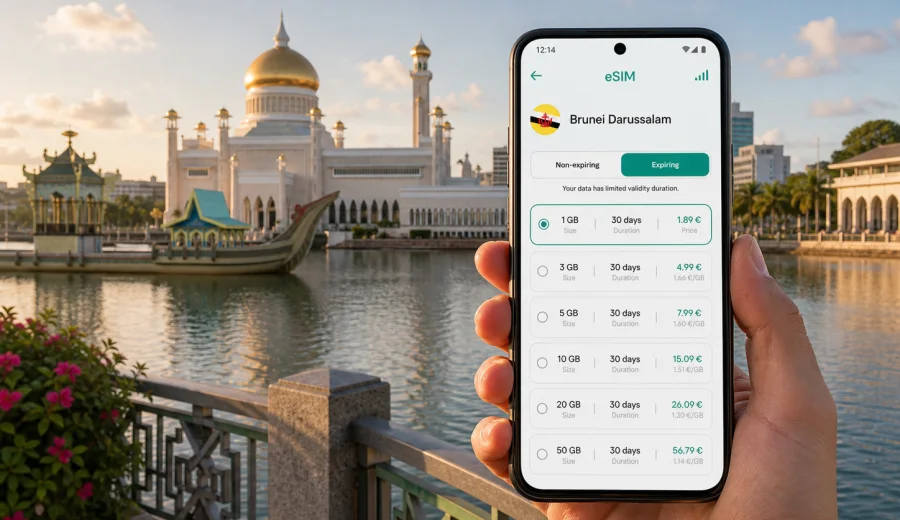
Bandar Seri Begawan eSIM: mobile connection and internet for a smooth city trip
Bandar Seri Begawan is a calm capital, but a trip here still depends on steady mobile internet. You may need a map as soon as you leave Brunei International Airport, a ride to your hotel near Kiulap or Gadong, a translation app at a food court, or a message thread with colleagues before a meeting. The city is compact compared with many Asian capitals, yet its main travel moments are spread across the airport, waterfront, mosque area, malls, hotels, offices, Kampong Ayer piers, and roads toward Jerudong or Muara. That is exactly where an eSIM becomes useful: it helps you prepare mobile data before the trip without looking for a physical SIM card after arrival.
This guide focuses on eSIM use in Bandar Seri Begawan, not on Brunei Darussalam in general. It explains when mobile connection matters in the city, how to estimate data for a short stay, what to check before choosing a plan, and how Kaspersky eSIM Store can help you select, arrange, install, and activate an eSIM tariff for mobile internet during an overseas trip.
Why mobile internet matters in Bandar Seri Begawan
Bandar Seri Begawan is easy to enjoy when you are not guessing where to go next. The city center around Omar Ali Saifuddien Mosque, the waterfront, Yayasan Sultan Haji Hassanal Bolkiah Complex, and the boat access points to Kampong Ayer can be explored at a slow pace. At the same time, visitors often move by car, hotel transfer, taxi, ride service, or arranged transport rather than by an extensive metro-style system. That makes mobile data important for checking routes, confirming pick-up points, sharing live locations, and staying reachable if a meeting time changes.
An eSIM is especially practical for travelers who want data ready before landing. You do not need to remove your primary SIM card, and you can keep your regular number active for banking messages or important calls if your device settings and home operator support that setup. The eSIM can handle mobile internet, while your main SIM remains available for other services.
Common city situations where mobile data helps:
- Leaving Brunei International Airport and checking the best route to your hotel.
- Finding the correct pier or meeting point for Kampong Ayer.
- Navigating between Gadong, Kiulap, the city center, and government or business districts.
- Using maps when walking around the mosque, waterfront, museums, and shopping areas.
- Coordinating with a driver, guide, colleague, or hotel reception.
- Opening booking confirmations, boarding passes, and meeting details.
- Using translation, messaging, cloud documents, and email during a business visit.
Arrival: from airport connection to the first ride
The first hour in Bandar Seri Begawan is often when a prepared eSIM feels most useful. After landing, you may want to message your hotel, open a map, check whether your transfer is waiting, or confirm the address in a booking app. Airport Wi-Fi can be helpful, but relying on public Wi-Fi alone creates friction: you need to find the network, complete any sign-in steps, stay within range, and switch again once you leave the terminal.
With an eSIM installed on a compatible phone, you can turn on the eSIM line for mobile data when the plan is ready to activate under its conditions. This gives you a simpler start: your map, messenger, and email are available as you move from the terminal to the car. If your arrival is late, if you are tired after a connection, or if you have a tight business schedule, reducing that first-arrival uncertainty matters.
Before you travel, check three practical points:
- Your phone must support eSIM.
- Your phone should not be locked to one mobile operator.
- You should understand when the selected data plan starts counting its validity period.
If you are unsure whether your device supports eSIM, use the compatibility check before arranging a plan: check your device. This step is worth doing before payment because eSIM profiles are tied to device capability and installation rules.
City movement: where a data plan earns its keep
Bandar Seri Begawan does not overwhelm visitors with distance, but it does require small navigation decisions throughout the day. A typical itinerary may combine the mosque area, the waterfront, a boat ride through Kampong Ayer, lunch in Gadong, an afternoon meeting, and an evening return to the hotel. Each movement can involve a different pick-up point or walking route.
Mobile internet is useful because the city experience is often shaped by timing:
| Travel moment | Why mobile data helps |
|---|---|
| Airport arrival | Open hotel address, contact transfer, check route timing. |
| Hotel check-in | Retrieve booking details, message family or colleagues, set up maps. |
| City center walk | Navigate between mosque, waterfront, museum, cafes, and shops. |
| Kampong Ayer visit | Confirm pier location, coordinate a boat meeting point, share your location. |
| Business day | Use email, calendar, video meeting links, cloud files, and ride updates. |
| Evening plans | Check opening hours in your apps, book transport, find dinner directions. |
| Departure | Open airline app, ride details, travel documents, and airport route. |
For a short capital visit, the value is not only speed. It is the ability to make small adjustments without hunting for a stable Wi-Fi network. If a driver asks for a landmark, if your meeting location changes from one hotel to another, or if rain makes walking less appealing, mobile data lets you adapt immediately.
Choosing the right data amount for Bandar Seri Begawan
The right eSIM data package depends on how you travel. A visitor on a one-day stopover has different needs from a consultant spending a week between meetings and hotel work sessions. You do not need to overcomplicate the choice, but you should match the plan to your real habits.
Use this simple estimate:
- Light use: maps, messaging, email, ride coordination, and occasional web searches.
- Medium use: light use plus social media, photo sharing, restaurant searches, and cloud document access.
- Heavy use: frequent video calls, hotspot use, large uploads, streaming, and continuous work on cloud files.
Many travelers in Bandar Seri Begawan can keep usage moderate by using hotel Wi-Fi for large updates, cloud backups, and long video calls, while reserving mobile data for movement around the city. Business travelers may need a larger data allowance if they work from multiple locations, use hotspot mode, or keep a laptop connected during transit. Families should think about each device separately: one eSIM on one phone does not automatically cover every traveler unless you use tethering and the selected plan permits it.
A practical city checklist before you fly
Prepare your mobile setup before departure, ideally while you are on a stable home connection. This reduces pressure when you arrive in Bandar Seri Begawan.
- Confirm that your smartphone supports eSIM and is not operator locked.
- Decide whether the eSIM will be used only for data or also as a hotspot for another device.
- Check the trip length: stopover, weekend, business week, or longer stay.
- Estimate your data use based on navigation, messaging, email, and work needs.
- Keep your primary SIM available if you need your usual number for banking or calls.
- Save your hotel address, airport transfer details, and key meeting locations offline.
- Install the eSIM before travel if the plan instructions allow it, then activate it according to the plan rules.
- Keep installation instructions accessible in case you need to review device settings.
When you are ready to compare options, you can prepare an eSIM tariff for a trip to Bandar Seri Begawan through Kaspersky eSIM Store. Use the plan details to check the destination, traffic allowance, validity period, and price before you proceed.
How to install and activate an eSIM for the trip
The exact steps depend on your phone and the selected plan, but the general process is straightforward. In Kaspersky eSIM Store, you select the destination and a suitable data plan, then follow the installation flow for your device. If you need device-specific guidance, use the Android installation instructions or the iOS installation instructions.
Typical steps:
1. Choose Brunei Darussalam as the destination for your Bandar Seri Begawan trip.
2. Select a data amount and validity period that fit your itinerary.
3. Arrange the eSIM tariff and review the plan conditions.
4. Install the eSIM profile on your compatible smartphone.
5. Set the eSIM line for mobile data when you are ready to use it.
6. Keep your primary SIM settings as needed for calls, SMS, or your usual number.
7. Check whether data roaming must be enabled for the eSIM line.
Do not delete an installed eSIM profile unless the plan instructions or support guidance tell you to do so. In many cases, an eSIM cannot simply be moved to another phone after activation. If you are changing devices shortly before your trip, finish that change first, then install the eSIM on the phone you will actually carry in Bandar Seri Begawan.
eSIM, roaming, and public Wi-Fi in the city
Travelers often compare three options: standard roaming from a home operator, public Wi-Fi, and an eSIM data plan. Each has a role.
Roaming can be convenient because it uses your existing SIM, but the cost and data conditions depend on your home tariff. Public Wi-Fi is useful in hotels, airports, and some cafes, but it is not always available exactly when you need a route update or a ride message. An eSIM is a practical middle option for many visitors: it lets you prepare mobile internet for the destination and use data on a compatible device without buying a physical SIM card after arrival.
| Option | Best for | Things to check |
|---|---|---|
| Home roaming | Keeping your usual line active with minimal setup. | Daily charges, data limits, and speed rules. |
| Public Wi-Fi | Hotel work sessions, large updates, and non-urgent browsing. | Availability, sign-in steps, and privacy settings. |
| eSIM data plan | Maps, messaging, rides, email, and flexible city movement. | Device compatibility, validity period, and data allowance. |
The most resilient setup is often a mix: use hotel Wi-Fi for heavy tasks and keep the eSIM for mobile moments. That way, you preserve data for navigation, coordination, and urgent work while still staying productive indoors.
Short stay, business trip, or longer visit: sample planning scenarios
One-day stopover. You need a small amount of reliable data for airport messages, maps, a quick city loop, and the return ride. Install the eSIM before departure if the plan allows it, keep your documents offline, and avoid heavy media uploads until you are back on Wi-Fi.
Weekend visit. You may use maps several times a day, share photos, check restaurants, coordinate rides, and message home. A medium data allowance usually gives more breathing room, especially if you are visiting Kampong Ayer, Gadong, and the city center across different parts of the day.
Business trip. Your data use is less predictable. Calendar changes, file access, ride updates, hotel Wi-Fi gaps, and authentication messages can all matter. Choose a plan with enough validity for the full stay and consider extra data if you expect hotspot use or frequent cloud work.
Regional itinerary. If Bandar Seri Begawan is the base for other places in Brunei Darussalam, choose the country plan that matches your whole route rather than thinking only about the first hotel. Check that the plan destination and validity fit every day you will be in the country.
FAQ: eSIM for Bandar Seri Begawan
Can I use an eSIM for mobile internet in Bandar Seri Begawan?
Yes, if your phone supports eSIM, is not restricted by an operator lock, and the selected plan covers Brunei Darussalam under its conditions. Always review the plan details before you arrange it.
Will an eSIM give me a local phone number?
Usually, travel eSIM plans are focused on mobile data. Voice calls and SMS are not included unless the specific plan says otherwise. You can use internet-based messaging and calling apps over mobile data.
Should I install the eSIM before arriving?
In many cases, installing before departure is convenient, provided you follow the plan instructions and understand when validity starts. Install while you have stable Wi-Fi, then activate or switch mobile data according to the plan rules.
Is public Wi-Fi enough for Bandar Seri Begawan?
Public or hotel Wi-Fi can help indoors, but it does not cover every travel moment. Mobile data is more useful for airport transfer, maps, ride coordination, walking routes, and messages while moving around the city.
Can I keep my regular SIM active?
On many dual-SIM phones, you can keep your regular SIM for calls or SMS and use the eSIM for mobile data. The exact settings depend on your device and home operator.
How much data do I need?
For maps, messaging, and occasional browsing, light or medium use may be enough. Add more data if you plan to upload many photos, use hotspot mode, join video calls, or work heavily with cloud files.
Final preparation before you travel
Before your flight to Bandar Seri Begawan, give your mobile setup the same attention as your passport, hotel booking, and airport transfer. Check device compatibility, choose a plan with the right destination and validity period, install the eSIM on the phone you will use, and keep the instructions available in case you need to adjust settings after landing.
Kaspersky eSIM Store helps you prepare mobile internet for an overseas trip through an app and website where you can select, arrange, install, and activate an eSIM with a suitable data tariff. For a city trip, choose Brunei Darussalam as the destination and match the data allowance to your real schedule in Bandar Seri Begawan: airport arrival, city navigation, hotel time, meetings, Kampong Ayer, shopping districts, and the ride back to the airport.
If you want to prepare before departure, choose an eSIM tariff for your Bandar Seri Begawan trip and review the plan details carefully before installation.