
Travel connectivity guide
Bandung eSIM: Mobile Internet for Your Trip
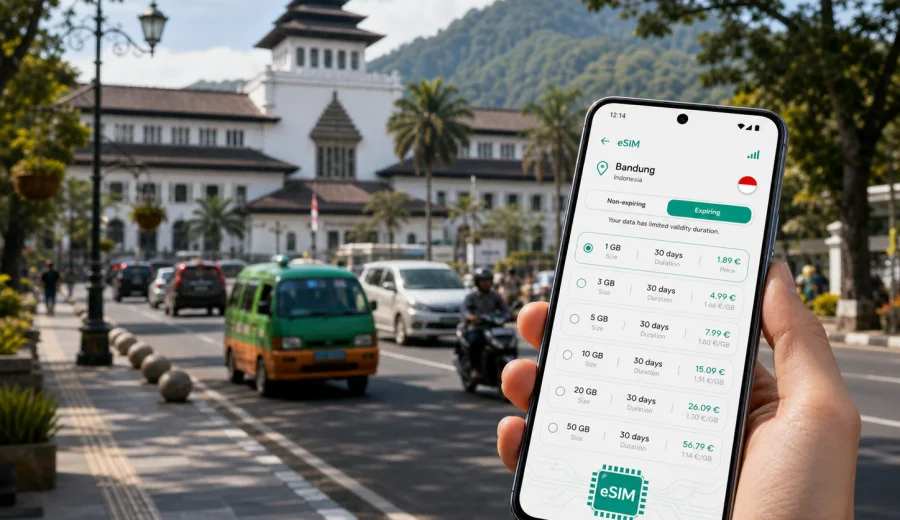
Bandung eSIM: mobile connection and internet for your trip
Bandung is a city where mobile internet becomes useful very quickly. You may land in West Java, arrive from Jakarta by train, continue from Padalarang after a high-speed rail segment, or come in by shuttle through Pasteur. In each case, the first hour often includes maps, ride-hailing apps, hotel messages, translation, payment confirmations and coordination with people who are already in the city.
An eSIM helps you prepare mobile internet for Bandung before you start looking for a local shop or relying on public Wi-Fi. With Kaspersky eSIM Store, you can choose a suitable eSIM plan for Indonesia, check the data amount and validity period, install the eSIM on a compatible device and use mobile data for common travel tasks.
This guide focuses on Bandung, not Indonesia in general. It covers arrival, local transport, districts, hotels, business trips, stopovers and short trips from the city, with practical notes on how to estimate data use and set up your phone.
Why mobile internet matters in Bandung
Bandung is compact compared with Jakarta, but movement across the city can still take time. Traffic is affected by university areas, shopping streets, weekend visitors, weather and the hill routes toward Lembang. A reliable mobile connection helps you adjust plans without having to search for Wi-Fi in every cafe or lobby.
Typical moments when you will want mobile data include:
- confirming your hotel address before getting into a car;
- checking whether a route through Pasteur, Dago or Setiabudi is faster;
- messaging a driver at a mall, station or hotel entrance;
- opening a booking confirmation at reception;
- using a translation app in restaurants, shops or transport;
- sharing your location with colleagues, friends or family;
- checking weather before going to Lembang, Kawah Putih or tea plantation areas;
- using mobile banking or travel apps when plans change.
Bandung is also a city of short hops. You may move from Braga to Asia Afrika, from a hotel in Dago to a meeting in Pasteur, or from Setiabudi toward Lembang for the afternoon. Mobile internet makes these changes easier because you can use maps, messaging and booking apps continuously instead of planning everything around Wi-Fi access.
Arrival scenarios: when eSIM helps first
Travelers reach Bandung in different ways. Some come through Jakarta and continue by train, shuttle or private transfer. Some itineraries use West Java routes through Kertajati or other regional connections, depending on current schedules. Others arrive from nearby cities by road. The exact route can vary, but the first connectivity tasks are similar.
| Arrival moment | What you may need online | Why eSIM can help |
|---|---|---|
| Train or feeder arrival | Maps, station exit, ride-hailing pickup | You can check the correct exit and message your driver |
| Shuttle to Pasteur | Hotel address, traffic, messaging | You can update arrival time while still on the road |
| Private transfer | Contact details, route sharing, maps | You can confirm destination and monitor the route |
| Late arrival | Hotel chat, digital booking, translation | You are less dependent on finding open shops or Wi-Fi |
| Business trip | Calendar, email, meeting location | You can move directly from arrival to your first appointment |
If you install an eSIM before the trip, you do not have to solve internet access at the same time as luggage, transport and currency questions. You still need to check the plan conditions and activation rules, because the start of validity and data use depend on the selected plan.
Where mobile data is especially useful in the city
Bandung has several areas where travelers often move between hotels, cafes, offices and attractions. The city is not difficult to navigate, but it is easy to lose time if you cannot check traffic, entrances or pickup points.
In Braga and Asia Afrika, mobile internet helps with walking routes, heritage buildings, cafe reservations, ride-hailing pickup locations and photos backed up to cloud services. Streets can be busy, and pickup points may change depending on traffic.
In Dago and Ir. H. Juanda, many travelers combine hotels, restaurants, campuses and viewpoints. A mobile connection is useful for checking uphill routes, opening menus, finding a return car and deciding whether to continue toward Dago Atas or Lembang.
In Pasteur and Sukajadi, connectivity is practical for airport-style transfers, shuttle terminals, shopping areas and hotels used by business travelers. If you are moving with luggage, you may not want to depend on public Wi-Fi just to confirm a pickup.
In Cihampelas, Riau and Setiabudi, mobile data supports shopping, cafe stops, hotel check-ins and short taxi rides. These areas can be crowded on weekends, so real-time map and messaging access is useful.
For Lembang and north Bandung day trips, a phone with data helps you check travel time, weather, opening hours in your own apps and the return route. Signal and speed depend on local networks, terrain and congestion, so download essential details offline before leaving the city center if the trip is important.
How to choose data for a Bandung trip
There is no single correct data amount for every visitor. A short business stay with hotel Wi-Fi has different needs from a long weekend with maps, video calls and social media uploads. Start with your trip length and the apps you expect to use outside Wi-Fi.
| Travel style in Bandung | Likely mobile data use | Practical note |
|---|---|---|
| One-night stopover | Low to moderate | Maps, messaging, ride-hailing and booking apps usually matter most |
| Business trip | Moderate | Email, calendars, files and calls can add up during transfers |
| Weekend city break | Moderate to high | Navigation, photo sharing and restaurant searches use more data |
| Family trip | High if tethering is used | Hotspot sharing can consume data quickly |
| Day trips outside the city | Moderate | Maps and messaging are useful, but offline maps can reduce use |
| Remote work stay | High | Video calls and large file sync should be planned carefully |
For most city travel tasks, maps, messaging and ride-hailing are not the heaviest data users. Video, cloud backup, app updates and hotspot sharing are usually the bigger variables. If your plan has limited data, switch off automatic photo backup and app updates on mobile data before you arrive.
Choosing an eSIM plan for Bandung
For a Bandung trip, the destination to choose is Indonesia. A city article uses the country plan because the eSIM plan is selected for the country or region where the city belongs. The important details are data amount, validity period, destination coverage and the conditions shown for the selected plan.
When comparing options, look at:
- how many days you will spend in Bandung and West Java;
- whether you will also visit Jakarta, Yogyakarta, Bali or another Indonesian destination;
- how much time you expect to spend outside hotel or office Wi-Fi;
- whether you will use video calls, cloud backup or hotspot sharing;
- whether your device supports eSIM and is not locked to one mobile operator;
- when the plan validity starts according to the plan conditions.
If Bandung is part of a wider Indonesia itinerary, choose a plan that matches the whole route, not only the first night in the city. You can choose an eSIM plan for your Bandung trip in Indonesia in Kaspersky eSIM Store and review the data amount, validity period and destination before completing your setup.
That link should not replace a quick data estimate. If you plan to work from cafes, share a hotspot with a laptop or stream video during transfers, choose more data than you would for a simple sightseeing weekend. If you mostly need maps and messages, a smaller package may be enough.
Quick data planning checklist
Use this checklist before you travel:
- Save your hotel address in an offline note.
- Download offline maps for Bandung and any day-trip areas.
- Turn off automatic app updates on mobile data.
- Turn off automatic cloud photo backup on mobile data if data is limited.
- Check whether your banking, airline and hotel apps are already logged in.
- Keep your main SIM active if you need SMS for banking or account verification.
- Decide whether you need hotspot sharing for a laptop or a travel companion.
- Check your eSIM plan validity and activation instructions before departure.
This preparation is especially useful if you arrive late, travel with children, carry work equipment or have a same-day meeting. The goal is not to use mobile data for everything, but to make sure the important tasks work when Wi-Fi is not available.
Installing eSIM before departure or after arrival
Many travelers prefer to install the eSIM before leaving home, then activate or switch mobile data according to the plan instructions. This can reduce stress on arrival because the eSIM profile is already on the phone. Other travelers install after arrival, especially if they want to keep the setup tied closely to the start of the trip.
The basic flow is simple:
1. Check that your phone supports eSIM and is not locked to one operator.
2. Choose Indonesia as the destination and select a suitable eSIM plan.
3. Complete the order process and open the eSIM details in your profile or app.
4. Install the eSIM using the on-screen steps or QR code.
5. Set the eSIM as the mobile data line when you are ready to use it.
6. If the instructions require data roaming for the eSIM line, enable it for that eSIM only.
7. Keep your primary SIM settings as needed for calls or SMS.
For detailed setup steps, use the Android eSIM installation guide or the iOS eSIM installation guide. The exact menus can differ by phone model and operating system version, so follow the instructions for your device.
Before purchasing, check your device for eSIM support. Compatibility matters because eSIM cannot be used on every smartphone or tablet, and some devices may be locked by a mobile operator.
Local movement, hotels and work trips
Bandung travel often mixes short car rides, walking routes and hotel stops. A distance that looks small on a map can take longer because of one-way streets, rain, weekend traffic or pickup rules at malls and stations. Keep mobile data available for ride-hailing messages, hotel directions, live maps and translation.
For a hotel or apartment stay, eSIM is most useful outside the room: before check-in, at a pickup point, in a lobby with crowded Wi-Fi or while moving between Dago, Braga, Pasteur and Setiabudi. Hotel Wi-Fi can handle large downloads, while mobile data is better kept for movement and urgent messages.
On a business trip, mobile internet supports calendar changes, driver contact, email, cloud files and internet-based calls. Download large documents on Wi-Fi when you can, and use mobile data for time-sensitive updates. If you need hotspot sharing for a laptop, check your phone settings and the selected plan conditions, then monitor data use closely.
Stopovers and trips from Bandung
For a one-night stopover, install the eSIM before the trip if possible, save your hotel address, keep enough data for maps and ride-hailing, and check the next morning route before leaving the hotel. A short stay does not always need a large data package, but it does need predictable access to the apps that keep the trip moving.
For day trips toward Lembang, tea plantation areas or scenic routes outside the center, download offline maps, save your driver's contact, check weather and carry a power bank. Mobile internet can help you adjust plans, but terrain, weather and local network conditions may affect performance outside central Bandung.
eSIM, Wi-Fi and roaming in Bandung
Most travelers use several connection options. eSIM is useful for maps, rides and messages outside Wi-Fi. Hotel Wi-Fi is better for large downloads and longer work sessions. Public Wi-Fi can help in cafes or malls, but it may require registration and is not always convenient. Home roaming keeps your existing operator settings, while cost and data limits depend on your home plan. A local physical SIM can suit a longer stay, but it requires shop time and physical SIM handling.
For many Bandung visitors, a practical approach is to use eSIM for movement and hotel Wi-Fi for heavier tasks. That keeps mobile data available for maps, rides, messages and urgent work while reducing unnecessary data use.
FAQ: eSIM for Bandung
Is there a separate eSIM just for Bandung?
For a Bandung city trip, you usually choose an eSIM plan for Indonesia, because Bandung is in Indonesia. The plan details should show the destination, data amount and validity period before you use it.
Can I install eSIM before I fly?
In many cases, yes. You can install the eSIM before departure and follow the plan instructions for activation and mobile data use. Check when validity starts so you do not activate earlier than intended.
Does eSIM include phone calls and SMS?
Travel eSIM plans are commonly focused on mobile internet. Regular voice calls, SMS or a local phone number are not included unless the specific plan says so. You can usually use internet-based messaging and calling apps over mobile data.
Will mobile internet work in every part of Bandung and West Java?
Coverage and speed depend on local networks, terrain, indoor conditions and congestion. eSIM helps you prepare mobile data for the trip, but no travel connection should be described as guaranteed in every place.
Final preparation for your Bandung trip
Before you leave, make sure your phone is ready, your accommodation details are saved and your key apps are logged in. Decide how much mobile data you need for maps, rides, messaging, work and day trips. Check compatibility, install the eSIM using the correct Android or iOS instructions, and keep Wi-Fi available during setup if possible.
Kaspersky eSIM Store helps you choose, arrange and activate an eSIM with a suitable mobile internet plan for travel. For Bandung, select Indonesia as the destination and review the data amount, validity period and plan conditions before you travel. When you are ready, choose an eSIM plan for your Bandung trip and prepare mobile internet before arrival.