
Travel connectivity guide
Bangassou eSIM for Mobile Internet
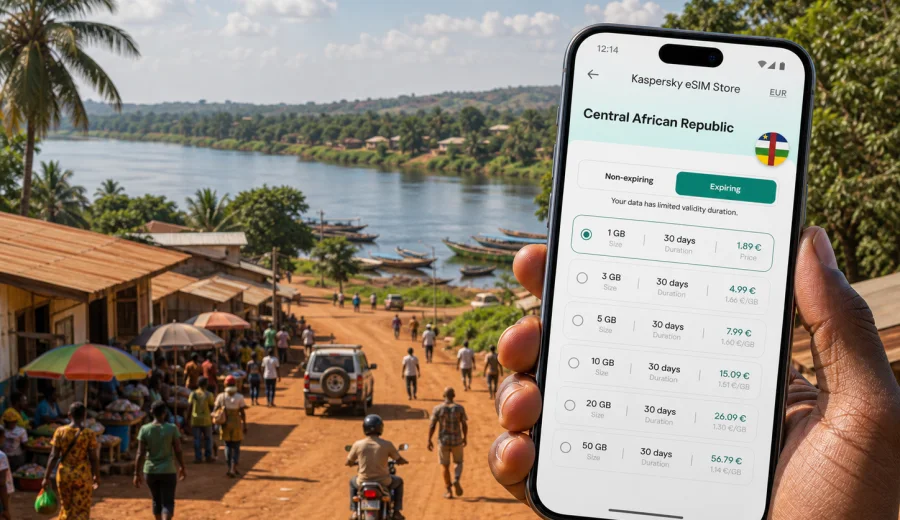
Bangassou eSIM: mobile connection and internet for your trip
Bangassou is not a city where you want to improvise mobile internet at the last minute. It is a riverside city in southeastern Central African Republic, close to the Mbomou River and far from the routines of large international airports. Travel here can involve domestic flights, overland transfers, project vehicles, local drivers, guesthouses, and plans that change because of weather or road conditions.
That is why an eSIM can be useful before you arrive in Bangassou. A digital SIM helps you prepare mobile data on a compatible phone without looking for a SIM card shop after arrival. You can keep maps, messages, booking details, translation tools, banking confirmations, and work apps available when you need clear information.
This guide focuses on practical city scenarios: arrival, local movement, maps near the river, driver coordination, guesthouses, business travel, and trips from Bangassou to other parts of Central African Republic.
Why mobile internet matters in Bangassou
Bangassou is a smaller, more remote destination than Bangui. In a large city, you may have many backup options: airport kiosks, shopping centers, hotel desks, and public Wi-Fi in many cafes. In Bangassou, the practical value of a prepared connection is higher because each errand can take more time.
Mobile internet helps you:
- confirming the address of a guesthouse, office, mission compound, or project base;
- sharing your arrival time with a local contact or driver;
- checking map pins before leaving the central area;
- translating short messages;
- sending documents, receipts, or location updates during a work trip;
- using messaging apps when a voice number is not included;
- keeping route details available if your schedule changes.
An eSIM is useful when your trip is tightly planned. You can choose a data package before departure, install the eSIM, and arrive with one less setup task. Activation details depend on the selected tariff and device, so read the plan conditions before you travel.
Bangassou arrival scenarios where eSIM helps
Travel to Bangassou may not follow the same pattern as a flight to a major tourism hub. Depending on your route and purpose, you may arrive by domestic air movement, by road from another city, or as part of an organized mission or business transfer.
| Arrival situation | Why data helps | What to prepare |
|---|---|---|
| Domestic flight or charter arrival | You may need to message a driver, confirm pickup, or share your location quickly. | Install the eSIM in advance and keep booking details offline as a backup. |
| Overland transfer | Route timing can change, and contacts may need progress updates. | Choose a data amount that covers maps, messaging, and delays. |
| Work or NGO movement | Teams often coordinate by messenger, email, and shared documents. | Check whether your work apps need mobile data during arrival. |
| Guesthouse check-in | Address details can be informal. | Save map pins and contact numbers before the final leg. |
The first hour in Bangassou can be busy: luggage, local transport, greetings, accommodation, and orientation. Prepared mobile internet removes one setup task from that moment.
Local movement: maps, drivers, and river routes
Bangassou is easier to navigate when you already know the main points you will use: your accommodation, office, project site, central market area, riverbank, health facility, and meeting points your host gives you. Even if you do not rely on turn-by-turn navigation for every street, mobile data helps you check where you are and communicate changes.
Use your phone for small but important tasks:
1. Save your accommodation location before you go out.
2. Share your live or current location with a trusted contact when appropriate.
3. Keep screenshots of addresses and meeting points in case data is temporarily slow.
4. Confirm the return route with your driver before leaving the central area.
5. Download key documents and travel confirmations before moving between sites.
River towns often use landmarks differently from large cities. A meeting point may be described by the river, a market lane, a compound gate, or a known road junction. Mobile internet does not replace local guidance, but it makes coordination easier.
Choosing the right data amount for Bangassou
The best eSIM data package for Bangassou depends on how you travel. A short stopover needs a different plan from a two-week field visit, and maps plus messages use less data than video calls or file uploads.
Use this planning table as a practical starting point:
| Trip style | Typical data use | Practical choice |
|---|---|---|
| 1-2 day stopover | Messaging, map checks, hotel coordination, ride updates | Small data package with enough validity for delays |
| 3-5 day city stay | Daily maps, email, social updates, light browsing | Medium package with a validity period covering the whole stay |
| Business or field visit | Email, documents, team chats, hotspot use | Larger package if Wi-Fi is uncertain |
| Regional route from Bangassou | Maps, messages, route updates, several accommodation changes | Country or regional plan that matches the full route |
Avoid choosing only by price. Look at data volume, validity, destination coverage, and whether your trip might extend. If your work requires file uploads or hotspot use, plan more data than a casual traveler.
Preparing eSIM before the trip
The safest time to prepare mobile internet is before the final travel leg. You may have better Wi-Fi, more time to read instructions, and easier access to email before you leave a larger city or your home country.
Before departure, check four things:
- your phone supports eSIM and is not locked to one carrier;
- the selected tariff covers Central African Republic;
- the validity period matches your arrival and departure dates;
- you understand when the tariff starts counting, because this can vary by plan.
If you want to prepare mobile internet before reaching Bangassou, you can use Kaspersky eSIM Store to choose an eSIM tariff for Central African Republic and review the plan conditions before activation.
Kaspersky eSIM Store is an app and website where you can choose, arrange, and activate an eSIM with a suitable mobile data tariff for travel. It is not a mobile network operator; connection quality depends on the selected tariff, the device, and local network conditions.
Device compatibility checklist
Not every smartphone supports eSIM. Before you buy a tariff, check compatibility carefully. This matters in Bangassou because replacing a device or finding specialist help may be harder than in a large airport city.
Use this checklist:
- Check your device before choosing a tariff.
- Make sure the phone is unlocked and can use mobile data with another profile.
- Update your operating system before the trip if an update is already available and stable.
- Keep your main SIM active if you need your usual number for banking or two-factor codes.
- Confirm whether your chosen eSIM is data-only or includes any other services.
- Save the QR code or installation instructions offline.
Many travel eSIM tariffs focus on mobile data. They may not include a regular phone number, voice calls, or SMS unless the selected plan says otherwise. For calls and messages, you can usually use internet-based apps when mobile data is active.
How to install and activate eSIM
Installation steps depend on your phone, but the logic is simple: choose a tariff, add the eSIM profile to your compatible device, then select it for mobile data when you are ready to use it. Do not delete an eSIM profile unless you are sure you no longer need it.
For setup guidance, use the official Kaspersky eSIM Store pages: follow the Android installation guide if you use Android, or the iOS installation guide if you use an iPhone.
Practical setup sequence:
1. Connect to a stable Wi-Fi network before installation.
2. Open the eSIM instructions from your profile or confirmation email.
3. Add the eSIM profile to your phone.
4. Name the line clearly, for example Travel Data.
5. Keep your regular SIM for calls if you still need it.
6. Set the eSIM as the mobile data line when you arrive or when the plan conditions say it should be activated.
7. If required, enable data roaming for the eSIM profile.
After setup, test the basics: mobile data line selection, browser loading, messenger notifications, and map access. If something does not work, review the plan instructions before changing several settings at once.
Bangassou city use cases
An eSIM is most useful when it supports the small actions that make a trip smoother. In Bangassou, those actions are practical rather than tourist-focused.
Hotel, business, and transport coordination
Accommodation in Bangassou may be arranged through local contacts, organizations, or direct communication. Mobile data helps you confirm check-in time, send a location pin, ask for directions, and update your host if transport is delayed.
Business and project trips often depend on coordination: drivers, meetings, site visits, team chats, and document sharing. Email alone may not use much data, but document sync, map updates, uploads, and hotspot sharing can use more than expected.
In a smaller city, you may rely on arranged drivers, motorbikes, project vehicles, or local contacts. Before leaving your accommodation, write down the return plan and keep a simple itinerary in your notes.
Stopovers and trips from Bangassou
Some visitors pass through Bangassou on the way to another place in the region. For a stopover, the main goal is enough data for messages, maps, accommodation, onward travel, and confirmations. If Bangassou is part of a longer route, choose your data plan for the whole route, not only the city.
Data-saving habits for Bangassou
Remote travel rewards simple data discipline. You do not need to make your phone difficult to use; you just need to stop background apps from spending data before you need it.
Before arrival:
- download offline map areas for Bangassou and your route;
- save key documents to your phone;
- turn off automatic cloud photo backup on mobile data;
- pause large app updates until Wi-Fi is available;
- preload translation languages if you use translation apps;
- keep data reserved for departure and emergencies.
During the trip, use messaging instead of video calls when signal is weak, close hotspot sharing after use, check data balance regularly, and keep Wi-Fi for large downloads. A data package can disappear quickly if cloud backup, streaming, or automatic updates run in the background.
What to check in the tariff details
Before selecting an eSIM tariff for Bangassou, read the details carefully. The most useful plan is the one that matches your real trip.
Check:
| Tariff detail | Why it matters in Bangassou |
|---|---|
| Destination | The tariff should cover Central African Republic or the full region you will use. |
| Data volume | Maps, messages, documents, and hotspot use require different amounts. |
| Validity | The plan should cover arrival, city stay, delays, and departure. |
| Activation rule | Some tariffs start after installation, others after first network use. |
| Top-up option | Useful if the trip extends. |
| Hotspot support | Important if you need to connect a laptop or second device. |
If the tariff terms mention local network conditions, read them with realistic expectations. Bangassou is not a dense metropolitan environment. Connection quality may vary by location, building, weather, device settings, and local infrastructure.
Quick answers about eSIM in Bangassou
Is an eSIM useful for Bangassou?
Yes, especially if you want mobile data ready for arrival, maps, messaging, hotel coordination, and work communication.
Does an eSIM replace my normal phone number?
Usually no. Many travel eSIM tariffs are data-only. Keep your regular SIM active if you need calls, SMS, or banking codes.
Can I install eSIM after arriving in Bangassou?
You can, but it is usually easier to install it before travel while you have stable Wi-Fi.
Do I need to enable data roaming?
Some eSIM tariffs require data roaming for the eSIM profile. Check the selected plan and turn roaming on only for the travel eSIM if required.
Can I use eSIM for a laptop?
You may be able to use hotspot mode if your phone, tariff, and local network conditions allow it. Check the tariff details before relying on it.
What if mobile data is slow in part of the city?
Move to a more open area, check that the eSIM is selected for mobile data, confirm roaming settings if required, and avoid heavy uploads.
Final checklist
Before you travel to Bangassou, prepare your phone the same way you prepare your route and documents.
- Confirm your trip dates and likely data needs.
- Check eSIM compatibility and carrier lock status.
- Choose a tariff that covers Central African Republic.
- Install the eSIM while you have stable Wi-Fi.
- Save offline maps, addresses, and contact details.
- Keep your regular SIM available if you need calls or SMS.
- Review activation rules and roaming settings.
- Save installation instructions for offline access.
Bangassou is a destination where practical preparation matters. With an eSIM ready on a compatible phone, you can spend less time searching for connectivity and more time managing arrival, transport, accommodation, meetings, local movement, and onward travel.
Before departure, use Kaspersky eSIM Store to prepare an eSIM tariff for your trip to Bangassou, review the conditions, and install it while you still have a stable connection.