
Travel connectivity guide
Bangladesh eSIM: mobile internet guide
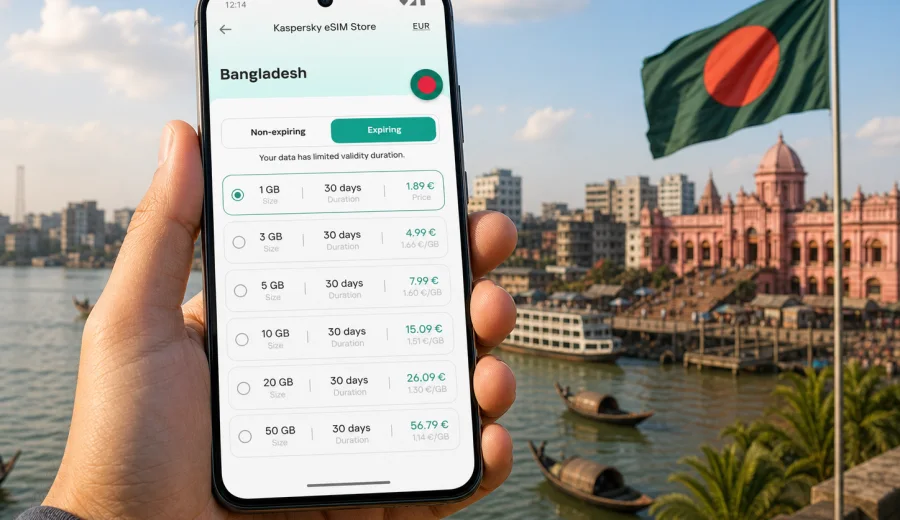
eSIM in Bangladesh: mobile connection and internet for your trip
Bangladesh is a country where mobile internet quickly becomes part of the travel plan. You may need maps in Dhaka, ride-hailing after landing, hotel messages in Chattogram, translation at a station, or weather updates before a river trip. An eSIM can help you prepare mobile connection and internet access before you start looking for a physical SIM card, a shop, or a reliable public Wi-Fi network.
This guide explains how to use an eSIM for Bangladesh, what to check before buying a plan, how much data different travel styles may need, and how Kaspersky eSIM Store can help you choose, arrange, and activate an eSIM tariff for mobile internet in a foreign trip.
Why eSIM is useful for Bangladesh
Bangladesh can be a fast-moving destination. Many trips begin at Hazrat Shahjalal International Airport in Dhaka, then continue through dense city traffic, domestic flights, buses, ferries, trains, or regional routes. In these moments, a working data connection is practical, not decorative.
With an eSIM, you do not need to replace your physical SIM card. You install a digital SIM profile on a compatible device and use it for mobile data in the selected destination. Your usual SIM can remain in the phone for bank messages or important calls, while the eSIM profile handles data for navigation, messaging, and travel apps.
Common situations where eSIM can help in Bangladesh:
- checking the address of a hotel or meeting point after arrival;
- using maps and ride-hailing in Dhaka, Chattogram, Sylhet, Rajshahi, or Khulna;
- staying in touch with family, colleagues, drivers, and hosts through messengers;
- opening booking confirmations, boarding passes, and train or bus details;
- translating short phrases when buying tickets or asking for directions;
- sharing mobile data with a laptop if the selected plan and device support tethering;
- reducing dependence on public Wi-Fi in airports, cafes, and hotel lobbies.
eSIM is especially useful when you want the connection process to be planned in advance. You can choose a tariff before departure, check the amount of data and validity period, and install the profile when you still have stable Wi-Fi at home or in the hotel.
What an eSIM does and does not do
An eSIM for Bangladesh is mainly a mobile internet solution for travel. It is not the same as a full local mobile subscription. In most travel scenarios, the eSIM gives you data access, while regular voice calls and SMS are not included unless the terms of the chosen tariff say otherwise.
That distinction matters. If you need to receive a bank SMS on your primary number, keep your home SIM active according to your operator's roaming rules. If you need everyday communication, use internet-based apps over the eSIM data connection. If you need a local phone number for a specific service, check that requirement separately before the trip.
| Travel need | How eSIM helps | What to check |
|---|---|---|
| Maps and transport | Mobile data for navigation, routes, and ride apps | Data allowance and local network availability |
| Messengers | Internet access for chats and calls in apps | Whether your messenger account is already set up |
| Work tasks | Email, cloud files, calendar, video calls when data allows | Larger data package and tethering rules |
| Booking access | Hotel, flight, and ticket confirmations online | Activation timing and validity period |
| Backup connection | Less reliance on public Wi-Fi | Device compatibility and unlocked status |
The safest approach is to treat eSIM as one part of your communication setup. Keep your main SIM available, save important documents offline, and use the eSIM for the mobile data you expect to need during the trip.
Where mobile internet matters most in Bangladesh
Bangladesh trips often combine busy urban movement with longer regional segments. In Dhaka, mobile data is useful for live traffic, pickup points, route changes, and quick coordination. In Chattogram, it can help with port-area meetings, transfers, or trips toward Cox's Bazar. In Sylhet, travelers often use maps and messaging while moving between tea garden areas, hotels, and transport hubs.
Mobile internet is also useful outside the biggest cities, but you should plan more carefully. Coverage, speed, and signal quality depend on the local network, terrain, building density, weather, and the specific place where you are standing. No travel data option can guarantee the same experience in every village, river area, island, or hill route.
For practical planning, divide your trip into connection scenarios:
1. Arrival: airport, immigration, transport, hotel check-in.
2. City days: maps, payments where supported, messaging, restaurant searches, bookings.
3. Regional travel: train, bus, ferry, domestic flights, intercity coordination.
4. Work or study: calls, email, file access, and backup internet.
5. Departure: online check-in, airport route, last-minute messages.
Each scenario uses data differently. A traveler who only needs maps and messaging can choose a smaller package. A traveler who uploads photos, joins video calls, or uses the phone as a hotspot should choose more data and check tethering rules.
How to estimate data for Bangladesh
Data usage depends on habits, not only on the country. Still, a simple estimate helps you choose a tariff without guessing.
| Usage style | Typical activities | Practical tariff logic |
|---|---|---|
| Light | Messaging, maps, email, occasional web pages | Choose a smaller package for a short trip |
| Standard | Maps, messengers, social media, bookings, translation | Choose a medium package with enough days of validity |
| Heavy | Frequent photo uploads, navigation all day, work apps, hotspot | Choose a larger package and monitor balance |
| Work-focused | Email, files, calls, laptop tethering | Prioritize data volume, duration, and tethering terms |
Before choosing, ask yourself five questions:
- How many full days will you spend in Bangladesh?
- Will you use hotel Wi-Fi for large downloads and backups?
- Do you need data only in Dhaka, or across several regions?
- Will you share the connection with another device?
- Do you stream video, or can you download entertainment before departure?
For many trips, the best plan is not the largest one by default. It is the one that matches your route, number of days, and actual use.
What to check before buying an eSIM
The most important check is device compatibility. Not every phone supports eSIM, and some devices are locked by a mobile operator. Before you pay for any travel data plan, confirm that your phone or tablet can install and use an eSIM profile. You can check your device before choosing a tariff.
Also review the tariff details carefully:
- destination: the plan should include Bangladesh or a regional route that covers Bangladesh;
- data volume: the package should fit your expected usage;
- validity period: the plan should cover the travel dates you need;
- activation rule: check when the validity period starts;
- hotspot support: important if you plan to share data with a laptop or another phone;
- top-up option: useful for longer trips or unpredictable usage;
- refund and usage conditions: review the terms before activation.
It is also worth checking your phone settings before the trip. Make sure the device software is updated, your main SIM is set up correctly, and you know which SIM profile will be used for mobile data.
Step-by-step setup for a Bangladesh trip
The exact screens differ by device, but the planning flow is simple.
1. Check that your device supports eSIM and is not locked to a specific operator.
2. Choose Bangladesh as the destination and compare available data packages.
3. Review validity, data volume, activation rules, and any hotspot conditions.
4. Complete the order and open the eSIM details in your profile or app.
5. Install the eSIM while connected to stable Wi-Fi.
6. Before or after arrival, select the eSIM profile for mobile data.
7. Turn on data roaming for the eSIM if the instructions for the plan or device require it.
8. Test messaging, maps, and browser access before relying on the connection.
If you need device-specific guidance, use the Android installation instructions or the iOS installation instructions. Install the eSIM only on the device where you plan to use it, because some eSIM profiles cannot be moved to another phone after activation.
Choosing a Bangladesh eSIM plan through Kaspersky eSIM Store
Kaspersky eSIM Store is an app and website where you can quickly choose, arrange, and activate an eSIM with a suitable tariff for mobile internet in a foreign trip. It helps you see the destination, data amount, validity period, and price before you decide.
For Bangladesh, compare options after you understand your route and expected data use. A short city trip to Dhaka has different needs from a two-week route through Dhaka, Sylhet, Chattogram, and Cox's Bazar.
When you are ready to compare packages, you can choose an eSIM tariff for a trip to Bangladesh and review the options available for the destination. Keep the decision focused on the basics: amount of data, number of days, price, and the conditions shown for the selected tariff.
Bangladesh travel scenarios and data planning
Different travelers need different mobile internet setups. Use these examples to narrow the choice.
First-time visitor to Dhaka
You will probably use data for airport pickup, live maps, restaurant searches, messaging, and checking travel details. A standard package is usually more comfortable than a very small one, because Dhaka navigation can involve route changes and long travel times across the city.
Practical tip: download your hotel address, passport copy, insurance details, and key contacts before departure. eSIM helps with live access, but offline backups reduce stress if the signal is weak in a building or vehicle.
Business trip
Business travel often needs predictable data for email, calendars, messengers, and occasional calls. If you plan to use your phone as a hotspot for a laptop, confirm that tethering is allowed by the plan and choose enough data. Video calls can consume data quickly, so use hotel or office Wi-Fi for long meetings when it is available and trusted.
Practical tip: install the eSIM before the flight or at the hotel over stable Wi-Fi, then test it before your first meeting day.
Regional route
If your route includes Dhaka, Sylhet, Chattogram, Cox's Bazar, Khulna, or river travel, plan for more variable conditions. Mobile data can help with route updates and coordination, but speeds may change as you move.
Practical tip: keep important maps and bookings available offline. Use the eSIM for live updates, messages, and route changes instead of relying on it as the only copy of your travel information.
How to reduce data use during the trip
Even with a suitable plan, careful settings help the package last longer.
- Download offline maps for Dhaka and the regions you will visit.
- Save tickets, hotel addresses, and travel documents in offline apps.
- Turn off automatic photo and video backup on mobile data.
- Restrict app updates to Wi-Fi.
- Lower video quality if you need to stream.
- Use Wi-Fi for large files, but avoid sensitive tasks on unfamiliar public networks.
- Check which SIM profile is used for data before opening heavy apps.
- Monitor data usage in your phone settings and in the app or profile where available.
A short routine can prevent accidental usage. After installing the eSIM, open mobile data settings, select the Bangladesh eSIM for data, keep your primary SIM for calls or SMS if needed, and disable mobile data for apps that do not matter on the road.
eSIM compared with roaming, public Wi-Fi, and physical SIM cards
There is no single option that is best for every traveler. The right choice depends on your device, route, budget, and tolerance for setup time.
| Option | Strengths | Trade-offs |
|---|---|---|
| eSIM | Can be prepared before arrival, no physical card, useful for data-focused travel | Requires a compatible unlocked device and correct installation |
| Home operator roaming | Keeps your usual SIM active and may be simple for short trips | Cost and data limits depend on your home operator |
| Public Wi-Fi | Useful for large downloads in hotels or offices | Availability, speed, and security vary |
| Physical local SIM | May suit longer stays or local-number needs | Requires finding a point of sale and checking registration rules |
For many visitors, eSIM works well as a practical middle path: prepare mobile internet before the trip, keep your main SIM in place, and use Wi-Fi selectively for heavy tasks. If your trip requires a local phone number or a special local service, check those requirements separately.
Quick checklist before departure
Use this checklist before you fly to Bangladesh:
- Your phone supports eSIM and is not locked to one operator.
- Your eSIM plan includes Bangladesh and covers your travel dates.
- You understand when the validity period starts.
- You know whether the plan includes only data or also other services.
- You have stable Wi-Fi for installation.
- You saved the QR code or installation details in a place you can access.
- Your main SIM settings are clear, especially for calls and SMS.
- Offline maps and key documents are already downloaded.
- You know how to switch mobile data between SIM profiles.
- You have support information available in case installation questions appear.
This preparation takes only a few minutes, but it can make the first day in Bangladesh easier. Do not leave every setting for airport arrival, when you may be managing luggage, transport, local currency, and messages at the same time.
FAQ about eSIM and mobile internet in Bangladesh
Can I use eSIM in Bangladesh for calls and SMS?
Most travel eSIM use cases are focused on mobile data. Regular calls and SMS are not included unless the selected tariff says so. You can usually use messengers and internet calling apps over mobile data.
Should I install the eSIM before I arrive?
Installing before departure can be convenient because you can use stable Wi-Fi and avoid setup pressure at the airport. Check the activation rules first, because validity may start at installation, first network connection, or another moment specified in the tariff conditions.
Do I need data roaming enabled?
Some eSIM profiles require data roaming to be enabled on the eSIM line. Follow the installation instructions and the information shown for your selected plan. Keep roaming settings separate for your home SIM if you want to avoid unintended charges from your usual operator.
Can I keep my normal SIM active?
In many dual-SIM phones, yes. You can keep your primary SIM for calls or SMS and set the eSIM as the line for mobile data. The exact options depend on the phone model and operating system.
What if the internet is slow in one place?
Move to a more open area, check that the eSIM is selected for mobile data, confirm that data roaming is enabled if required, restart the phone if needed, and check your remaining data. Local network conditions can vary by place, building, and time.
Can I use one eSIM on several devices?
Usually, an eSIM profile is installed on one device. If you need internet on a laptop or tablet, check whether the selected plan and phone support hotspot sharing.
Prepare mobile internet for Bangladesh before you travel
A good mobile connection plan for Bangladesh is simple: check your device, choose a tariff that fits your route, install the eSIM on stable Wi-Fi, and keep your main SIM settings under control. This gives you a practical way to use maps, messages, bookings, and travel services without searching for a physical SIM card immediately after arrival.
Kaspersky eSIM Store helps you choose, arrange, and activate an eSIM with a suitable tariff for mobile internet in a foreign trip. Before departure, review the available options and prepare an eSIM tariff for Bangladesh so your first online tasks in the country are easier to handle.