Travel connectivity guide
Banjul eSIM for Mobile Internet | The Gambia
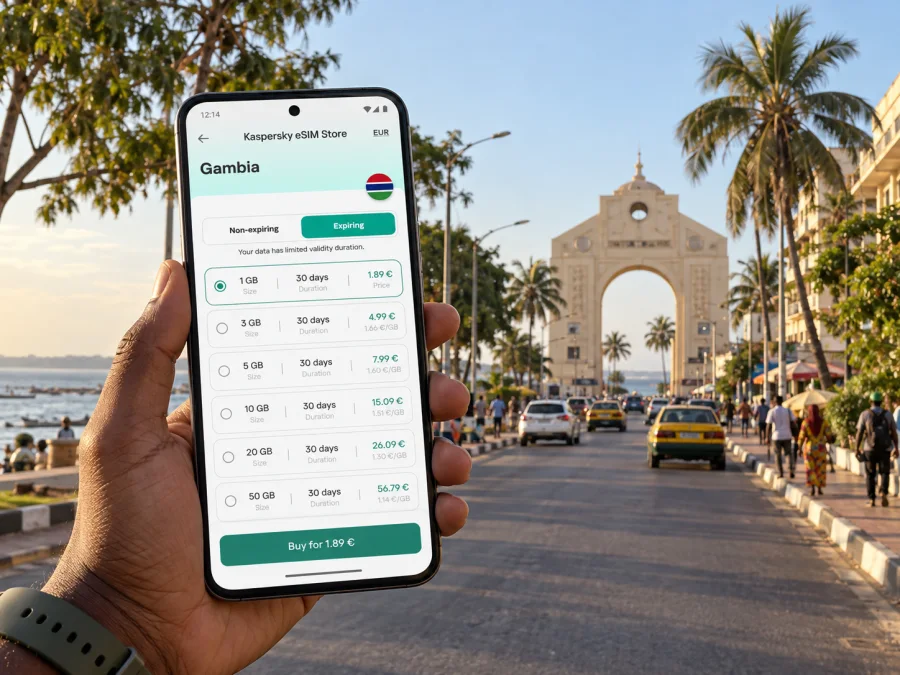
Banjul eSIM: mobile connection and internet for a city visit
Banjul is The Gambia’s capital, set on an island at the mouth of the Gambia River and facing the Atlantic. For a visitor, that geography shapes the day: the airport is outside the city, the central streets are compact, and trips to the wider Greater Banjul area or the coast can mean crossing between distinct places. Mobile internet is useful for the arrival transfer, finding a hotel or meeting point, checking directions, and keeping plans together while you move around.
An eSIM can provide a practical data connection without replacing the physical SIM already in your phone. The useful preparation is straightforward: check that your exact device variant supports eSIM, choose a plan for the country and length of your stay, install it while you have reliable Wi-Fi, and understand which line will handle mobile data. The details of local network performance depend on location, building, handset, and the network used by a particular plan, so prepare an offline fallback for essential information.
What makes Banjul different from a generic Gambia itinerary
Banjul is the country’s administrative and historic centre, but it is not the same place as the resort areas around Kololi or the broader urban area of Serekunda. A booking described as “Banjul area” may be outside the island city itself. Confirm the property’s map pin, not just the name, before arranging a pickup or estimating travel time.
The city’s main landmarks and everyday errands are concentrated in a relatively small area. Arch 22, the National Museum, Albert Market, the waterfront, and government offices can be connected in one itinerary, but walking conditions, heat, traffic, and the exact route matter. Use a live map for navigation and ask your accommodation to confirm the best entrance or pickup point. Street names and map labels may not always be what a driver uses locally; a landmark, business name, or shared map pin can reduce confusion.
Banjul’s position on the coast and river gives the city a different feel from inland destinations. It also means a trip beyond the centre can involve a ferry, a road approach, or a transfer to another town depending on the destination. Do not assume that a short distance on a map equals a short journey. Check the route and timing on the day, and save the place name and destination pin before leaving a dependable connection.
On arrival: plan the connection before you need it
Banjul International Airport is at Yundum, roughly 25 kilometres southeast of the capital. The drive into central Banjul is a separate leg of the trip, so an arriving visitor may need data before reaching the hotel: to coordinate a driver, message a host, check a map, or confirm a change in plans. Airport queues and traffic can make an exact arrival time difficult to predict; agree on a meeting point with your driver or accommodation rather than relying on a quick call after landing.
Before departure, download or save the essentials:
- Your accommodation address, phone number, and a map pin, including any gate or reception instructions.
- The airport pickup contact and meeting point, plus a screenshot of the driver or transfer details.
- A map area covering Yundum, central Banjul, and any onward destination.
- Booking confirmations, travel documents, and any QR code or installation details needed for your eSIM.
- A short note with the name of your destination written as your host or driver provided it.
If your eSIM is installed before departure, leave your regular SIM available for calls and texts if you need it. Set the travel eSIM as the line for mobile data only when you are ready to use it, and check the data-roaming setting required by the selected plan. The exact menus vary across Android and iOS versions. Keep the airport Wi-Fi or your home SIM as a backup during setup, and avoid deleting an installed eSIM profile while troubleshooting unless support or the plan instructions tell you to do so.
Choosing data for the way you will use Banjul
The best-sized plan depends more on your habits than on the city name. A traveller who mainly checks maps, messages, and transport details uses data differently from someone who uploads video, joins long video calls, or shares a hotspot with several devices. Estimate the trip as a whole: include arrival, time in Banjul, and any excursions elsewhere in The Gambia.
| Travel pattern | Likely data use | What to prepare |
|---|---|---|
| Short stop in the centre | Maps, messages, ride coordination, occasional searches | Save key places offline and choose a modest allowance if most media stays on Wi-Fi |
| Several days of sightseeing | Navigation, restaurant and opening-hour searches, photos, messaging | Check the plan’s validity window and how you will monitor remaining data |
| Work trip | Email, cloud documents, scheduled calls, map checks | Test essential work apps before travel and use trusted Wi-Fi for large downloads |
| Multi-person trip | Shared locations, group messages, possibly a hotspot | Check whether tethering is allowed and estimate usage across all connected devices |
| Banjul plus trips outside the city | Maps and coordination across several stops | Choose a destination plan that covers the full Gambian itinerary, not only the capital |
A map can use data in the background, while photos and video can consume much more if they sync automatically. Before leaving, disable automatic app updates and large photo backups over mobile data if you want to conserve your allowance. Download playlists, maps, and entertainment over Wi-Fi. When you need a video call, check the signal and use Wi-Fi where available; a stable call cannot be guaranteed in every building or on every route.
The Gambia’s mobile market includes several local operators. The operator and network generation available to an eSIM customer depend on the plan and its current local arrangements, while actual reception varies by place and device. The live country page for Kaspersky eSIM Store currently names AFRICELL as its local telecommunications provider for the Gambia plan. That identifies the provider listed for that plan; it does not mean that every Gambian operator, every technology, or every part of the country is included. Review the destination and plan conditions before purchase, especially if your visit extends well beyond Banjul.
When you are ready to compare the current destination options, choose a data plan for The Gambia and check the allowance, validity, and activation conditions shown for the plan you select. A city article cannot predict signal strength in a particular hotel room, office, market lane, or moving vehicle. Treat connectivity as location-dependent and keep your accommodation details and essential directions available offline.
Moving through central Banjul
For a first visit, group nearby stops rather than crossing the city repeatedly. Arch 22 and central civic landmarks can anchor a walk; Albert Market is a busy commercial area where a meeting point should be more precise than “near the market.” The National Museum and other central stops can fit around errands or a work appointment, but check current opening information locally before making them the only purpose of a trip.
Central Banjul is better approached as a set of short movements than as a single sightseeing loop with guaranteed walking times. Pavements, shade, traffic, and the amount of activity around a street can vary. A phone map helps with orientation, but it is sensible to ask staff at your hotel or a local guide which route is practical at that time of day. Keep the phone secure in crowded areas and take a screenshot of your next stop before putting it away.
A simple day plan
- Start from a fixed point. Save your hotel pin and ask reception for a useful pickup location. If the property sits outside Banjul, record its town or neighbourhood too.
- Check the route before setting out. Compare the map with local directions and note whether the trip involves a road crossing, a transfer, or a change of vehicle.
- Keep the next destination ready. A saved pin is easier to share than a long verbal description. Confirm the destination with the driver before starting.
- Pause for practical needs. If the phone battery is low, find a suitable place to charge rather than depending on navigation until it switches off.
- Recheck the return plan. For evening plans, confirm how you will return and whether your driver or host expects a message when you are ready.
Do not depend on mobile data as your only way to locate a hotel or contact. Save the address in a note, keep a screenshot of the route, and write down the name of a local contact. For a group, agree on a meeting location that can be identified without a data connection.
Beyond the island: excursions and onward travel
Banjul is a useful base for exploring the wider region, but a journey outside the city should be planned as a separate transfer. The Greater Banjul Area includes places with different names and road approaches; Serekunda, Bakau, and the Atlantic coast resorts are not districts inside the island city. If your accommodation is in one of these places, search for the exact address and confirm transport with the property.
Travel to another part of The Gambia may involve road conditions, ferry schedules, or waits that are not reflected in a basic map estimate. Check current arrangements with your driver, hotel, or transport operator. Keep the next destination and a fallback contact saved before leaving a connected area. If an itinerary crosses into Senegal, confirm border, roaming, and destination coverage conditions for that separate country before travel; a Gambia-only data plan should not be assumed to cover it.
For a beach or river outing, navigation is only one part of preparation. Agree on a pickup time and recognizable meeting point, carry sufficient battery power, and keep enough local currency or another accepted payment method for the journey. Signal may change between town, open road, and indoor spaces, so do not make a time-sensitive reservation depend solely on a message sent at the last minute.
Install your eSIM with a clear line setup
Before buying, check whether your exact device supports eSIM. Support can differ by model, country or regional hardware variant, carrier lock, and software configuration. The product name alone is not always enough: verify the complete model number in your phone settings or manufacturer documentation, and confirm that the handset is unlocked for use with another provider. A device that looks identical to another regional version may have different SIM capabilities.
Once you have confirmed compatibility, use a reliable Wi-Fi connection for installation and keep the purchase confirmation available. Depending on your device and the plan, installation may use an in-app flow or a QR code. Do not scan a QR code from an untrusted source, and do not remove the profile after installation unless you are certain it is safe to do so. Follow the on-screen prompts for the selected eSIM and save the support details before travel.
After installation, label the lines clearly, for example “Home” and “Travel”. Keep the home line selected for calls and SMS if that suits your needs, and choose the travel eSIM for mobile data. Check which line is selected for data and whether the device should allow data roaming on that eSIM. A data-only plan may not include a Gambian phone number, conventional voice calls, or SMS. Messaging and internet calls may work through apps you already use, subject to their account setup and available data.
Before you leave home: a five-minute checklist
- Confirm the exact phone or tablet variant supports eSIM and is not network-locked.
- Review the selected plan’s destination, data amount, validity, and activation details.
- Install the profile over Wi-Fi and keep the confirmation email or QR instructions accessible.
- Decide which line handles mobile data and which line handles regular calls or texts.
- Download maps and bookings, then test that you can find them in airplane mode.
If the connection does not start on arrival, check that the travel line is enabled, selected for mobile data, and configured according to its instructions. Toggle airplane mode once, then give the device a moment to register. If there is still no connection, restart the phone and check the provider or network selection guidance for the plan. Do not repeatedly delete and reinstall the profile; many eSIM activation codes are single-use. Contact support using the details in your account if the issue continues.
Where mobile data is most useful
At the airport: coordination and directions for the transfer into town. Save the driver’s contact and meeting point before landing in case setup takes longer than expected.
Around Albert Market: sharing a precise location and navigating the surrounding streets. Agree on a clear meeting point, since a broad market label may not identify the stall or entrance you intend.
At a hotel or guesthouse: checking messages, bookings, and tomorrow’s route. Use the property’s Wi-Fi for large downloads when available, while keeping mobile data ready for the trip outside.
On a work visit: retrieving documents, confirming appointments, and messaging colleagues. Download important files in advance and do not assume that a mobile connection is a substitute for a dependable office network.
On a day trip: keeping a map and contacts accessible between stops. Save the return plan and meeting point while you still have a connection.
This approach keeps the phone useful without assuming continuous coverage. If an app offers offline access, enable it before travelling. Keep important addresses in both a map and a plain text note, and consider carrying a small power bank on long days.
Common questions about eSIM in Banjul
Is Banjul the same as the beach resort area?
No. Banjul is the capital on an island, while well-known resort locations such as Kololi and other coastal places are outside the city. Confirm the exact location of your hotel before deciding how much travel time or data you will need.
Will an eSIM connect at Banjul International Airport?
A compatible, correctly installed eSIM may connect when it registers with a supported local network, but service depends on the plan, network conditions, handset, and exact location. Airport Wi-Fi or a saved offline copy of your transfer details is a useful backup.
Does an eSIM plan provide a local phone number?
A data-only eSIM plan generally provides mobile data rather than a conventional phone number for cellular calls and SMS. Check the terms of the selected plan. Internet messaging and voice apps can use data if they are already configured on your device.
Can I use one plan for a visit outside Banjul?
The country destination may suit travel elsewhere in The Gambia, but coverage and speed depend on the local network and location. Check the selected plan’s stated destination and terms, then download maps and essential details for areas where service may be less dependable.
Does every phone sold under the same model name support eSIM?
Not necessarily. Regional variants and carrier-locked devices can differ. Check the exact model identifier and the manufacturer’s support information, then verify compatibility before purchasing a plan.
What if my home SIM must stay active?
Many dual-SIM phones let you keep the home SIM active for calls or texts while routing mobile data through an eSIM. The options vary by device and carrier. Confirm your line settings and home-provider roaming charges before departure.
Prepare for Banjul with fewer connection surprises
A little preparation makes it easier to find your airport transfer, move between central landmarks, and keep plans accessible on a day outside the city. Confirm your phone’s exact eSIM compatibility, install the profile over Wi-Fi, save essential addresses offline, and select a plan whose destination and validity fit your whole trip. Leave room in your plan for the way you actually use maps, messages, work apps, and media.
When you are ready, select an eSIM data plan for your trip to The Gambia. Kaspersky eSIM Store is an app and website for choosing, arranging, and activating an eSIM plan for mobile data abroad. Check the current plan conditions before purchase, then travel with your directions and key contacts saved both online and offline.


