
Travel connectivity guide
Banos eSIM: mobile internet for Ecuador travel
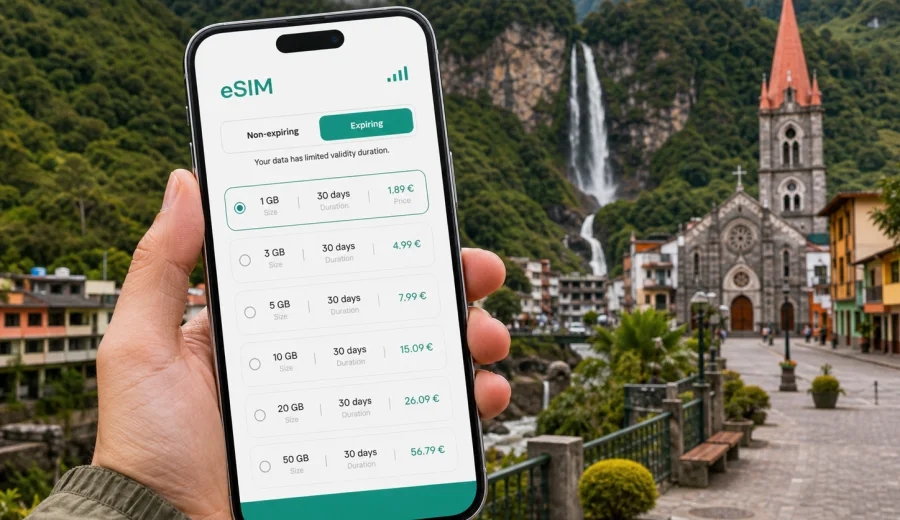
Banos eSIM: mobile connection and internet for your Ecuador trip
Banos is a compact mountain city where travel decisions often happen on the move. You may arrive after a long bus ride from Quito, check into a hotel near the town center, book a canyoning tour for the next morning, then decide whether to continue toward Puyo, Riobamba, or the Avenue of the Waterfalls. In that kind of trip, mobile internet is not just for scrolling. It helps you confirm reservations, follow maps, message a driver, check weather before an outdoor activity, and keep your travel plans visible when Wi-Fi is weak or unavailable.
An eSIM can make that first day easier because you do not need to look for a physical SIM card after arrival. With a compatible phone, you can prepare a digital SIM profile before the trip, choose a prepaid data package for Ecuador, and use mobile data for essential travel tasks once the plan is active. Kaspersky eSIM Store is an app and website where you can choose, arrange, and activate an eSIM with a suitable data plan for mobile internet during an international trip.
This guide focuses on Banos itself: arrival, local movement, day trips, hotels, transport, outdoor activities, and practical data planning. Ecuador is the country context because a city trip to Banos uses an Ecuador eSIM plan, not a separate city-only plan.
Why mobile internet matters in Banos
Banos is easy to enjoy without overplanning, but it is also a place where many details depend on timing. Tours can change with weather. Buses and shared transport may require checking departure points. Trails, waterfalls, thermal baths, cafes, and hotels are spread across the town and the valley. If you rely only on hotel Wi-Fi, you may be online in your room and offline exactly when you need directions.
Common Banos situations where mobile data helps:
| Situation | Why internet helps |
|---|---|
| Arriving by bus | You can check the hotel address, message reception, and find the walking route from the terminal. |
| Booking activities | You can compare tour times, confirm pickup details, and keep voucher emails available. |
| Moving around town | Maps help with steep streets, bridges, viewpoints, and restaurants outside the central grid. |
| Visiting waterfalls | Mobile data helps with route checks, transport coordination, and weather updates. |
| Remote work | You can use mobile data as a backup when cafe or hotel Wi-Fi is not enough for messages or files. |
| Continuing across Ecuador | A country plan can support onward travel beyond Banos, depending on the selected tariff conditions. |
Banos is not a large metropolis, so the risk is not getting lost in a complicated subway system. The real issue is smaller and more practical: you want internet at the moment a plan changes. A prepaid eSIM data plan can reduce the need to search for public Wi-Fi or buy a local SIM card during limited travel time.
Arrival scenarios: when to set up your eSIM
Most travelers reach Banos overland, often after landing elsewhere in Ecuador and continuing by bus, private transfer, or rental car. That means your connection plan should cover more than the hotel check-in. It should cover the route into town, the first walk to your accommodation, and your next-day activity planning.
If you are flying into Quito before Banos, mobile internet may be useful before you even reach the city. You may need to message a transfer driver, check terminal information, or monitor a route while leaving the capital. If you are coming from Guayaquil, Cuenca, Latacunga, or Riobamba, the same logic applies: the city is usually part of a route, not an isolated stop.
A practical setup timeline looks like this:
1. Before departure, check that your phone supports eSIM and is not locked to one carrier.
2. Choose an Ecuador data plan that matches your full itinerary, not only the nights in Banos.
3. Install the eSIM while you still have stable home or hotel Wi-Fi.
4. Activate the data plan according to its instructions and validity rules.
5. Set mobile data to the eSIM profile when you need internet abroad.
Do not wait until you are tired, standing outside a bus terminal, and trying to understand local directions. Installing an eSIM is usually simple, but it is still a technical step that is easier with a calm connection and enough battery.
Choosing an eSIM plan for Banos
For a Banos trip, the best data package depends less on the size of the city and more on how you travel. A person spending two nights in town with hotel Wi-Fi needs a different amount of data from someone working remotely, uploading videos, or using maps all day during outdoor activities.
Use this planning checklist:
- Trip length: count the full Ecuador itinerary, including Quito, transfers, Banos, and onward cities.
- Daily habits: maps and messaging use less data than video calls, cloud backups, and streaming.
- Hotel reliability: treat accommodation Wi-Fi as useful but not guaranteed.
- Activity style: waterfall routes, cycling, canyoning, rafting, and viewpoints create more need for mobile maps and messaging.
- Group travel: one traveler may coordinate taxis, tickets, and reservations for everyone.
- Hotspot use: check whether tethering is allowed by the selected tariff if you plan to connect a laptop.
A short trip can often work with a smaller data package if you download offline maps and avoid video over mobile data. A longer route through Ecuador usually benefits from a larger plan because the eSIM can support movement before and after Banos. Always check the tariff details before payment: data volume, validity period, destination, activation rules, and any limitations on sharing data.
How much data to budget in Banos
There is no single correct number because travel behavior varies. Still, you can estimate your needs by separating essential use from heavy use.
| Use case | Typical data pressure | Notes for Banos |
|---|---|---|
| Messaging, email, maps, ride coordination | Low to moderate | Good for arrivals, restaurants, tour messages, and basic navigation. |
| Social media posts and photo uploads | Moderate | Upload over hotel Wi-Fi when possible if your plan is small. |
| Video calls and remote meetings | High | Consider a larger data package and test Wi-Fi before important calls. |
| Streaming video or music | High | Download playlists and shows before travel to preserve mobile data. |
| Hotspot for a laptop | High | Useful for work, but check tariff conditions before relying on it. |
For Banos specifically, maps and messaging are the main daily uses. You may check the route to La Casa del Arbol, coordinate a waterfall ride, confirm thermal bath opening times, or send your location to a guide. These tasks do not require huge data volumes, but they do require a connection at the right moment.
Before choosing a plan, also consider your route after Banos. If you continue to the Amazon gateway around Puyo, return to Quito, or move toward Riobamba and Cuenca, a country plan for Ecuador keeps the planning simple because the same destination remains relevant across the trip.
Where mobile data helps around town
Banos has a walkable center, but many of the best-known experiences sit outside the central streets. Mobile internet becomes useful when you leave the hotel area and start making decisions in real time.
Helpful Banos examples:
- Bus terminal to hotel: use maps to avoid carrying luggage in the wrong direction on hilly streets.
- Town center restaurants: check opening times, recent reviews, and walking routes.
- Thermal baths: confirm location and timing before leaving your accommodation.
- Adventure agencies: message about pickup points, equipment, and weather-related changes.
- Waterfall route: keep navigation available if you rent a bike or arrange transport.
- Viewpoints: share location with travel companions if the group splits up.
- Late arrivals: contact your hotel before reception hours become an issue.
Public Wi-Fi can be useful in cafes and hotels, but it is not a complete travel connection strategy. You may not want to depend on an open network to access booking confirmations or payment apps. With an eSIM data plan, you can use mobile internet when it is available through the selected plan and local network conditions, while still saving larger downloads for trusted Wi-Fi.
Using Kaspersky eSIM Store for an Ecuador plan
For a Banos city trip, choose the Ecuador destination because Banos is in Ecuador and your plan should match the country where you will use mobile data. Kaspersky eSIM Store helps you compare available data packages by destination, data amount, validity period, and price before you arrange the plan.
If you are preparing the trip now, you can choose a data plan for your trip to Banos in Ecuador and review the details before installation. This link leads to the Ecuador plans page, which is the relevant country page for a city article about Banos.
When you review a tariff, look for these details:
- Destination: make sure the plan is valid for Ecuador or a broader region that includes Ecuador.
- Data amount: match it to navigation, messaging, bookings, and any work use.
- Validity period: compare the plan duration with the full travel route, not only hotel nights.
- Activation rules: check when the validity period starts and what steps are required.
- Included services: many travel eSIM data plans focus on mobile internet and may not include a local phone number, voice calls, or SMS unless stated in the tariff conditions.
- Support and management: confirm where you can view the eSIM, installation details, and balance.
This approach keeps the product role clear: the store helps you select, arrange, install, and activate an eSIM plan for mobile data abroad. Actual mobile service conditions depend on the selected tariff, device settings, and local network availability.
Compatibility checks before you buy
The most important preparation step is device compatibility. An eSIM only works on devices that support eSIM, and some phones can be locked by a mobile carrier. A traveler can choose a suitable data package and still have trouble if the device itself cannot install an eSIM profile.
Before purchasing, check your device and confirm these points:
- Your smartphone or tablet supports eSIM.
- The device is not carrier-locked.
- The operating system is up to date enough for eSIM setup.
- You can access Wi-Fi during installation.
- You know which SIM profile should handle mobile data after arrival.
- Your primary SIM settings will not accidentally trigger expensive roaming.
If you use dual SIM, label the profiles clearly. For example, keep your home SIM for important SMS if needed, but set mobile data to the travel eSIM while in Ecuador. Exact settings differ by device, so review the instructions before you are on the road.
Installing an eSIM before Banos
Installation is usually more convenient before you leave for Banos, especially if you are arriving in Ecuador after a long flight or connecting through another city. After purchase, the eSIM details are available through the website or app, and you can follow the on-screen process or use the QR code from the email if that option is provided.
For setup help, use the Android installation guide or the iOS installation guide. Keep the instructions open until you finish the process.
A simple setup sequence:
1. Connect to reliable Wi-Fi.
2. Open the eSIM installation details.
3. Add the eSIM profile to your compatible device.
4. Name the profile clearly, such as Ecuador data.
5. Keep your home SIM active only for the services you still need.
6. When the plan should be used, select the eSIM for mobile data.
7. Enable data roaming for the eSIM if the tariff instructions require it.
8. Test basic internet access before relying on it for navigation.
Activation can take several minutes and depends on the device, settings, and local network conditions. Avoid deleting the eSIM profile unless the instructions or support team tell you to do so, because some eSIM profiles cannot be moved or reinstalled after activation.
Transport, maps, and local movement
Banos rewards flexible movement. You may walk most central streets, take local transport, rent a bike, join a tour, or use taxis for viewpoints and trailheads. Mobile data helps because the same day can include several transport modes.
For local movement, keep these habits:
- Save your hotel address in your map app before arrival.
- Download an offline map of Banos and the surrounding valley.
- Keep mobile data available for live route changes, messages, and search.
- Screenshot tour meeting points in case signal is weak in a valley or inside a building.
- Ask your hotel or guide where pickup points are easiest to identify.
- Use mobile data carefully for navigation, then switch heavy uploads to Wi-Fi.
If you rent a bike for the waterfall route, do not rely only on a single app. Take a charged power bank, save the route offline, and keep important contacts visible. A mobile data plan is helpful, but mountain terrain and local conditions can still affect signal quality.
For hotel stays, business trips, and remote work, treat mobile data as a backup rather than the only connection. Test your accommodation Wi-Fi early, save large uploads for trusted Wi-Fi when possible, and check whether hotspot use is allowed by the selected tariff if you plan to connect a laptop. If Banos is one stop on a larger route through Quito, Latacunga, Puyo, Riobamba, or Cuenca, choose a plan based on the full Ecuador segment, not only one city.
Data-saving checklist for Banos
Before arrival:
- Download offline maps for Banos and the route from your arrival city.
- Save hotel, bus terminal, tour agency, and emergency contact details.
- Download tickets, travel documents, and insurance documents.
- Turn off automatic app updates over mobile data.
- Disable cloud photo backup on mobile data if your package is limited.
- Save screenshots of meeting points, QR codes, and booking references.
During the trip, use mobile data for maps, messaging, bookings, and urgent searches. Save video streaming, large photo uploads, and system updates for trusted Wi-Fi. This is especially useful in Banos because outdoor days can be long and spontaneous, with several navigation and messaging moments between breakfast and evening.
FAQ: eSIM and mobile internet in Banos
Is there a city-only eSIM for Banos?
Travel eSIM plans are usually selected by country or region. For Banos, choose Ecuador or a broader plan that includes Ecuador, then check the tariff details.
Can I use an eSIM for calls and SMS in Banos?
Many travel eSIM tariffs focus on mobile data and do not include a local phone number, voice calls, or SMS unless the selected plan states otherwise. You can use internet-based calling and messaging apps over mobile data.
Should I install the eSIM before arriving in Ecuador?
It is usually easier to install it before travel or while you have stable Wi-Fi. Follow the activation rules for your selected tariff so the validity period starts when expected.
Will an eSIM replace hotel Wi-Fi?
It can reduce your dependence on Wi-Fi, but it does not need to replace it. Use mobile data for movement, maps, and urgent tasks, and use trusted Wi-Fi for large uploads when convenient.
Do I need data roaming enabled?
Some eSIM profiles require data roaming to be enabled for mobile data to work. Follow the instructions for your selected plan and make sure roaming settings apply to the eSIM profile, not accidentally to your home SIM.
What if I travel from Banos to another Ecuadorian city?
If your plan is valid for Ecuador and the validity period still applies, it can support the broader Ecuador part of your itinerary according to the tariff conditions.
Before you leave for Banos
Use this final checklist before the trip:
- Your phone supports eSIM and is unlocked.
- You selected an Ecuador plan that fits the whole itinerary.
- You understand the data amount, validity period, and activation rules.
- The eSIM is installed while you have stable Wi-Fi.
- Mobile data is assigned to the correct SIM profile.
- Offline maps and key travel documents are saved.
- Data-heavy app updates and backups are disabled.
- You know where to find the Android or iOS setup instructions if needed.
When these basics are ready, Banos becomes easier to navigate. You can focus on thermal baths, waterfalls, mountain views, local cafes, and the next leg of your Ecuador route instead of searching for a SIM card after arrival.
To prepare mobile internet before the trip, review the available Ecuador eSIM data plans in Kaspersky eSIM Store and choose the option that matches your time in Banos, your route through Ecuador, and the way you use data while traveling.