Travel connectivity guide
Banska Bystrica eSIM: Mobile Internet Guide
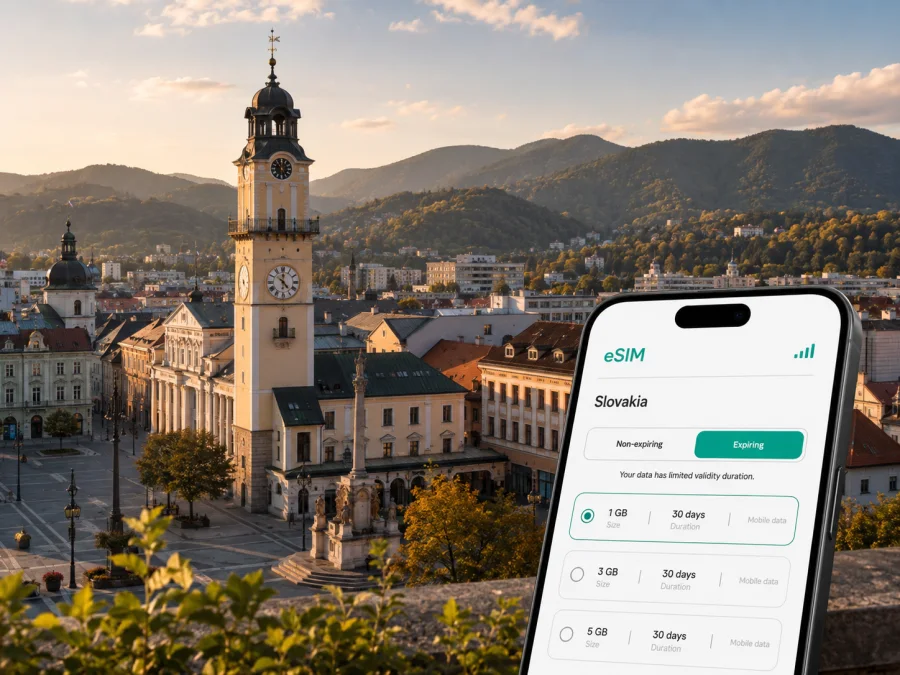
Banska Bystrica eSIM for a Reliable Mobile Connection and Internet
Banska Bystrica is a useful base for discovering central Slovakia. The city lies in a broad valley on the Hron River, with the Low Tatras, Veľká Fatra and Kremnica Mountains around it. A short visit may include a train or bus arrival, a hotel near the historic centre, walks around SNP Square and a trip into the hills. A longer stay may add meetings, restaurant bookings, route changes, work calls and weekend excursions.
Mobile internet supports these decisions. You may need a map while looking for a guesthouse, a timetable while changing transport, a translation at a café, or a message to your host. An eSIM lets you prepare data without removing your physical SIM card; choose it according to your itinerary, device and plan conditions.
Kaspersky eSIM Store is an app and website that helps you choose, arrange and activate an eSIM with a suitable plan for mobile internet during an international trip. This guide focuses on using an eSIM in Banska Bystrica: arrival, local movement, districts, accommodation, work and travel beyond the city.
Why mobile internet is useful in Banska Bystrica
The historic centre is comfortable for walking, but visitors also move between the old town, transport hubs, hotels, meeting venues and Urpín.
In practice, this means maps, transport checks, bookings, messages, translations and work email are available when you need them.
An eSIM can give you a planned data option as you reach the city, but read its destination, validity, activation and usage terms.
Arrival: prepare the first connection
Banska Bystrica does not have a civilian airport in the city. Nearby Sliač Airport is currently closed to civilian traffic; Bratislava, Košice, Žilina and Poprad are among the other airports used to reach the region. The final leg may be by train, intercity bus, car or a combination of airport and ground transport. Because routes and schedules change, check your current itinerary before leaving for the airport.
Save the hotel or apartment name and address in your notes, keep the online confirmation accessible, and check whether the accommodation is closer to the main railway station, Banska Bystrica mesto station, the bus terminal or a local stop.
On arrival, keep your home SIM available for essential calls if needed, select the eSIM only after checking the active data line, open your accommodation details before leaving the station or terminal, and compare walking time with local transport when carrying luggage. The aim is simply to have maps, messages and travel information available while you orient yourself.
Getting around the city
Banska Bystrica combines a compact historic core with districts spread along the valley. City transport includes bus and trolleybus lines. Identify a destination by its exact street and stop rather than only by a broad district name; a map can then help you compare a walk, a local connection and a route with a change.
SNP Square and the historic centre
SNP Square is a natural reference point for a first visit. Its Clock Tower is a prominent landmark, and the surrounding streets lead to cafés, restaurants, shops and cultural sights. The area invites an unplanned walk, but a map remains useful when you need to return to a hotel, meet a colleague or reach a departure point at a set time.
Save your accommodation address, next departure point, reservation and meeting point before setting off. Historic streets, slopes, crossings and temporary works can affect a route, so allow more time if you have luggage.
Urpín and the edge of the centre
Urpín is a visible natural feature beside the city and a popular recreation area. The Serpentines of Urpín educational trail links the railway-station area, the Calvary, a viewpoint and points towards Uhlisko and public transport. Keep your phone charged, save the return point and take an offline fallback.
Districts and accommodation
Hotels, apartments and business venues may be in Radvaň, Fončorda, Sásová, Uhlisko, Podlavice or other parts of the city. Do not assume that a Banska Bystrica address means a short walk from SNP Square. Check the street, district and nearest stop when booking. Data is especially useful for the last section, when a local line, transfer and uphill walk must be combined with the exact building address.
| Situation | Prepare in advance | How data helps |
|---|---|---|
| Walk in the centre | Hotel address and meeting point | Adjust the route around streets and slopes. |
| Arrival with luggage | Station, terminal and stop name | Compare walking time with local transport. |
| Trip to a district | Exact street and building details | Find the final approach instead of guessing. |
| Visit to Urpín | Return point and charged phone | Check orientation as the landscape changes. |
| Early departure | Departure time and stop or station | Review the route before leaving the hotel. |
Use navigation as a support for the day, not as a replacement for saving essential details offline.
Choosing an eSIM plan for your stay
Choose according to your usage, not just the city name. A two-day walking break is different from a month-long business stay, and a trip that includes other Slovak regions may need a different destination option. Ask yourself:
- Does the validity cover the period when you need data?
- Will you use data for maps and messages only, or also for video meetings and cloud files?
- Will Banska Bystrica be your only stop, or will you travel elsewhere in Slovakia?
- What do the selected conditions say about the destination, allowance, activation and expiration?
A modest allowance may suit a weekend when large downloads happen on hotel Wi-Fi. A work trip needs more room for attachments, navigation and calls. A regional option is relevant only when its terms explicitly cover every destination on your route.
Compare allowance, validity and destination together. The lowest visible price is not automatically the best fit if you need a hotspot for a laptop; a larger allowance may be unnecessary if mobile data is limited to directions. Kaspersky eSIM Store helps you review the available options for a trip to Slovakia so you can choose according to your itinerary and the current terms shown there.
Actual consumption depends on the device, app settings and content quality. Video meetings, cloud files, photo backup and laptop hotspot use deserve more allowance than occasional maps and messages.
Check your device before purchase
An eSIM is a digital SIM profile, so the phone or tablet must support it. Models can differ by generation, sales region and operator status. Before you choose a plan, check whether your device supports eSIM and confirm that it is not locked to a mobile operator.
Use this checklist:
- identify the exact model, not only the product family;
- install system updates while you have a stable connection;
- make sure you can access the profile or email containing eSIM details;
- keep the QR code available on another screen where possible;
- decide which line will handle ordinary calls and SMS;
- decide which line will handle mobile data;
- check whether data roaming must be enabled for the eSIM under the plan instructions.
If your phone has two SIMs, label them clearly. Keep your home line for calls and messages if intended, assign the travel eSIM to data, and disable automatic data switching if it could move usage back to the home line. Menu names vary, so follow your phone’s wording.
Install and activate the eSIM
Install the profile with a stable internet connection and enough time to read each screen. You can do this before departure or after arrival, depending on the plan’s activation rules. First check when validity begins and whether the profile can be installed before travel.
1. Confirm the conditions
Check compatibility, operator lock status, destination, data allowance, validity and activation terms. Keep the purchase confirmation or QR code accessible.
2. Open mobile-network settings
Go to mobile-network or cellular settings and choose the option for adding an eSIM or mobile plan.
3. Scan or enter the details
Scan the QR code from your Kaspersky eSIM Store profile or message, or use the method offered by your device.
4. Name the profile
Use a clear label such as “Slovakia travel” so it is easy to distinguish from your home SIM.
5. Select the data line
Choose the travel eSIM for mobile data when you want to use it. Keep your preferred line for calls and SMS if required, and check data switching.
6. Activate at the right time
Follow the plan instructions. Connection may take a few minutes and depends on the device and local network. Some devices may require data roaming for the eSIM; enable it only as described by the plan or device instructions.
For platform-specific help, use the Android installation instructions or the iOS installation instructions. The labels differ, but the basic sequence is to add the profile, select the data line and verify the connection without changing the line used for ordinary calls.
Scenarios for a Banska Bystrica trip
A weekend around the centre
After leaving your luggage at a hotel, use the eSIM for the first route and a message to your accommodation, then save the return address and next departure before exploring on foot.
A business stay
Your priorities are the hotel address, meeting venue, calendar changes, email authentication and video calls. Test the eSIM and data line before the first meeting; if you need a laptop hotspot, check plan support and monitor usage. Keep the meeting address offline.
A short rail or bus stop
If Banska Bystrica is one stop on a longer journey, keep the next ticket, station name and host message easy to open. Data can help with a changed platform or stop, but leave a buffer for a walk between parts of a transport hub.
An excursion from the city
Banska Bystrica’s central location makes it a useful starting point for trips beyond the city. For routes into the surrounding mountains or nearby towns, download key details, charge your phone, share your broad plan and keep an offline fallback.
Manage data without surprises
An eSIM does not make every app economical. Turn off automatic video playback, postpone photo backups and system updates until trusted Wi-Fi, review background refresh permissions, use lower-quality streaming, check usage after heavy navigation or video calls, and keep a reserve for the journey back to the station or terminal.
An eSIM plan for mobile internet normally does not include an ordinary phone number, voice calls or SMS unless the selected conditions say otherwise. Messaging and calling apps can use data, but contacts must know how to reach you. The eSIM may reduce reliance on roaming or public Wi-Fi, while the experience still depends on the plan, device and local network.
Do not assume an activated eSIM can be moved to another device. Follow the selected plan’s transfer and support conditions. Refunds, expiration, reinstallation and top-up rules also depend on the purchase and usage terms, so keep the confirmation and read them before installation.
Trip checklist
Before departure, confirm compatibility and operator-lock status, choose a suitable plan, check activation timing, save key addresses, update and charge the phone, and assign the lines for data, calls and SMS. On arrival, confirm the travel eSIM is selected for data, check roaming settings, open the route before leaving the station, and keep home-SIM data roaming disabled if needed. During the stay, monitor usage, keep key details offline and carry a charged phone on excursions.
- [ ] Device checked and plan conditions understood.
- [ ] Accommodation, meetings and departures saved.
- [ ] Data, calls and SMS assigned to the intended lines.
- [ ] Arrival route and an offline fallback prepared.
Frequently asked questions
Is an eSIM useful for a short visit to Banska Bystrica?
Yes, if you need data for arrival, navigation, messages or transport checks and do not want to rely entirely on roaming or Wi-Fi. Match the allowance and validity to the trip.
Can I keep my regular number active?
Usually, you can keep the physical SIM installed for calls and SMS while assigning the eSIM to mobile data, subject to device and operator settings. Check the selected line for each function before travelling.
Does an eSIM include calls and text messages?
Not normally. It is intended for mobile internet unless voice, SMS or a number are specifically included in the selected plan. Internet calling and messaging apps use data.
What if it does not connect near my hotel?
Check that the correct profile is active for data, data roaming is set as required, and automatic data switching has not selected another line. Restarting may help. If the issue remains, check the plan terms and contact support with your device and purchase details.
Prepare your connection for Banska Bystrica
A considered setup leaves more attention for SNP Square, the river valley, a museum, a meeting, a hillside walk or the next train. Check your device, choose a plan that matches the stay, understand activation rules and decide which SIM will carry data. Install the eSIM using the relevant instructions and keep essential addresses available offline.
When you are ready, choose an eSIM plan for your trip to Slovakia through Kaspersky eSIM Store. Review the current plan conditions before purchase, activate at the appropriate time, and use it as a practical mobile-internet option throughout your Banska Bystrica itinerary.


