
Travel connectivity guide
Bariloche eSIM: Mobile Internet Travel Guide
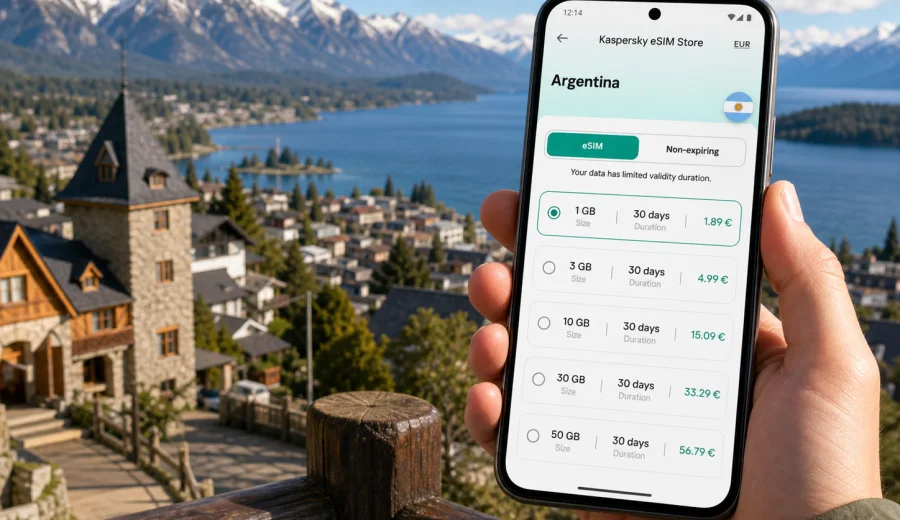
Bariloche eSIM: mobile connection and internet for your trip
Bariloche is one of the most connected travel bases in Argentine Patagonia, but it is not a place where you want to depend only on hotel Wi-Fi or a last-minute SIM counter. The city spreads along Lago Nahuel Huapi, climbs into wooded hills, and sends visitors out toward ski slopes, hiking trails, viewpoints, breweries, lake beaches, and long-distance roads. Mobile internet is useful from the moment you land or arrive by bus, because many practical decisions in Bariloche happen on the move: which transfer to take, whether the weather has changed in the mountains, how to reach your hotel, and how to share your location with a driver or travel partner.
An eSIM can make that first day easier. Instead of looking for a physical SIM card after a long trip, you can prepare a digital SIM profile on a compatible phone and use mobile data for maps, messaging, bookings, ride coordination, and travel apps. Kaspersky eSIM Store is an app and website where you can choose, arrange, and activate an eSIM with a suitable data plan for international travel. For Bariloche, the right plan is usually the one that covers Argentina, matches the number of days you will spend in the country, and gives you enough data for navigation, photos, weather checks, and messaging.
Why mobile internet matters in Bariloche
Bariloche looks compact on a map, but the travel experience is spread out. The civic center, the lakefront, Cerro Catedral, Circuito Chico, Colonia Suiza, Playa Bonita, Llao Llao, and nearby viewpoints are all part of the same trip, yet they are not always within a short walk of each other. You may move by airport transfer, taxi, rental car, public bus, tour vehicle, bike, or on foot. Each option becomes easier when your phone can load maps and messages without waiting for Wi-Fi.
The city also has a mountain rhythm. A sunny morning in the center can turn into wind or rain near a viewpoint. A ski day at Cerro Catedral can require checking lifts, timing, transfers, and equipment details. A summer hike may require confirming route conditions before leaving town. Mobile data does not replace local advice or safety preparation, but it helps you make decisions before you lose time.
Common moments when data is useful in Bariloche:
- checking your hotel address before leaving the airport or bus terminal;
- following a map along Avenida Bustillo, where distances between stops can be longer than expected;
- contacting a host if your cabin, apartment, or boutique hotel has a gated entrance;
- translating restaurant menus, pharmacy labels, and transport information;
- confirming tour pickup points for Circuito Chico, Isla Victoria, or lake excursions;
- comparing routes before driving toward Villa La Angostura or El Bolsón;
- using messaging apps if your travel group splits between the city center and the lakefront.
Arrival: airport, bus terminal, and first route into town
Most international travelers reach Bariloche through a domestic connection, often after entering Argentina through Buenos Aires. San Carlos de Bariloche Airport is outside the central area, so the first practical need is usually transport. If you already have mobile data, you can check your booking, message your accommodation, open a map, and confirm whether you are heading to the city center, the lakefront, or a hotel farther west along Avenida Bustillo.
Bariloche’s long lakefront layout matters on arrival. A hotel described as “near the lake” may still be several kilometers from the civic center. Some stays are in the center, others are toward Playa Bonita, Cerro Catedral, Llao Llao, or residential hills above the water. Before you start the ride, check the exact address, the entrance instructions, and the approximate travel time. This is especially useful if you arrive late, in winter, or with luggage after a long flight.
The bus terminal is similar: after a long Patagonia route, mobile data helps you confirm local transport, call a taxi, or send your arrival time without searching for Wi-Fi first.
Quick arrival checklist:
- save your accommodation address in your map app before departure;
- keep the booking confirmation available offline;
- install the eSIM while you still have stable Wi-Fi, if your plan allows installation before travel;
- check whether your phone is eSIM-compatible and unlocked before you buy a plan;
- keep your primary SIM active if you need bank verification messages or calls.
Bariloche travel patterns and data needs
Your data plan should match how you will use the city. A short stop in the center has different needs from a ski week, a remote cabin stay, or a road trip through the lakes region. You do not need to predict every megabyte, but it helps to think in scenarios.
| Trip style | Typical phone use | What to consider |
|---|---|---|
| Weekend in the city center | maps, messaging, restaurant searches, boarding passes | a modest data allowance may be enough if you use hotel Wi-Fi |
| Ski trip to Cerro Catedral | transport coordination, weather checks, photos, group chats | choose enough data for frequent updates away from the hotel |
| Lake and viewpoint route | navigation, camera uploads, translation, tour messages | keep maps offline as a backup and use mobile data for changes |
| Remote cabin stay | messaging, check-in details, route planning | confirm Wi-Fi at the property and do not rely on it for arrival |
| Business trip | email, video call backup, documents, ride coordination | choose more data and keep hotspot needs in mind |
| Patagonia road trip | navigation, accommodation changes, messaging | plan for longer stretches where coverage may vary outside towns |
Mobile data is not only about entertainment. In Bariloche, it often supports practical continuity: you know where you are, you know when to move, and you can stay reachable when plans change.
Choosing an eSIM for Bariloche
For a city trip to Bariloche, focus on three details: destination coverage, validity period, and data volume. The destination should match Argentina if Bariloche is your only country on this part of the trip. If you are combining Argentina with nearby countries, check whether a country-specific or regional option makes more sense for your route. Validity should cover the full period from arrival to departure, including the day you travel back through Buenos Aires or another Argentine city.
Data volume depends on habits. Messaging and maps use less data than video, cloud backup, hotspot sharing, and constant social media uploads. Mountain trips can encourage photo sharing, but it is still sensible to upload large files later on Wi-Fi. If you plan to use your phone as a hotspot for a laptop, choose a plan with that in mind and check the plan conditions first.
Use this simple planning method:
1. Count your full days in Argentina, not only nights in Bariloche.
2. Add travel days through airports or bus routes.
3. Decide whether you will use mobile data only for essentials or also for streaming, remote work, and hotspot use.
4. Check whether your device supports eSIM and is not locked to one operator.
5. Choose a plan before travel so you can handle setup calmly.
If you are preparing a city break, ski trip, or Patagonian route based in Bariloche, you can choose an eSIM plan for travel in Argentina before departure and keep the setup focused on the country your city trip belongs to.
Device compatibility and setup before you go
Not every phone supports eSIM, and some phones that support eSIM can still be restricted by region, model, or operator lock. Check this before buying a plan. It is much easier to confirm compatibility at home than at the airport with low battery and unstable Wi-Fi. You can use the device compatibility window here: check your device.
Installation is usually straightforward, but it is still a technical action. Read the plan information carefully, follow the instructions in the app or website, and avoid deleting an installed eSIM profile unless you are sure that the plan terms allow reinstallation. Some eSIM profiles cannot be moved to another phone after activation.
For setup steps, use the relevant guide for your device:
Before leaving for Bariloche, also check these settings:
- your main SIM remains available if you need calls or bank SMS;
- mobile data is assigned to the eSIM when you want to use the travel plan;
- data roaming is enabled for the eSIM if the plan instructions require it;
- background app refresh and cloud backup are limited if you want to save data;
- offline maps are downloaded for Bariloche and nearby routes.
An eSIM plan is mainly for mobile data. It does not automatically include a local phone number, standard voice calls, or SMS unless the plan details say so. For most travelers, internet-based messaging and calling apps cover daily communication, but it is still important to understand the difference.
Moving around Bariloche with mobile data
Bariloche’s public transport and local transfers can be easy once you understand the geography, but the city rewards preparation. The central area around the Civic Center is walkable, while many popular places stretch west along the lake. Cerro Catedral is a separate trip from the center. Circuito Chico and Llao Llao can feel close on a tourist map, yet they involve road distance, timing, and sometimes weather decisions.
With mobile data, you can:
- compare route options before leaving the hotel;
- check whether walking, bus, taxi, or a tour pickup is the better choice;
- share your location with a driver if the street entrance is not obvious;
- keep a map open when moving between lakefront viewpoints;
- message a tour operator if pickup times change;
- check your return route before sunset or after dinner.
If you rent a car, download offline maps first and use mobile data for live changes, accommodation messages, and route checks. Outside the central city and main tourist roads, coverage quality can vary depending on terrain and operator conditions. Do not treat mobile internet as a guarantee for every mountain road or remote stop. Use it as a practical travel layer, and keep essential addresses saved offline.
Districts, hotels, and where data helps most
The best area to stay in Bariloche depends on your trip style. The city center is convenient for restaurants, chocolate shops, lake walks, agencies, and transport connections. The western lakefront offers views, lodges, and easier access to Circuito Chico. Cerro Catedral is practical in ski season if mountain time matters more than city-center evenings. Cabins and small hotels in wooded areas can be peaceful, but they make arrival details more important.
Mobile internet is especially useful when accommodation is not a standard downtown hotel. Many Bariloche stays are cabins, apartments, boutique lodges, or properties with reception hours. You may need entry instructions, gate codes, a map pin, or a WhatsApp message with the host. If your plan lands late or weather slows the transfer, being able to communicate prevents small problems from becoming long delays.
Hotel Wi-Fi is still valuable, especially for updates, cloud backup, streaming, and work calls. But Wi-Fi is location-based. Mobile data fills the gaps between the airport, café, bus stop, trailhead, restaurant, and hotel lobby.
Practical data-saving tips in Bariloche
Bariloche is photogenic, which means phones work hard. Photos, maps, weather apps, and chat groups can use more data than expected, especially on a group trip. You can keep the eSIM plan for the moments that matter by changing a few habits.
Data-saving checklist:
- download offline maps for Bariloche, Cerro Catedral, Circuito Chico, and your onward route;
- turn off automatic cloud photo upload on mobile data;
- save hotel, airport, and bus terminal addresses offline;
- use Wi-Fi for app updates and large file transfers;
- send compressed images in chats when possible;
- close navigation after you arrive instead of leaving it running;
- check plan balance in the app or profile so you are not surprised near the end of the trip.
For many travelers, this is enough to keep a moderate plan comfortable. If you expect laptop hotspot use, video meetings, or heavy social posting, plan for more data from the start.
Business trips and remote work from Bariloche
Bariloche is not only a leisure destination. It also attracts conferences, incentive trips, research travel, outdoor industry meetings, and remote workers who extend a Patagonia trip. If you need to stay reachable for work, an eSIM can serve as a practical backup to hotel or apartment Wi-Fi. It helps with taxi coordination, urgent messages, email checks, and document access when you are between locations.
For work travel, think beyond average daily browsing. A single video call or file transfer can use more data than a full day of maps and messages. If you may need to tether a laptop, choose a data allowance that leaves room for unexpected tasks and check whether hotspot use is allowed by the selected plan. Keep sensitive work tasks on secure connections and avoid treating public Wi-Fi as your only option.
Business traveler checklist:
- choose a plan that covers the full Argentina segment, including airport days;
- keep meeting addresses and hotel details saved offline;
- test the eSIM before your first important appointment if the plan terms allow it;
- keep your main SIM available for banking or company verification;
- know how to switch mobile data between SIM profiles on your phone.
Stopovers and short stays
Some travelers pass through Bariloche as part of a larger route: Buenos Aires, Bariloche, El Calafate, Mendoza, or the Chilean lake district. Others spend only one or two nights before moving on. For short stays, mobile data can matter even more because there is less time to solve connectivity problems locally.
On a quick stop, you may need to:
- coordinate an airport transfer;
- store luggage or find your check-in time;
- book a last-minute lake tour;
- check weather before choosing a viewpoint;
- confirm a bus departure;
- navigate from the center to a hotel outside the main grid.
If Bariloche is one part of a wider Argentina itinerary, choose a validity period that covers the whole country segment. A city-only mindset can lead to a plan that expires before your final airport transfer or onward domestic flight.
Trips from Bariloche: when to prepare offline
Bariloche is a gateway to classic Patagonia routes. Travelers often go toward Circuito Chico, Cerro Catedral, Lago Gutierrez, Colonia Suiza, Villa La Angostura, the Seven Lakes route, El Bolsón, or longer road trips. Mobile internet is helpful for planning and communication, but terrain and distance mean you should prepare offline too.
Before leaving the city:
1. Download maps and route notes.
2. Save accommodation and emergency contact details.
3. Tell someone your expected return time if you are hiking or driving far.
4. Check weather and daylight before departure.
5. Keep enough battery for navigation and communication.
An eSIM plan can support the trip, but it should not be your only source of information on remote routes. In mountain areas, sensible preparation is still the best travel tool.
FAQ: Bariloche eSIM and mobile internet
Do I need an eSIM for Bariloche if my hotel has Wi-Fi?
Hotel Wi-Fi helps when you are inside the property, but Bariloche involves transfers, lake routes, viewpoints, restaurants, and day trips. An eSIM is useful for the time between Wi-Fi zones.
Should I choose an Argentina plan or a regional plan?
If your trip is only in Argentina, a country plan is usually the simplest match. If you cross into other countries, compare the destinations and validity periods carefully before choosing.
Can I use an eSIM for normal phone calls and SMS?
Most travel eSIM plans are mainly for mobile data. Standard calls, SMS, and a local phone number are not included unless the plan terms clearly say so. You can usually use messaging and calling apps over mobile internet.
When should I install the eSIM?
Install it when you have stable Wi-Fi and time to follow the steps. Activation timing can depend on the plan, so read the instructions before travel and avoid activating too early if the validity period starts immediately.
Is mobile data enough for mountain routes near Bariloche?
It helps, but coverage can vary outside urban and tourist areas because of terrain and network conditions. Download offline maps and keep key information saved on your phone.
How much data should I choose?
For maps, messaging, and light browsing, a smaller plan may be enough. For hotspot use, video, cloud uploads, or remote work, choose more data and monitor usage during the trip.
Final preparation before your Bariloche trip
Bariloche is easier when your phone is ready before you arrive. Save your hotel address, download offline maps, check the weather, confirm your airport or bus transfer, and prepare mobile data before the first travel day. Then use Wi-Fi for heavy tasks and keep your eSIM data for movement, navigation, messages, and unexpected changes.
Kaspersky eSIM Store helps you choose, arrange, and activate an eSIM with a suitable data plan for international travel through its app or website. Before you buy, check device compatibility, read the selected plan conditions, and make sure the validity period covers your full stay in Argentina. When your route is set, you can prepare an eSIM plan for your Bariloche trip and arrive with mobile internet planning already handled.